
Introduction
Nobody films a bicycle ride like Studio Ghibli. Think of Kiki soaring over the seaside town, or the quiet country lanes in My Neighbor Totoro where every pedal stroke feels like freedom. The Ghibli countryside is impossibly green, the clouds impossibly fluffy, and the wind always in your hair. This Ghibli style cyclist countryside AI photo prompt puts you on a winding road through that dream landscape, scarf flying, with your real face glowing with the joy of the ride.
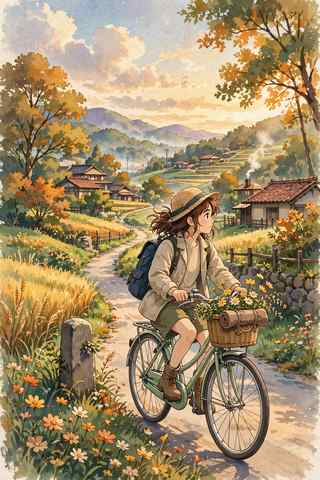
Here is what the finished portrait looks like. You pedal along a winding country road that curves between emerald rice fields, wildflowers nodding at the roadside in a rainbow of hand-painted color. Your scarf streams behind you in the wind, and your hair lifts with the speed of the ride. Ahead, the road rolls over gentle hills toward a distant village with tiled roofs, while enormous cumulus clouds pile up in a brilliant blue sky. Dragonflies dart past, and the whole world seems to be moving with you.
People adore this portrait because it captures the simplest happiness: a beautiful day, an open road, and nowhere to be. The Ghibli style turns an ordinary bike ride into a memory that feels decades warm, like a summer from childhood. Cyclists love it for obvious reasons, but anyone who has felt wind on their face will recognize the feeling instantly.
In this guide, you get the exact copy-paste prompt that creates this look, a breakdown of why it works so well, step-by-step instructions for using it with free AI image tools, pro tips for keeping your face recognizable, and answers to the most common questions. By the end, you will be able to turn any ordinary photo of yourself into a hand-painted anime moment that looks like a still frame from a beloved film, ready to share with friends or frame on your wall.
The Prompt
Copy the prompt below and paste it into your favorite AI image generator along with your photo:
Transform my photo into a Studio Ghibli anime portrait of a cyclist riding through rolling countryside, keeping my exact face, hairstyle and happy expression. Show me pedaling along a winding road through green rice fields with wildflowers, my scarf fluttering in the wind. Use soft cel shading, bright summer colors, fluffy anime clouds, hand-painted fields and hills, and the carefree joy of a Ghibli journey. Portrait orientation, highly detailed anime illustration.
Why This Prompt Works
First, Studio Ghibli is famous for animating motion, and this prompt leans into that strength. Instead of a stiff posed portrait, you are captured pedaling with joyful energy, your scarf and hair streaming in the wind as wildflowers blur past at the roadside, with fabric, hair, and the world around you responding to the movement. Think of Think of Kiki’s Delivery Service, where every journey through the sky and streets hums with wind, light, and the thrill of going somewhere., where every gesture feels alive. This prompt bottles that same breezy joy for your country road, as if Totoro himself might be napping in the meadow you just passed. That sense of living motion is what separates a flat filter from a true anime illustration, and it is the reason these images stop people mid-scroll.
Second, Ghibli backgrounds are practically characters themselves, and this scene gives the AI a rich one to paint. You ride a winding road through rolling green countryside, with rice fields, wildflower meadows, distant village rooftops, and huge fluffy clouds overhead. The prompt asks for layered, hand-painted detail: drifting particles in the air, textured surfaces, and a sky full of feeling. Bright summer sunlight floods the landscape, making the greens glow and throwing crisp, cheerful shadows across the winding road. When the setting is this alive, the portrait gains the depth and warmth that make Ghibli frames so comforting to look at.
Third, the prompt protects your identity. Many anime filters redraw your face into someone else entirely, which is fun for a day but forgettable. Here, the instructions explicitly tell the AI to keep your exact face, hairstyle, and expression, then build the Ghibli world around the real you. The result still feels like you, just translated into soft cel shading with expressive anime eyes and painterly color. That personal connection is why people love sharing these: friends instantly recognize you inside the magic.
Finally, the color and light do the emotional heavy lifting. Ghibli films like Kiki’s Delivery Service and My Neighbor Totoro are masterclasses in golden-hour glow, luminous skies, and shadows that feel soft rather than harsh. Bright summer sunlight floods the landscape, making the greens glow and throwing crisp, cheerful shadows across the winding road. The prompt calls for that same gentle cinematic lighting, and it dresses you in a breezy casual outfit with a fluttering scarf, rolled sleeves, and a woven basket on the handlebars full of fresh flowers, so every element of the frame works together. The outcome is an image with mood, not just a costume swap.
How to Use This Prompt
Using this prompt takes about two minutes. You do not need any editing skills, and most of the tools below are free to try. Here is the full process:
Step 1: Pick a clear, front-facing photo of yourself with good lighting. A simple background and a natural expression work best, because the AI will preserve your face and redraw everything else.
Step 2: Open an AI image generator that accepts photo uploads, such as ChatGPT with image generation, Gemini, Midjourney, Leonardo AI, or any similar tool you already use.
Step 3: Upload your photo and paste the prompt from the box above exactly as written. Add nothing else for your first try, so you can see the baseline result.
Step 4: Set portrait orientation if the tool offers aspect ratio choices. A 2:3 or 3:4 ratio suits phone wallpapers and profile pictures, while 9:16 is ideal for stories and reels.
Step 5: Generate the image, then refine if needed. If a detail looks off, regenerate with one small tweak, for example asking for a warmer sky or a different camera angle, rather than rewriting the whole prompt.
Step 6: Download your favorite version in the highest resolution available. Share it on social media, set it as your profile picture, or print it. Tag it with the hashtags below so other Ghibli fans can find it.
Pro Tips for Best Results
Small choices make a big difference with AI portraits. These tips will help your cyclist image look its best:
Tip 1: A smiling outdoor photo is the perfect source. The happy expression and natural daylight translate directly into the joyful cycling scene.
Tip 2: Personalize the basket in a follow-up. Add ‘with a baguette and flowers in the basket’ or ‘with a sleepy cat in the basket’ for an adorable Kiki-inspired touch.
Tip 3: Try a golden-evening variation. ‘Riding at sunset with long shadows and fireflies starting to glow’ gives you a dreamy alternative to the bright midday ride.
Tip 4: Use the highest-resolution photo you have. The AI keeps your facial features sharper when it starts from a clear, well-lit source image instead of a compressed screenshot.
Tip 5: Keep the original background simple. A plain wall or an uncluttered room gives the AI less to untangle, so more of its effort goes into painting the Ghibli scene around you.
Tip 6: Generate two or three variations before settling. Tiny differences in pose, lighting, and background detail appear between runs, and the second or third attempt is often the keeper.
Frequently Asked Questions
Will the portrait keep my face looking like me?
Yes. The prompt explicitly preserves your exact face, hairstyle, and happy expression while the AI paints the Ghibli countryside around you. A clear, smiling photo taken in daylight gives the strongest likeness. If the first result looks slightly generic, regenerate once more without changing anything; identity detail often improves on the second pass.
Which free AI tools can I use with this prompt?
Most modern AI image tools that accept photo uploads will work, including ChatGPT with image generation, Google Gemini, Midjourney, Leonardo AI, and Microsoft Designer. Free tiers usually give you a handful of generations per day, which is plenty to produce a great portrait. Paste the prompt exactly as written, upload your photo in the same message, and request portrait orientation.
Can I change the landscape, the season, or add details like a basket?
Yes, and this prompt loves customization. Try ‘autumn countryside with golden fields’ or ‘spring road lined with cherry blossoms’ for seasonal versions, and add details like ‘a wicker basket with fresh bread’ or ‘a small dog running alongside’ to make the scene your own.
What kind of photo gives the best result?
A front-facing photo taken in soft daylight, with your face clearly visible and a neutral or gently happy expression. Avoid heavy filters, sunglasses, or deep shadows across the face, since the AI needs clean facial features to preserve your identity. A simple background helps, but the prompt will replace the setting anyway, so do not worry if your original photo was taken indoors.
The best rides are the ones you never want to end, and now yours does not have to. Paste the prompt, upload your photo, and feel the wind in your hair on a road that only exists in the most beautiful anime. Keep pedaling: the village ahead is waiting, and the clouds have never looked fluffier.
Related Viral Prompts
If you loved this one, try these other prompts from the collection:
- Ghibli Style Shepherd Hills AI Photo Prompt
- Ghibli Style Greenhouse Plants AI Photo Prompt
- Ghibli Style Porch Sunset Tea AI Photo Prompt
#GhibliAI #StudioGhibli #AIPhotoPrompt #GhibliStyle #AnimeCycling




Leave a Reply