
Introduction
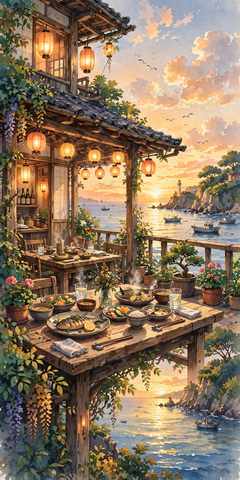
Few settings say Studio Ghibli like the sea. From the cliff-top house in Ponyo to the coastal town of Koriko in Kiki’s Delivery Service, Ghibli’s oceans are always alive, sparkling, breathing, and painted in impossible shades of blue and gold. The seaside restaurant dinner trend takes that magic and seats you right in the middle of it: your own face, anime-painted, at a candlelit table while the sun melts into the waves.
There is something deeply cinematic about dinner by the water. The day’s last light, the salt in the air, plates of food arriving as the sky turns pink and orange, it is the kind of scene Ghibli uses to mark a moment of peace between adventures. This prompt recreates that exact feeling, turning an ordinary selfie into a frame that looks pulled from a film about summer, the sea, and second chances.
What makes this trend different from a simple filter is identity preservation. The prompt explicitly instructs the AI to keep your exact face, hairstyle, and features from your uploaded photo, so the result is unmistakably you, just reimagined with watercolor shading, glowing lanterns, and a hand-painted ocean. People share these because they look like personal movie posters, not cartoons of strangers.
Below you will find the exact copy-paste prompt, why it produces such convincing results, how to use it in ChatGPT, Gemini, Midjourney, and other tools, pro tips for the best output, and answers to common questions. Get ready for the most romantic dinner reservation you will ever make; no booking required.
The Prompt
Copy the exact prompt below and paste it into your favorite AI image generator along with your photo. For best results, upload a clear front-facing photo first, then paste the entire prompt exactly as written.
Transform my photo into a Studio Ghibli anime-style portrait of me having dinner at a seaside restaurant at sunset, keeping my exact face, hairstyle, and features from the uploaded photo. I sit at a table by an open window overlooking sparkling ocean waves, with hand-painted seafood dishes, pasta, and glowing lanterns on the table. Warm watercolor shading, salty sea breeze atmosphere, seagulls in the distance, and a pastel sunset sky melting into the horizon. Portrait orientation, vertical 2:3 composition.
Why This Prompt Works
Sunset is doing heavy lifting in this prompt. By specifying a pastel sunset sky melting into the horizon, you hand the model Ghibli’s favorite lighting condition, the magic hour that bathes films like Ponyo and From Up on Poppy Hill in amber and rose. Sunset light flatters faces, deepens colors, and instantly reads as nostalgic, which is why these portraits feel emotional rather than merely pretty.
The prompt also layers sensory specifics: sparkling ocean waves, glowing lanterns, hand-painted seafood and pasta, seagulls in the distance. Each is a concrete visual anchor the AI can render with confidence. Vague prompts produce vague images; this one reads like a shot list, so the model paints a scene with real depth, with the foreground table, you in the midground, and the sea and sky beyond.
Finally, the open-window framing is a classic Ghibli composition. Ghibli films constantly frame characters in windows and doorways, from Kiki’s bakery window to the bathhouse balconies in Spirited Away, because it creates intimacy and vastness at once. Sitting you by that open window gives the portrait its cinematic depth and its quiet, wistful mood.
How to Use This Prompt
Using this prompt takes less than two minutes once you know the flow. Follow these steps in order for the most reliable results.
- Choose a clear, front-facing photo. Pick a well-lit selfie with a neutral expression and minimal background clutter. The AI preserves your facial identity, so a sharp, evenly lit source photo is the single biggest factor in a convincing seaside dinner portrait.
- Copy the entire prompt text. Select everything inside the
block above, including the face-preservation instruction at the start, which is what keeps the result looking like you instead of a stranger.
- Open your AI image generator. This prompt works in ChatGPT, Google Gemini, Midjourney, Leonardo AI, and most modern image tools. Use whichever platform you already have access to; all of them accept an uploaded reference photo plus a text prompt.
- Upload your photo first, then paste the prompt. Attach your chosen photo to the chat or canvas, paste the full prompt text, and send. Uploading the photo before the prompt helps the model lock onto your face before it starts painting the scene.
- Request portrait orientation if needed. Some tools default to square or landscape images. If yours does, add vertical 2:3 portrait to your follow-up message or select the portrait aspect ratio in the tool's settings before generating.
- Regenerate and refine. Your first result is a starting point, not a verdict. If the ocean view looks right but your face drifted, regenerate with the same prompt, or add keep the face exactly like the reference photo and try once more.
Pro Tips for Best Results
The prompt does most of the work, but these small refinements separate a good result from a jaw-dropping one.
- Lead with good light in your source photo. Soft daylight facing a window beats any overhead bulb. The AI borrows your photo's lighting logic, so clean, even illumination on your face translates into a clean, believable seaside dinner portrait.
- Play with the sky for different moods. Change pastel sunset to golden sunrise or starry twilight and the whole emotional temperature of the portrait shifts, while your face and the restaurant stay consistent.
- Do not delete the face-preservation sentence. It is the most important line in the prompt. If a tool shortens or improves your prompt automatically, check that the identity instruction survived; without it, you get a pretty stranger instead of you.
- Generate at the highest resolution your tool allows, then upscale. Fine watercolor texture and tiny background details, the lantern glow and wave sparkle, only shine when the image has enough pixels. Upscale before posting or printing.
- Try one variation at a time. Change a single element per regeneration, the time of day or the dishes on the table, so you learn what each tweak does. Changing five things at once makes it impossible to tell which edit improved the image.
Frequently Asked Questions
Will this prompt really keep my face looking like me?
Yes, that is what the opening sentence is engineered to do. By explicitly instructing the AI to keep your exact face, hairstyle, and features from the uploaded photo, the prompt prioritizes identity preservation over stylization. For the strongest likeness, use a clear, front-facing, well-lit photo; extreme angles, heavy filters, or sunglasses in the source photo make the AI guess, and guessing is where likeness drifts.
Which AI tools work best with this prompt?
Any modern image generator that accepts a reference photo plus a text prompt: ChatGPT, Google Gemini, Midjourney, Leonardo AI, Firefly, and similar tools all handle it well. Paste the full prompt exactly as written and upload your photo in the same message. If a tool rewrites or shortens prompts automatically, double-check that the face-preservation sentence survived the edit.
Can I change it to lunch or a different coastline?
Yes. Replace sunset with bright midday or moonlit night and describe a different shore, like the Amalfi cliffs or a tropical beach, and the prompt adapts beautifully. The seaside-restaurant structure, meaning you, the table, the open window, and the sea, is what makes it work. The time and place are yours to choose.
Can I post or print the image?
For personal sharing, profile pictures, prints for your wall, and gifts, absolutely, and these portraits make wonderful versions of all three. For commercial use, check your AI tool's terms of service, since rights vary by platform and plan. One note: the style is inspired by Studio Ghibli rather than an official Ghibli product, so avoid presenting it as licensed artwork.
The best dinners are the ones where time slows down, and that is exactly what this portrait captures: you, the sea, the last light of day, and a table that never needs clearing. Paste the prompt, upload your photo, and take yourself out to the most beautiful restaurant in the anime universe. The sunset is waiting, and your table by the window is ready.
Related Viral Prompts
Ghibli Style Tea Time Cakes AI Photo Prompt
Ghibli Style Street Food Stall Night AI Photo Prompt
Ghibli Style Pirate Ship AI Photo Prompt
#GhibliAI #StudioGhibli #AIPhotoPrompt #GhibliStyle #AnimeAesthetic




Leave a Reply