
Introduction
There is a reason Studio Ghibli food scenes live rent-free in everyone’s head. From the sizzling bacon and eggs in Howl’s Moving Castle to the humble herring pie in Kiki’s Delivery Service, Ghibli animators paint food with almost obsessive love, with every glisten, every crumb, and every curl of steam rendered by hand. That devotion turned simple meals into some of the most screenshot-shared frames in anime history, and now the same magic is driving one of the biggest AI photo trends of the year: turning your own selfie into a Ghibli-style afternoon tea portrait.
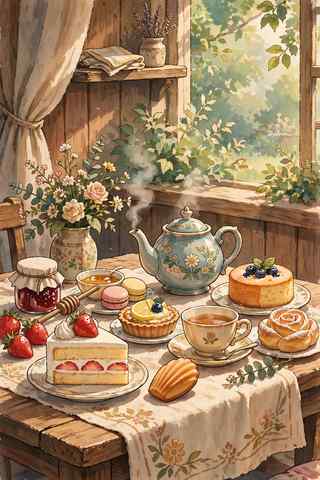
Afternoon tea is the perfect subject for this treatment. It is slow, it is soft, and it is unapologetically cozy, everything the Ghibli aesthetic does best. A table crowded with cakes, a teapot breathing steam into golden window light, lace curtains swaying gently: these are the quiet in-between moments Ghibli films cherish, the pauses between adventures where characters simply get to be happy. This prompt bottles that feeling and puts you at the center of it.
Unlike generic anime filters that redraw you into a stranger, this prompt is engineered to preserve your identity. Your face, your hairstyle, and your features stay recognizably yours; only the world around you transforms into a hand-painted watercolor afternoon. That is why these portraits explode on Instagram, Pinterest, and WhatsApp statuses: people do not just see a pretty anime scene, they see themselves inside it.
In this article you get the exact copy-paste prompt, a breakdown of why it works so well, step-by-step instructions for every major AI image tool, pro tips for sharper results, and answers to the questions everyone asks. By the end, you will have a portrait that looks like a lost frame from a Ghibli film, starring you, surrounded by cake.
The Prompt
Copy the exact prompt below and paste it into your favorite AI image generator along with your photo. For best results, upload a clear front-facing photo first, then paste the entire prompt exactly as written.
Transform my photo into a Studio Ghibli anime-style portrait of me enjoying a cozy afternoon tea time, keeping my exact face, hairstyle, and features from the uploaded photo. I sit at a rustic wooden table covered with hand-painted cakes, strawberry shortcake, scones, macarons, and a steaming teapot, warm golden sunlight streaming through lace curtains. Soft watercolor shading, gentle nostalgic warmth, tiny cozy details like a sleeping cat and wildflowers in a vase, with a dreamy countryside cottage in the background. Portrait orientation, vertical 2:3 composition.
Why This Prompt Works
Ghibli food works because of specificity. The prompt does not ask for vague desserts; it names strawberry shortcake, scones, and macarons, and describes steam, lace curtains, and golden sunlight. AI image models respond to concrete visual nouns far better than vague adjectives, so each named detail becomes something the model can actually paint: the gloss on a strawberry, the crumb of a scone, the translucent curl of tea steam.
The second secret is light. Warm golden sunlight through lace curtains is practically the Ghibli house style; think of the farmhouse kitchen in My Neighbor Totoro or Sophie’s hat shop in Howl’s Moving Castle. That lighting cue pushes the model toward the studio’s signature palette of honeyed yellows, soft creams, and gentle shadows instead of the flat digital look most AI portraits default to.
Finally, the prompt anchors the scene with tiny nostalgic details: a sleeping cat, wildflowers in a vase, a countryside cottage beyond the window. These are the storytelling touches that separate a generic anime image from a true Ghibli frame. They give the eye places to wander and the heart places to rest, which is exactly why viewers keep staring at these portraits instead of scrolling past.
How to Use This Prompt
Using this prompt takes less than two minutes once you know the flow. Follow these steps in order for the most reliable results.
- Choose a clear, front-facing photo. Pick a well-lit selfie with a neutral expression and minimal background clutter. The AI preserves your facial identity, so a sharp, evenly lit source photo is the single biggest factor in a convincing afternoon tea portrait.
- Copy the entire prompt text. Select everything inside the
block above, including the face-preservation instruction at the start, which is what keeps the result looking like you instead of a stranger.
- Open your AI image generator. This prompt works in ChatGPT, Google Gemini, Midjourney, Leonardo AI, and most modern image tools. Use whichever platform you already have access to; all of them accept an uploaded reference photo plus a text prompt.
- Upload your photo first, then paste the prompt. Attach your chosen photo to the chat or canvas, paste the full prompt text, and send. Uploading the photo before the prompt helps the model lock onto your face before it starts painting the scene.
- Request portrait orientation if needed. Some tools default to square or landscape images. If yours does, add vertical 2:3 portrait to your follow-up message or select the portrait aspect ratio in the tool's settings before generating.
- Regenerate and refine. Your first result is a starting point, not a verdict. If the tea table looks right but your face drifted, regenerate with the same prompt, or add keep the face exactly like the reference photo and try once more.
Pro Tips for Best Results
The prompt does most of the work, but these small refinements separate a good result from a jaw-dropping one.
- Lead with good light in your source photo. Soft daylight facing a window beats any overhead bulb. The AI borrows your photo's lighting logic, so clean, even illumination on your face translates into a clean, believable afternoon tea portrait.
- Name your own cakes for a personal twist. Swap strawberry shortcake for chocolate truffle cake or mango mousse and the AI will repaint the table around your craving. The prompt's structure holds firm; only the desserts change.
- Do not delete the face-preservation sentence. It is the most important line in the prompt. If a tool shortens or improves your prompt automatically, check that the identity instruction survived; without it, you get a pretty stranger instead of you.
- Generate at the highest resolution your tool allows, then upscale. Fine watercolor texture and tiny background details, the lace curtains and cake textures, only shine when the image has enough pixels. Upscale before posting or printing.
- Try one variation at a time. Change a single element per regeneration, cake selection or the window view, so you learn what each tweak does. Changing five things at once makes it impossible to tell which edit improved the image.
Frequently Asked Questions
Will this prompt really keep my face looking like me?
Yes, that is what the opening sentence is engineered to do. By explicitly instructing the AI to keep your exact face, hairstyle, and features from the uploaded photo, the prompt prioritizes identity preservation over stylization. For the strongest likeness, use a clear, front-facing, well-lit photo; extreme angles, heavy filters, or sunglasses in the source photo make the AI guess, and guessing is where likeness drifts.
Which AI tools work best with this prompt?
Any modern image generator that accepts a reference photo plus a text prompt: ChatGPT, Google Gemini, Midjourney, Leonardo AI, Firefly, and similar tools all handle it well. Paste the full prompt exactly as written and upload your photo in the same message. If a tool rewrites or shortens prompts automatically, double-check that the face-preservation sentence survived the edit.
Can I change the cakes or the setting?
Easily. The prompt is modular, so swap the dessert list for anything you crave, from matcha tiramisu to a birthday cake with candles, or trade the cottage for a Parisian cafe terrace. Keep the face-preservation sentence and the lighting description intact, and the Ghibli magic carries over to whatever scene you invent.
Can I post or print the image?
For personal sharing, profile pictures, prints for your wall, and gifts, absolutely, and these portraits make wonderful versions of all three. For commercial use, check your AI tool's terms of service, since rights vary by platform and plan. One note: the style is inspired by Studio Ghibli rather than an official Ghibli product, so avoid presenting it as licensed artwork.
Some trends are just filters; this one is a feeling. A Ghibli-style tea time portrait does not just make you look like anime, it places you inside the quietest, happiest hour of an imaginary afternoon, cake fork in hand, sunlight doing its slow golden work. Copy the prompt, upload your favorite photo, and give yourself the afternoon tea you deserve. The kettle is already on.
Related Viral Prompts
Ghibli Style Seaside Restaurant Dinner AI Photo Prompt
Ghibli Style Pancake Stack Honey AI Photo Prompt
Ghibli Style Porch Sunset Tea AI Photo Prompt
#GhibliAI #StudioGhibli #AIPhotoPrompt #GhibliStyle #AnimeFood




Leave a Reply