
Introduction
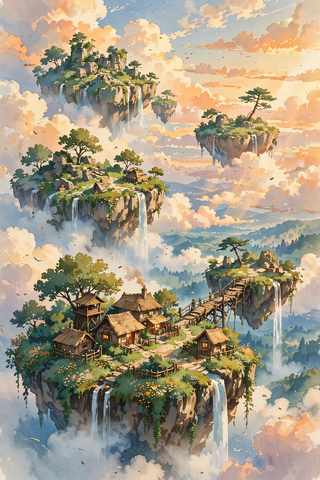
Of all the dreams Studio Ghibli ever painted, Laputa — the castle in the sky — might be the most beloved, and now you can stand inside it. The Ghibli style floating islands sky trend turns your photo into a portrait among drifting islets: waterfalls spilling off grassy edges into nothing, ancient ruins dozing in the clouds, tiny airships puttering past. It is going viral because it is the purest form of wonder a portrait can hold.
Castle in the Sky gave the world an entire visual vocabulary for floating worlds: the impossible blue, the dandelion-clock clouds, the sense that gravity is merely a suggestion. This prompt speaks that vocabulary fluently. It does not just paste clouds behind you; it builds a navigable sky — near islets with readable detail, far islets dissolving into blue distance, and you standing on the edge of one, wind in your hair, looking out over everything.
Imagine the finished portrait: you stand at the grassy rim of a floating islet, one waterfall pouring past you into the clouds below. Broken stone arches — unmistakably ancient, unmistakably Laputa — rise behind you, half-swallowed by flowering vines. A small airship putters across a sky stacked with towering cumulus, and far below, more islands drift in a blue haze. Soft cel shading and hand-painted detail make the impossible feel completely, calmly real.
Floating island portraits earn their virality through sheer imaginative density: every corner of the frame rewards a second look. The prompt’s layered islets, ruins, waterfalls, and airships give viewers that treasure-hunt richness, while the Ghibli styling keeps it cohesive and dreamlike instead of chaotic.
The Prompt
Copy the prompt below exactly as written and paste it into your AI image tool with your photo. Every phrase builds the Laputa look — drifting islets, edge waterfalls, ancient ruins — so keep it all.
Transform my photo into a Studio Ghibli anime illustration while preserving my exact face, features, hairstyle and expression. Place me among floating islands drifting through a vast sky, with grassy islets, waterfalls pouring off their edges, ancient stone ruins, and small airships gliding past cotton clouds. Use soft cel shading, hand-painted background detail, and a wondrous adventurous mood, in portrait 9:16 orientation.
Why This Prompt Works
Floating scenes collapse without clear physics, and this prompt supplies them: islets “drifting,” waterfalls “pouring off their edges,” airships “gliding past.” Those motion verbs tell the AI how the impossible world behaves, which is why the results feel like a real place with rules rather than a collage of sky clip-art. Ghibli’s floating worlds always obey their own gentle logic, and the prompt mirrors that.
The ancient stone ruins are doing crucial style work. They are the most recognizable Laputa signature in the frame — weathered arches, old stonework softened by vines — and they instantly signal “Castle in the Sky” to any viewer. Combined with soft cel shading and hand-painted backgrounds, the ruins anchor the fantasy in Ghibli’s specific visual history.
Your face, features, hairstyle, and expression are preserved by explicit instruction, so the wonder never costs you identity. Portrait 9:16 is the perfect vessel here: islets above, clouds below, and you at the grassy edge in between — the full vertical poetry of a sky with no ground.
- Motion verbs (drifting, pouring, gliding) give the floating world believable physics
- Ancient stone ruins instantly signal the Castle in the Sky legacy
- Layered islets create real depth from near grass to far blue haze
- Preserves your exact face, hairstyle, and expression
- Waterfalls off islet edges add impossible-beauty spectacle
- Portrait 9:16 captures the full vertical poetry of a groundless sky
How to Use This Prompt
Turning your photo into this Ghibli scene takes less than two minutes. Follow these steps:
- Choose a clear photo of yourself — front-facing, good lighting, and your whole face visible. Bright, cheerful photos match the prompt’s wondrous sky-high mood best.
- Open an AI image generator that accepts photo uploads. ChatGPT, Google Gemini, and Microsoft Copilot all work for free — just start a new chat and upload your photo.
- Paste the complete prompt from the
box above into the chat, exactly as written, and send it together with your photo.
- Wait for the generation to finish, then review the result carefully: check your likeness, the floating islets and edge waterfalls, and the overall Ghibli look.
- Download the portrait in the highest resolution available, then share it as a post, a Story, or your new wallpaper.
Pro Tips for Best Results
A few small choices separate a good Ghibli portrait from a breathtaking one:
- Use a sharp, front-facing photo with even lighting — the clearer your input, the stronger the face likeness in the final portrait.
- If the first result drifts slightly off your likeness, regenerate with the same prompt; the second attempt usually locks your face in.
- Keep glasses, jewelry, or distinctive hairstyles visible in your input photo if you want them preserved in the Ghibli portrait.
- If the islets look flat or pasted, follow up with “more depth: near detailed islet, far hazy islets” to rebuild the atmospheric layers.
- Hair blowing upward or sideways in your input photo sells the high-altitude wind beautifully.
- Add “a tiny robot guardian among the ruins” in a follow-up — Laputa fans will instantly recognize the homage.
Frequently Asked Questions
Will this prompt keep my face looking like me?
Yes — face preservation is written directly into the prompt. It instructs the AI to keep your exact face, features, hairstyle, and expression while transforming everything else into a hand-painted sky adventure. For the best likeness, upload a sharp, front-facing photo with even lighting and skip heavy beauty filters. If the first result drifts a little, generate once more with the same prompt; likeness usually locks in on the second pass.
Which free AI tools can I use this Ghibli prompt with?
The prompt works in any image-capable AI tool that accepts a photo plus text instructions: ChatGPT, Google Gemini, and Microsoft Copilot all handle it for free. Dedicated art generators like Leonardo AI, Adobe Firefly, and Playground AI also produce beautiful results. Paste the prompt exactly as written — its Ghibli-specific wording (soft cel shading, hand-painted backgrounds) is phrased to work consistently across different models.
Why does the prompt specify portrait 9:16 orientation?
The 9:16 vertical format is chosen deliberately for this scene: a groundless sky is inherently vertical — islets above, you at the edge, clouds falling away below. It is also the native size for phone wallpapers, Instagram Stories, TikTok, and Reels covers — exactly where Ghibli portraits go viral. If you need a square profile picture, generate the full portrait first and crop the center afterward so you keep the complete composition.
Can I change the setting or add my own details to the scene?
Absolutely. Keep the face-preservation line and the Ghibli style phrases untouched, then adjust the scenery to taste: try “floating islands at sunset” for gold-lit clouds, or add “flocks of birds circling a distant islet” or “glowing levitation crystals”. Small, specific additions work best — AI image models handle concrete details far better than vague requests, so name exactly what you want to see.
Gravity was always optional in the Ghibli sky. Step onto your islet, feel the wind, watch the waterfalls fall forever — your floating islands portrait is wonder you can hang on a wall, starring you.
Related Viral Prompts
Ghibli Style Cloud Sea Sunset AI Photo Prompt
Ghibli Style Starry Night Sky AI Photo Prompt
Ghibli Style Rainbow After Rain AI Photo Prompt
#GhibliAI #AIPhotoPrompt #StudioGhibliStyle #CastleInTheSky #AnimePortrait




Leave a Reply