
Introduction
Every October, social feeds fill up with golden-hour portraits beneath crimson canopies, and the Studio Ghibli version of that moment is having its own viral wave. The Ghibli style autumn maple road trend turns an ordinary selfie into a scene that looks lifted from a hand-painted anime film: a quiet country road, maple leaves falling like slow rain, and you at the very center of it. Millions of anime fans are saving and sharing these portraits because they capture a feeling no ordinary filter can fake — the cozy melancholy of fall, rendered with the warmth only Ghibli-style art delivers.
What makes this trend hit so hard emotionally is nostalgia. Autumn in Ghibli films is never just a season; it is a memory you can step inside. Think of the quiet residential streets Shizuku wanders in Whisper of the Heart, leaves crunching underfoot as she chases her dreams, or the russet countryside afternoons of Only Yesterday that feel like childhood itself. This prompt recreates that exact atmosphere around your own face, so the finished portrait feels less like an edit and more like a still from a film you somehow starred in.
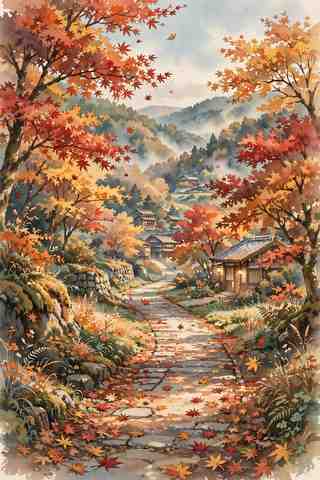
Picture the scene this prompt paints: you stand on a narrow road carpeted with red and gold maple leaves, tall maples arching overhead to form a glowing tunnel of foliage. A gentle gust lifts a swirl of leaves past your shoulders while afternoon light filters through the canopy in soft amber shafts. In the distance the road curves toward a sleepy village, smoke curling from chimneys into a peach-colored sky. Hand-painted textures, soft cel shading, and that unmistakable Ghibli warmth make every single leaf feel alive.
This prompt is engineered for the details that make Ghibli art sing: dappled light pooling on the road, drifting leaves caught mid-motion, painterly bark and stone textures, and a color palette pulled straight from autumn in rural Japan. It keeps your likeness front and center while the world around you turns cinematic, which is exactly why these portraits outperform generic anime filters in saves, shares, and comments.
The Prompt
Copy the prompt below exactly as written, then paste it into your favorite AI image tool together with your photo. Every phrase is tuned for the autumn maple road look — the maple tunnel, the drifting leaves, the golden afternoon light — so do not skip the details.
Transform my photo into a warm Studio Ghibli anime illustration while preserving my exact face, features, hairstyle and expression. Place me on a quiet country road lined with towering autumn maple trees, crimson and amber leaves drifting through soft golden afternoon light. Use gentle cel shading, warm hand-painted background detail, and a cozy nostalgic mood, in portrait 9:16 orientation.
Why This Prompt Works
Most AI photo prompts fail because they simply say “make it anime” and leave the style to chance. This one names the exact visual language — Studio Ghibli’s soft cel shading and hand-painted backgrounds — so the generator renders warmth and storybook texture instead of generic anime gloss. The autumn maple road is a perfect subject for this style because Ghibli’s artists are masters of seasonal atmosphere: every leaf, shadow, and sunbeam in their films is doing quiet storytelling work, and this prompt asks the AI to do the same.
The prompt also protects the one thing that matters most in a personal portrait: your face. By explicitly instructing the model to preserve your face, features, hairstyle, and expression, it anchors identity first and paints the fantasy around it. That is why results look like you on a magical fall day rather than a stranger wearing your clothes, and it is the difference between a portrait you proudly post and one you quietly delete.
Finally, the composition choices are deliberate rather than decorative. Portrait 9:16 framing lets the maple tunnel wrap around you vertically, drawing the viewer’s eye from the leaves scattered at your feet all the way up through the glowing canopy. Golden afternoon light flatters every skin tone and bathes the whole image in the cozy, nostalgic glow that makes Ghibli scenes endlessly shareable.
- Names Studio Ghibli’s soft cel shading so the style stays authentic, never generic anime
- Locks in your face, hairstyle, and expression for a true, recognizable likeness
- Builds a complete autumn scene: maple tunnel, drifting leaves, distant village
- Uses golden-hour light for warmth that flatters every skin tone
- Portrait 9:16 format — perfect for wallpapers, Stories, and Reels covers
- Hand-painted background detail gives every render a film-still richness
How to Use This Prompt
Turning your photo into this Ghibli scene takes less than two minutes. Follow these steps:
- Choose a clear photo of yourself — front-facing, good lighting, and your whole face visible. Natural daylight photos blend beautifully with the prompt’s golden autumn light.
- Open an AI image generator that accepts photo uploads. ChatGPT, Google Gemini, and Microsoft Copilot all work for free — just start a new chat and upload your photo.
- Paste the complete prompt from the
box above into the chat, exactly as written, and send it together with your photo.
- Wait for the generation to finish, then review the result carefully: check your likeness, the maple road and drifting leaves, and the overall Ghibli look.
- Download the portrait in the highest resolution available, then share it as a post, a Story, or your new wallpaper.
Pro Tips for Best Results
A few small choices separate a good Ghibli portrait from a breathtaking one:
- Use a sharp, front-facing photo with even lighting — the clearer your input, the stronger the face likeness in the final portrait.
- If the first result drifts slightly off your likeness, regenerate with the same prompt; the second attempt usually locks your face in.
- Keep glasses, jewelry, or distinctive hairstyles visible in your input photo if you want them preserved in the Ghibli portrait.
- Ask for “more falling leaves” or “deeper red maples” in a follow-up message to tune the autumn mood without regenerating from scratch.
- Golden, warm input photos blend best with the prompt’s afternoon light, so avoid harsh flash shots taken under white indoor lighting.
- For couples or friends, upload a group photo and change “my photo” to “our photo” — the maple road fits two people perfectly.
Frequently Asked Questions
Will this prompt keep my face looking like me?
Yes — face preservation is written directly into the prompt. It instructs the AI to keep your exact face, features, hairstyle, and expression while transforming everything else into a hand-painted autumn memory. For the best likeness, upload a sharp, front-facing photo with even lighting and skip heavy beauty filters. If the first result drifts a little, generate once more with the same prompt; likeness usually locks in on the second pass.
Which free AI tools can I use this Ghibli prompt with?
The prompt works in any image-capable AI tool that accepts a photo plus text instructions: ChatGPT, Google Gemini, and Microsoft Copilot all handle it for free. Dedicated art generators like Leonardo AI, Adobe Firefly, and Playground AI also produce beautiful results. Paste the prompt exactly as written — its Ghibli-specific wording (soft cel shading, hand-painted backgrounds) is phrased to work consistently across different models.
Why does the prompt specify portrait 9:16 orientation?
The 9:16 vertical format is chosen deliberately for this scene: the vertical frame lets the maple tunnel stretch from the leaves at your feet to the glowing canopy above you. It is also the native size for phone wallpapers, Instagram Stories, TikTok, and Reels covers — exactly where Ghibli portraits go viral. If you need a square profile picture, generate the full portrait first and crop the center afterward so you keep the complete composition.
Can I change the setting or add my own details to the scene?
Absolutely. Keep the face-preservation line and the Ghibli style phrases untouched, then adjust the scenery to taste: swap “autumn maple” for “spring cherry blossom” to change the season, or add details like “a sleepy cat on a mossy stone wall” or “a distant torii gate”. Small, specific additions work best — AI image models handle concrete details far better than vague requests, so name exactly what you want to see.
Some photos capture how you looked; this one captures how autumn feels. Turn your selfie into a hand-painted Ghibli memory — a maple road, golden light, and you, right at the heart of the season’s most beautiful moment.
Related Viral Prompts
Ghibli Style Sunflower Field Sunset AI Photo Prompt
Ghibli Style Cherry Blossom Path AI Photo Prompt
Ghibli Style Cloud Sea Sunset AI Photo Prompt
#GhibliAI #AIPhotoPrompt #StudioGhibliStyle #GhibliAutumn #AnimePortrait




Leave a Reply