
Introduction
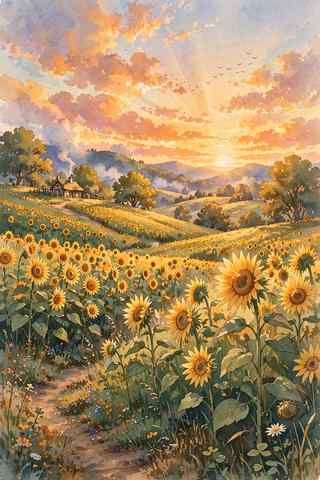
Golden hour in a sunflower field is one of nature’s most cinematic moments — and Studio Ghibli knew it long before golden hour became a photography buzzword. The studio’s countryside scenes glow with a light that feels almost edible: warm, honeyed, and full of promise. The Ghibli style sunflower field sunset prompt captures that exact light and places you right in the middle of it, surrounded by towering blooms.
This trend is exploding because sunset portraits are universally flattering, and the Ghibli treatment elevates them into art. A sunflower field at dusk already looks magical in real life; rendered in soft cel shading with a watercolor sky, it becomes the kind of image people stop scrolling for. The warm orange and pink palette triggers instant feelings of hope, warmth, and quiet joy.
The emotional resonance runs deep. Sunflowers symbolize loyalty, optimism, and turning toward the light — themes that echo through Ghibli’s most beloved stories. Standing among them at sunset, you become the embodiment of that optimism. It is no wonder these portraits are being used for everything from motivational posts to wedding announcements.
Below is the exact copy-paste prompt, a breakdown of why it works, simple usage steps, pro tips for the most luminous results, and answers to common questions.
The Prompt
Copy the full prompt from the box below, attach your photo in any AI image tool, and step into a glowing Ghibli sunflower field at sunset.
Transform this photo into a Studio Ghibli anime-style illustration of a person standing in a vast sunflower field at sunset, keeping the person's face and likeness exactly the same. Towering sunflowers glow in warm golden light around them, the sky painted in soft orange and pink watercolor hues, with distant hills and a few drifting clouds completing the scene. Portrait orientation (9:16), soft cel shading, luminous hand-painted background details, and a warm hopeful mood like the countryside scenes in My Neighbor Totoro.
Why This Prompt Works
The prompt works because it masters light. ‘Towering sunflowers glow in warm golden light’ combined with a ‘soft orange and pink watercolor’ sky gives the AI a precise lighting brief — and lighting is what separates amateur-looking AI art from the real Ghibli glow. The luminous hand-painted detail instruction pushes the model toward rich, textured rendering rather than flat digital color.
Scale contrast is the second secret. Towering sunflowers around a human figure create a wonderful sense of being embraced by nature — small person, big beautiful world — which is a recurring Ghibli composition, from Totoro’s camphor tree to the flower fields of Howl’s Moving Castle. That contrast makes the portrait feel both intimate and epic at once.
Finally, the warm hopeful mood keeps the image emotionally uplifting without tipping into melodrama. Combined with face preservation and the phone-perfect 9:16 portrait format, the result is a share-ready image that works as a profile picture, an inspirational post, or a printed keepsake.
- Precise golden-hour lighting brief produces the authentic Ghibli glow.
- Towering sunflowers create beautiful scale contrast — small person, vast nature.
- Orange-pink watercolor sky delivers a dreamy, painterly backdrop.
- Face preservation keeps the portrait personal amid the epic scenery.
- Warm hopeful mood makes it perfect for inspirational and celebratory posts.
- Vertical 9:16 framing suits wallpapers, Stories, and profile pictures.
How to Use This Prompt
Creating your sunflower sunset portrait takes less than a minute.
- Pick a clear, well-lit photo of yourself — warm smiles match the hopeful mood of the scene.
- Upload it to an AI image generator with image-to-image support, such as ChatGPT, Gemini, or a photo-to-anime app.
- Copy the prompt from the box above and paste it in, keeping your photo attached as the reference image.
- Generate and review — check your likeness and the sunflower detail, then regenerate if the blooms look blurry.
- Download your golden portrait and share it, or print it as a radiant piece of wall art.
Pro Tips for Best Results
Use these refinements to get the most luminous sunflower field possible.
- Source photos with warm indoor lighting blend more naturally into the sunset glow than cool fluorescent-lit shots.
- Add ‘sunflower petals drifting in a light breeze’ for extra movement and Ghibli-style atmosphere.
- If your face looks too small among the tall flowers, add ‘person clearly visible above the sunflowers’ to adjust the composition.
- Request a ‘low sun near the horizon’ variation for longer shadows and even more dramatic golden light.
- Avoid heavy sunglasses in the source photo — the AI preserves them, and they can look odd in a soft anime style.
- Generate two versions — one at sunset, one at bright midday — and compare; both are stunning in completely different ways.
Frequently Asked Questions
Will the sunflowers overwhelm my face in the portrait?
Not with this prompt — the composition keeps you as the clear focal point with the field as your surroundings. If a generation does bury you in blooms, regenerate or add ‘person as the clear central focus’ to rebalance the scene. Two or three tries usually produce a perfect balance.
Can I change the sunset to a different time of day?
Yes. Replace ‘at sunset’ and the sky description with alternatives like ‘under a bright blue midday sky’ or ‘at dawn with soft morning mist.’ The sunflower field works beautifully at any hour — sunset is simply the most popular and emotionally warm choice.
Does this prompt work for couple photos?
It works wonderfully. Change ‘a person’ to ‘a couple’ and ‘the person’s face’ to ‘each person’s face’ — the sunflower field becomes a romantic golden backdrop that rivals any professional couple shoot, with a dreamy anime twist.
Why does my sky look flat instead of watercolor?
Some models need a stronger nudge. Add ‘painterly watercolor sky with visible brush texture and gradient blends’ to emphasize the hand-painted look. Also try generating at higher quality settings if your tool offers them — skies benefit the most from extra rendering detail.
Turn toward the light like a sunflower and let the golden hour do the rest. This Ghibli prompt transforms an ordinary photo into a radiant anime memory — copy it, generate, and glow.
Related Viral Prompts
Ghibli Style Sand Dunes AI Photo Prompt
Ghibli Style Cloud Sea Sunset AI Photo Prompt
Ghibli Style Tea Plantation AI Photo Prompt
#GhibliAI #AIPhotoPrompt #StudioGhibliStyle #SunflowerField #GoldenHour #AnimePortrait




Leave a Reply