
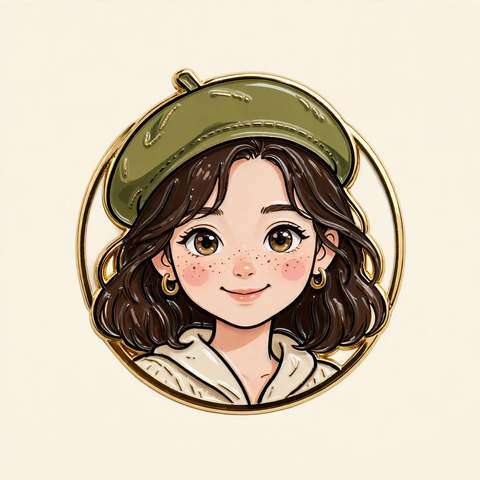
Introduction
Some photos are meant to stay on your phone, and some are meant to be worn, collected, and shown off. The enamel pin portrait trend sits firmly in that second category. It takes an ordinary portrait and turns it into a cute, collectible pin design, the kind you would find on a denim jacket, a backpack, or a limited edition merch drop. With bold outlines, glossy colours, and a clean, simplified shape, the result looks instantly charming, instantly shareable, and instantly recognisable as you, only in miniature, collectible form.
What makes this trend so popular is how it balances personality with simplicity. A good enamel pin does not try to copy every pore and strand of hair. Instead, it distils a face into its most distinctive features: the shape of a smile, a favourite hairstyle, a pair of glasses, a signature jacket, or a small accessory that tells your story at a glance. That simplification is exactly why pins feel so collectible. They are bold enough to read from across a room, yet personal enough to feel like they could only belong to one person.
This article gives you a ready to copy prompt for Gemini image generation that transforms your photo into a polished enamel pin portrait. You do not need design skills, illustration software, or any experience with pins. You upload your photo, paste the prompt, and let the AI handle the outlines, the glossy enamel fill, and the clean background. The sections below explain why the prompt works, how to use it step by step, and how to get the cutest, cleanest result on your first try.
The Prompt
Transform this photo into a cute collectible enamel pin portrait design. Keep the person's face, hairstyle, and key features clearly recognisable, but simplify them into a charming pin illustration style. Use bold, clean black outlines, smooth glossy enamel colours, and flat colour fills with subtle highlights that suggest shiny metal and enamel. Design the portrait as a single pin badge with a neat rounded shape, a thin gold or silver metal border, and a small pin backing effect. Place the pin centred on a plain, light, solid background with soft even lighting and no clutter. Make the style playful, premium, and collectible, like a high quality hard enamel pin from a popular merch collection. Keep the expression friendly and confident, preserve the person's identity, and avoid realistic skin texture, photorealistic details, or busy backgrounds.
Why This Prompt Works
This prompt works because it tells the AI exactly what an enamel pin is, rather than just asking for a cartoon version of a photo. The phrases bold outlines, glossy colours, and flat colour fills guide the model away from photorealism and toward the clean vector-like look that defines real pins. The mention of a metal border and pin backing effect adds authenticity, so the result does not look like a flat sticker or a random illustration. It looks like something you could actually pin to a jacket.
The prompt also protects your likeness. By asking the model to keep your face, hairstyle, and key features recognisable while simplifying everything else, you get the best of both worlds: a stylised design that still looks like you. The plain light background is deliberate too. It makes the pin pop, it makes the image easy to crop for social media, and it makes the design easy to reuse for profile pictures, stickers, merch mockups, or print on demand products.
Finally, the negative guidance matters. By explicitly avoiding realistic skin texture and busy backgrounds, the prompt prevents the most common failure of this trend, which is a half realistic, half cartoon image that looks neither like a photo nor like a pin. Clear constraints produce a cleaner, more collectible result, and they make the output far more consistent when you generate variations for friends, family, or a whole group.
How to Use This Prompt
Start with a clear, well lit portrait photo. A front facing or slight three quarter angle works best, with your face fully visible and not covered by sunglasses, heavy shadows, or a hand. Good lighting helps the AI read your features accurately, which is especially important when those features will be simplified into bold shapes. Crop the photo loosely around your head and shoulders before you upload it.
Next, open Gemini image generation, upload your photo, and paste the full prompt exactly as written above. Do not shorten it on your first attempt, because each detail about outlines, gloss, border, and background plays a role in the final look. Generate the image, then review it carefully. Check that your hairstyle, glasses, smile, and any signature accessory are still recognisable. If something is missing, you can add a short detail to the prompt, for example mentioning red glasses, curly hair, or a denim jacket, and regenerate.
Once you love the result, save it at the highest quality available. You can use it as a profile picture, post it on Instagram or TikTok with a before and after comparison, or turn it into a real product mockup. Many creators pair the pin image with a caption about their own collectible, which performs very well because followers instantly understand the concept and want one of themselves.
Pro Tips for Best Results
Choose one or two signature features to emphasise. If you always wear a particular pair of glasses, a cap, or a favourite colour, mention it in the prompt. Pins work best when they have one memorable detail that makes them instantly yours. Too many accessories, however, can clutter the small pin shape, so keep the design focused and let the face do most of the work.
Experiment with border colours. A gold border feels warm, premium, and vintage, while a silver or black nickel border feels modern and sleek. If you plan to post a series, keep the border consistent across all pins so they look like a matching collection. You can also try different background colours, but keep them plain and light for the cleanest, most professional presentation.
Generate a few variations and pick the strongest one. Small changes in outline thickness or colour saturation can make a big difference at pin size. Zoom out and look at the image as a thumbnail, because that is how most people will first see it. If your face is still clear and charming at thumbnail size, you have a winner. If details disappear, simplify further and regenerate with a cleaner prompt.
Frequently Asked Questions
Will the enamel pin still look like me?
Yes, when you start with a clear portrait and keep your most distinctive features in the prompt. The AI simplifies your face into bold shapes, but it preserves your hairstyle, expression, glasses, and overall identity, so friends should recognise you instantly. If the first result drifts too far, add one sentence describing your key feature and regenerate.
Can I use this prompt for a group or couple pin?
You can, but single portraits work best because pins are small and detailed faces need space. For a couple, ask for two heads side by side inside one rounded pin shape, and keep both expressions simple and friendly. For larger groups, consider making one pin per person so each design stays clean and collectible.
Can I turn the AI pin into a real physical pin?
Yes, many creators use the AI image as a design reference and then work with a pin manufacturer or a print on demand service to produce a real enamel pin. You may need to clean up the artwork into a vector file for manufacturing, but the AI image is an excellent starting point for colours, outlines, and overall composition.
Why does my result look like a sticker instead of a pin?
This usually happens when the metal border and glossy enamel effect are missing. Make sure you keep the phrases about the gold or silver border, glossy highlights, and pin backing in your prompt. Those details signal to the AI that you want a three dimensional collectible object, not a flat sticker illustration.
Your photo already tells your story, and now it can wear it too. Try the enamel pin prompt today, keep your favourite features front and centre, and share a collectible version of yourself that friends will want to collect, post, and pin everywhere.
Related Viral Prompts
Y2K Flash Portrait AI Photo Prompt: Create a Viral Early 2000s
Impressionist Painting Portrait AI Photo Prompt: Create an Artistic
1970s Bollywood Family Album AI Photo Prompt: Create a Nostalgic
#AI photo prompt #EnamelPin #PromptBazar #CollectiblePortrait #CuteAIArt


Leave a Reply