
Introduction
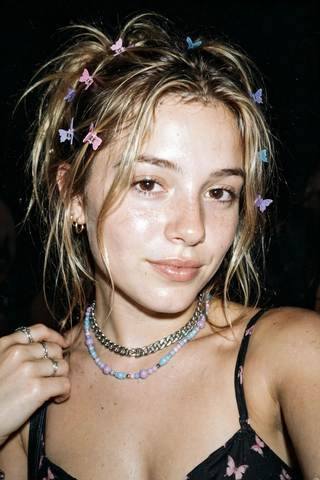
Scroll through any social feed right now and you will see it everywhere: a candid portrait lit by a harsh little camera flash, the face bright and slightly overexposed, the background falling away into darkness, and a fine layer of digital grain sitting over everything like dust on an old memory. That is the Y2K flash portrait look, and it has become one of the most shareable photo styles on the internet. It feels honest, spontaneous, and a little bit chaotic, exactly like a snapshot taken at 2 a.m. on a tiny early 2000s digicam at a house party, in a club corridor, or outside a fast-food joint after a night out with friends.
What makes this style so powerful is that it does not try to look perfect. Modern phone cameras smooth skin, balance light, and erase every flaw, but the Y2K digicam look does the opposite. The direct flash flattens the scene, makes eyes shine, and turns an ordinary moment into something that feels like evidence of a great night. Add low-rise jeans, a baby tee, butterfly clips, chunky highlights, frosted lip gloss, and a tiny handbag, and suddenly the image is not just a photo, it is a time machine. People share it because it reminds them of an era when photos were fun first and flawless never.
This article gives you a complete, copy-paste Gemini prompt for creating your own viral Y2K flash portrait from any selfie or portrait photo. You will learn why the harsh flash and grain combination works so well, how to use the prompt step by step, and which small tweaks keep your face recognisable while the style around it goes full early 2000s. Whether you want a party shot for Instagram, a throwback profile picture, or a fun image to send to your group chat, this prompt will get you there in seconds.
The Prompt
Copy the full prompt below and paste it into Gemini together with your photo:
Transform this photo into a viral early 2000s Y2K digicam portrait. Keep the person's face, facial features, hairstyle shape, and identity exactly the same and clearly recognisable. Shoot it like a candid snapshot taken on a small early 2000s digital camera at a night party: harsh direct on-camera flash lighting the face brightly, slightly overexposed skin with a soft shine on the forehead and cheeks, red-eye-free but with bright catchlights in the eyes, and a dark, underexposed background that falls off quickly behind the subject. Add authentic digicam grain, mild digital noise, slightly crushed blacks, and a faint cool colour cast with warm skin tones. Style the subject in early 2000s party fashion: a fitted baby tee or halter top, low-rise jeans or a mini skirt, a tiny shoulder bag, hoop earrings, butterfly hair clips, and glossy lips. Pose them casually and candidly, mid-laugh or looking directly at the camera with a relaxed, confident party expression, one hand holding a plastic cup or phone. Frame it as a slightly off-centre vertical portrait with a casual, unposed composition, a cluttered party background softly blurred by flash falloff, and the imperfect, spontaneous energy of a real 2003 party photograph. No studio lighting, no beauty retouching, no modern smartphone HDR look.
Why This Prompt Works
The prompt works because it controls the three things that define the Y2K digicam aesthetic: light, texture, and styling. Harsh direct flash is the single most recognisable element. It creates that bright face and dark background contrast that instantly reads as a party snapshot rather than a posed shoot. By explicitly asking for slightly overexposed skin and fast flash falloff, the prompt stops the AI from softening the light into a modern, flattering studio glow, which would kill the entire effect.
Texture is the second secret. Grain, digital noise, and crushed blacks tell the viewer this image came from a small sensor in a dark room, not from a 2026 flagship phone. Our brains associate that texture with real memories, so the photo feels authentic even when it is AI-generated. The prompt also protects your identity by insisting the face stays exactly the same, which matters because heavy stylisation often drifts into a stranger. Keeping the hairstyle shape and facial features locked means friends will recognise you instantly, and that recognition is what drives comments, tags, and shares.
Finally, the fashion details do the storytelling. Baby tees, low-rise jeans, butterfly clips, and hoop earrings are visual shorthand for the early 2000s, so viewers understand the era in half a second without reading a caption. The candid pose and plastic cup complete the scene, turning a portrait into a moment. Together, light, grain, and styling create an image that looks less like an edit and more like a photograph pulled from an old memory card, and that is precisely why this style keeps going viral.
How to Use This Prompt
Start with a good source photo. Choose a clear, front-facing portrait with even lighting and a neutral expression, or a natural smile. Avoid heavy filters, sunglasses, or extreme angles, because the AI needs a clean read of your face to keep you recognisable. Open Gemini, upload your photo, and paste the full prompt exactly as written. Generate the image, then look closely at the result before posting. Check that your face still looks like you, that the flash effect is strong without blowing out your features, and that the background has fallen dark rather than staying bright and clean.
If the first result feels too polished, regenerate with the same prompt, or add a short line such as “make the flash harsher and the grain stronger” to push it further toward the digicam look. If the result feels too messy, add “keep the face sharp and clean, grain only in the background” to rebalance it. You can also swap the outfit details: try a velour tracksuit, a mesh top over a camisole, or a denim mini skirt with boots to create a series of Y2K portraits. Post the best version with a simple caption, a throwback song, and a few friends tagged, and watch how quickly people react to the nostalgia.
Pro Tips for Best Results
Use a high-resolution source photo so the AI has plenty of facial detail to preserve, even after grain is added. Keep the prompt’s identity sentence intact in every variation, because deleting it is the most common reason faces drift. Ask for a vertical 4:5 crop if you plan to post on Instagram, since that ratio fills the feed beautifully. For a group version, generate each person separately and combine them, because single-person prompts hold identity far better than group prompts. Try different party backdrops too: a kitchen at a house party, a club hallway with a poster wall, or a street outside a venue at night all change the mood while the flash style stays consistent. Finally, do not over-edit the result afterwards. A light contrast bump is fine, but heavy smoothing or modern filters will erase the grain and flash character that make this style work.
Frequently Asked Questions
Will this prompt keep my face looking like me?
Yes, as long as you keep the identity instruction in the prompt and start from a clear, front-facing photo. The prompt explicitly tells Gemini to preserve your facial features and hairstyle shape, and most results will be instantly recognisable. If a result drifts, regenerate rather than accepting a stranger’s face, and avoid source photos with sunglasses or heavy shadows.
Why does my result look too clean and modern?
That usually happens when the AI softens the flash into flattering studio light. Regenerate and emphasise the harsh direct flash, dark background, and digicam grain, and remove any words like beautiful lighting or professional photography from your version. The imperfect, snapshot quality is the whole point of this style.
Can I use this prompt for a couple or group photo?
You can, but single portraits work best. For groups, generate each person separately with the same prompt and lighting description, then place them together in a collage or editing app. This keeps every face accurate and keeps the flash look consistent across the whole set.
Is this style good for Instagram and TikTok?
Absolutely. The Y2K flash look is one of the most shared portrait styles on both platforms because it reads instantly in a small feed thumbnail, feels candid rather than staged, and triggers nostalgia. Pair it with a throwback caption and an early 2000s song to maximise comments and shares.
So grab your favourite photo, paste the prompt, and let the flash take you straight back to 2003. Your feed is about to look like the best night out you never actually had, and your friends will be asking how you got your hands on a time machine.
Related Viral Prompts
- Direct Flash Instagram Party AI Photo Prompt: Create a
- 1980s Retro Portrait AI Photo Prompt: Create a Classic
- Gemini Golden Hour Beach AI Photo Prompt: Create a Natural
#Y2KFlashPortrait #AI photo prompt #PromptBazar #DigicamAesthetic #RetroParty #Early2000sStyle


Leave a Reply