
Introduction
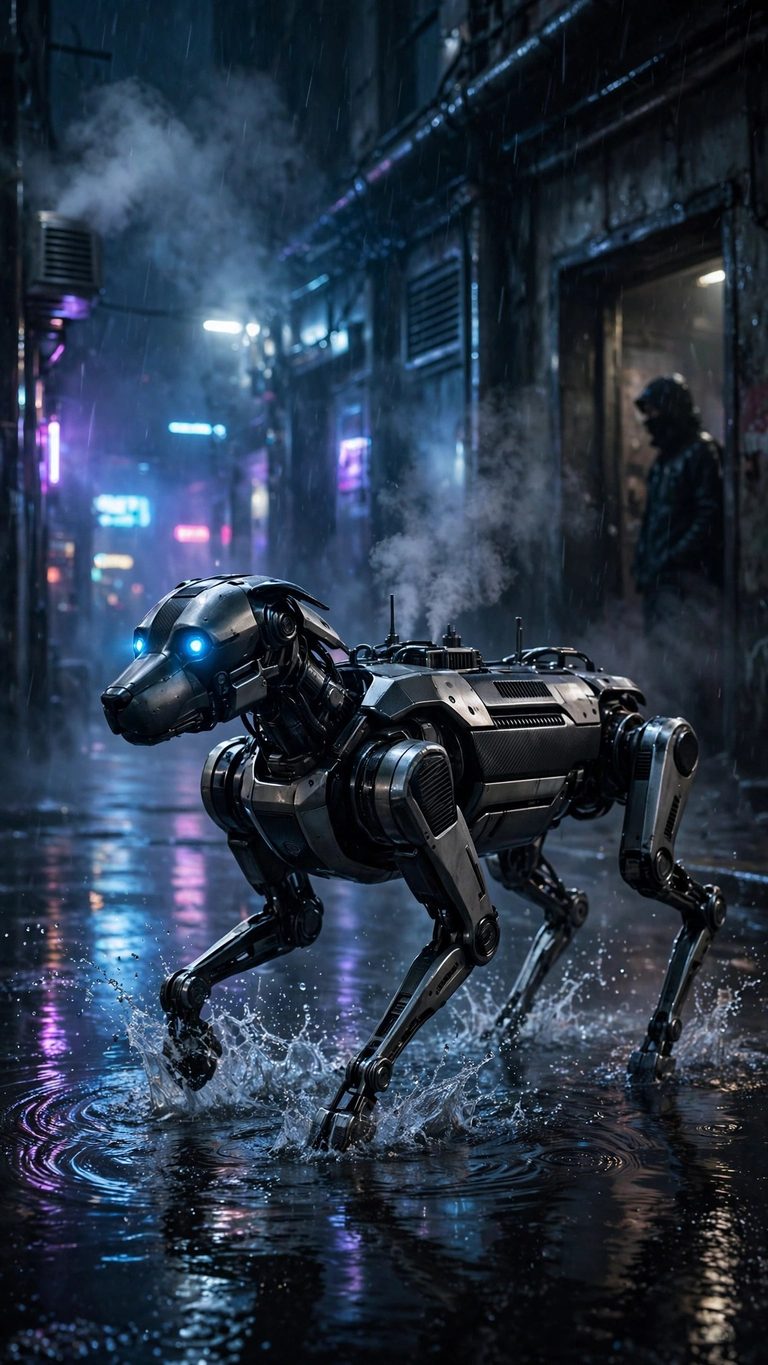
There is a particular hour of the night — around 3am — when even the busiest megacity exhales and its streets belong to the machines. A sleek quadruped robot dog moves down a rain-slick avenue, its glowing blue sensor eyes sweeping the pavement as steam curls from nearby vents and neon signs smear their reflections across every puddle. Its metal paws strike the wet asphalt with a rhythm too precise to be alive, too patient to be human, and from a dark doorway a lone figure watches, caught between fear and fascination. This is cyberpunk noir at its purest: the future not as a spectacle, but as a patrol — quiet, efficient, and utterly indifferent to the humans it was built to protect. Scenes like this dominate the #Cyberpunk corner of every AI art gallery for a reason. They compress an entire genre into a single frame: technology, loneliness, neon, rain, and the sense that the city itself has become the protagonist. The #RobotDog motif has exploded in popularity as quadruped robots moved from research labs into public consciousness, making this prompt both instantly recognizable and deeply evocative. With this ready-made #AIPhoto prompt from #PromptBazar, you can generate that exact lonely-futuristic-noir mood in seconds — no camera, no 3am location scout, no permission needed.
The Prompt
Copy and paste the full prompt below into your favorite AI image generator. It is already engineered with the lighting, mood, and detail language these models respond to best.
Cinematic cyberpunk photograph of a sleek quadruped robot dog with glowing blue sensor eyes patrolling a rain-slick neon street at 3am, steam rising from vents, its metal paws splashing through puddles reflecting signs, a lone figure watching from a doorway, lonely futuristic noir mood, ultra detailed, 8k, masterpiece
Why This Prompt Works
Great prompts work because they give the model three things: a hero subject, a cinematic environment, and an emotional temperature — and this one delivers all three in one breath. The hero subject, a sleek quadruped robot dog with glowing blue sensor eyes, is a visual paradox the human brain cannot resist. We are hardwired to respond to dogs — loyalty, motion, companionship — and to feel uneasy when those familiar cues arrive wrapped in cold metal and machine eyes. That tension is the engine of the entire image, and it is pure #Noir storytelling: something familiar made strange by the dark. The environment does the heavy lifting for composition. A rain-slick neon street at 3am gives the generator an entire vocabulary of light to work with — reflections in puddles, signs bleeding color across wet asphalt, steam diffusing backlight. Models trained on millions of cinematic frames understand rain and neon as a single aesthetic unit, which is why this combination renders so reliably across Midjourney, DALL-E 3, and Flux. The lone figure in the doorway is the secret ingredient: a human witness transforms a cool scene into a narrative, giving viewers someone to identify with and a question to ask. Platform trends confirm it. Cyberpunk content with strong #Noir mood consistently outperforms generic cityscape renders on social feeds because it triggers curiosity rather than just admiration. Viewers pause to decode the story, and pauses drive engagement. Finally, the closing quality tokens — “ultra detailed, 8k, masterpiece” — function as stylistic steering, pushing the model toward its highest-fidelity rendering mode where metal textures, droplet physics, and light bloom all get extra attention.
How to Use This Prompt
Using this prompt is straightforward, but a few platform-specific tweaks will elevate your results. In Midjourney (v6 or v7), paste the prompt as-is and add --ar 9:16 for the portrait framing specified in the settings, plus --style raw if you want the photograph to feel less stylized and more like genuine night photography. Try --chaos 10 for subtle variations in how the robot is posed. In DALL-E 3, paste the prompt into ChatGPT’s image mode and request the 9:16 portrait aspect ratio; DALL-E tends to render the “glowing blue sensor eyes” and rain reflections beautifully on the first attempt, so generate two or three variants and pick the one with the best puddle reflections. In Flux, use the dev or pro model with a 9:16 output size and a guidance scale around 3.5–5; Flux excels at mechanical detail, so the robot dog’s joints and sensor housing will look especially crisp. Across all platforms, if the robot looks too toy-like, append “realistic proportions, weathered metal” to ground it. Generate in batches of four and look for the frame where the doorway figure is partially in shadow — that partial concealment is what sells the noir mood. Upscale the winner before posting, since the fine rain detail benefits enormously from higher resolution.
Pro Tips & Creative Variations
Once the base prompt is working, you own a formula you can remix endlessly. Change the hour: swap “at 3am” for “at dawn” and watch the prompt’s mood flip from noir to melancholic hope as cold blue streetlight meets warm morning haze. Change the weather: replace the rain with drifting snow and puddles with slush, and the robot dog becomes a winter patrol unit — a completely different story. Change the eyes: “glowing blue sensor eyes” can become amber for a more hostile machine, or red for outright menace; small token changes like this are how prompt engineers redirect an entire emotional register. Change the witness: the lone figure in the doorway could become a child with an umbrella, a street vendor, or another robot — each substitution rewrites the narrative without touching the composition. For a more cinematic crop, try requesting a low angle “shot from ground level behind a puddle” so the reflection leads the eye to the dog. You can also push the noir further with monochrome: add “black and white photograph, single blue neon accent” for a Sin City effect. Gearheads can zoom into detail by regenerating just the head with “extreme close-up of the robot dog’s sensor eyes, rain droplets on the lens housing.” And for series creators: keep the same prompt but vary the time stamps (“at 3am,” “at 4am,” “at dawn”) to build a patrol-night photo series that tells a story across your feed — the kind of cohesive #Cyberpunk project that gets saved and shared.
Frequently Asked Questions
Will this prompt work on free AI image tools? Yes. The descriptive, natural-language style works on virtually every generator, including free-tier options, because it avoids obscure parameters and relies on concepts every model understands: robot, rain, neon, night. You may need to add the aspect ratio manually on tools that default to square.
Why does my robot dog look cartoonish? Some models default to a stylized quadruped. Fix it by adding “photorealistic, realistic proportions, worn battle-damaged metal” to the prompt, or switch to a model known for photographic output such as Midjourney’s raw mode or Flux.
Can I remove the lone figure for a cleaner shot? Absolutely — delete the “lone figure watching from a doorway” clause and the composition becomes a pure environmental portrait of the machine. Conversely, moving the figure closer to the dog increases the narrative tension.
Is this prompt good for commercial projects? AI-generated images can be excellent for mood boards, book covers, and concept art. Check your generator’s terms of service regarding commercial use, and consider upscaling and light retouching for client-facing work.
Now it is your turn to send the patrol out into the night. Paste the prompt into Midjourney, DALL-E 3, or Flux, dial in that 9:16 portrait frame, and watch a rain-slick neon street come alive with the soft blue glow of sensor eyes. Share your best render with the #PromptBazar community — the city is waiting, and the dog is already walking.
Related Viral Prompts
- Neon Bridge Reflection: A Breathtaking Cyberpunk AI Photo Prompt for Dreamlike Symmetrical Cityscapes
- Robot Bartender Close-Up: A Stylish Cyberpunk AI Photo Prompt for Glowing Neon Bar Portraits at Night
- AR Street Overlay: A Mind-Bending Cyberpunk AI Photo Prompt for Augmented-Reality Future City Scenes
# A I P h o t o # P r o m p t B a z a r # C y b e r p u n k # R o b o t D o g # N o i r

Leave a Reply