
Introduction
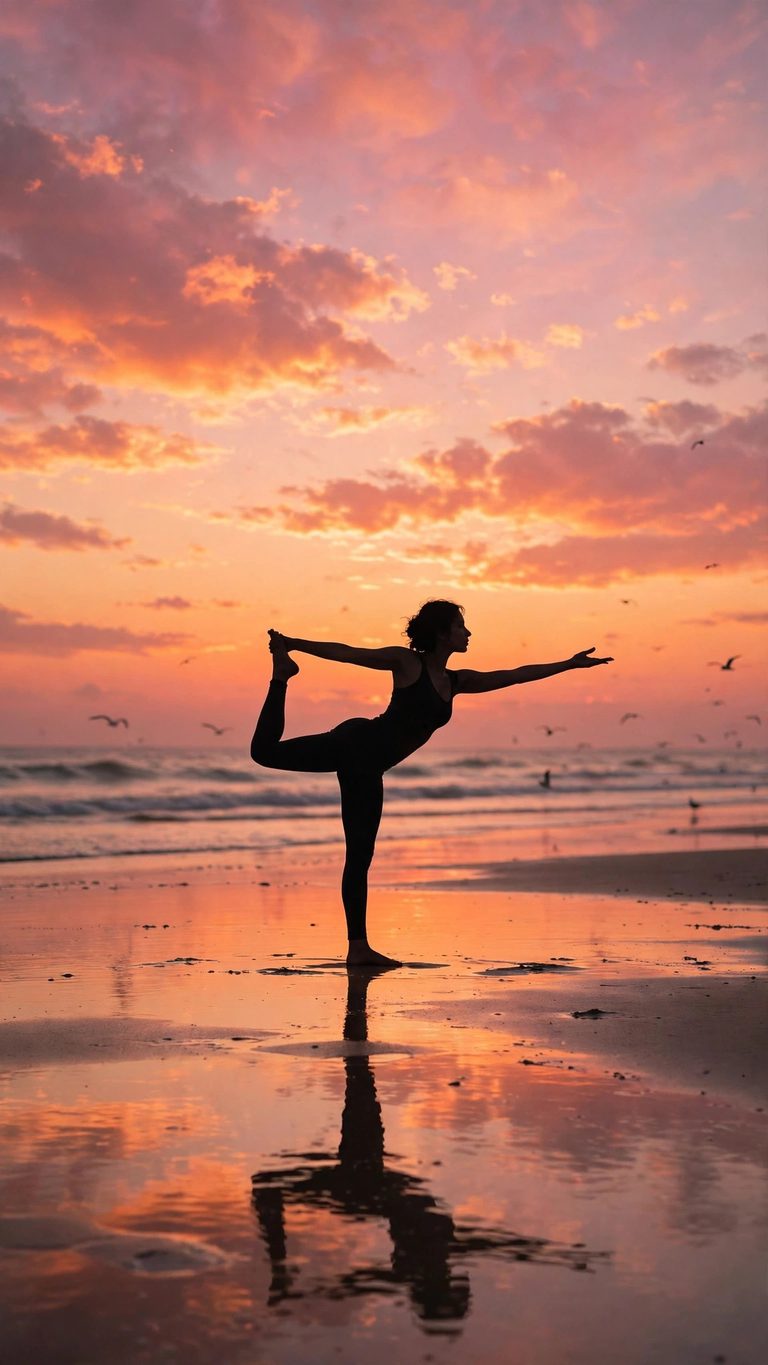
There is a kind of image that stops thumbs mid-scroll: a lone yogi, frozen in dancer pose, carved black against a sky that is melting from orange into pink. The wet sand beneath mirrors the whole scene, so it feels like two sunsets stacked on top of each other. Gulls drift across the distance as tiny silhouettes, and the horizon stretches on without end. It looks like a dream someone photographed by accident — and that is exactly why this beach yoga silhouette style dominates wellness feeds, Pinterest boards, and yoga studio pages.
What makes this particular prompt special is how little it leaves to chance. Every element that makes sunset yoga photos go viral — the graceful arc of dancer pose, the rich gradient sky, the doubled beauty of a wet-sand reflection, the soft blur of the waves — is baked right into the wording. You do not need photography skills, a beach, or perfect timing. You need one copy-paste prompt and about thirty seconds. Below you will find the exact prompt, why it works so well, how to run it on Midjourney, DALL-E 3, Flux, and Stable Diffusion, plus pro tips, creative variations, and answers to the questions everyone asks before posting their first AI wellness photo tagged #AIPhotoPrompt and #Yoga.
The Prompt
Here is the complete prompt, ready to copy. Paste it exactly as written — every color cue and composition word earns its place:
Dreamy silhouette photograph of a yogi in dancer pose on a beach at sunset, vibrant orange and pink sky, reflection on wet sand, waves softly blurred, graceful elegant lines, minimalist composition, hyper-detailed edges, ultra detailed, 8k quality, gulls silhouetted in distance, endless calm horizon
Why This Prompt Works
Silhouette photography works on a deep psychological level. When the viewer cannot see the yogi’s face, they unconsciously insert themselves into the frame. The image stops being “someone doing yoga” and becomes “the peace I want to feel.” That self-projection is why faceless wellness imagery consistently earns more saves and shares than portraits — and this prompt leans into it with a dancer pose, one of the most expressive shapes in yoga. Natarajasana is grace under tension: one leg lifted, chest open, the body drawn into a single elegant arc. Even as a pure black shape, it reads as both movement and stillness, which gives the image its emotional charge.
Then there is the sky. Warm orange-to-pink gradients are among the most reliably viral color palettes on visual platforms, because sunsets trigger genuine awe — a measurable emotion linked to lower stress and higher generosity. The prompt specifies “vibrant orange and pink sky” rather than a generic sunset, which pushes the generator toward the rich, saturated gradients that perform best in feeds. The wet-sand reflection doubles the payoff: reflections create visual symmetry, and symmetry reads as harmony to the human eye, reinforcing the wellness mood. Softly blurred waves keep the background calm instead of noisy, while the distant gulls add a whisper of scale and life without stealing attention.
From a trend perspective, this image sits at the intersection of three booming aesthetics: sunset photography, minimalist wellness content, and the “dreamy” romantic edit style that dominates yoga and travel pages. The minimalist composition means it works at any size — a phone wallpaper, an Instagram story, a Facebook page cover — and the endless calm horizon gives text overlays room to breathe, which is why wellness brands love this style for quote cards. Shareability is baked in: it is beautiful enough to repost, universal enough to need no caption translation, and calming enough that people send it to friends who are having a hard week. Tag it with #Yoga, #Sunset, and #AIPhotoPrompt and it will find its audience.
How to Use This Prompt
Using this prompt is straightforward, but each generator has its own sweet spot. In Midjourney, type /imagine, paste the prompt, and add --ar 9:16 --v 7 for a tall portrait frame that matches the source settings. Add --stylize 250 if you want Midjourney’s more polished, cinematic rendering, or keep stylize low (around 100) for a rawer photographic feel. If the silhouette edges look soft, re-roll rather than upscaling a weak result — silhouettes live or die on crisp edges, which the prompt already requests with “hyper-detailed edges.”
In DALL-E 3 (via ChatGPT), paste the prompt as a single message and ask for a portrait/vertical image. DALL-E follows descriptive prompts faithfully, so keep every phrase intact on your first run. If the sky looks washed out, add “rich saturated sunset gradient” to your follow-up request. In Flux (Flux.1 Dev or Schnell in any text-to-image interface), set the aspect ratio to 9:16, run 28–40 steps with guidance around 3.5, and let the prompt’s “ultra detailed, 8k quality” phrasing carry the sharpness — Flux excels at clean gradients and reflections.
In Stable Diffusion (SDXL or Pony), use a 768×1344 or 832×1216 canvas for the 9:16 portrait ratio, 30–40 steps, CFG scale 5–7, and a negative prompt like “blurry, watermark, text, extra limbs, distorted hands, lowres.” The negative prompt matters here because dancer pose is anatomically complex; telling the model what to avoid keeps the lifted leg and arched back clean. Across all four tools, generate two or three variations and pick the one with the cleanest silhouette edge and the richest sky gradient before you post.
Pro Tips & Creative Variations
The source pro tips for this prompt are gold, so start there. First, the phrase “dancer pose” is doing heavy lifting — it is a universally recognized, graceful silhouette, but you can swap in other expressive shapes once you have a good base render. Try “warrior two pose,” “tree pose,” or “crow pose” for a different energy, or “couple in partner yoga pose” for a romantic variation. Keep the rest of the prompt identical so the dreamy sunset look stays consistent across a series.
Second, the wet-sand reflection is the secret weapon: it literally doubles the beauty of the image. If your generator renders the sand too dry, strengthen it with “mirror-like wet sand reflection” or add “after light rain” to the scene. Third, protect the sky gradient — it is the emotional core of the photo. Words like “rich,” “vibrant,” and “gradient” push the model away from dull gray-pink washes. You can push further with “golden hour glow” or “cotton-candy clouds catching the last light.”
For creative variations, try a sunrise version (“soft peach and lavender dawn sky”) for morning-routine content, which performs beautifully with #MorningYoga audiences. Go monochrome by adding “black and white fine-art photography” for a gallery-wall look. Change the beach itself: “tropical palm beach,” “rocky Nordic shoreline,” or “desert dunes at dusk” each give the same pose a completely different mood. Add “subtle lens flare” for a more cinematic feel, or generate a matching pair — one sunset, one moonrise — and post them as a carousel. Finally, this image makes a stunning phone wallpaper: render at 9:16, add your favorite affirmation as text in any free editor, and share it with #AIVideo and #PromptBazar so the community can see what you made.
Frequently Asked Questions
Which AI image generator gives the best result for this sunset silhouette prompt?
Midjourney v7 is the strongest choice for this particular prompt because it renders dramatic skies and crisp silhouette edges beautifully — the two things this image depends on. DALL-E 3 is the easiest option if you already use ChatGPT, and it follows the long descriptive prompt very faithfully. Flux is excellent at smooth gradients and mirror reflections, while Stable Diffusion gives you the most control through negative prompts and seeds. Honestly, all four can produce a viral-worthy result; the prompt is written to be tool-agnostic, so start with whichever generator you already have access to.
What aspect ratio and size should I use?
Use 9:16 portrait — it is the ratio in the original settings and the native shape of phone screens, Instagram Reels, TikTok, YouTube Shorts, and Facebook/Instagram Stories. A vertical frame also suits the composition: the tall sky gradient above and the reflection below need vertical room to breathe. If you want a feed post instead, 4:5 portrait is a good compromise. Avoid square or landscape crops — they cut off either the sky or the reflection, which are the two most shareable elements of the image.
Can I post the generated image on my wellness page or use it commercially?
Generally yes for social posting, but check your specific generator’s terms. Images you create with paid Midjourney, DALL-E 3, and Flux plans typically come with broad commercial rights, while free tiers may have restrictions. What you cannot do is claim the prompt itself as your exclusive creation if you are selling prompt packs — but posting the image on your wellness page, using it in a yoga class flyer, or adding it to a blog is exactly what this prompt was made for. When in doubt, check the current terms of service of the tool you used.
How can I customize the prompt without breaking what makes it work?
Change one element at a time. The load-bearing phrases are the pose (“dancer pose”), the time of day (“sunset”), the sky colors (“vibrant orange and pink”), and the reflection (“reflection on wet sand”). Swap the pose, the beach type, or the sky palette — but keep the others intact for your first variation. Keep descriptive quality tags like “hyper-detailed edges, ultra detailed, 8k quality” at the end, since they stabilize sharpness across tools. If a variation looks worse, revert your last change rather than rewriting the whole prompt.
This beach yoga silhouette prompt turns thirty seconds of copy-paste into the kind of dreamy sunset photo wellness pages dream about. Try it today on your favorite generator, post the result with #Yoga, #Sunset, and #AIPhotoPrompt, and tag @PromptBazar so we can feature your creation. Your next viral wellness post is one prompt away — go make it.
Related Viral Prompts
- Bamboo Forest Zen AI Photo Prompt: Serene Meditation Among Towering Stalks for Deeply Calming Photos
- Chakra Energy Art AI Photo Prompt: Glowing Seven-Chakra Meditation Silhouette for Spiritual Digital Art
- Calm Tea Ceremony AI Photo Prompt: Cozy Clay Cups, Rising Steam & Rainy Window Bokeh for Mindful Photos
# A I V i d e o # P r o m p t B a z a r # A I P h o t o P r o m p t # Y o g a # S i l h o u e t t e # S u n s e t

Leave a Reply