
Introduction
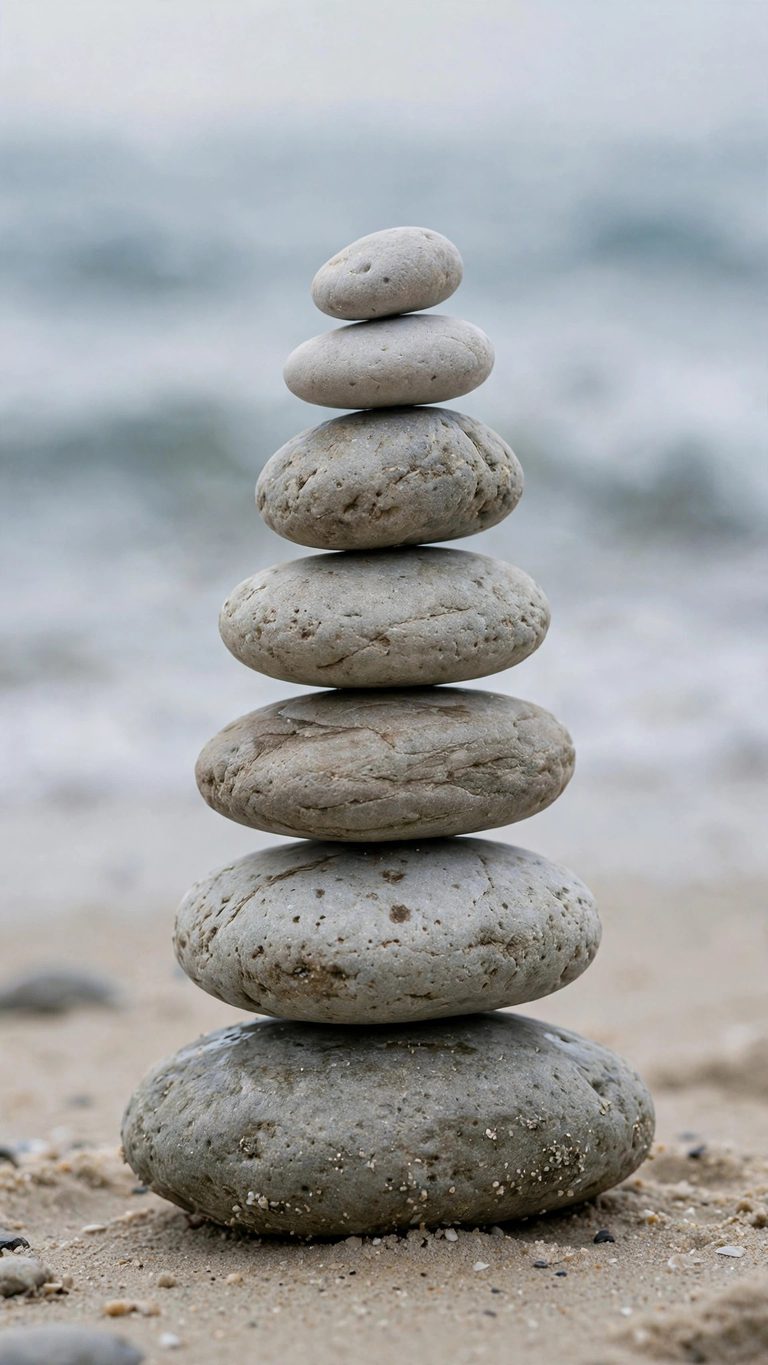
Seven smooth stones. One impossible tower. Nothing holding them together but patience, gravity, and a steady hand. There is a reason videos of stone stacking rack up millions of views: watching perfect balance emerge from chaos scratches an itch deep in the human brain. It is the visual equivalent of a deep exhale. This AI photo prompt captures that exact feeling — a minimalist photograph of seven stones balanced in a tall stack on a beach, ocean blurred behind, a single distant seagull completing the scene. No tide tables, no numb fingers, no toppled towers. Just a copy-paste prompt that generates gallery-worthy zen minimalism in seconds. Whether you run a wellness account, design calming wallpapers, or simply love the “oddly satisfying” corner of the internet, this guide gives you the exact prompt, the psychology behind its power, and step-by-step instructions for Midjourney v7, DALL-E 3, Flux, and Stable Diffusion.
The Prompt
Copy the prompt below exactly as written — the specific details about light, texture, and balance are what separate a generic rock photo from a mesmerizing zen composition:
Minimalist photograph of seven smooth stones perfectly balanced in a tall stack on a beach, blurred ocean waves behind, soft overcast light, impossible delicate balance, hyper-detailed stone texture, zen minimalist aesthetic, calming composition, ultra detailed, 8k quality, single distant seagull, timeless patience embodied in stone
Why This Prompt Works
Minimalism is not emptiness; it is focus. By stripping the scene down to stones, sand, sea, and sky, this prompt removes every distraction and forces the viewer’s attention onto a single miraculous fact: those stones are standing. The brain cannot help but engage — it starts calculating angles, imagining the patience required, feeling the tension of potential collapse. That micro-drama is what makes people stare, and staring is what drives saves and shares.
The lighting choice is quietly brilliant. Soft overcast light eliminates harsh shadows and hot spots, giving the stones an even, sculptural quality that flatters their texture. “Hyper-detailed stone texture” then invites the viewer to lean in close — every grain and speckle becomes a tiny landscape of its own, rewarding the kind of zoomed-in inspection that boosts dwell time on Pinterest and Instagram.
The single distant seagull is the prompt’s secret weapon. It provides scale, proving the tower’s real-world size, while its solitude echoes the theme: one bird, one stack, one moment of perfect calm. Psychologically, the image embodies “timeless patience,” a concept that resonates powerfully with audiences burned out by hustle culture. Content tagged #ZenStones, #Balance, #Satisfying, and #AIPhotoPrompt taps directly into the massive “oddly satisfying” trend — a genre built on exactly this kind of quiet, perfect, repeatable visual pleasure. People save these images as phone wallpapers and meditation anchors, giving your post a lifespan far beyond the usual 24-hour feed decay.
How to Use This Prompt
Follow these steps to render your own impossible tower:
1. Midjourney v7: Paste the prompt into /imagine with –ar 9:16 –v 7 for the portrait format. If the stack looks wobbly or physically implausible, hit Vary (Subtle) a few times — Midjourney usually converges on a believable balance within three or four rolls.
2. DALL-E 3 (via ChatGPT): Paste the prompt and add “vertical 9:16 portrait orientation, photorealistic.” If stones appear to float, follow up with “make every stone physically touch the one below it” — DALL-E 3 responds well to plain-language physics corrections.
3. Flux: Use a 768 x 1344 canvas, 30+ steps, and guidance around 3.5. Flux is excellent at material realism, so the stone grain and wet-sand sheen will look genuinely photographic.
4. Stable Diffusion XL: Generate at 768 x 1344 with a negative prompt like “floating stones, extra stones, blurry, cartoon, watermark.” The negative prompt is important here because some models hallucinate additional pebbles or impossible cantilevers. A refiner pass sharpens the contact points between stones, which sells the illusion of real balance.
Pro Tips & Creative Variations
The stacked-stone concept is endlessly remixable. Change the count: try “three massive boulders” for bold simplicity or “twelve tiny pebbles in a delicate spiral tower” for extra tension. Relocate: “balanced stones on a mossy forest rock,” “in a desert at dawn,” or “on black volcanic sand in Iceland” each create a distinct mood. Shift the light: replace “soft overcast light” with “warm sunset glow, long shadows” or “moonlit beach, stones silvered by moonlight.” Add a human touch: “a hand gently placing the top stone, motion frozen” introduces story and scale. Go macro: “extreme close-up of the contact point between two stones, shallow depth of field” turns physics into abstract art. Reflect: “tower reflected in wet sand at low tide, mirror-like” doubles the symmetry and the wow factor. Build a series: generate the same stack at dawn, noon, sunset, and under stars, then post as a four-panel carousel about patience through changing time. Wellness coaches can pair each panel with a short mindfulness caption. Save the vertical 9:16 renders as phone wallpapers — this is one of the rare AI subjects that looks genuinely calming on a lock screen, and followers will ask where you got it.
Frequently Asked Questions
How do I make the stone balance look physically believable?
Believability lives in the contact points. Zoom into each place where stones touch — they should show slight compression shadows and realistic angles, not floating gaps. If a render looks impossible, regenerate or inpaint the problem joint. Adding “physically plausible balance” to the prompt also nudges the model toward realism.
Can I change the number of stones?
Yes — just replace “seven smooth stones” with any number. Odd numbers (3, 5, 9) tend to look most pleasing because they create a clear visual center. Very tall stacks (10+) look more dramatic but are harder for the model to render believably, so expect more retries.
Will this work as a phone wallpaper?
Perfectly. The 9:16 portrait ratio matches most phone screens exactly, and the minimalist composition keeps app icons readable over the blurred ocean background. Generate at the highest resolution your tool allows for crisp lock-screen detail.
Can I sell prints of these images?
Generally yes under paid Midjourney plans or with DALL-E 3 generations, but verify your platform’s current commercial terms first. Minimalist zen art is a proven print-on-demand niche — these images suit posters, canvas prints, and even jigsaw puzzles.
Balance is a practice, not a destination — and now it is also a prompt. Copy it, stack your stones, and share the result with #AIPhotoPrompt, #AIVideo, and #PromptBazar. In a feed full of noise, your quiet tower of stones might be the calmest thing someone sees all day.
Related Viral Prompts
- Incense Smoke Portrait AI Photo Prompt: Craft Mystical Backlit Ritual Photography with Golden Smoke Art
- Mandala Art Macro AI Photo Prompt: Capture Mesmerizing Sacred Geometry Detail in Stunning Color Photos
- Beach Yoga Silhouette AI Photo Prompt: Dreamy Sunset Dancer Pose on Wet Sand for Viral Wellness Posts
# A I V i d e o # P r o m p t B a z a r # A I P h o t o P r o m p t # Z e n S t o n e s # B a l a n c e # S a t i s f y i n g

Leave a Reply