
Introduction
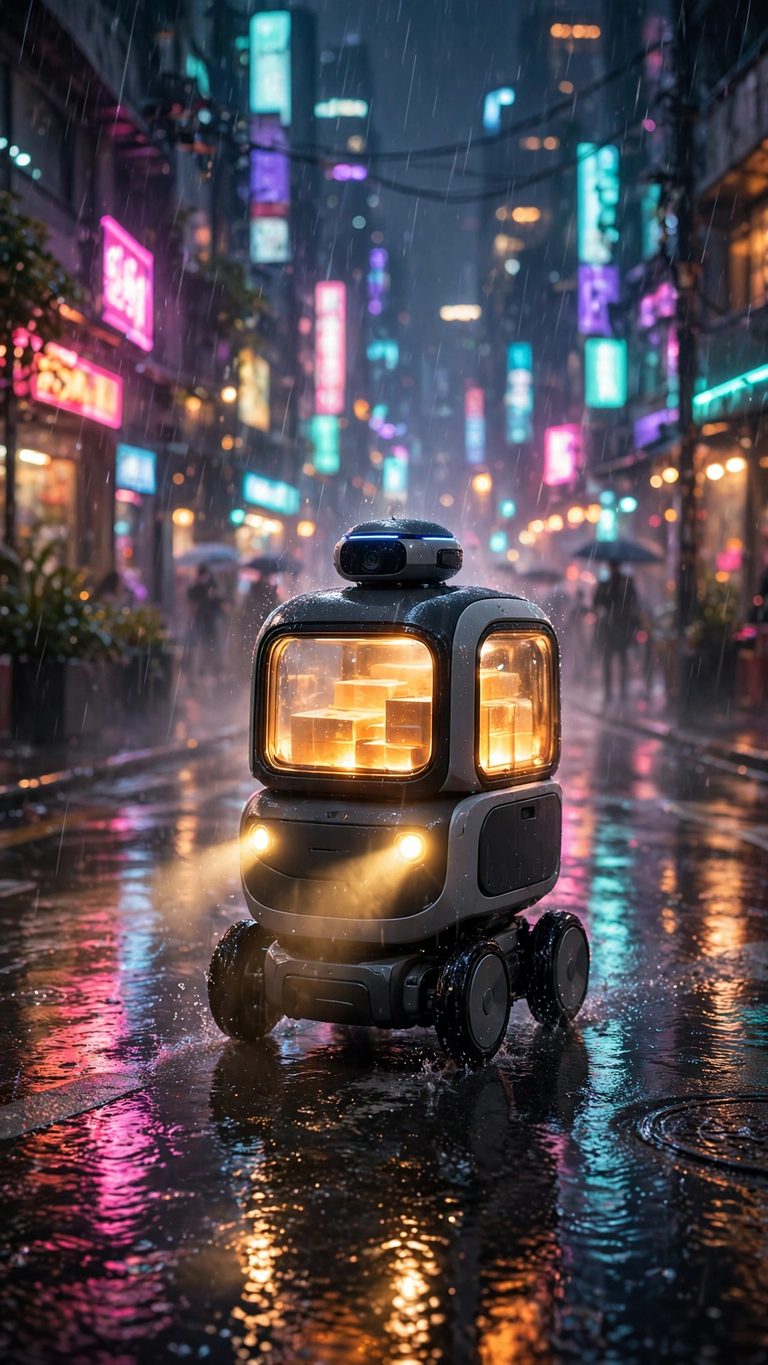
There is something irresistibly charming about a tiny hero on a big mission, and this AI video prompt delivers exactly that: a small delivery robot rolling through neon-lit city streets at night, its package compartment glowing softly, headlights cutting through a gentle rain while the city buzzes around it. It is part cyberpunk daydream, part bedtime story, and entirely captivating. Night-city aesthetics are among the most consistently viral visual styles on social media, and adding a cute, determined little robot turns moody atmosphere into a narrative viewers instantly root for. Is the package important? Who is it for? Will it arrive on time? In eight seconds, this prompt makes you care about a machine on wheels. Whether you are a creator chasing that cinematic neon look, a brand wanting to visualize future logistics with personality, or a storyteller building a tiny-robot universe one clip at a time, this prompt is a compact masterpiece of mood and character. Let us dive into why this rainy night delivery works so well and how to make your version glow.
The Prompt
Copy this exact prompt into your AI video generator to send the little robot on its night route:
Charming night scene of a small delivery robot rolling down neon-lit streets with a glowing package compartment, headlights cutting through light rain, reflections on wet pavement, city buzzing around, cozy cyberpunk mood, smooth follow shot, ultra realistic, 8k, glowing urban adventure
Why This Prompt Works
This prompt is a perfect storm of proven viral ingredients. First, the cute robot factor: small, round, glowing machines trigger the same nurturing instincts as baby animals, a phenomenon designers call the baby schema, and viewers cannot help but root for them. Second, the cyberpunk night aesthetic: neon reflections on wet pavement, glowing signs, and rain-slicked streets create one of the most beloved visual palettes on the internet, endlessly rewatchable and instantly premium-looking. Rain is doing quiet heavy lifting here too; it adds motion, sparkle, and atmosphere to every frame while the reflections double the visual richness without any extra effort. Third, the small hero narrative: a tiny robot on an important delivery is a classic underdog story compressed into seconds, and underdog stories are among the most shareable narratives in existence because they invite emotional investment. The glowing package compartment is a brilliant focal detail, a literal beacon of purpose that gives the viewer’s eye somewhere to land and the story a clear objective. Platform trends amplify all of this: night-city clips earn high save rates as aesthetic content, robot clips earn comments and tags, and the combination earns both. The buzzing city around the robot provides scale contrast that makes the little machine feel even smaller and braver. Finally, the scene is drenched in curiosity gaps: what is in the package, where is it going, and will it make it? Curiosity is the engine of watch time, and watch time is the engine of virality.
How to Use This Prompt
Nailing the night aesthetic requires attention to light and motion. In Google Veo 3, paste the prompt as written, set 9:16 vertical and an 8-second duration, and use the highest quality tier so the neon reflections and rain render cleanly. Runway Gen-4 users should keep the night follow camera move and can enhance it with a slow tracking descriptor to keep the robot smoothly centered as it rolls. Kling excels at wet-surface reflections and rain physics, making it a top pick for this particular scene; enable its high-fidelity mode for the glossiest pavement. In Pika, consider adding a cinematic neon grade or anamorphic glow descriptor to intensify the cyberpunk mood. For OpenAI Sora, the prompt works verbatim, and generating a longer take lets you select the 8 seconds with the most beautiful reflection work. Whichever platform you choose, generate multiple takes and select the one where the robot’s movement looks most purposeful and the rain reads clearly without obscuring the subject. Keep the robot well-framed in the lower third with the glowing compartment visible, render at maximum resolution, and pair the export with moody synthwave or lo-fi night-drive music to complete the atmosphere. A subtle rain sound effect layered under the music adds remarkable immersion.
Pro Tips & Creative Variations
The difference between a nice render and an unforgettable one lives in the lighting details. Push the rain reflections hard: ask for mirror-like wet pavement and doubled neon glows, because reflections are what make night scenes feel expensive and cinematic. Keep the package compartment glowing warmly against the cool neon surroundings; that warm-cool contrast is the visual anchor of the entire scene and the symbol of the robot’s mission. Keep the follow camera smooth and steady, like a patient documentary crew tracking a hero, since shaky movement would undermine the calm determination of the moment. For creative variations, the possibilities are endless: a snow-covered night route with the robot’s headlights cutting through falling flakes, a festival version with lanterns and crowds parting around the little courier, or a sunrise finale where the robot finally arrives as the city wakes up. You can build an episodic series around the deliveries: each clip a new district, a new weather challenge, a new package, with viewers guessing the contents in the comments. Try a point-of-view variation from the robot’s perspective, headlights sweeping across crosswalks and puddles, for an immersive twist. For logistics or delivery brands, this is ready-made ad creative: add your logo to the package compartment or the robot’s shell. Another fun angle is the obstacle course: the robot navigating puddles, curbs, and a curious cat, each tiny challenge making the audience love it more. Finally, experiment with scale: a giant robot striding through the same neon streets flips the underdog story into a gentle-giant fantasy.
Frequently Asked Questions
How do I get the neon reflections to look realistic?
Emphasize wet pavement and mirror reflections in your prompt, as this one does, and render at the highest quality setting. Kling and Veo 3 currently produce the most convincing reflective surfaces. If reflections look muddy, regenerate rather than trying to fix them in post.
Can I make a series out of this concept?
Absolutely, and you should. Keep the robot design consistent by reusing the same prompt core and only changing the district, weather, or package. Audiences love following a tiny hero across episodes, and series content earns far more follows than one-offs.
What music fits this scene best?
Synthwave, lo-fi hip-hop, or ambient electronic tracks with a night-drive feel work perfectly. Add a soft rain ambience underneath for immersion. Keep the tempo relaxed to match the robot’s steady, determined roll.
Is vertical or horizontal better for this prompt?
The prompt is tuned for 9:16 vertical, ideal for Shorts, Reels, and TikTok. If you want a cinematic 16:9 version for YouTube or a portfolio, regenerate with a wide aspect ratio and a wider street composition so the neon cityscape can breathe.
Send your tiny hero out into the neon rain tonight. Try this prompt now and let your audience fall in love with the bravest little delivery bot on the internet: one glowing package is all it takes to start the journey.
Related Viral Prompts
- Robot Gardener AI Video Prompt: Plant a Peaceful Morning Garden With Butterflies and Gentle Robot Hands
- Humanoid Robot Studio Portrait AI Photo Prompt: Capture a Lifelike Robot Gaze with Cinematic Split Lighting
- Cute Robot Reading AI Photo Prompt: Create a Heartwarming Robot Child Reading in a Cozy Library Glow
# A I V i d e o # P r o m p t B a z a r # D e l i v e r y R o b o t # N i g h t # C y b e r p u n k

Leave a Reply