
Introduction
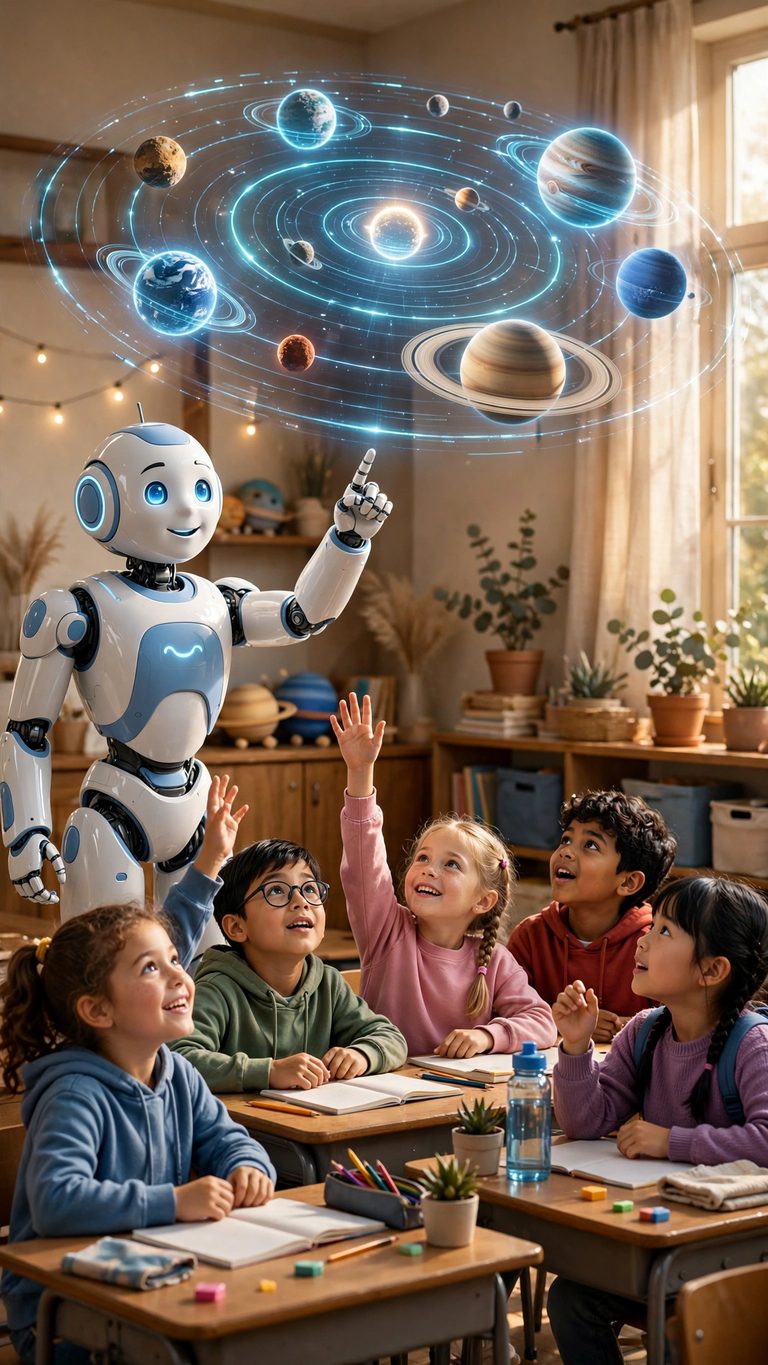
Imagine walking into a classroom where the teacher never gets tired, knows every answer, and can summon the entire solar system to float above the desks in glowing holograms. This AI video prompt brings that dream to life: a friendly robot teacher guiding fascinated children through the wonders of space, with holographic planets orbiting overhead and small hands shooting up eagerly in warm, golden classroom light. It is the kind of scene that makes parents smile, educators share, and futurists say finally. Education content with a heartwarming twist consistently outperforms on social platforms because it taps into hope, nostalgia, and the universal desire to give children a better future. Whether you create content for an edtech brand, run a parenting or teaching channel, or simply love feel-good futurism, this prompt gives you a cinematic, emotionally rich clip that practically shares itself. The warm lighting keeps it cozy rather than cold, the children’s wonder keeps it human, and the holograms deliver the wow factor that stops thumbs mid-scroll. Let us unpack why this classroom of tomorrow resonates so deeply and how to direct your own perfect take.
The Prompt
Use this exact prompt in your AI video generator to stage the futuristic classroom:
Inspiring classroom scene with a friendly robot teacher explaining the solar system to fascinated children, holographic planets orbiting above desks, kids raising hands eagerly, warm classroom light, joyful learning atmosphere, smooth camera pan, ultra realistic, 8k, eager young minds learning
Why This Prompt Works
This prompt succeeds because it sells a feeling, not just a visual: optimism about the future. Psychologically, scenes of children learning trigger warmth and protectiveness in adult viewers, and adding a kind, capable robot reframes AI from a threat narrative into a nurturing one. That emotional reframing is powerful; content that makes people feel hopeful about technology gets shared as a statement, with captions like this is the future I want. The holographic planets provide the spectacle, giving viewers a reason to stop scrolling within the first second, while the children’s raised hands supply the human story that keeps them watching. Platform trends strongly favor this combination. Education and future-tech content both enjoy high save rates because viewers bookmark them as inspiration, and parenting communities amplify heartwarming school content organically through shares and tags. The warm classroom light is a deliberate and important choice: warm tones signal safety, comfort, and nostalgia, which dramatically increases emotional engagement compared to the sterile blue lighting often used in sci-fi. Shareability is baked in through multiple audiences: teachers share it with colleagues, parents share it with parenting groups, tech enthusiasts share it as a vision of progress, and kids simply love watching other kids having fun. The scene also invites conversation, with comments debating robot teachers versus human ones, and every debate boosts the algorithm. It is wholesome, spectacular, and discussion-worthy all at once.
How to Use This Prompt
Directing this scene well comes down to warmth and clarity. In Google Veo 3, paste the full prompt, choose 9:16 vertical framing and an 8-second duration, and let its strong character rendering handle the robot and the children’s expressions. If you use Runway Gen-4, keep the smooth pan camera move from the prompt and consider a slow arc that reveals the holographic planets gradually for a more cinematic unveiling. Kling is excellent at rendering glowing holographic effects with clean edges, so it is a great choice if the planets are your priority; use high-quality mode to keep the holograms crisp. Pika users can add a warm cinematic grade descriptor to deepen the cozy classroom atmosphere. For OpenAI Sora, the prompt works verbatim, and you may want to generate a couple of takes to get the most natural-looking hand raises from the children. Across all platforms, pay attention to the robot’s face and gestures in your chosen take: a gentle, encouraging expression sells the friendly teacher concept instantly. Render at maximum resolution, keep the vertical frame composed so both the robot and the orbiting planets stay visible, and consider layering soft, inspiring background music with a touch of wonder, like gentle piano with airy synth, to complete the emotional package.
Pro Tips & Creative Variations
The details are what transform a good render into a great one. Make the holographic planets vivid and distinct: give Saturn its rings, Mars its rusty red, and Earth its blue glow, because recognizable planets trigger instant delight and educational value. Add more raised hands than you think you need; eager participation is the visual shorthand for an amazing teacher, and a forest of small hands is irresistibly charming. Keep the classroom warm in every sense: wooden desks, soft window light, colorful posters, and cozy tones that say this is a place children love to be. For creative variations, try themed lessons: the robot could conjure a holographic volcano for geology, a beating heart for biology, or ancient pyramids for history, turning one prompt into an entire educational series. A fun twist is the field trip variation: the robot teacher leading wide-eyed kids through a holographic rainforest or the surface of Mars. You can also play with perspective, rendering the scene from a student’s point of view looking up at the robot and the orbiting planets for extra wonder. For edtech brands, subtly place your logo on the robot’s chest display or on a classroom poster. Another engaging format is the before-and-after: a dull, gray classroom transforming into this vibrant future as the robot powers on. Finally, experiment with the robot’s design across episodes, from sleek chrome to a friendly rounded retro bot, and let your audience vote on their favorite teacher.
Frequently Asked Questions
Is this prompt good for edtech marketing?
Excellent. It visualizes the promise of educational technology in one emotional, shareable clip. Many edtech brands use scenes like this for ads, landing page heroes, and social campaigns because it communicates innovation plus warmth without a single word of copy.
How do I keep the children’s faces looking natural?
AI generators sometimes struggle with multiple faces, so generate several takes and choose the one with the most natural expressions. Keeping the children slightly soft in focus while the robot and holograms stay sharp is a cinematic trick that also hides minor rendering imperfections.
Can I change the subject being taught?
Yes, simply swap the solar system and planets for your topic, such as dinosaurs, the human body, or ocean life, and describe the corresponding holograms. The classroom warmth and the children’s wonder transfer beautifully to any subject.
What music works best with this clip?
Uplifting, gentle tracks with piano, strings, or airy synths complement the hopeful mood. Avoid anything too intense or electronic; the goal is wonder and warmth, and the music should feel like a sunrise, not a launch sequence.
Bring the classroom of tomorrow to your audience today. Try this prompt now and watch wonder light up every face: one inspiring clip is all it takes to remind people why the future is worth getting excited about.
Related Viral Prompts
- Delivery Robot AI Video Prompt: Roll a Cute Cyberpunk Hero Through Neon-Lit Rainy City Streets at Night
- Robot Gardener AI Video Prompt: Plant a Peaceful Morning Garden With Butterflies and Gentle Robot Hands
- Humanoid Robot Studio Portrait AI Photo Prompt: Capture a Lifelike Robot Gaze with Cinematic Split Lighting
# A I V i d e o # P r o m p t B a z a r # R o b o t T e a c h e r # E d u c a t i o n # F u t u r e


Leave a Reply