
Introduction
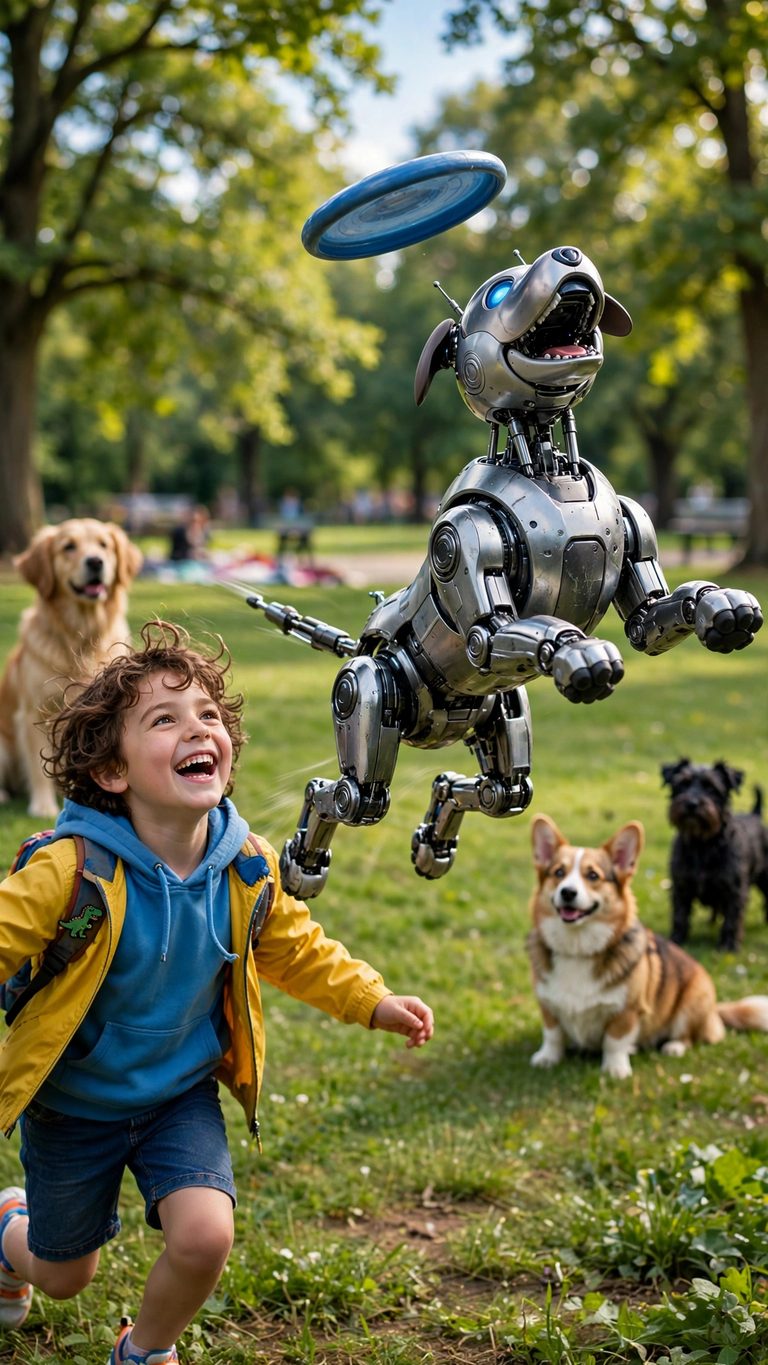
There is a special kind of magic that happens when technology meets pure, unfiltered joy, and nothing captures it better than watching a metallic robot dog sprint across a sun-drenched park to catch a frisbee mid-air. This AI video prompt turns that fleeting moment of playful bliss into a cinematic slow-motion spectacle that feels like it leapt straight out of a feel-good movie trailer. Picture it: golden sunlight dappling through green trees, a laughing child winding up for the throw, and a gleaming robot companion launching itself skyward in a gravity-defying leap while real dogs watch in wide-eyed curiosity. It is heartwarming, it is hilarious, and it is impossibly shareable. In a social media landscape where cute animals and cutting-edge tech both dominate the algorithm, combining the two is a guaranteed engagement multiplier. Whether you are a content creator hunting for your next viral short, a brand marketer looking for a family-friendly concept, or simply someone who loves imagining a friendlier robotic future, this prompt delivers a polished, emotionally rich clip in seconds. Let us break down exactly why this scene works so well and how to squeeze every drop of charm out of it.
The Prompt
Copy the exact text below into your favorite AI video generator to recreate this joyful park scene:
Joyful park scene of a metallic robot dog playing fetch with a laughing child, robot sprinting and leaping to catch a frisbee mid-air, slow motion jump, other dogs watching curiously, sunny day, playful energy, dynamic camera follow, ultra realistic, 8k
Why This Prompt Works
This prompt is a masterclass in emotional engineering. At its core, it taps into one of the most universal and hardwired human responses: delight at play. Watching a dog chase a frisbee triggers an instant dopamine hit, and swapping in a robot dog adds a layer of novelty and wonder that makes viewers stop scrolling. The contrast between cold metal and warm, goofy playfulness creates a delightful cognitive surprise, the kind that earns rewatches and shares. The prompt is also brilliantly specific about motion: the sprint, the leap, and the slow-motion jump give the AI generator a clear kinetic arc to render, and slow motion is a proven engagement amplifier because it stretches a peak moment of action into something savor-worthy. The laughing child adds human warmth and relatability, turning a tech demo into a story about friendship. Meanwhile, the detail of other real dogs watching curiously is a stroke of genius; it mirrors the viewer’s own reaction inside the scene, creating a meta layer of comedy and charm. Visually, the sunny day setting keeps the color palette bright and optimistic, which performs far better on platforms like TikTok, Reels, and Shorts than dark or muted footage. Bright, high-energy clips get longer watch times and more shares, and the platform algorithms reward exactly that. Finally, the concept has a strong narrative hook with sequel potential: viewers will immediately imagine what the robot dog does next, which drives comments, duets, and stitches. In short, this prompt fuses cute, tech, humor, and heart into one compact, loopable package engineered for virality.
How to Use This Prompt
Getting a flawless result is easy if you follow a few platform-specific steps. Start by choosing your generator: Google Veo 3 handles complex character motion and natural lighting beautifully, so paste the full prompt into the text-to-video box, set the aspect ratio to 9:16 vertical, and aim for an 8-second duration to match the intended pacing. If you are using Runway Gen-4, enable its motion controls and emphasize the slow-motion leap by adding a camera note like slow push-in during the jump for extra drama. On Kling, which excels at physics-based motion, keep the prompt as written and use the standard quality mode; its motion engine will render the frisbee catch with convincing weight and momentum. Pika users should try the prompt in its cinematic mode and can add a subtle lens flare descriptor for that sunny glow. For OpenAI Sora, paste the prompt verbatim and let its world model handle the multi-character choreography, then trim the clip so the slow-motion jump lands exactly on the beat if you plan to add music. Across all platforms, generate two or three variations and pick the one where the robot’s leap looks the most natural. Render at the highest resolution available, keep the vertical framing tight on the action, and export with a trending upbeat audio track layered underneath to maximize watch time.
Pro Tips & Creative Variations
Once you have the base clip, the real fun begins with customization. For maximum drama, freeze the frame at the apex of the robot’s jump and hold it for a beat before resuming, a classic sports-highlight technique that makes the leap feel legendary. Add the sound of the child’s laughter prominently in the mix; genuine human laughter is one of the most contagious sounds on social media and dramatically lifts share rates. Keep the day bright and saturated, because cheerful lighting signals feel-good content to viewers within the first second. Try creative variations to build a series: swap the frisbee for a glowing energy disc to lean into the sci-fi angle, or set the scene at sunset for a golden-hour glow that looks stunning in thumbnails. You could dress the robot dog in a tiny team jersey for sports-themed content, or have it perform a celebratory backflip after the catch for a show-off moment audiences will replay. Another powerful variation is the point-of-view shot: render the frisbee’s perspective as it spins toward the leaping robot. For brand work, add a subtle logo to the robot’s flank or the child’s cap. You can also extend the narrative across multiple clips: part one is the throw, part two the catch, part three the victory lap around the park, turning a single prompt into an episodic mini-series that keeps followers coming back. Experiment with weather too; a light autumn breeze scattering leaves during the leap adds gorgeous particle motion that AI generators render beautifully.
Frequently Asked Questions
Which AI video tool gives the best results for this prompt?
Google Veo 3 and Kling currently produce the most convincing results because both handle multi-subject motion and animal-like physics well. Runway is excellent if you want finer control over the slow-motion timing. All of them work with the prompt as written, so pick whichever platform you already subscribe to and generate a few takes.
How do I make the slow-motion jump look realistic?
The prompt already requests a slow-motion jump, but you can strengthen it by adding descriptors like ultra slow motion at peak leap or 240fps sports replay feel. Generating at a longer duration and then slowing the middle section in your editor also gives you precise control over the effect.
Can I use this video commercially?
That depends on your AI platform’s terms of service. Most major generators grant commercial rights to paid subscribers for content they create, but always check your plan’s licensing terms before using the clip in ads or branded campaigns.
What aspect ratio should I export?
Stick with 9:16 vertical for TikTok, Instagram Reels, and YouTube Shorts. If you also want a landscape version for YouTube or presentations, most platforms let you regenerate or outpaint the same prompt in 16:9 without rewriting anything.
Grab this prompt, hit generate, and watch a robot dog steal the show in your next short. Try it today and share the joy: your audience will thank you with likes, shares, and a flood of heartwarming comments.
Related Viral Prompts
- Neural Network AI Video Prompt: Dive Through a Glowing Abstract Brain of Pulsing Nodes and Data Rivers
- Robot Teacher AI Video Prompt: Film an Inspiring Classroom With Holographic Planets and Eager Young Kids
- Delivery Robot AI Video Prompt: Roll a Cute Cyberpunk Hero Through Neon-Lit Rainy City Streets at Night
# A I V i d e o # P r o m p t B a z a r # R o b o t D o g # P l a y f u l # C u t e


Leave a Reply