
Introduction
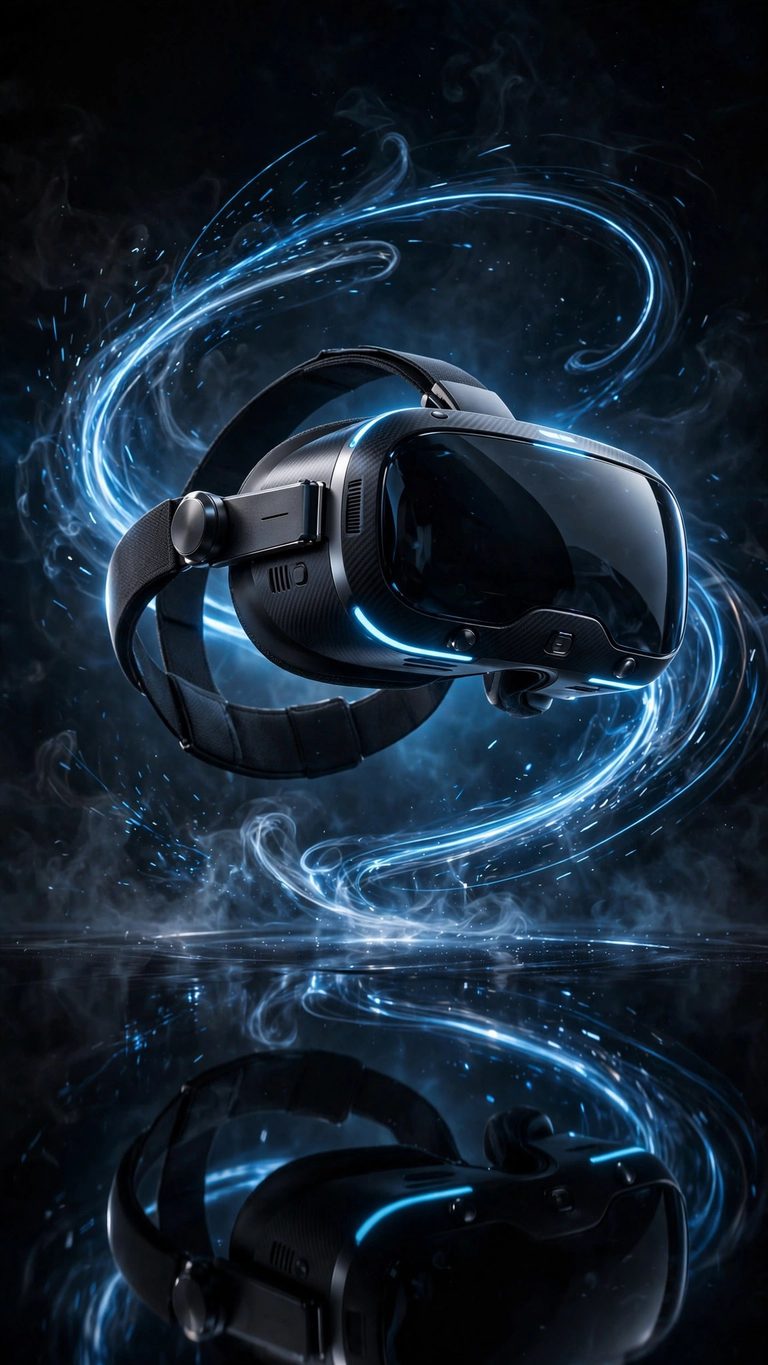
Few images scream “the future is here” like a virtual reality headset suspended in darkness, wrapped in electric blue light. VR has moved from niche hobby to mainstream cultural force, powering everything from gaming marathons to virtual offices and immersive fitness. But here is the challenge every tech creator faces: a VR headset sitting on a desk looks like a chunky plastic visor, while the experience it delivers feels like stepping into another universe. The gap between the boring object and the thrilling experience is exactly where dramatic studio photography earns its keep. By floating the headset in dark space, carving it out with rim lighting, and swirling light streaks around it, this AI photo prompt transforms a familiar gadget into a cinematic icon. The result looks like a frame from a sci-fi blockbuster or a flagship product launch, the kind of image that makes viewers stop, stare, and imagine what is on the other side of those lenses.
The Prompt
Copy the prompt below exactly and paste it into your image generator. It is engineered to produce a premium, high-contrast studio shot with the headset as the undisputed hero of the frame.
Dramatic studio photograph of a sleek VR headset floating in dark space, glowing blue accents, light streaks swirling around, reflective surface below, futuristic premium tech aesthetic, dramatic rim lighting, hyper-detailed, ultra sharp, 8k, photorealistic
Why This Prompt Works
Every element of this prompt is chosen to manufacture drama. “Floating in dark space” does two things at once: it frees the headset from any mundane context like a desk or a shelf, and it creates a vast field of negative space that makes the product feel monumental. Human eyes are drawn to bright objects on dark backgrounds, so the headset becomes an instant focal point. “Glowing blue accents” taps into the universal visual language of technology: blue light reads as digital, futuristic, and premium, which is why everything from sci-fi films to real product launches leans on it. “Light streaks swirling around” injects motion and energy into a static product shot, suggesting speed, data, and immersion without showing a single pixel of an actual virtual world.
The realism cues are equally deliberate. “Reflective surface below” grounds the floating headset with a mirror-like floor, a classic luxury advertising technique that doubles the visual richness of the frame. “Dramatic rim lighting” sculpts the edges of the headset with bright outlines, separating it from the dark background and revealing its curves and materials. “Futuristic premium tech aesthetic” acts as a style anchor, steering the model toward the clean, high-end look of flagship launch imagery rather than gritty cyberpunk chaos. The closing stack of “hyper-detailed, ultra sharp, 8k, photorealistic” ensures the plastics, fabrics, and lenses render with convincing material quality.
Strategically, this style of image is content gold. #VR and metaverse topics generate enormous curiosity, and dramatic product visuals dramatically outperform plain photos in thumbnails, headers, and ad creatives. Tech YouTubers, reviewers, and news sites all need exactly this kind of hero image, and most cannot afford a professional studio shoot. A single strong generation can anchor a review video, a blog header, a social announcement, or a presentation slide. The dark background also makes the image incredibly versatile: white or neon text overlays pop beautifully against it, which is perfect for titles, quotes, and call-to-action graphics.
How to Use This Prompt
Here is the step-by-step process. First, copy the full prompt text exactly as written, keeping the quality tags at the end. Second, open your image generator. This post recommends the settings “9:16 portrait, Midjourney v7 / Flux,” and both excel at dramatic lighting. In Midjourney v7, run /imagine with the pasted prompt plus –ar 9:16. In Flux, paste the prompt and select the 9:16 portrait preset. DALL-E 3 and Stable Diffusion also work: ask DALL-E 3 for a vertical portrait orientation, and in Stable Diffusion use a portrait resolution such as 768 by 1344 with 30 or more sampling steps.
Third, generate at least four variations. Dark scenes with glowing elements vary a lot in how the model balances the light, and you want the version where the headset is clearly readable rather than lost in shadow or blown out by glare. Fourth, check the details that matter most: the lenses should look like clean glass, the straps should connect plausibly, and the glow should feel like light rather than paint. Fifth, upscale your favorite for maximum crispness. If the composition feels too dark, most generators let you request a slightly brighter variant by adding “balanced exposure, headset clearly visible” to a follow-up generation. Save the exact prompt and seed of your winner so you can produce matching images for a whole VR content series.
Pro Tips & Creative Variations
Once the base shot looks stunning, remixing it is easy and fun. The fastest variation is color: swap “glowing blue accents” for “glowing violet accents,” “cyan and magenta neon,” or “warm amber glow” to create completely different moods. Violet feels mysterious and premium, cyan-magenta screams gaming culture, and amber gives a warm, cinematic sunset-in-space feeling. You can also change the environment: “floating above a glowing grid floor” adds a retro Tron-like vibe, “with a futuristic city blurred in the background” adds depth, and “surrounded by floating holographic interface panels” tells a richer story about what the headset does.
Try structural variations too. Add “with two motion controllers floating beside it” for a complete product story, or go abstract with “extreme close-up of the front visor reflecting a digital landscape.” For lifestyle content, generate “a person wearing the headset, seen from behind, reaching toward glowing virtual objects” to show the human experience. A “dramatic exploded view with components separating in mid-air” makes a spectacular educational graphic for explainers about how VR hardware works.
For thumbnail and marketing use, remember that the dark negative space is your canvas: leave room at the top or bottom for titles by adding “headset positioned in the lower third, empty dark space above.” If you need a wider format, regenerate at 16:9 for YouTube thumbnails or 1:1 for feed posts, keeping the same lighting language for brand consistency. And if the glow ever looks flat, strengthen it with “volumetric glow” or “bloom lighting effect” to get that luminous, high-end render feel that separates amateur generations from professional-looking ones.
Frequently Asked Questions
Q: The headset shape looks wrong or melted in some generations. How do I fix it?
A: Complex manufactured objects are genuinely hard for AI models. Generate larger batches, four to eight images at a time, and pick the one with the most coherent geometry. Describing the headset more specifically helps: try “sleek modern VR headset with smooth curved visor and fabric head strap” instead of relying on the generic term alone. Midjourney v7 and Flux tend to handle product geometry better than older models.
Q: Can I change the glow color without breaking the composition?
A: Yes, color swaps are the safest edit you can make. Replace “glowing blue accents” with your chosen color and keep everything else identical. The lighting logic, rim light, reflections, and streaks all adapt automatically to the new hue. For brand work, match the glow to the brand’s signature color for instant cohesion across a campaign.
Q: Will this work for AR glasses or other headsets too?
A: Absolutely. Replace “VR headset” with “augmented reality smart glasses,” “mixed reality headset,” or even “gaming headphones” and the dramatic studio formula still applies. Smaller devices may need “extreme close-up” or “macro detail” added so they do not get lost in the dark space. The lighting and atmosphere cues are device-agnostic.
Q: How do I add text to the image for thumbnails?
A: Generate first, add text afterward in a design tool like Canva or Photoshop for the crispest result, since AI-rendered text is still unreliable. The dark background of this prompt is ideal for overlays: use bold white or neon-colored type in the empty space above or below the headset. If you must bake text into the generation, keep it to one or two short words and expect to regenerate several times.
This dramatic VR headset prompt turns an ordinary gadget into a cinematic showpiece in under a minute. Copy the prompt, generate your studio shot in 9:16, and give your tech content the blockbuster look it deserves. Try it now and watch your thumbnails and headers transform.
Related Viral Prompts
- AI Photo Prompt: Dynamic Drone Propeller Macro Photo With Motion Blur, Sunset Bokeh and Dramatic Backlight
- AI Photo Prompt: Serene Smart Speaker Minimal Interior With Morning Light, Oak Table and Scandi Calm
- Unfolding Smartphone Hologram City: The Ultimate AI Video Prompt for Futuristic Tech Reels and Shorts
# A I P h o t o # P r o m p t B a z a r # V R # H e a d s e t # S t u d i o S h o t

Leave a Reply