
Introduction
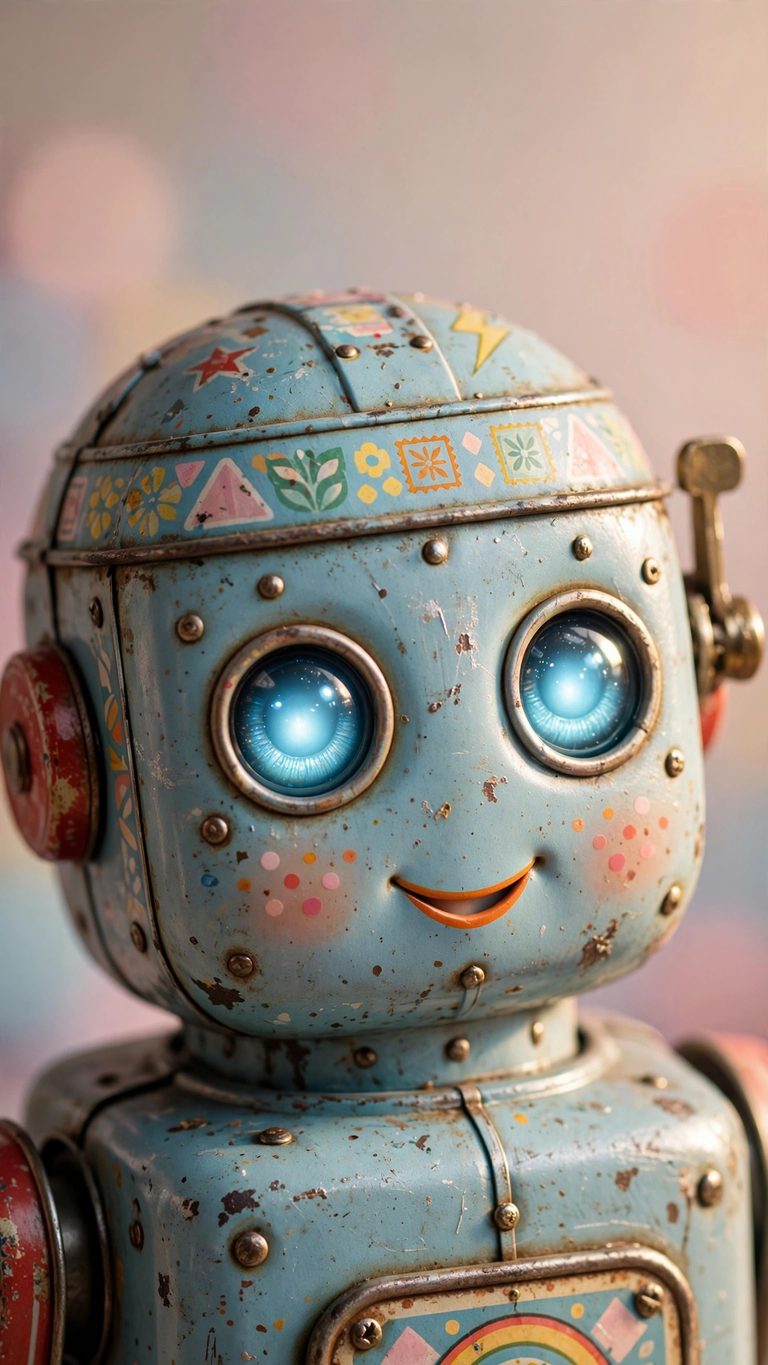
Some images do not need a caption to make you smile, and a wide-eyed little robot toy photographed like a Hollywood star is one of them. Retro robot toys sit at the perfect intersection of two internet obsessions: our endless love for cute things and our growing nostalgia for the chunky, colorful tin toys of decades past. These are the robots of a more optimistic future, the kind with riveted metal bodies, wind-up keys, and friendly faces, long before sleek minimalism took over gadget design. Photographing one as a studio portrait, with soft key light, a dreamy pastel background, and razor-sharp detail, elevates a humble desk toy into a tiny celebrity. Collectors post them, brands use them as mascots, and creators build entire accounts around cute tech characters. The best part is that you do not need a studio, a camera, or even the actual toy: this AI photo prompt generates the whole portrait for you, glowing eyes and all.
The Prompt
Paste the prompt below into your image generator exactly as written. It is tuned for maximum cuteness and crisp detail, with lighting and background cues that make the little robot look professionally photographed.
Charming studio portrait of a cute retro robot toy, big expressive eyes glowing, tin body with colorful details, soft key light, pastel background, shallow depth of field, playful nostalgic mood, hyper-detailed textures, ultra sharp, 8k, photorealistic
Why This Prompt Works
This prompt is a masterclass in cute-driven visual psychology. “Big expressive eyes glowing” triggers the baby schema response, the hardwired human instinct to find large eyes adorable and worth protecting. It is the same reason cartoon characters and pet photos dominate social feeds, and it works just as powerfully on a tin robot. “Cute retro robot toy” sets the character archetype clearly: not a menacing sci-fi machine, but a friendly vintage plaything, which keeps the model away from dark Terminator-style territory. The “tin body with colorful details” cue is doing quiet technical work too, because painted metal, rivets, and decals give the model rich surface textures to render, and texture is what separates a flat-looking generation from one that feels touchable and real.
The lighting and camera language complete the professional illusion. “Soft key light” mimics a studio softbox, wrapping the toy in flattering, shadow-softening illumination, while “pastel background” and “shallow depth of field” isolate the subject in a creamy, blurred wash of color that makes the robot pop forward. “Playful nostalgic mood” steers the overall feeling toward warmth and whimsy rather than cold product photography. The closing stack of “hyper-detailed textures, ultra sharp, 8k, photorealistic” pushes surface detail to the maximum, which matters enormously for a subject covered in tiny decals, scratches, and metallic edges.
Content-wise, cute tech is one of the most shareable categories on the internet. Desk setup videos, toy photography communities, and #RobotToy collector groups all thrive on exactly this kind of image. A single charming robot portrait can serve as a profile picture, a sticker design, a merch graphic, or the mascot for a tech newsletter. It also photographs, so to speak, beautifully at small sizes: the simple silhouette and glowing eyes stay readable even as a tiny thumbnail, which is a huge advantage in crowded feeds and comment sections.
How to Use This Prompt
Using this prompt is straightforward. First, copy the entire prompt text exactly as written above. Second, choose your generator: the recommended settings for this post are “9:16 portrait, Midjourney v7 / DALL-E 3,” and both handle character-style subjects exceptionally well. In Midjourney v7, type /imagine, paste the prompt, and add –ar 9:16 for the vertical portrait format. In DALL-E 3, paste the prompt into the chat and mention that you want a vertical 9:16 portrait orientation. Third, generate a batch of at least four images, because eye shape, expression, and body proportions vary between generations, and you want to pick the most charming face.
Fourth, zoom in on the details that matter: check that the eyes are symmetrical, the tin textures look painted rather than smeared, and any small decals or buttons are coherent. Cute subjects are unforgiving of asymmetry, so do not hesitate to regenerate until the face feels right. Fifth, if your tool supports it, upscale the winner for maximum sharpness before posting. A useful Midjourney trick is adding a seed value once you find a robot design you love, so you can generate the same character in new poses later. For DALL-E 3, you can ask for the same robot “with the exact same design” in follow-up prompts to build a consistent little character series.
Pro Tips & Creative Variations
The base prompt gives you one adorable robot, but small tweaks unlock a whole toy shelf of possibilities. Start with color: swap “colorful details” for “cherry red and cream details,” “mint green and silver,” or “sunshine yellow with red accents” to create distinct characters. Change the pastel background to “soft peach,” “baby blue,” or “lavender” to match your feed palette, or try “warm cream studio backdrop” for a timeless catalog look. You can even go dramatic with “dark navy background with neon rim light” for a collector’s-edition vibe that still keeps the cute face.
Personality variations are where this prompt really shines. Add “sleepy half-closed eyes” for a bedtime mood, “tiny waving arm” for extra charm, or “holding a small balloon” for a celebratory post. Dress the robot up: “wearing a tiny party hat,” “with a miniature scarf,” or “sporting round spectacles” all read beautifully at this level of detail. For storytelling, place the character in a scene: “sitting on a wooden desk beside a small potted succulent,” “peeking out of a cardboard box,” or “standing in a field of soft-focus flowers.” Each scenario keeps the studio-portrait lighting while adding narrative.
If you want a consistent mascot, generate your favorite robot first, then create variations with the same design description plus new actions, like “waving,” “holding a coffee cup,” or “reading a tiny book.” In tools that support image references, feed your winning robot back in as a character reference for near-perfect consistency. For print or merch use, generate at the highest resolution available and consider a clean 1:1 square crop so the design centers perfectly on stickers, pins, and profile avatars. And remember the golden rule of cute content: when in doubt, make the eyes slightly bigger and the lighting slightly softer.
Frequently Asked Questions
Q: How do I keep the same robot design across multiple images?
A: Describe the winning robot precisely, noting its colors, body shape, and distinctive details, then reuse that exact description in every new prompt. In Midjourney, use the seed from your favorite generation or a character reference image. In DALL-E 3, reference “the same retro robot toy design as before” and restate its key features. Consistency improves dramatically when the description stays word-for-word identical.
Q: The eyes sometimes look creepy instead of cute. How do I fix it?
A: Add calming modifiers like “gentle,” “friendly,” or “soft warm glow” near the eyes description, and avoid words like “staring” or “intense.” Slightly larger, rounder eyes with visible highlights read as cute, while narrow or asymmetrical eyes read as unsettling. Regenerating a few times usually lands on a friendly face.
Q: Can I use these robot images commercially, for merch or branding?
A: That depends on your AI tool’s terms of service, which vary by plan and provider, so check the commercial-use policy of the generator you use. Many paid tiers grant commercial rights to images you create. Also avoid prompting the robot to resemble any existing trademarked character to keep your designs original.
Q: What is the best aspect ratio for a robot toy portrait?
A: The recommended 9:16 portrait is ideal for Stories, Reels covers, and Pinterest, where cute content performs best. For profile pictures, stickers, or feed posts, a 1:1 square crop centered on the face works better. Generate in 9:16 first for maximum flexibility, then crop down, since you can always trim a tall image but cannot add missing background.
This cute retro robot prompt proves you do not need a studio to create professional toy photography. Copy the prompt, generate your little robot in 9:16, and give your feed a dose of nostalgic charm today. Try it now and see how quickly a pair of glowing eyes can win over your entire audience.
Related Viral Prompts
- AI Photo Prompt: Dramatic VR Headset Studio Shot Floating in Dark Space With Blue Glow and Rim Lighting
- AI Photo Prompt: Dynamic Drone Propeller Macro Photo With Motion Blur, Sunset Bokeh and Dramatic Backlight
- AI Photo Prompt: Serene Smart Speaker Minimal Interior With Morning Light, Oak Table and Scandi Calm
# A I P h o t o # P r o m p t B a z a r # R o b o t T o y # C u t e # P o r t r a i t

Leave a Reply