
Introduction
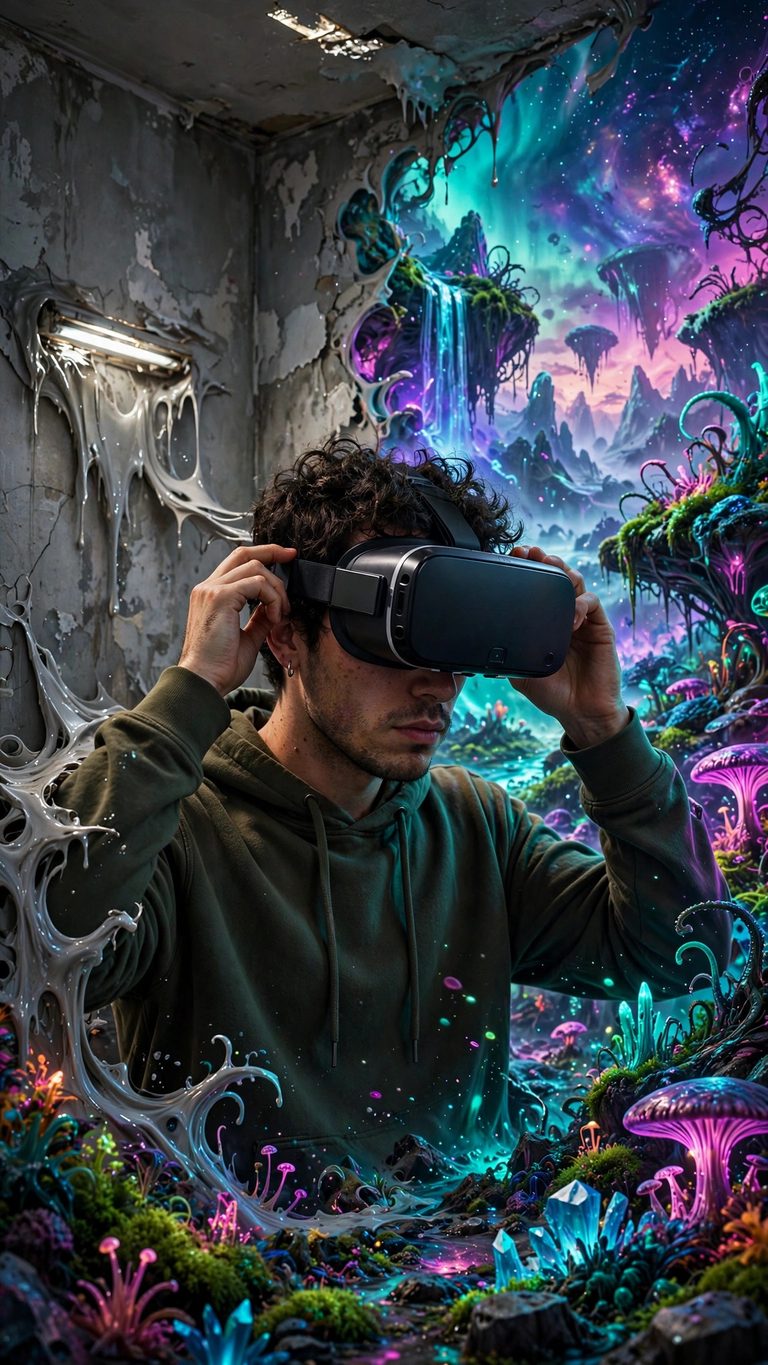
The most powerful moment in any virtual reality demo is not the graphics. It is the second the headset goes on and the ordinary room disappears. That single transition, from dull reality to impossible world, is pure cinema, and it is why VR content has a magnetic pull on viewers who have never even worn a headset. They are not watching a game. They are watching someone escape. AI video generators can now stage this escape with a fidelity that feels ripped from a science fiction film: a person lifts a VR headset, the walls melt into neon landscapes, and the camera pushes straight through the transformation into a vibrant alien world. This guide deconstructs the exact prompt behind that reality-bending scene and shows you how to wield it. Whether you cover gaming, future tech, or mind-bending visual effects, this transition prompt delivers the kind of clip that makes viewers stop, rewind, and share. Welcome to the #VR rabbit hole.
The Prompt
Here is the exact AI video prompt that creates this trippy VR transition. Copy it precisely and paste it into your AI video generator to bend reality on demand:
Trippy transition scene, a person putting on a VR headset and the dull room melting into a vibrant alien world, walls dissolving into neon landscapes, camera pushing through the transformation, reality bending, immersive sci-fi wonder, ultra realistic, 8k, cinematic, mind-bending digital escape
Why This Prompt Works
This prompt is built on the oldest trick in visual storytelling: the portal. From wardrobe doors to rabbit holes, audiences are hardwired to lean in when one world dissolves into another. The genius of the VR framing is that it gives the portal a modern, relatable trigger. Everyone understands putting on a headset, so the transformation feels personal rather than abstract; the viewer imagines themselves as the person crossing over. The camera pushing through the transformation is the critical direction. A static shot of a changing room would be interesting, but a camera that moves through the change makes the viewer a participant, and participation is what separates watched content from felt content. Reality bending and immersive sci-fi wonder are not just flavor words; they instruct the model to prioritize spectacle, saturated color, and impossible geometry, the exact qualities that stop thumbs mid-scroll. Tech content trends heavily favor transition videos because they compress a complete story, before, change, after, into seconds, delivering a full narrative arc with zero exposition. The #Transition format is one of the most remixed structures on TikTok and Reels for exactly this reason. Shareability is almost automatic: the clip reads instantly even without sound, the visual payoff is unmistakable, and viewers share it as a reaction to VR itself, tagging friends with messages like we need to try this. The dull room opening is equally strategic. Contrast is the engine of the effect; the more ordinary the starting room, the more astonishing the alien world feels, which is why the prompt specifies dullness before the melt begins.
How to Use This Prompt
The post settings are 9:16 vertical, 8 seconds, push-through transition. Lock those in first, then follow this workflow.
Step 1: Choose a generator strong at stylized environments. Veo 3 and Kling render vivid neon alien landscapes convincingly, while Runway Gen-4 gives good control over the transition timing. Pika 2 is a fast option for testing variations.
Step 2: Paste the prompt exactly as written. The cause-and-effect chain, headset on, room melts, camera pushes through, must stay intact for the narrative to read clearly.
Step 3: Set 9:16 vertical aspect ratio and 8-second duration. The vertical frame intensifies the push-through by making the environment surround the viewer.
Step 4: Add a negative prompt like static image, no transition, blurry face, watermark to make sure the model actually performs the transformation instead of settling on one scene.
Step 5: Generate several takes. Transitions are the hardest thing for AI video, and some runs will cut corners by fading instead of melting. Keep the take where walls visibly dissolve into the neon landscape.
Step 6: Add a riser sound effect that peaks exactly as the world changes, plus a deep cinematic boom on arrival. Audio sells the crossing more than any visual tweak.
Pro Tips & Creative Variations
The destination world is your playground. Swap the alien landscape for an underwater city, a floating castle in the clouds, a retro synthwave grid, or a microscopic world inside the human body, and each version targets a different audience while reusing the identical transition structure. You can also invert the concept: start in the fantastical world and have it collapse back into the dull room when the headset comes off, which creates a poignant, almost melancholic loop about escaping reality. For gaming channels, describe the destination as a specific game-like environment, a blocky voxel world, a neon racing track, a fantasy battlefield, and pair the clip with commentary about the actual VR title. Horror creators can twist the prompt by making the destination subtly wrong, too-perfect faces, skies that breathe, which turns a tech demo into dread. The person matters too: describe different wearers, a kid, an elderly person, an astronaut, to change the emotional register of the scene. If your tool supports image-to-video, upload a photo of a real room as the starting frame for a personalized version that feels like your own space transforming. Creators in the #VirtualReality niche often build anticipation series: the same person putting on the headset in episode one, with the destination revealed only in episode two. Finally, experiment with the transition mechanic itself. Instead of melting walls, try the room shattering like glass, folding like origami, or pixelating away, each described in place of the dissolving language, to develop a signature transition style your audience recognizes instantly.
Frequently Asked Questions
Q1: Which AI video tool does the best reality-bending transitions?
A: Google Veo 3 currently produces the most fluid environment transitions, with walls genuinely appearing to melt rather than crossfade. Kling is a strong second for vivid stylized worlds. Runway Gen-4 offers the most control if you want to art-direct the exact moment of transformation. Transitions remain the hardest task in AI video, so generate at least four or five takes and select the one where the change feels continuous and physical rather than a simple dissolve.
Q2: My video just shows a room, then cuts to an alien world with no real transition. How do I fix it?
A: The model took the easy path. Strengthen the transformation language by emphasizing the melting and dissolving process, and add a negative prompt such as hard cut, static scene, no transition. Generating with a slightly longer duration can give the model room to render the in-between states. If the tool supports start and end frames, provide the dull room as the first frame and the alien world as the last, forcing it to invent the journey between them.
Q3: Can I make the destination a specific place, like a game world or underwater city?
A: Yes, that is the best way to customize this prompt. Replace vibrant alien world with whatever destination fits your niche: underwater kingdom, cyberpunk city, fantasy forest, voxel game world. Keep the headset trigger and the push-through camera language unchanged, since those carry the narrative structure. Each destination essentially creates a new video, so one prompt can generate a whole series of escapes.
Q4: Will this work for promoting actual VR headsets or games?
A: It works brilliantly as a hook. Use the AI transition as the opening that captures attention, then cut to real footage or gameplay of the headset you are covering. The fantasy sells the feeling of VR; your real content delivers the information. Many tech creators use exactly this structure for reviews and unboxings. Just be transparent that the transition is AI-generated if the platform requires disclosure for synthetic media.
Reality is optional for eight seconds, and that is more than enough. This VR transition prompt turns the simple act of putting on a headset into a cinematic escape that viewers feel in their chest. Copy the prompt, generate your first crossing, and start exploring destination worlds your audience has never imagined. The next reality is one prompt away.
Related Viral Prompts
- Solar Drone City Flight AI Video Prompt: Soar Over a Futuristic Green City at Dawn in a Stunning Aerial Clip
- AI Photo Prompt: Futuristic Neon Smartphone Product Shot With Titanium Build and Cinematic Rim Light
- AI Photo Prompt: Breathtaking Drone Aerial Photo of a Glowing City Grid Captured at Blue Hour for Stunning Visuals
# A I V i d e o # P r o m p t B a z a r # V R # V i r t u a l R e a l i t y # T r a n s i t i o n


Leave a Reply