
Introduction
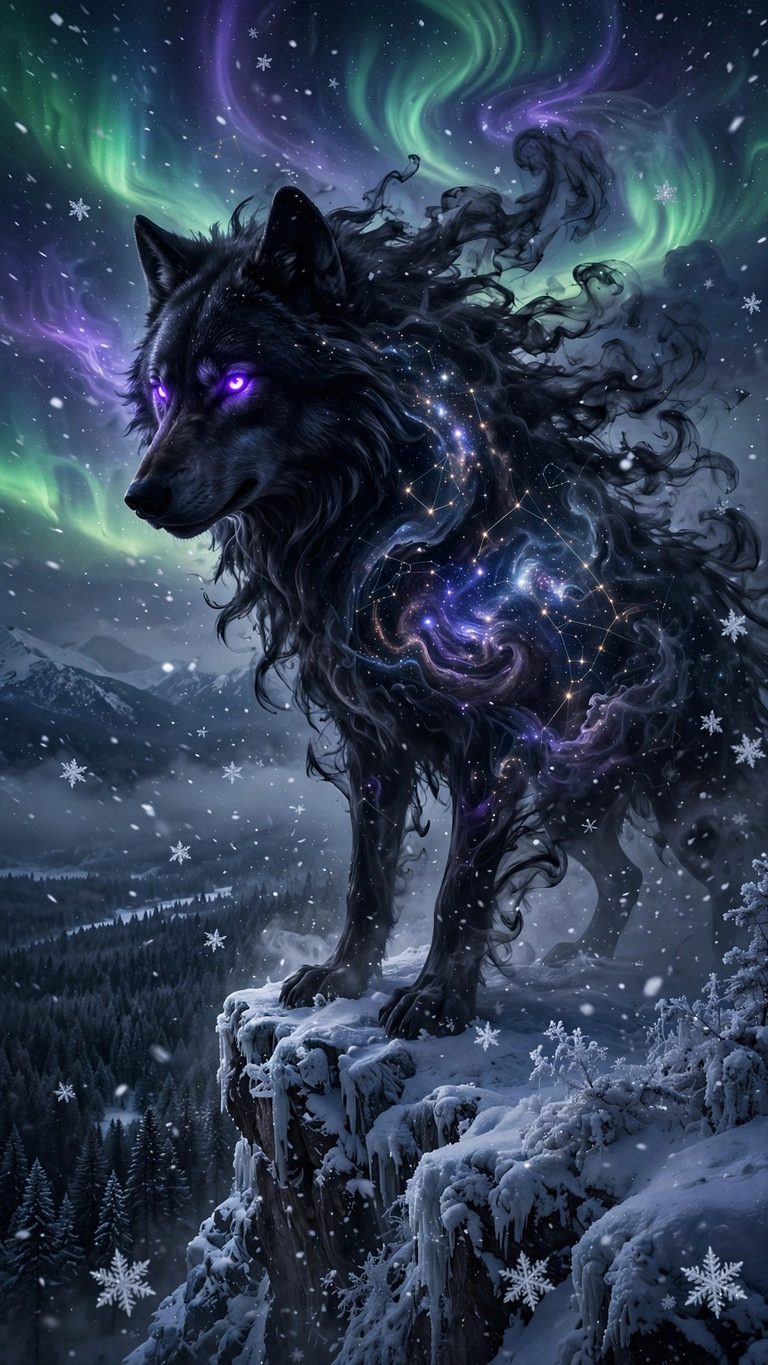
Picture a cliff of untouched snow under a sky torn open by the aurora borealis. Out of the darkness steps a wolf, but no ordinary wolf: its body is living night, and inside that darkness entire constellations swirl like galaxies trapped beneath fur. Its eyes burn violet, the only warm color in a frozen world, and the snowflakes around it hang suspended as if time itself is holding its breath. This is the shadow wolf, one of fantasy art’s most haunting archetypes, and this AI photo prompt renders it in breathtaking, gallery-worthy detail. The image works because it fuses three obsessions of the internet age: wolves, the northern lights, and cosmic horror beauty. Aurora photography already dominates travel feeds; add a mythical predator woven from starlight and you have something no camera could ever capture, which is precisely why AI fantasy art like this spreads so fast. Whether you are decorating a phone wallpaper, building a dark-fantasy portfolio, or hunting for your next viral post, this prompt delivers a scene that feels both ancient and impossible.
The Prompt
Copy the prompt below exactly as written and paste it into your favorite AI image generator. Every clause guides the model toward cosmic detail, dramatic lighting, and that signature haunting beauty.
Mystical fantasy photograph of a giant shadow wolf made of living darkness with starry constellations swirling inside its body, standing on a snowy cliff under dancing aurora borealis, its glowing violet eyes piercing the night, snowflakes freezing mid-air around it, pine forest below, hauntingly beautiful, ultra detailed, 8k, masterpiece
Why This Prompt Works
This prompt succeeds because it stacks three independent visual hooks that each command attention on their own, then fuses them into one impossible creature. The first hook is the aurora borealis, nature’s most cinematic light show and a perennial viral subject. The second is the wolf, an animal with deep symbolic resonance across cultures, representing wildness, loyalty, and mystery, and one of the most searched animals in fantasy art. The third is the cosmic body: constellations swirling inside living darkness. This is the masterstroke, because it creates a paradox the eye cannot resolve quickly. Viewers see a solid animal and a deep-space nebula simultaneously, and that cognitive tension holds attention far longer than a conventional creature portrait. The glowing violet eyes serve as the compositional anchor, a single high-saturation focal point in a cool blue-green palette that follows classic color theory for maximum impact. Snowflakes frozen mid-air add a subtle supernatural cue, suggesting the wolf commands time or temperature, which deepens the mythology without a single word of lore. The pine forest below grounds the fantasy in a recognizable landscape, giving scale and a sense of place. On social platforms, this formula is shareability gold. Dark fantasy and cosmic art communities are enormous and highly engaged, the #Aurora tag rides one of photography’s most beloved trends, and #ShadowWolf speaks directly to a niche that collects this exact aesthetic. The 9:16 portrait format makes the towering sky and the wolf’s full stature fill a phone screen, turning a casual scroll into a moment of genuine wonder.
How to Use This Prompt
This prompt shines brightest in generators known for atmospheric lighting and fine detail. In Midjourney v7, paste the prompt with –ar 9:16 –v 7 to lock the vertical composition. The aurora and starfield benefit from higher stylization, so try –stylize 400 for richer, more painterly skies, and generate at least four variations to find the one where the constellations inside the wolf read clearly rather than dissolving into noise. DALL-E 3 users can paste the prompt verbatim and ask for a vertical image; if the wolf’s body renders too solid and the stars get lost, follow up in plain language with “make the wolf’s body more translucent with visible galaxies inside.” Flux handles this prompt beautifully at 9:16 with a guidance scale near 3.5, and its texture rendering makes individual snowflakes and fur edges razor sharp. Whichever tool you use, pay special attention to the eyes: they should glow violet and pierce the composition. If they render dull, regenerate with extra emphasis or touch them up in a photo editor with a subtle outer glow. Always upscale before publishing, because the “ultra detailed, 8k” quality lives in the starfield and snowflake micro-detail that compression loves to destroy. Save your best seed so you can build a matching series later with consistent style.
Pro Tips & Creative Variations
The shadow wolf is a remix machine, and small edits produce dramatically different moods. Swap the aurora for a blood moon and change “violet eyes” to “crimson eyes” for a horror-leaning variant that thrives in October. Replace the snowy cliff with a misty pine forest floor and add “moonbeams breaking through fog” for a quieter, more mysterious composition. Try a color-shifted twin: a “dawn wolf” of living golden light with sun flares inside its body, standing over the same cliff at sunrise, makes a perfect diptych when posted as a pair or carousel. For motion-ready art, append “wind whipping its starry fur” to suggest movement, which performs well as an animated wallpaper or short video loop. A cub version, “a small shadow wolf pup with tiny constellations,” delivers heart-melting contrast to the original’s menace and lets you run a growth narrative across posts. If you want lore depth, add environmental storytelling: “ancient runestones glowing faintly on the cliff” or “a distant village with lit windows far below.” For print and wallpaper use, regenerate at maximum resolution and consider a deep-blue color grade in post to unify the palette. Caption strategy matters here: one evocative line like “It does not howl at the moon. It carries the night sky within it” will outperform a plain description every time, and pairing the post with #AIPhoto and #Fantasy plugs you into the largest AI art discovery streams.
Frequently Asked Questions
Which generator renders the starry body effect best?
Midjourney v7 currently produces the most convincing “galaxy inside fur” effect thanks to its strong texture blending. DALL-E 3 is excellent if you iterate conversationally, asking it to increase the translucency of the body. Flux sits between the two with superb fine detail. Test all three with the same prompt and keep the winner’s seed.
How do I keep the aurora from overpowering the wolf?
Add “aurora softly blurred in background, wolf in sharp focus” to establish depth priority. In Midjourney, you can also weight the wolf clause to tell the model where the emphasis belongs.
Can I animate this image into a video?
Absolutely. Run the finished still through an image-to-video tool and prompt “aurora slowly dancing, snowflakes drifting, wolf’s starry fur shimmering, subtle breathing motion.” The result makes a mesmerizing looping wallpaper or story background.
What hashtags work best for this kind of art?
Combine broad discovery tags (#AIPhoto, #Fantasy) with niche passion tags (#ShadowWolf, #Aurora). Niche tags have less competition and highly engaged audiences, while broad tags give you reach. Five to eight tags total is the sweet spot on most platforms.
The night sky has always belonged to wolves in our oldest stories. Now you can picture one woven from the cosmos itself. Generate this shadow wolf tonight, let the aurora dance behind it, and share the haunting beauty with your audience. Try the prompt and tag #PromptBazar.
Related Viral Prompts
- Baby Griffin AI Photo Prompt: Adorable Fantasy Nest Art for Midjourney, DALL-E 3 & Flux (9:16 Portrait Cuteness)
- Leviathan Deep Sea AI Photo Prompt: Terrifying Abyssal Monster Art with DALL-E 3 & Midjourney (9:16 Portrait)
- Celestial Kirin AI Photo Prompt: Divine Fantasy Creature Art in Misty Bamboo Grove for Midjourney & DALL-E 3 (9:16)
# A I P h o t o # P r o m p t B a z a r # S h a d o w W o l f # A u r o r a # F a n t a s y

Leave a Reply