
Introduction
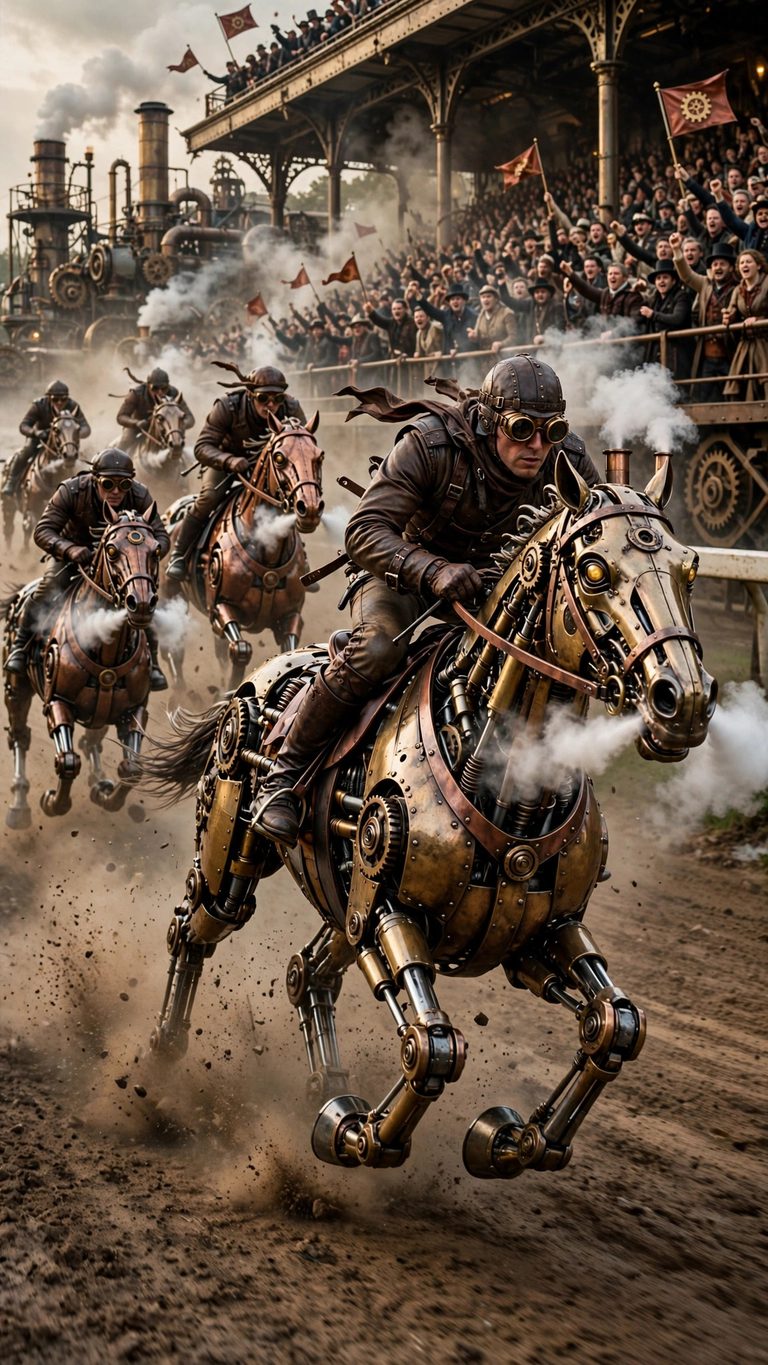
Imagine the thunder of hooves on packed dirt, but the hooves are pistons and the thunder is steam. A mechanical horse race is one of steampunk’s most electrifying ideas: the romance of the racetrack fused with the raw machinery of the industrial age. Brass and copper steeds stretch their articulated legs in a full gallop, exhaust vents puffing white steam from their nostrils while jockeys in leather and goggles crouch low over the metallic withers. The grandstand roars, flags snap in the wind, and dust hangs golden in the afternoon light. This is the scene our AI photo prompt captures in a single frozen frame, and it is pure spectacle. Whether you run a steampunk blog, design posters for a retro-futurist event, or simply love generating striking AI art, this prompt delivers an image that stops thumbs mid-scroll. It blends kinetic sports photography with fantasy engineering, and the result looks like a lost photograph from a world where the industrial revolution never stopped inventing. In this guide we break down exactly why the prompt works, how to run it on every major image model, and how to twist it into dozens of fresh variations.
The Prompt
Copy the prompt below exactly as written and paste it into your favorite image generator. Every word has been tuned for maximum visual impact.
Dynamic steampunk photograph of a mechanical horse race at full gallop, brass and copper steeds with piston legs kicking up dust, jockeys in leather and goggles leaning forward, steam bursting from nostril vents, grandstand crowd cheering with flags, dramatic low angle, motion energy frozen, rich metallic tones, ultra detailed, 8k, masterpiece
Why This Prompt Works
This prompt succeeds because it layers four kinds of descriptive power: materials, motion, characters, and cinematic framing. First, the material language is precise and evocative. Words like brass, copper, and metallic tones tell the model exactly what the machines are made of, and AI generators respond strongly to specific material cues because they map directly to texture and reflectivity in the training data. A generic phrase like metal horses would produce flat grey results, while brass and copper steers the palette toward warm golds and burnished oranges that instantly read as steampunk. Second, the prompt engineers motion into a still image. Phrases such as full gallop, kicking up dust, leaning forward, and motion energy frozen give the model a sense of direction and speed, which is critical because still-image models cannot show literal movement; they must imply it through pose, blur, and composition. Third, the scene is populated. Jockeys in leather and goggles and a grandstand crowd cheering with flags add human scale and storytelling, turning a technical illustration of a robot horse into a narrative moment with stakes and emotion. Fourth, the dramatic low angle is a cinematographer’s trick: shooting from below makes the steeds loom large and heroic, exactly like professional sports photography at a real racetrack. Finally, the quality stack of ultra detailed, 8k, and masterpiece pushes the model toward its highest-fidelity output mode, sharpening rivets, gears, and reflections. Together these layers explain why one prompt can produce a finished, gallery-worthy image in a single generation instead of needing ten retries.
How to Use This Prompt
Follow these steps to get the best result on each major platform.
Midjourney: Paste the full prompt into the imagine bar and add the parameters –ar 9:16 –v 7 –style raw for a tall portrait composition with photographic realism. If the first result looks too polished, add –chaos 15 to vary the poses of the horses. Use the Vary (Strong) button on your favorite result to get alternate takes of the same race.
DALL-E 3: Paste the prompt into the chat or image box as-is. DALL-E 3 follows natural language well, so you can add a follow-up like make the dust backlit and golden without rewriting the whole prompt. Ask for a 9:16 portrait orientation in the same message if the interface allows size choice.
Flux: Flux handles long descriptive prompts beautifully. Paste the prompt unchanged and generate at a portrait resolution such as 768 by 1344. If you want sharper mechanical detail, add 20 to 30 sampling steps and keep guidance around 3.5 so the model stays creative rather than rigid.
Stable Diffusion: Use the prompt as your positive prompt and add a negative prompt like blurry, deformed legs, extra limbs, watermark, cartoon to protect against the classic multi-limb problem that plagues mechanical animals. Thirty steps with the DPM++ 2M Karras sampler and a CFG scale of 7 works well. Upscale with a 2x model afterward to make the brass textures pop.
Pro Tips & Creative Variations
The base prompt is a launchpad. Try these scene-specific twists to build a whole series. Change the materials: swap brass and copper for blackened iron and chrome for a grim midnight race, or polished gold and silver for a royal championship. Change the weather and light: a rain-soaked night race with lanterns reflecting off wet metal turns the dust into mist and makes every rivet gleam, while a desert dust-storm version adds drama through swirling sand. Change the camera: the prompt uses a dramatic low angle, but a side-on panning shot with motion blur on the background would feel like televised sports coverage, and an extreme close-up of one piston leg mid-stride makes a stunning macro study. Change the action beat: instead of the full gallop, describe the explosive start out of brass starting gates, the photo-finish at the line, or a spectacular stumble with steam venting everywhere. Add narrative details: a jockey raising a brass trophy, a rival steed with a cracked faceplate limping in last, or clockwork bookmakers in the grandstand waving betting slips. Mash up genres: put the race on the deck of a flying airship, underwater in a glass tunnel, or on the surface of the moon with Earth hanging in the sky. Each of these keeps the core mechanical-horse DNA while giving you a genuinely new image, which is exactly how you build a cohesive steampunk gallery rather than a pile of random generations.
Frequently Asked Questions
Why do my mechanical horses sometimes have extra legs? AI models struggle with articulated limbs, especially when legs overlap at a gallop. The negative prompt trick in the Stable Diffusion section helps, and in Midjourney you can add the phrase clean anatomy or four legs clearly visible to the prompt. Generating at higher resolution also gives the model more room to resolve the limbs correctly.
Can I make the image look like motion blur instead of frozen action? Yes. Replace motion energy frozen with motion blur on the background, sharp focus on the lead horse and add panning shot. DALL-E 3 and Flux interpret this combination well, giving you a speed-smeared backdrop that makes the sharp steed look even faster.
What aspect ratio works best for this scene? The prompt was designed for 9:16 portrait, which suits phone wallpapers and social posts. For a desktop wallpaper or poster, switch to 16:9 landscape and add wide establishing shot of the racetrack so the model composes the grandstand across the frame instead of cropping it.
Which model gives the most realistic metal? In our testing, Midjourney v7 and Flux produce the most convincing brass and copper reflections, with Flux slightly better at fine mechanical detail like piston rods. DALL-E 3 wins on following complex scene instructions, such as getting the jockeys and crowd exactly where you describe them.
Now it is your turn. Paste the prompt into your favorite generator, run it once, and watch brass thunder come alive on your screen. Then try one variation from the Pro Tips section and compare the two results side by side. The racetrack is waiting, and the starting gates are open.
Related Viral Prompts
- Victorian Lady Inventor AI Photo Prompt: Elegant Steampunk Portrait With Copper Goggles in 8K Detail
- Underwater Brass City AI Photo Prompt: Jules Verne Steampunk Metropolis Glowing on the Ocean Floor in 8K
- Clockwork Butterfly Garden AI Photo Prompt: Hundreds of Brass Butterflies Fluttering Among Flowers in 8K
# A I P h o t o # P r o m p t B a z a r # S t e a m p u n k # H o r s e R a c e # A c t i o n

Leave a Reply