
Introduction
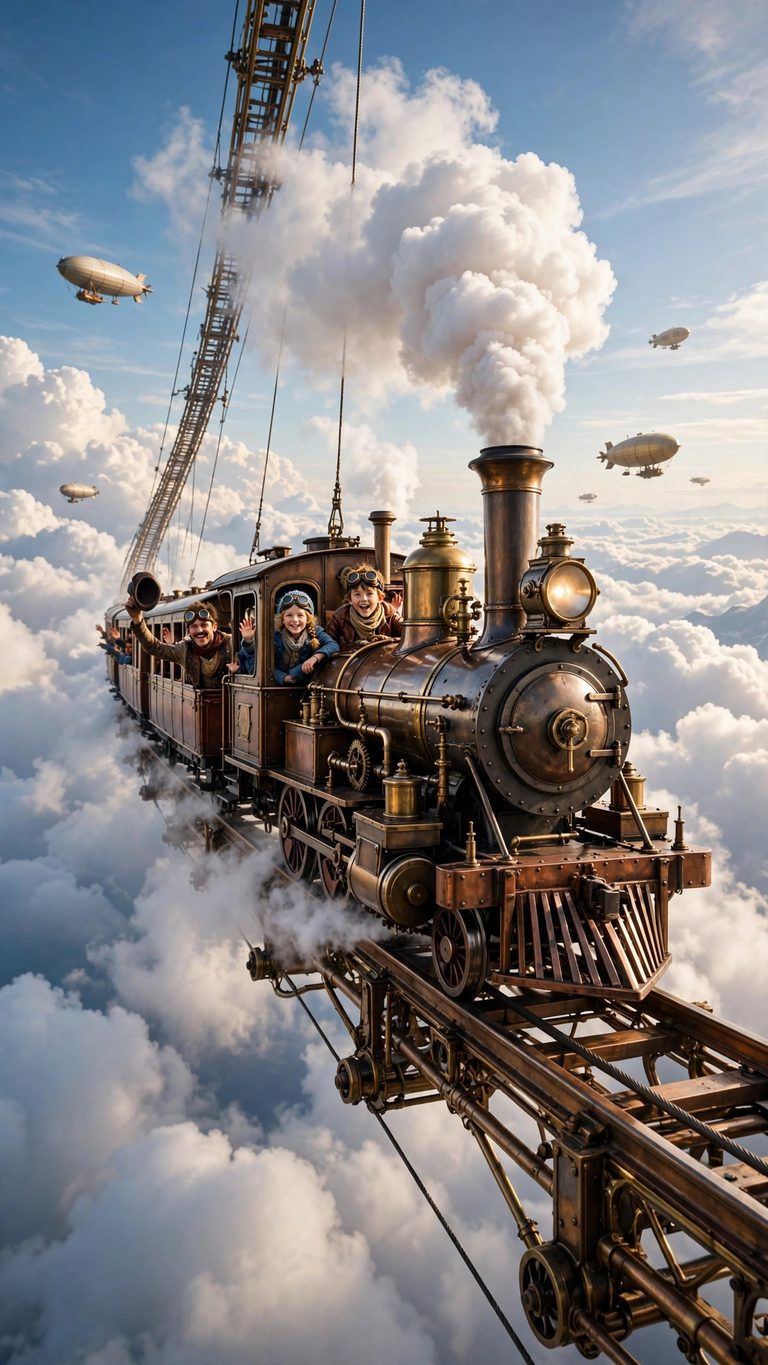
Some images feel like they were pulled straight from a childhood dream. A vintage steam train, brass rails gleaming, racing across a track suspended among fluffy clouds. White steam billows from its chimney and curls into the endless blue. Passengers lean from open windows, waving at nothing and everything. In the distance, airships drift past like slow whales. The camera flies alongside the speeding train, close enough to feel the rush. This is steampunk’s purest joy: the impossible made routine, a commuter line through the sky. The scene radiates what the prompt calls “pure childlike wonder,” and that emotion is rocket fuel for short-form video. Wonder is universal, language-independent, and instantly shareable. Parents show it to kids, dreamers send it to friends, and creators use it as the ultimate escapism clip. It is also technically forgiving: sky, clouds, and steam are subjects AI video models render beautifully, so even a first-generation attempt tends to look gorgeous.
The Prompt
Copy the prompt below exactly as written and paste it into your favorite AI video generator.
Breathtaking steampunk scene of a vintage steam train racing along brass rails suspended among fluffy clouds, white steam billowing from its chimney, passengers waving from open windows, distant airships floating past, camera flying alongside the speeding train, endless blue sky, pure childlike wonder, ultra realistic, cinematic
Why This Prompt Works
This prompt is a masterclass in selling motion and emotion together. The camera direction, flying alongside the speeding train, is the single most important choice: it creates parallax between the train, the clouds, and the distant airships, which is what makes ten seconds feel like a journey instead of a slideshow. The prompt stacks multiple layers of movement: the train racing, steam billowing, passengers waving, airships floating. Layered motion at different speeds is how real cinematography creates depth, and it works the same way in generated video. Suspending brass rails “among fluffy clouds” gives the model a clear, simple environment to render; clouds are forgiving subjects that hide imperfections while looking spectacular. The passengers waving from open windows add the human heartbeat that pure landscape shots lack; viewers instinctively imagine themselves aboard. The emotional tag “pure childlike wonder” is a deliberate tonal instruction that steers the render toward bright, uplifting colors rather than moody gray. And the closer “ultra realistic, cinematic” ensures the train reads as a real machine with weight and texture, not a cartoon. Simple environment plus strong motion plus clear emotion: that is the formula for a viral sky shot.
How to Use This Prompt
This prompt is ready to copy and paste. Choose the AI video tool that fits your workflow and follow the steps below.
- Copy the prompt exactly as written in the box above, including the style tags at the end like “ultra realistic” and “cinematic”. These quality modifiers are what keep the output looking like a film frame rather than a cartoon.
- Veo 3: Paste the prompt into the text-to-video field, set the aspect ratio to 9:16 for vertical shorts, pick a duration of 8 to 10 seconds, and generate two variations so you can choose the better hull reflection or crowd detail.
- Runway: Use the prompt in Gen-4 or the current video model, lock the camera motion setting to match the described move (for example “sweeping aerial” means a lateral glide), and generate at 1080p.
- Kling: Paste the prompt, enable professional mode for richer detail, and let the built-in physics handle the steam, smoke, and fabric motion.
- Pika: Use the prompt as the core text input, then add negative prompts like “blurry, distorted, extra limbs, watermark” to clean up the render.
- Sora: The prompt works as-is in storyboard mode; if you want a longer cut, split the scene into two beats (wide establishing shot, then the described camera move) and generate each separately.
- Post and publish: Export vertical 9:16, add the caption and hashtags from this post, and upload to your shorts, reels, or TikTok feed.
For this flying-side-by-side shot, Kling’s motion physics keep the train stable at speed, while Veo 3 and Runway render the billowing steam and cloud parallax beautifully.
Pro Tips & Creative Variations
The sky train begs for sequels. Change the weather: a golden sunset run with “the rails glowing orange, clouds lit pink and gold,” a night journey with “lantern-lit windows, stars above, the moon reflected on the brass rails,” or a storm approach where “dark clouds gather ahead, lightning flickering, the train racing toward the light.” Alter the train itself: a luxurious dining car with “passengers in Victorian dress toasting through the windows,” a tiny branch-line engine puffing up to a cloud station, or a double-decker sky train for extra whimsy. Add destinations: “approaching a floating station of brass and glass” gives the clip a story beat, perfect for a two-part series. For speed variation, append “slow majestic glide” for calm or “hurtling at breakneck speed, steam streaming horizontal” for thrill. If the rails look unstable, add “sturdy brass trestles anchored to floating rock islands.” Sound designers can lean into the rhythm: this clip pairs perfectly with train-chug percussion and swelling orchestral wonder. Cut three variants, day, sunset, night, into a 30-second “one journey, three skies” reel.
Frequently Asked Questions
Do I need to edit the prompt before using it?
No. It was written and tested for text-to-video models. Copy it exactly for your first generation. Edit only after you see the result and know what you want to change, such as the time of day or camera angle.
Which AI video tool gives the best steampunk look?
Veo 3 and Runway currently render brass, gears, and atmospheric smoke with the most convincing realism. Kling is excellent for motion fluidity, while Pika and Sora are strong on stylized or cinematic framing. Try two tools and compare.
Why does my video look cartoonish instead of realistic?
Usually because the style tags were dropped or the model defaulted to a stylized render. Keep “ultra realistic, cinematic” in the prompt, and in tools like Pika add negative prompts such as “cartoon, anime, flat colors”.
Can I use the generated video commercially?
That depends on the terms of the AI tool you use, so check your plan’s license before monetizing. The prompt itself is free to use and adapt for your own creative projects.
All aboard the train that sails through clouds. Copy the prompt, ride the sky rails, and give your viewers the most joyful ten seconds on their feed today.
Related Viral Prompts
- Airship Battle AI Video Prompt: Epic Steampunk Cannon Warfare Between Two Massive Airships Above Storm Clouds
- Clockwork Owl Flight: Cinematic Steampunk AI Video Prompt With a Magical Brass Owl Over Gaslit Streets
- Steampunk Submarine Dive: Cinematic AI Video Prompt of a Brass Submarine Descending Into the Deep Ocean
# A I V i d e o # P r o m p t B a z a r # S t e a m p u n k # S k y T r a i n # C l o u d s

Leave a Reply