
Introduction
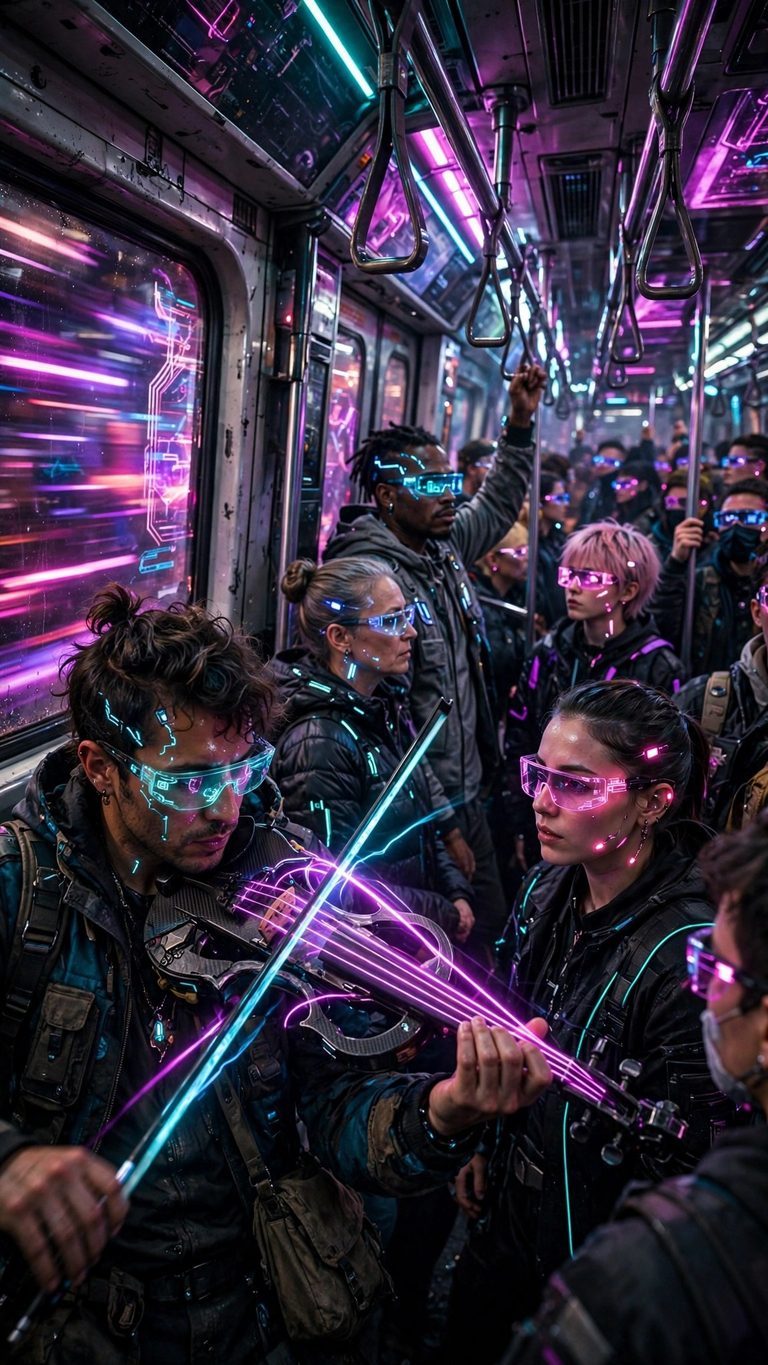
Step into the car and feel the city move: a packed futuristic subway hurtling through neon tunnels, passengers wearing glowing implants and AR glasses, holographic ads flickering across the windows, magenta light strobing past in blurs — and in the middle of it all, a street musician playing a laser violin. This AI video prompt captures the kinetic soul of the cyberpunk city, not its skyline but its bloodstream. While most #Cyberpunk prompts look up at towers, this one looks sideways at people, and that human density is pure gold for short-form video. Crowd scenes signal “the world is alive” to viewers in the first second, and the weaving camera turns the audience into a passenger rather than a spectator. The laser violinist is the stroke of genius: a single, strange, memorable focal point inside beautiful chaos, the kind of detail viewers screenshot and comment about. Whether you are building a cyberpunk series, need a high-energy transition clip, or want a #Subway scene that feels like a music video, this prompt delivers eight seconds of pure urban electricity. Below, we dissect why it works, how to run it on every major platform, and how to remix it without losing its pulse.
The Prompt
Paste the block below exactly as written. The prompt layers background, midground, and foreground action in order, so keep the sequence intact — it is effectively a shot list.
Electric cyberpunk scene inside a packed futuristic subway car speeding through neon tunnels, passengers with glowing implants and AR glasses, holographic ads flickering across windows, lights strobing past in blurs of magenta, a street musician playing a laser violin, camera weaving through the crowd, kinetic urban energy, ultra realistic
Why This Prompt Works
This prompt works because it understands that energy is a compositional problem, and it solves it in layers. The background layer — “speeding through neon tunnels” with “lights strobing past in blurs of magenta” — provides constant peripheral motion, so even when the camera lingers, the frame never feels static. The midground layer — “passengers with glowing implants and AR glasses,” “holographic ads flickering across windows” — fills every inch with points of interest, rewarding rewatchs as viewers spot new details on the second loop. And the foreground layer — “a street musician playing a laser violin,” “camera weaving through the crowd” — gives the eye a protagonist and a path. That three-layer structure mirrors how great directors block crowded scenes, and it is why this eight-second clip feels richer than many thirty-second AI generations. The “laser violin” deserves special attention as a prompt-craft lesson: it is specific, visual, slightly impossible, and instantly imaginable. Generic prompts say “musician”; great prompts say “street musician playing a laser violin,” because the model then has a concrete object to render — glowing strings, light trailing from the bow — instead of a vague concept that dissolves into mush. Color discipline returns here too: magenta is named explicitly, giving the tunnel strobes a unified palette that reads as designed rather than random. “Kinetic urban energy” functions as a mood lock, preventing the model from drifting toward calm, empty compositions. From a platform-trend perspective, this prompt rides two powerful waves at once: the endless appetite for #Neon-drenched cyberpunk aesthetics and the proven performance of “POV walking through” formats, where the weaving camera triggers the same immersion response as first-person walking videos that routinely pull millions of views. The crowd also future-proofs engagement: comment sections on clips like this fill with “did you see the guy with the…” observations, and comments are algorithmic rocket fuel.
How to Use This Prompt
Copy the prompt verbatim into your generator. Set the aspect ratio to 9:16 vertical — the subway car’s height and the standing crowd fill a vertical frame naturally, with the violinist positioned in the middle distance. Keep the duration at 8 seconds to match the “kinetic crowd cam” setting; the weaving camera needs constant motion, and shorter is punchier here. On Veo 3, the layered crowd motion and window reflections render with impressive depth — use the standard quality setting or higher and let the prompt’s own motion verbs drive. In Runway, enable a gentle handheld or weave camera preset to reinforce “camera weaving through the crowd,” and watch the holographic ads: if they smear, regenerate rather than accepting it, since the ads are a key detail layer. Kling handles dense crowds well; its 9:16 output keeps passengers distinct, so choose Kling when crowd coherence is your priority. In Pika, add a negative prompt like “empty car, static, blurry faces” to hold the energy up — Pika sometimes calms crowded prompts down, and the negative prompt counteracts that. Sora users get strong window-strobe and reflection behavior for free; let it run the full eight seconds. Across every platform, generate at least three takes and pick the one where the laser violin is clearly visible with light trailing from the bow — that is the clip’s signature image and thumbnail. Export at the highest resolution available, and when posting, choose a cover frame showing the violinist mid-bow for maximum tap-through.
Pro Tips & Creative Variations
The subway car is a stage, so start by changing the performance. Swap the laser violin for a holographic DJ mixing light, a poet whose words appear as floating text, or a dancer whose AR trail paints the air — each keeps the crowd-weave structure while giving followers a reason to watch the next installment. Change the passengers to change the story: corporate drones scanning commuters, a celebrity android trying to ride incognito, or an entire car of people frozen while one hacker moves between them. The tunnel is a variable too — run the train through an underwater glass tube with neon sea life outside, through a vertical shaft dropping between arcologies, or above the city on an elevated maglev at sunset. For camera experiments, try “camera locked on the violinist while the crowd blurs past” for a music-video feel, or a slow 360-degree rotation inside the car for a disorienting loop. Time of day and palette swaps are cheap wins: a dawn version in cyan and gold, or a red-alert version where the tunnel strobes shift to emergency crimson and the passengers look up from their AR glasses in unison — instant narrative. Chain the concept into a series: same violinist, different transit each episode (subway, sky-tram, underwater ferry), same 8-second weave, building a recognizable character your audience follows. For a quieter, stranger variation, empty the car except the musician and one sleeping passenger — the kinetic energy inverts into loneliness without changing a single structural phrase. And if your tool supports it, extend to a two-clip sequence: weave toward the violinist in clip one, then cut to an extreme close-up of the glowing strings in clip two for a beat that feels professionally edited.
Frequently Asked Questions
The crowd looks like blurry mannequins. How do I improve faces?
Faces at the edge of a moving 9:16 frame will always be soft. Keep key faces near the center, add “detailed faces on nearby passengers” to the prompt, and choose the take where the midground reads cleanest — viewers forgive background softness when the foreground is sharp.
Can I use this prompt for a longer YouTube video?
Absolutely — generate four or five 8-second variations (different camera weaves, same violinist description and magenta palette) and intercut them with beat-matched music. The consistent palette sells them as one continuous ride.
Which model handles the holographic ads best?
Veo 3 and Sora currently render layered transparency effects like window holograms most convincingly. If ads smear on your first take, regenerate before tweaking — hologram coherence varies significantly run to run.
How do I keep the vertical framing from feeling cramped?
It should feel dense, not cramped — density is the point. But ensure the violinist has headroom in frame; if the model crops the bow, add “full figure of the musician visible” to the prompt.
This neon subway prompt is eight seconds of pure city pulse: crowds, strobes, holograms, and a laser violin cutting through it all. Paste it, shoot it in 9:16, pick the take where the bow trails light — then remix the performer, the passengers, or the tunnel and build a series. Your audience will ride every episode.
Related Viral Prompts
- Data Stream City Aerial AI Video Prompt: Dive Through Glowing Rivers of Light Above a Cyberpunk Megacity
- Rainy Neon Alley AI Photo Prompt: Generate a Stunning Cyberpunk Street Portrait in Cinematic Detail Now
- Cyborg Eye AI Photo Prompt: Capture a Jaw-Dropping Hyper-Detailed Macro Shot With Midjourney Right Now
# A I V i d e o # P r o m p t B a z a r # C y b e r p u n k # S u b w a y # N e o n

Leave a Reply