
Introduction
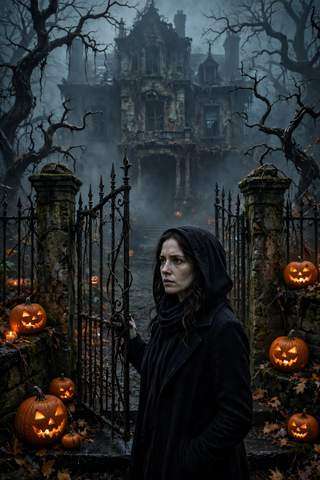
Halloween is the one night of the year when a spooky portrait does not look out of place on your feed. It looks like you planned it, like you stepped straight out of a horror movie poster, and like you know exactly how to use AI to tell a story in a single frame. This Halloween haunted house prompt does exactly that. It places you at the rusted iron gate of an old mansion, wraps the scene in rolling fog, and lights your face with cold moonlight from above and warm pumpkin glow from below, so the result feels cinematic rather than like a simple costume snapshot.
The reason this prompt works so well for social media is that it gives the AI a complete scene instead of a vague idea. Many people type something short like haunted house photo and then wonder why the result looks flat or random. A strong prompt names the location, the weather, the light, the pose, and the mood, and it protects the one thing that matters most: your face. When every layer is described, the generator has far less room to guess, and the portrait it returns looks intentional, polished, and ready to post without heavy editing.
This prompt is also perfect for anyone who loves Halloween but does not want gore, blood, or a frightening distorted face. The scare here comes from atmosphere, not shock. Fog, twisted trees, glowing jack-o-lanterns, and a grand old mansion do the storytelling, while your calm, confident expression keeps the portrait stylish and shareable. It works for a solo profile picture, a Halloween party post, a couple portrait, or a whole series of spooky photos with friends, and it takes less than a minute to try.
The Prompt
Copy the full prompt below and paste it into your image or video generator exactly as written. You can swap the subject details to match your own photo while keeping the atmosphere, lighting, and composition words unchanged, because those are the parts that create the finished look.
Create a cinematic horror portrait of a person standing at the rusted iron gate of an old Victorian haunted mansion at night. Thick fog rolls across the ground and curls around twisted, leafless trees. Glowing jack-o'-lanterns with carved grins line the stone path and the mansion porch. The person wears a dark vintage coat, stands in a confident three-quarter pose, and looks directly at the camera with a calm, mysterious expression. Keep the person's real face, facial features, and hairstyle exactly the same. Moody blue moonlight from above, warm orange pumpkin glow from below, dramatic rim lighting, shallow depth of field, ultra-detailed skin texture, photorealistic, 4:5 vertical portrait, high-end horror movie poster quality, no gore, no blood, no scary jump-scare face distortion.
Why This Prompt Works
The first reason this prompt works is layering. Fog softens the background and creates depth, the twisted trees frame the scene on both sides, the jack-o-lanterns add warm points of light that draw the eye toward the path, and the mansion gives the portrait a sense of place and history. Each layer adds something different, so the final image feels rich and three-dimensional instead of like a person pasted onto a flat Halloween background. That depth is what separates a viral portrait from an ordinary filtered photo.
The second reason is the lighting contrast. Cold blue moonlight from above and warm orange glow from below create a classic horror-movie colour palette that photographers spend a long time setting up in real life. The cool light sculpts your cheekbones and hair, the warm light lifts your face out of the darkness, and the rim light separates you from the fog behind you. Together they make the portrait dramatic without making it dark or muddy, which is a common problem when people ask AI tools for a night scene without describing the light.
The third reason is the face protection built into the prompt. The instruction to keep your real face, features, and hairstyle exactly the same tells the generator that the Halloween magic should happen around you, not to you. This matters because many horror prompts accidentally change the person’s identity, age, or expression. By keeping your pose calm and your expression mysterious rather than screaming or distorted, the portrait stays recognisably you, which is exactly what you want for a profile picture or a post your friends will recognise and share.
Finally, the format choices help the result look professional. A vertical 4:5 portrait fits Instagram, Facebook, and WhatsApp perfectly, shallow depth of field keeps the focus on you while the mansion melts into fog, and the request for ultra-detailed skin texture avoids the plastic, over-smoothed look that gives away a low-quality AI image. When all of these details work together, the image reads as a planned photoshoot, not a random experiment, and that is why it earns saves, comments, and shares.
How to Use This Prompt
Start with a clear, well-lit photo of yourself where your face is fully visible and looking toward the camera. A simple front-facing selfie in daylight works best, because the AI needs clean facial details to preserve your identity in the final portrait. Avoid sunglasses, heavy shadows across your face, or a photo where you are turned far to the side, since those make it harder for the generator to keep your features accurate.
Open your image generator, upload your photo, and paste the full prompt from the section above into the prompt box. Do not shorten it on your first try, because every sentence controls a different part of the scene, from the fog density to the pumpkin glow. If your tool has an aspect ratio setting, choose vertical 4:5 or portrait mode so the mansion, gate, and trees frame you properly instead of cropping the scene awkwardly.
Generate the first version and look closely at three things: your face, the fog, and the lighting balance. If your face looks slightly different, regenerate with the same prompt rather than rewriting it, because small variations often fix themselves on a second run. If the image is too dark, add the words brighter face lighting to your next attempt, and if the fog hides the mansion completely, change thick fog to light drifting fog for a clearer background.
Once you are happy with the result, save the highest-quality version and make only light edits afterwards. A small increase in contrast or warmth can help the pumpkin glow pop, but avoid heavy filters that flatten the fog or blur your skin texture. Then post it with a Halloween caption, tag the friends you want to try it with, and keep the original prompt saved, because you can reuse it with different coats, poses, or friends to build a matching spooky series all season.
Pro Tips for Best Results
For the most realistic result, choose a source photo taken at eye level with a neutral expression and natural light. The AI will add the mysterious mood itself, so you do not need to pose dramatically in your upload. A calm source photo gives the generator a clean base, and the prompt does the rest, which is why the finished portrait still looks like you even after the full haunted-house transformation.
Pay attention to your outfit description if you want to personalise the look. The prompt uses a dark vintage coat because it suits the old mansion setting, but you can swap it for a witch cloak, a Victorian dress, a suit, or a modern black jacket without changing anything else. Keep the rest of the prompt untouched when you make that swap, so the fog, lighting, and composition stay consistent and the new outfit feels like it belongs in the same scene.
If you are creating portraits for a group, generate each person separately with the same prompt and then post them as a carousel. Using the identical prompt for every person keeps the mansion, fog, and lighting consistent, so the series feels like one photoshoot rather than five unrelated edits. Ask each friend for a clear front-facing photo, and keep the gate, pumpkins, and twisted trees the same across the set for the strongest visual impact.
Finally, avoid the temptation to add gore, blood, or extreme horror words to make it scarier. Those words often push the generator toward distorted faces or content filters that block the image entirely. Atmosphere is stronger than shock in this style: thicker fog, a larger moon, more pumpkins, or a taller mansion gate will all increase the spooky feeling while keeping the portrait beautiful, shareable, and safe for every platform.
Frequently Asked Questions
Do I need a Halloween costume to use this prompt?
No, you do not need a costume at all. The prompt dresses the scene around you with the mansion, fog, pumpkins, and lighting, and it gives you a dark vintage coat in the image itself. You only need a clear photo of your face, so you can try it in everyday clothes and still get a fully spooky, cinematic portrait.
Will the AI keep my face looking like me?
Yes, as long as you start with a clear, front-facing photo and keep the face-protection sentence in the prompt. That instruction tells the generator to preserve your features and hairstyle while changing only the background, lighting, and outfit. If the first result drifts slightly, regenerating with the same prompt usually brings it closer.
Can I use this prompt for a couple or family portrait?
Yes, and it works beautifully for couples and families. Upload a clear group photo or generate each person separately with the same prompt and post them as a matching series. Keep the mansion gate, fog, and pumpkin lighting identical across the images so the set feels like one haunted-house photoshoot.
Is this prompt safe to post on Instagram and Facebook?
Yes, because it deliberately avoids gore, blood, and distorted faces. The spooky feeling comes from fog, twisted trees, moonlight, and glowing pumpkins, which are classic Halloween atmosphere rather than graphic horror. That makes it suitable for all audiences and unlikely to trigger content filters.
This Halloween, you do not need a real haunted mansion, a fog machine, or a professional photoshoot to look like the star of a horror movie poster. You need one clear photo, one well-written prompt, and a minute of patience while the AI builds the fog, the pumpkins, and the twisted trees around you. Try it tonight, save your favourite version, and share it before the Halloween feed fills up with everyone else’s spooky portraits.
Related Viral Prompts
- Halloween Door Opens Itself Video AI Prompt: Create a Terrifying
- Halloween Hallway Lights Flicker Video AI Prompt: Create a Suspense
- Halloween Figure in Window Video AI Prompt: Create a Chilling Clip
#HalloweenAI #AIPhotoPrompt #HauntedHouse #SpookyPortrait #PromptBazar


Leave a Reply