
Introduction
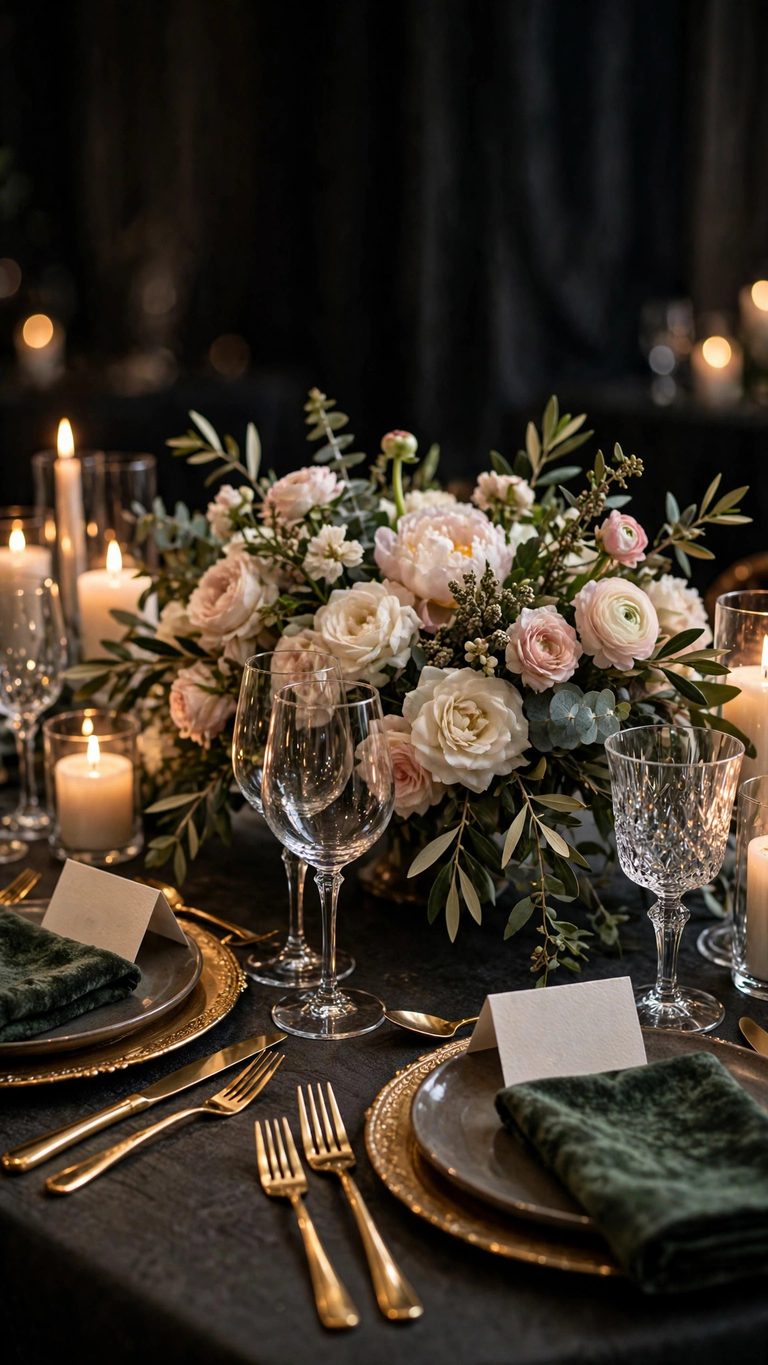
Long before the first toast is raised, the table tells guests everything they need to know about the wedding. Crystal catching candlelight, gold flatware laid with geometric precision, a centerpiece that looks gathered rather than arranged: these details whisper luxury in a way no speech ever could. Event photographers know that table settings are among the most saved images in wedding content, because they are pure aspiration, a vision of the celebration every viewer secretly wants for themselves. This AI photo prompt manufactures that aspiration on demand: a luxurious wedding table setting with crystal glasses, gold cutlery, fresh flowers, and candle glow against a dark, sophisticated backdrop. Whether you are a wedding planner pitching a high-end client, an event stylist building a portfolio, or a creator posting #TableSetting and #Luxury content that radiates premium taste, this #AIPhotoPrompt delivers high-end event photography without renting a single champagne coupe. Below: why each phrase earns its place, how to run it on every major platform, and variations that stretch one prompt into a full styling library.
The Prompt
Copy the block below exactly as written into your image generator. The interplay between the dark background and the glowing elements is the heart of this prompt.
Luxurious photograph of an elegant wedding table setting, crystal glasses, gold cutlery, fresh flower centerpiece, candle glow, personalized name cards, dark sophisticated background, hyper-detailed, high-end event photography, ultra detailed, 8k quality, crystal chandelier glow above, refined luxurious ambiance, impeccable taste
Why This Prompt Works
This prompt is essentially a lighting designer and a stylist collaborating in text. The masterstroke is the contrast architecture: dark sophisticated background against candle glow and crystal chandelier glow above. Image models render luxury through contrast, bright specular highlights on glass and gold floating in deep shadow, and this prompt explicitly constructs that chiaroscuro stage. Without the dark background instruction, the model would default to a bright, flat banquet hall; with it, every glint becomes jewelry.
The prop list reads like a luxury stylist’s checklist, and each item earns its glow. Crystal glasses give the model refractive surfaces to show off, the kind of caustic light play that signals expensive optics in the render. Gold cutlery provides warm metallic accents that harmonize with candle glow, creating a unified warm palette. Fresh flower centerpiece introduces organic softness and color against all that hard shine, preventing the image from feeling cold or corporate. Personalized name cards is a subtle genius inclusion: it adds bespoke, human detail, suggesting this table was set for specific beloved guests, which elevates the image from stock-photo generic to editorial specific. High-end event photography anchors the style to the world of luxury wedding publications, while hyper-detailed, ultra detailed, and 8k quality ensure the micro-textures, etched crystal, brushed gold, petal veins, survive rendering. The closing pair, refined luxurious ambiance, impeccable taste, functions as a taste filter, steering the model away from gaudy excess toward restrained opulence, which is precisely what premium clients and #Luxury audiences respond to.
How to Use This Prompt
On Midjourney, paste the prompt via /imagine with –ar 9:16 –v 7. Table settings are detail-dense, so add –style raw to keep the model’s color grading honest; default Midjourney can push candle scenes too orange. If glasses render cloudy, append crystal clear glassware, sharp reflections in a regeneration. Two or three seeds will give you meaningfully different centerpiece arrangements to choose from.
On DALL-E 3, paste the prompt verbatim in portrait orientation. DALL-E 3 is strong at literal prop placement, so crystal glasses, gold cutlery, personalized name cards will all appear where described. If the name cards render with gibberish text, that is normal for AI; either crop them out, blur them slightly in post, or follow up with blank elegant name cards without text.
On Flux, run at 9:16 with 40+ steps and guidance around 3.5. Flux handles glass and metal beautifully, so lean into close crops that show off refraction. For a hero shot, add a variation with low camera angle, shallow depth of field, chandelier bokeh above, which creates the premium editorial look event magazines favor. Generate large, then downscale for social so the fine sparkle survives compression.
Pro Tips & Creative Variations
The source pro tips remain the foundation: candle glow is non-negotiable for warmth, name cards add the personal touch that separates styled shoots from stock, and a low angle creates depth that flat overhead shots lack. Elevate further with these refinements. First, control the glow: if the scene feels murky, add soft rim light on glassware edges to define each piece against the dark background. Second, mind the reflections: crystal doubles whatever is around it, so a variation with fairy lights reflected in every glass multiplies the magic without adding a single new prop.
Creative variations turn this into a content engine. Build a palette series from the same skeleton: emerald and gold for a jewel-toned winter wedding, blush and rose gold for spring romance, midnight blue and silver for a modern gala, each one a fresh post for #Wedding audiences. Try a daylight counterpart, morning light through linen curtains, same table, for a bright editorial mood. Seasonal centerpieces, peonies, marigolds, pine and berries, let planners market year-round from one prompt. Detail crops are gold: generate tight shots of just the gold cutlery fan, just the name card beside a bloom, just the chandelier glow through crystal, and you have a carousel that tells the table’s story course by course. Finally, pair the table with a venue wide shot for a before-guests-arrive narrative that venues and planners on #PromptBazar love to repost.
Frequently Asked Questions
The text on the name cards looks like gibberish. Can I fix it?
AI models still struggle with legible small text. The practical fixes: request blank name cards and add real calligraphy in post-production, crop the cards so only their elegant edges show, or embrace slight blur as shallow depth of field. For client mockups, compositing real text in Canva or Photoshop takes minutes.
How do I make the gold cutlery actually look like gold, not yellow plastic?
Add brushed gold finish, realistic metallic reflections to a variation, and keep –style raw on Midjourney to avoid cartoonish saturation. Flux tends to render metals most convincingly; if gold is the hero, consider generating there and compositing.
Can I match this to my real wedding color scheme?
Easily. Swap the color adjectives while keeping the structure: replace gold cutlery with rose gold cutlery, fresh flower centerpiece with blush peony centerpiece. The lighting architecture and luxury anchors stay identical, so the mood remains while the palette becomes yours.
Is a dark background always better for luxury table shots?
For drama and premium feel, yes, dark backgrounds make glass and candlelight glow. But bright, airy table settings have their own market, especially for daytime and garden weddings. Generate both from this skeleton by swapping dark sophisticated background for bright airy conservatory light, and let your audience tell you which performs better.
A single table, rendered in candlelight and crystal, can carry the entire promise of a luxury wedding, and this prompt builds that promise pixel by pixel. Run it today, explore the palette series, and share your most opulent version with #AIPhotoPrompt and #PromptBazar. Impeccable taste is now copy-paste away.
Related Viral Prompts
- Bridal Lehenga Embroidery AI Photo Prompt: Stunning Zardozi & Sequin Macro Detail in 8k Textile Photography
- Confetti Kiss AI Photo Prompt: Capture Pure Wedding Joy in a Colorful Celebration Burst — Free Guide
- Bridal Shoes AI Photo Prompt: Elegant Crystal Flat Lay Detail With Rose Petals and Soft Natural Light
# A I V i d e o # P r o m p t B a z a r # A I P h o t o P r o m p t # T a b l e S e t t i n g # L u x u r y # W e d d i n g

Leave a Reply