
Introduction
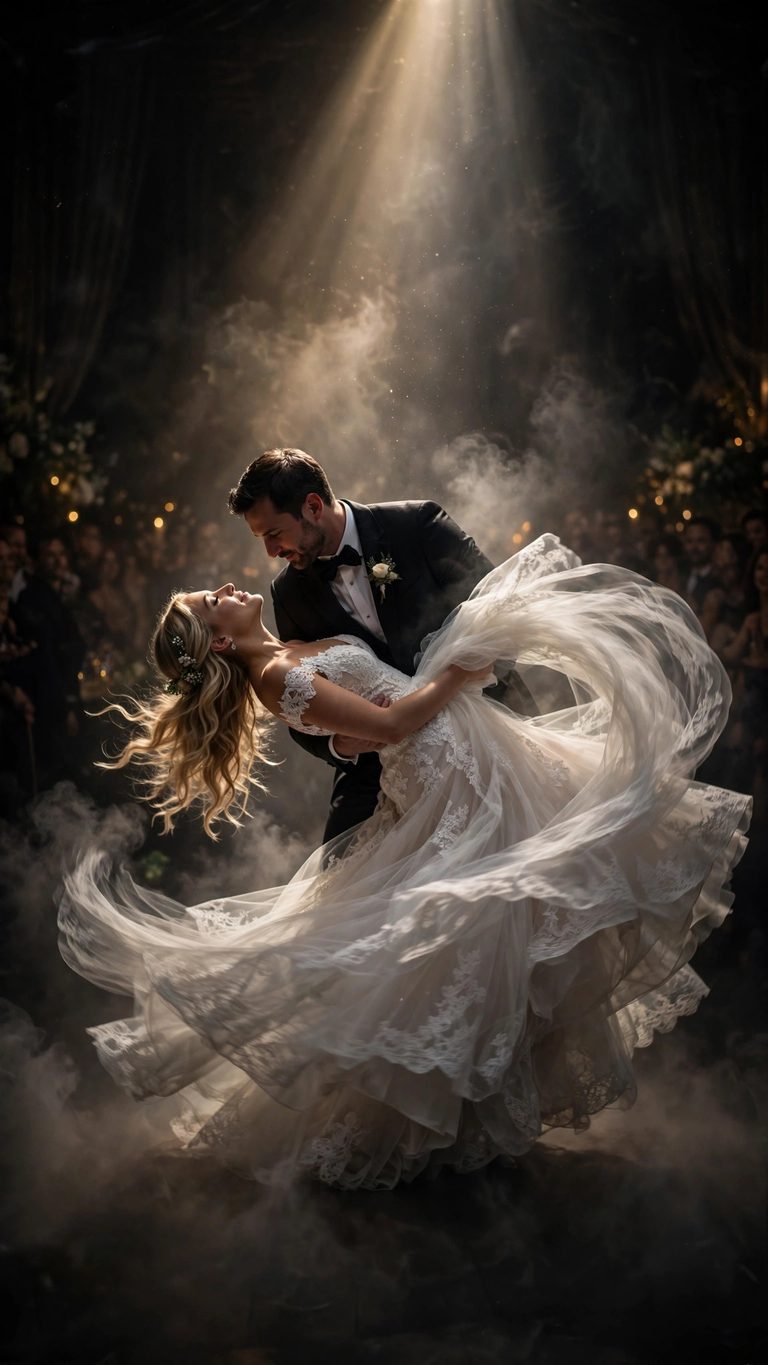
There is a hush that falls over a wedding reception when the first dance begins. The lights dim, a single spotlight finds the couple, and for three minutes the entire room disappears. Guests stop talking mid-sentence. Phones rise like a field of candles. It is the couple’s first act as a married pair, told entirely in movement, and no wedding film feels complete without it. But capturing that moment cinematically is harder than it looks: real first dances are shot in dark ballrooms with harsh spotlights, busy backgrounds, and guests crowding the frame. The dream version, the one that lives in highlight reels and goes viral, has the couple floating in a pool of light while the world blurs into darkness. This #FirstDance #Wedding #Romantic prompt generates exactly that dream. A gown twirls, a dip lands in perfect slow grace, and the camera orbits like a satellite around two people who only have eyes for each other. For wedding videographers, content creators, and couples planning their big day, this #AIVideo prompt is a ready-made spotlight scene that turns a milestone into pure cinema.
The Prompt
Paste this prompt into any AI video generator to create a magical spotlight first dance scene, rendered in flawless 8K cinematic detail.
Magical shot of a couple's first dance under a single spotlight, gown twirling, dramatic dip, guests blurred in darkness around, hazy romantic atmosphere, camera orbiting gracefully, timeless wedding elegance, ultra realistic, cinematic, 8k, music swelling softly around, timeless elegant romance moment
Why This Prompt Works
The genius of this prompt is how it choreographs light, motion, and camera in a single sentence, giving the model a complete directorial brief instead of a vague wish. Start with the lighting concept: “a single spotlight” is doing enormous work. It tells the model to crush the background into darkness, which elegantly solves the hardest part of reception footage, clutter, while creating natural contrast that makes the couple glow. The phrase “guests blurred in darkness around” doubles down on that, explicitly ordering the model to dissolve the crowd into bokeh so no stray face steals focus. Then the motion design: “gown twirling” gives the model flowing fabric physics, which video generators render beautifully and which reads as pure romance, while “dramatic dip” supplies a peak action beat, a single frozen instant of drama that the model will build the clip around. “Camera orbiting gracefully” is the camera direction that elevates this from a clip to a film shot; an orbit adds parallax and dimensionality, making the dance feel three-dimensional and expensive. “Hazy romantic atmosphere” layers in volumetric light, the visible beam of the spotlight through gentle haze, which is one of the strongest cinematic mood signals you can give a model. The quality stack of “ultra realistic, cinematic, 8k” pushes the render toward premium wedding-film texture, and the closing emotional anchors, “timeless wedding elegance” and “timeless elegant romance moment,” plus “music swelling softly around,” tune the pacing toward slow, swelling grace rather than frantic energy. Notice what the prompt does not do: it never names a song, a dance style, or a venue. That deliberate openness lets the model compose the most beautiful generic first dance possible, which also makes the clip reusable across countless #ViralReels contexts.
How to Use This Prompt
Here is how to run this prompt across the major AI video platforms. Step one: copy the prompt exactly as written in the
block, preserving the phrase order. Step two: choose 9:16 vertical and a 10-second duration, matching the original post settings, since the orbit needs those seconds to complete a satisfying arc. In Veo 3, paste the prompt and use the highest fidelity mode; Veo handles orbiting camera moves and fabric motion exceptionally well, so the gown twirl will look natural. In Runway, use Gen-4 with camera control set to a slow orbit or "arc right," and consider extending to 10 seconds from a 5-second seed for the smoothest motion. In Kling, Professional Mode is recommended because the dip is a complex two-body pose and Kling's stronger coherence keeps the couple's anatomy believable through the movement. In Pika, keep effects subtle and let the prompt's own atmosphere carry the scene; over-stylizing will fight the "ultra realistic" instruction. In Sora, paste the prompt verbatim and request the full 10 seconds, as Sora is strong at maintaining consistent lighting on moving subjects. Step three: review the dip frame, because that is the money shot; if the pose looks awkward, regenerate with the same seed but add "elegant dip, groom supporting bride" to clarify the mechanics. Step four: in editing, add a slow orchestral swell or a trending romantic audio, and consider a gentle speed ramp into the dip for extra drama. Step five: post as a #FirstDance highlight with a caption about the couple's song, and watch the saves roll in.Pro Tips & Creative Variations
This prompt is a fantastic base for experimentation. First, change the lighting color for completely different moods: append "warm golden spotlight" for a classic ballroom feel, "cool blue moonlight" for a modern editorial look, or "candlelit amber glow" for an intimate, old-Hollywood romance. Each one transforms the same choreography into a fresh clip. Second, vary the dance moment. Replace "dramatic dip" with "slow spin, bride's veil floating" for a softer variant, or add "forehead kiss at the end" to give the clip a tender closing beat that performs wonderfully as a loop. Third, play with the camera: "camera orbiting gracefully" can become "camera slowly pushing in" for a more intimate, breathless feel, or "aerial slow orbit" for a grand, music-video-scale reveal. Fourth, adjust the atmosphere density. "Hazy romantic atmosphere" at its default gives gentle haze; strengthening it to "thick dreamy haze, light beams visible" creates a concert-like spectacle, while softening it to "clear crisp air" gives a sharper, more modern fashion-film look. Fifth, build a sequence around it: generate an establishing shot of the empty dance floor with the spotlight on, this first dance as the centerpiece, and a wide shot of applauding guests, and you have a complete reception story in three clips. Sixth, for couple clients, personalize the gown by appending a descriptor like "blush pink ballgown" or "sleek satin mermaid gown" so the render echoes the bride's real dress. Seventh, remember the negative prompt safety net: "extra limbs, distorted faces, flickering light" keeps the orbit clean and the couple coherent through the full rotation.
Frequently Asked Questions
Q: My generated dance looks stiff or the dip looks unnatural. How do I fix it?
A: Complex two-person poses are the hardest thing for video models. Add clarifying anatomy language like "groom dipping bride gracefully, both smiling" and generate in Kling's Professional Mode or Veo 3's highest quality setting. Shorter durations of 6 to 8 seconds can also help, since there is less time for the pose to drift.Q: Can I make the couple look like a specific real couple?
A: Text-to-video models cannot reliably reproduce real faces. The best approach is image-to-video: upload a photo of the couple as the starting frame in Runway or Kling, then apply this prompt's motion and atmosphere. The result keeps their likeness while gaining the cinematic spotlight choreography.Q: What audio should I pair with this clip?
A: The prompt mentions music swelling, but the video itself is silent, so you add the track in editing. A slow orchestral instrumental or a trending romantic song on Reels works best. Time the dip to land on the music's swell for maximum emotional impact.Q: Is 10 seconds the right length, or should I go longer?
A: Ten seconds is the sweet spot for social: long enough for a full orbit and the dip, short enough to loop cleanly. If you need a longer version for a wedding film, generate two 10-second variants and cross-dissolve between them at the orbit's midpoint, where the framing is most similar.The first dance only happens once, but its magic deserves to live forever. This prompt hands you that magic in a single paste: spotlight, twirl, dip, and all the romance of the night distilled into ten perfect seconds. Generate it, set it to music, and share it, because some moments are too beautiful to exist only in memory. Try this #FirstDance prompt today and give your #Wedding films the spotlight they deserve.
Related Viral Prompts
- Sparkler Send-Off AI Video Prompt: Festive Night Wedding Finale for Veo 3, Runway, Kling & Pika Films
- Groom Waiting Candid AI Video Prompt: Emotional Wedding Morning Moment for Veo 3, Runway & Kling Videos
- Joyful Wedding Cake Cutting AI Video Prompt: Celebration Scene for Veo 3, Runway, Kling & Pika Films
# A I V i d e o # P r o m p t B a z a r # F i r s t D a n c e # W e d d i n g # R o m a n t i c # V i r a l R e e l s

Leave a Reply