
Introduction
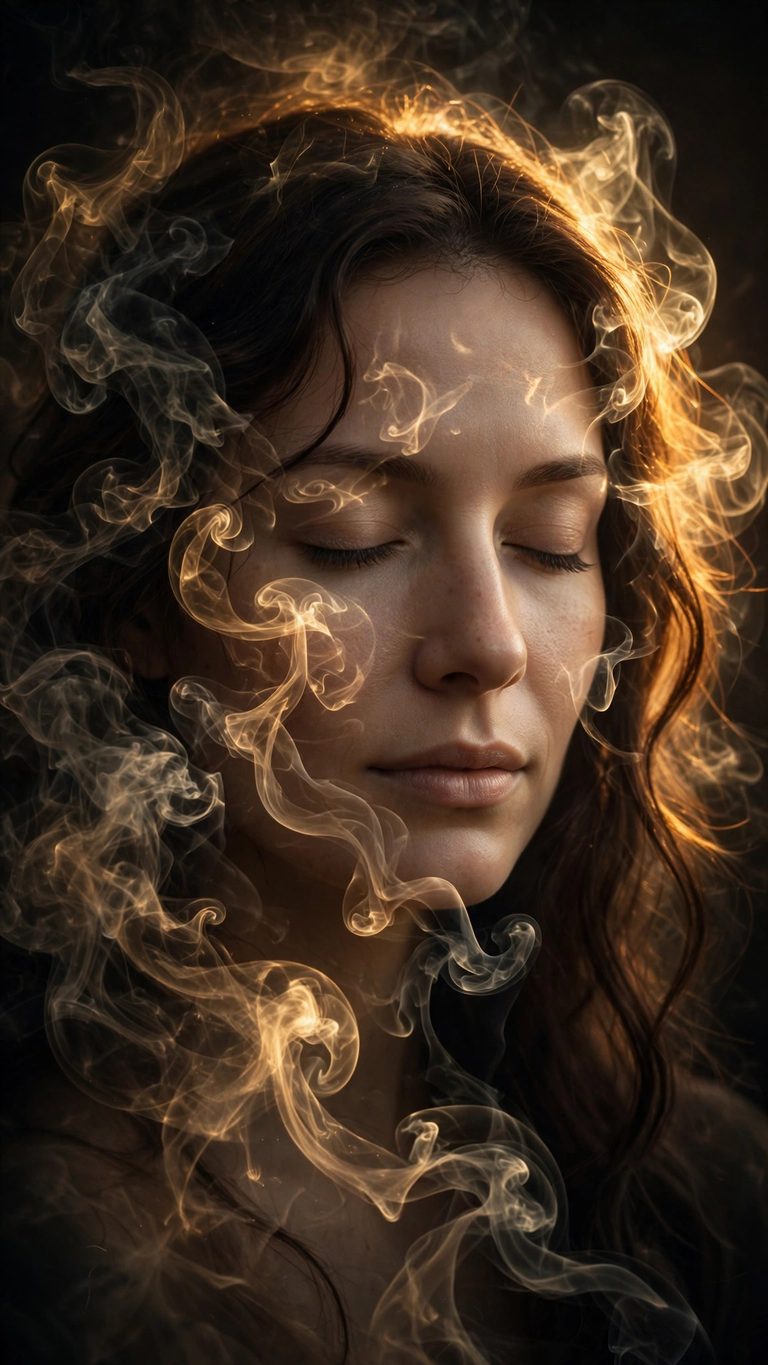
There is a moment in every sacred ritual when the ordinary world goes quiet — when curling incense smoke catches the light and turns to gold, and a face behind it seems to belong to another realm entirely. It is cinematic, mysterious, and almost impossible to photograph well without a studio, a lighting crew, and a very patient model. Until now. This AI photo prompt generates a mystical portrait of a serene face partially veiled by backlit incense smoke — golden wisps glowing against darkness, embers breathing softly below, eyes closed in perfect peace. The result looks like a still from an arthouse film about ancient mysteries. In this guide, you will get the exact copy-paste prompt, understand the lighting psychology that makes smoke portraits so hypnotic, and learn to render them across Midjourney v7, DALL-E 3, Flux, and Stable Diffusion. Best of all, every variation you create inherits the same golden, cinematic mystery that makes the original so captivating.
The Prompt
Here is the prompt, word for word. The backlighting and smoke-detail phrases are doing critical work here, so copy it exactly:
Mystical portrait photograph of a serene face partially veiled by curling incense smoke, backlit so smoke glows golden, dark background, closed peaceful eyes, spiritual atmosphere, hyper-detailed smoke wisps, fine-art photography, dramatic lighting, ultra detailed, 8k quality, embers glowing softly below, sacred ritual mood
Why This Prompt Works
Backlight is the oldest trick in cinematic lighting, and this prompt wields it beautifully. By placing the light source behind the smoke, every wisp becomes rim-lit — edges glowing gold while cores stay dark, creating luminous ribbons that seem to move even in a still frame. Against the dark background, that glowing smoke has nowhere to hide and nothing to compete with; the contrast ratio does the emotional heavy lifting, whispering “mystery” before the viewer has processed a single feature of the face.
The partially veiled face is a masterstroke of visual psychology. Humans are compulsive face-readers, and a half-hidden face triggers the same curiosity as a half-told story — the brain leans in, trying to complete the picture. Closed peaceful eyes amplify the effect: instead of meeting our gaze, the subject is turned inward, which reads as profound calm and invites the viewer into a meditative state rather than a social one. This is why the image feels sacred rather than merely pretty.
“Hyper-detailed smoke wisps” matters more than it looks. Smoke is notoriously hard for AI — it can easily turn to muddy gray blobs — so explicitly demanding detail forces the model to render fine, curling filaments. The glowing embers below anchor the composition with a warm base, balancing the cool darkness above and completing a vertical gradient of light that guides the eye upward through the frame. Culturally, incense carries instant spiritual associations across Buddhism, Hinduism, Catholicism, and countless indigenous traditions, giving the image near-universal resonance. Mystical portrait content under #Incense, #Mystical, #Portrait, and #AIPhotoPrompt performs exceptionally well because it sits at the intersection of spirituality, fine art, and cinematic aesthetics — three of the most save-worthy genres online.
How to Use This Prompt
Smoke portraits demand a little extra care. Here is how to nail them on each platform:
1. Midjourney v7: Paste the prompt into /imagine with –ar 9:16 –v 7. Midjourney renders smoke and backlight exceptionally well; if the face distorts, use Vary (Region) to repaint just the face while keeping the beautiful smoke untouched.
2. DALL-E 3 (via ChatGPT): Paste the prompt and request “vertical 9:16 portrait orientation.” DALL-E 3 handles the “backlit so smoke glows golden” instruction literally and reliably. Ask for “denser smoke” or “thinner wisps” in follow-ups to art-direct the atmosphere.
3. Flux: Use 768 x 1344, 35-40 steps, guidance near 3.0. Flux’s photorealism shines on skin texture half-seen through smoke — keep guidance moderate so the smoke stays soft rather than over-sharpened.
4. Stable Diffusion XL: Generate at 768 x 1344 with a negative prompt like “deformed face, extra fingers, muddy smoke, flat lighting.” Consider generating the portrait and the smoke emphasis in two passes: get the face right first, then use img2img at low denoising (0.35) with extra smoke descriptors to enrich the atmosphere without breaking the face.
Pro Tips & Creative Variations
Smoke is a playground for experimentation. Color the smoke: add “smoke glowing deep violet and teal” or “crimson smoke” for a fantasy or festival feel. Change the angle: “side profile silhouette veiled in smoke” is even more mysterious than the front view. Go full silhouette: “face completely in shadow, only the smoke illuminated” creates a haunting, anonymous icon. Macro the embers: “extreme close-up of glowing incense embers, smoke rising, bokeh background” works as a companion piece. Add candles: “rows of candles blurred in the dark background” deepens the ritual atmosphere. Try monochrome: “black and white, silver-gelatin fine-art print aesthetic” turns the smoke sculptural. Festival energy: “colored festival smoke in magenta and gold swirling around a dancer’s face” flips the mood from sacred to celebratory. Double exposure: “faint temple architecture visible within the smoke” layers narrative into abstraction. Because the base prompt is so strong on lighting, nearly any variation inherits its cinematic quality — build a series of five and release them as “Rituals,” a mini-collection your audience will binge-save. Finally, try a diptych: pair the smoke portrait with its ember macro side by side for a gallery-style presentation that doubles engagement on portfolio sites.
Frequently Asked Questions
How do I avoid distorted faces behind the smoke?
The veil of smoke actually helps — it hides minor imperfections. Still, generate at least four variations and inspect faces at full zoom before upscaling. In Midjourney, Vary (Region) lets you repaint only the face; in Stable Diffusion, inpainting with a face-focused prompt does the same job.
Which generator renders smoke best?
Midjourney v7 currently produces the most naturally curling, luminous smoke, with Flux a close second for photorealism. DALL-E 3 is the most obedient to specific smoke instructions (“thicker,” “golden,” “spiraling”), making it ideal when you want precise art direction.
How do I control smoke thickness?
Add explicit density words: “thick billowing smoke” versus “thin delicate wisps.” You can also weight the concept in Midjourney with “smoke::2” to emphasize it, or de-emphasize with “smoke::0.5” when the face should dominate.
Can I use these portraits commercially?
Under paid Midjourney plans and with DALL-E 3 outputs, commercial use is generally permitted — confirm current terms. Mystical portraits are popular for album covers, book covers, event posters, and wellness branding, all strong commercial niches.
Some portraits show a face; this one shows a feeling — reverence made visible in golden smoke. Copy the prompt, conjure your own ritual portrait, and share it with #AIPhotoPrompt, #AIVideo, and #PromptBazar. Mystery is the most shareable emotion of all.
Related Viral Prompts
- Mandala Art Macro AI Photo Prompt: Capture Mesmerizing Sacred Geometry Detail in Stunning Color Photos
- Beach Yoga Silhouette AI Photo Prompt: Dreamy Sunset Dancer Pose on Wet Sand for Viral Wellness Posts
- Bamboo Forest Zen AI Photo Prompt: Serene Meditation Among Towering Stalks for Deeply Calming Photos
# A I V i d e o # P r o m p t B a z a r # A I P h o t o P r o m p t # I n c e n s e # M y s t i c a l # P o r t r a i t

Leave a Reply