
Introduction
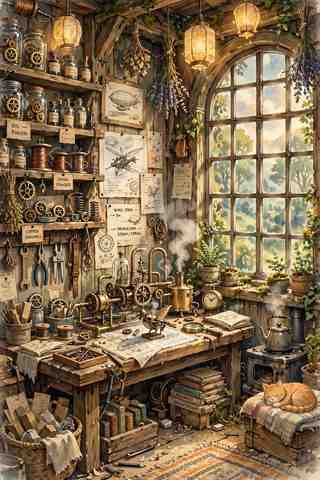
Nobody films the romance of making things quite like Studio Ghibli. The clanking, hissing, wonderfully improbable machines of Howl’s Moving Castle, the lovingly rendered airships of Castle in the Sky, the little workshop where Kiki’s world comes alive: Miyazaki’s films are love letters to tinkerers, to the belief that a cluttered desk and a wild idea can change the world. This prompt seats you at the heart of that belief, an inventor sketching a flying machine at a lamplit desk, gears and brass contraptions crowding the shelves, a tiny clockwork bird watching your pencil move.
The inventor workshop portrait has charmed its way through the Ghibli AI photo trend because coziness is its own kind of spectacle. While other prompts chase vast landscapes, this one builds a world you could reach out and touch: wood grain, lamplight, scattered blueprints, the glint of brass. It is the portrait for makers, engineers, artists, writers, and daydreamers, anyone whose happiest place is a desk covered in half-finished wonderful things.
Your real face, lit warm by the desk lamp and lit brighter by the idea taking shape on the page, is the emotional center of the scene. Every gear and sketch exists to tell your story: the brilliant mind at work. Below is the exact copy-paste prompt, why it captures Ghibli’s maker magic so faithfully, step-by-step usage instructions, pro tips for the perfect generation, and answers to common questions.
The Prompt
Copy the exact prompt below and paste it into your AI image generator together with your photo:
Convert this photo into a cozy Studio Ghibli-style anime scene of a brilliant inventor in a cluttered workshop, surrounded by gears and brass contraptions on wooden shelves, sketching a flying machine at a lamplit desk while a tiny clockwork bird perches nearby. Preserve the person's face and identity exactly from the uploaded photo. Hand-painted Ghibli aesthetic with warm lamplight, rich wood textures, whimsical mechanical details, and magical storybook coziness; vertical portrait orientation, 3:4 aspect ratio.
Why This Prompt Works
The prompt works because it understands that Ghibli machines have souls. The studio never draws cold technology; its contraptions are warm, quirky, and slightly alive, from the bouncing castle to the flapping airships. By specifying whimsical mechanical details, a tiny clockwork bird, and a hand-sketched flying machine, the prompt steers the AI toward charming, characterful invention rather than sterile sci-fi, which is the entire difference between a Ghibli workshop and a generic laboratory.
It also builds coziness through density. Ghibli interiors are famously cluttered in the best way: shelves of jars, hanging tools, papers everywhere, every surface telling a story. The gears and brass contraptions on wooden shelves give the AI exactly this kind of rich, touchable detail to paint. Warm lamplight ties it all together, pooling on the desk and gilding the wood, recreating the intimate evening glow of the studio’s most beloved indoor scenes.
Finally, the sketching gesture makes you the author of the wonder. You are not standing beside someone else’s machine; you are drawing the flying machine yourself, mid-creation. That active, creative posture is deeply Ghibli, the studio’s heroes are always making, fixing, cooking, or building something. With your face preserved and the storybook coziness dialed high, the portrait becomes a celebration of your own imagination, rendered as the warmest room in an animated film.
How to Use This Prompt
Step 1: pick a thoughtful source photo. Choose a clear, front-facing, well-lit photo of yourself. An expression of absorbed concentration or quiet delight fits the inventor at work; the AI transfers your expression into the lamplit scene, so a thoughtful look in the source becomes creative fire in the workshop.
Step 2: upload and paste the prompt. Open an AI image generator that supports reference photos, such as ChatGPT image generation, Google Gemini, Midjourney, or Leonardo AI. Upload your photo first, then paste the complete prompt text exactly as it appears in the prompt box above.
Step 3: lock in the vertical format. The prompt specifies a 3:4 portrait, which frames you at the desk with the shelves of contraptions rising behind you. Select a portrait or 3:4 aspect ratio in your tool for the intended cozy composition.
Step 4: generate and iterate. Review the result closely: the gears, the sketch on the desk, the clockwork bird, your likeness in lamplight. Regenerate if the machinery looks melted, or use follow-ups like more blueprints on the desk or a warmer lamp glow to refine the mood while keeping your face.
Pro Tips for Best Results
Make the invention yours. In a follow-up, name the machine you are sketching: a pedal-powered ornithopter, a wind-up submarine, a clockwork dragon. A specific invention transforms the portrait from a generic workshop into your workshop, and it gives the AI a clearer, more interesting detail to draw.
Try the night-invention variant. Ask for the same workshop seen through a rain-streaked window at night, with the lamp as the only light. The contrast of the cozy interior against the dark, wet world outside is peak Ghibli atmosphere and makes a gorgeous companion piece.
Check the small mechanics at full size. Gears, the clockwork bird, and sketch lines are fine details where AI models sometimes smudge. Zoom in at maximum resolution before posting or printing; a regeneration usually sharpens a blurry bird or a melted gear into something delightful.
Use it as a creative professional portrait. For makers, engineers, designers, and writers, this is a profile picture with genuine personality: it says imaginative and hands-on without saying a word. The painterly style keeps it artistic rather than gimmicky, so it works even in semi-professional contexts.
Pass along the exact wording. The precise mix of brass contraptions, lamplit sketching, and face preservation is what yields the reliable Ghibli workshop look. Share the verbatim prompt from this page so fellow tinkerers get the same magical result.
Frequently Asked Questions
Will the workshop look cluttered or messy?
Cozy, not messy. The prompt asks for a cluttered workshop in the Ghibli sense: rich, detailed, and full of interesting objects, like the beloved interiors of Howl’s Moving Castle. Everything is rendered as charming storybook detail rather than disorder.
Can I be shown building something specific?
Yes. After the first generation, describe your project in a follow-up, such as assembling a small brass robot or painting a model airship. Keep the request specific and singular so the AI renders one clear activity instead of a jumble.
Does my face stay recognizable in the lamplight?
Yes. The prompt instructs the model to preserve your face and identity exactly, and warm lamplight is flattering, clear illumination in the Ghibli style. A bright, front-facing source photo ensures the strongest likeness.
What is the best tool for this detailed interior?
Any major image generator with reference-photo support works well, including ChatGPT image generation, Google Gemini, Midjourney, and Leonardo AI. Dense interiors with many small objects benefit from the highest quality or detail settings available.
Every flying machine ever drawn began as a pencil line in lamplight, and in this portrait that line is yours: proof that the most magical workshops are simply rooms where someone refuses to stop imagining.
Related Viral Prompts
Ghibli Style Photographer Street AI Photo Prompt | Ghibli Style Street Musician AI Photo Prompt | Ghibli Style Dancer Stage AI Photo Prompt
#GhibliAI #StudioGhibli #AIPhotoPrompt #GhibliStyle #InventorWorkshop




Leave a Reply