
Introduction
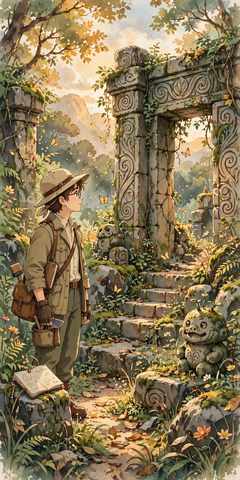
Few fantasies are as universal as pushing through jungle leaves and finding something ancient waiting in the green: moss-covered stones, carved faces half-swallowed by roots, sunbeams falling like spotlights through the canopy. Studio Ghibli built entire worlds on this exact wonder, from the floating ruins of Laputa in Castle in the Sky to the overgrown sacred places of Princess Mononoke and Nausicaa. This prompt makes you the explorer at the center of that discovery, an archaeologist in field vest and hat, brush in hand, uncovering a carved artifact as golden light rains down around you.
The archaeologist portrait has become a sleeper hit of the Ghibli AI photo trend because it taps into pure curiosity. It is the portrait for travelers, history lovers, museum wanderers, and anyone who grew up dreaming of lost cities. Where the knight promises battle and the pirate promises the sea, the archaeologist promises the thrill of finding something, and the Ghibli treatment renders that thrill as warm, painterly, and deeply romantic rather than dusty or academic.
Your real face carries the wonder: the exact expression of someone brushing centuries of dust from a carved stone and realizing what they have found. The jungle, the ruins, and the light all frame that human moment of discovery. Below you will find the exact copy-paste prompt, why it captures Ghibli’s spirit of exploration so well, step-by-step instructions, pro tips for the best generation, and answers to common questions.
The Prompt
Copy the exact prompt below and paste it into your AI image generator together with your photo:
Reimagine this photo as a Studio Ghibli-style anime illustration of an adventurous archaeologist exploring ancient moss-covered stone ruins deep in a jungle, wearing a field vest and explorer's hat, gently brushing dust from a carved stone artifact as sunbeams pierce the forest canopy. Keep the person's face and identity exactly the same as the uploaded photo. Painterly hand-drawn Ghibli look with lush greenery, intricate carved stone details, floating dust motes in golden light, and a sense of wonder; vertical portrait orientation, 3:4 aspect ratio.
Why This Prompt Works
The prompt works because discovery is one of Ghibli’s great themes. Castle in the Sky is essentially a film about the wonder of finding Laputa; Nausicaa is about reading the ruins of a lost world with curiosity instead of fear. By staging you in the act of gently uncovering an artifact, rather than posing heroically beside one, the prompt captures the studio’s belief that exploration is an act of care. The brushing-dust gesture is small, human, and completely Ghibli.
It also builds the layered jungle world Ghibli does best. Moss-covered stone, lush greenery, intricate carvings, floating dust motes: each detail gives the AI more to paint, and Ghibli backgrounds thrive on exactly this density. The sunbeams piercing the canopy do double duty, creating the dramatic god-ray lighting of the studio’s most awe-struck moments while literally spotlighting your discovery, guiding the viewer’s eye to the artifact and your face.
Finally, the sense of wonder is baked into every descriptor. The prompt does not ask for a realistic documentary still; it asks for painterly, golden, floating, intricate, the vocabulary of enchantment. Combined with strict face preservation, the result is a portrait that feels like the key frame of your own adventure film: you, mid-discovery, in a place the world forgot, rendered in the warmest hand-drawn style imaginable.
How to Use This Prompt
Step 1: choose a curious, well-lit photo. Pick a clear, front-facing photo with good light on your face. An expression of gentle focus or quiet delight suits the discovery moment; the AI carries your expression into the scene, so a look of wonder in the source becomes wonder in the ruins.
Step 2: upload to your AI generator. Use any modern image model that accepts reference photos, such as ChatGPT image generation, Google Gemini, Midjourney, or Leonardo AI. Upload your photo first, then paste the full prompt text exactly as written in the prompt box above.
Step 3: set the portrait format. The prompt calls for vertical 3:4 orientation, which stacks the canopy, the sunbeams, the ruins, and your figure into a towering composition of discovery. Choose a portrait or 3:4 aspect ratio in your tool’s settings.
Step 4: generate and refine. Create the image and examine the details: the carved stonework, the hat, the dust motes, your likeness in the dappled light. Regenerate if the artifact looks muddy, or use follow-ups like stronger sunbeams or closer view of the artifact to tune the scene while keeping your face.
Pro Tips for Best Results
Personalize the artifact. In a follow-up, describe what you are uncovering: a carved stone owl, an ancient circular calendar, a small jade figurine. A specific artifact makes the portrait feel like your expedition rather than a generic dig, and it gives the AI a clearer detail to render.
Try the Laputa variant. Ask for floating-island ruins with waterfalls pouring off the edges into clouds below, echoing Castle in the Sky. It is a breathtaking alternate take that keeps your archaeologist but trades the jungle floor for the sky, and the two versions make a spectacular pair.
Mind the hat and hands. Explorer hats and the delicate brushing gesture are detail-heavy, so check them at full resolution before posting or printing. If the brim warps or the fingers blur, regenerate; these elements vary between runs and usually resolve cleanly.
Use it for travel storytelling. This portrait is perfect for travel bloggers, museum visits, or announcing an upcoming trip. The adventure framing turns an ordinary travel post into a storybook moment, and the painterly style stands out in feeds full of standard travel photos.
Share the prompt verbatim. The exact combination of moss-covered ruins, canopy sunbeams, and face preservation is what produces the consistent Ghibli expedition look. Send friends the exact text from this page so their discovery looks just as magical as yours.
Frequently Asked Questions
Will my face be clear in the jungle lighting?
Yes. The prompt preserves your face and identity exactly, and the sunbeams piercing the canopy naturally illuminate your features in the Ghibli style. Starting with a bright, clear, front-facing source photo gives the AI the best material for an accurate likeness.
Can I change the type of ruins?
Absolutely. Follow up with requests like desert temple ruins at golden hour or snowy mountain monastery ruins. Describe the new setting specifically while keeping the archaeologist, the artifact gesture, and your face unchanged for a coherent series.
Is this good for a travel or history themed profile?
It is ideal. The explorer framing instantly communicates curiosity and adventure, making it a memorable profile picture for travelers, historians, teachers, and museum enthusiasts. The Ghibli warmth keeps it approachable rather than overly serious.
Which generator handles the stone details best?
Any leading image model with reference-photo support works, including ChatGPT image generation, Google Gemini, Midjourney, and Leonardo AI. Intricate carvings and foliage benefit from the highest detail or quality settings, so enable those before generating.
Long after the jungle reclaims the stones, the moment that matters is the human one: your hand brushing away the dust, your eyes widening, and a forgotten world deciding, just for you, to be found again.
Related Viral Prompts
Ghibli Style Inventor Workshop AI Photo Prompt | Ghibli Style Photographer Street AI Photo Prompt | Ghibli Style Street Musician AI Photo Prompt
#GhibliAI #StudioGhibli #AIPhotoPrompt #GhibliStyle #JungleExpedition




Leave a Reply