
Introduction
Few landscapes say “Ghibli” as instantly as the Japanese countryside — rolling green fields, water sparkling in flooded paddies, and mountains dissolving into mist. The Ghibli style rice terraces trend takes that iconic scenery and puts you right in the middle of it, turning a simple portrait into a love letter to rural life. These images are going viral because they radiate something feeds are starved for: genuine peace.
This is the landscape of My Neighbor Totoro, where the fields around the Kusakabe house hum with summer life, and of Only Yesterday, where the countryside becomes a character in its own right. Ghibli’s rural scenes are never empty postcards; they are full of small living details — dragonflies, rippling water, wind moving through grass. This prompt is built to reproduce exactly that density of life, with you standing in the terraces as if you have always belonged there.
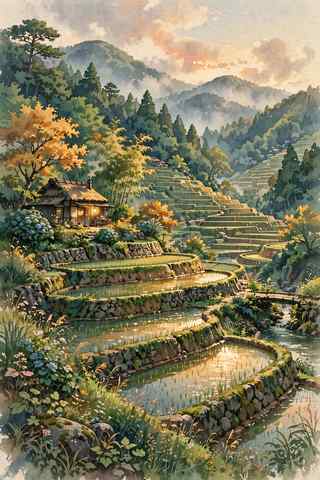
Envision the portrait: you stand on a narrow earthen path between flooded paddies that mirror the sky like scattered pieces of glass. The terraces step down the valley in waves of green, a thatched hut sits beneath a persimmon tree, and far off, mountains fade into soft blue mist. Dragonflies hover, light shimmers on the water, and the whole valley glows with late-afternoon warmth — every ripple and leaf rendered in Ghibli’s unmistakable hand-painted style.
Rice terrace portraits perform so well because they feel both exotic and deeply familiar — a faraway place rendered with the intimacy of home. The prompt’s layered composition, from mirror-like foreground water to misty background peaks, gives the AI the depth cues it needs to make the valley feel vast and real rather than flat and pasted-on.
The Prompt
Copy the prompt below exactly as written and paste it into your AI image tool with your photo. It is tuned for the terraced valley look — reflective paddies, misty mountains, dragonflies — so preserve every detail.
Transform my photo into a Studio Ghibli anime illustration while preserving my exact face, features, hairstyle and expression. Place me among lush green rice terraces cascading down a valley, with mirror-like flooded paddies reflecting the sky, small farmers’ huts, distant misty mountains, and dragonflies dancing in warm afternoon light. Use soft cel shading, hand-painted background detail, and a peaceful rural mood, in portrait 9:16 orientation.
Why This Prompt Works
The secret weapon of this prompt is reflection. Flooded rice paddies act as natural mirrors, and asking the AI to render “mirror-like flooded paddies reflecting the sky” forces it to handle light, symmetry, and ripple distortion — the exact details that make a scene feel photographic even inside an anime style. Most generic prompts never give the model this kind of optical anchor, which is why their backgrounds feel fake.
Layering is the second strength. Foreground path, midground terraces and huts, background misty mountains: this classic Ghibli depth stack gives the composition a sense of vastness that a single flat field could never achieve. The hand-painted background instruction then ensures each layer gets painterly texture rather than smooth digital gradients.
And the human element is never an afterthought. Your face, features, hairstyle, and expression are explicitly preserved, so the portrait remains unmistakably you — a real person standing in a painted valley, which is precisely the Ghibli magic of ordinary people in extraordinary places.
- Mirror-like paddies give the AI real optical detail for believable water
- Classic Ghibli depth stack: path, terraces, huts, misty mountains
- Dragonflies and ripples add the small living details Ghibli is famous for
- Preserves your exact face, hairstyle, and expression
- Warm afternoon light keeps greens lush instead of flat
- Portrait 9:16 framing stacks the valley’s layers beautifully
How to Use This Prompt
Turning your photo into this Ghibli scene takes less than two minutes. Follow these steps:
- Choose a clear photo of yourself — front-facing, good lighting, and your whole face visible. Outdoor photos with natural light merge most seamlessly into the terraced valley lighting.
- Open an AI image generator that accepts photo uploads. ChatGPT, Google Gemini, and Microsoft Copilot all work for free — just start a new chat and upload your photo.
- Paste the complete prompt from the
box above into the chat, exactly as written, and send it together with your photo.
- Wait for the generation to finish, then review the result carefully: check your likeness, the terraced paddies and misty mountains, and the overall Ghibli look.
- Download the portrait in the highest resolution available, then share it as a post, a Story, or your new wallpaper.
Pro Tips for Best Results
A few small choices separate a good Ghibli portrait from a breathtaking one:
- Use a sharp, front-facing photo with even lighting — the clearer your input, the stronger the face likeness in the final portrait.
- If the first result drifts slightly off your likeness, regenerate with the same prompt; the second attempt usually locks your face in.
- Keep glasses, jewelry, or distinctive hairstyles visible in your input photo if you want them preserved in the Ghibli portrait.
- If the water reflections look muddy, follow up with “clearer sky reflections in the paddies” for that mirror-glass Ghibli effect.
- A photo where you are looking slightly into the distance matches the contemplative countryside mood better than a direct camera stare.
- Add “egrets standing in the shallow water” in a follow-up for an authentic rural detail straight out of a Totoro summer.
Frequently Asked Questions
Will this prompt keep my face looking like me?
Yes — face preservation is written directly into the prompt. It instructs the AI to keep your exact face, features, hairstyle, and expression while transforming everything else into a hand-painted countryside afternoon. For the best likeness, upload a sharp, front-facing photo with even lighting and skip heavy beauty filters. If the first result drifts a little, generate once more with the same prompt; likeness usually locks in on the second pass.
Which free AI tools can I use this Ghibli prompt with?
The prompt works in any image-capable AI tool that accepts a photo plus text instructions: ChatGPT, Google Gemini, and Microsoft Copilot all handle it for free. Dedicated art generators like Leonardo AI, Adobe Firefly, and Playground AI also produce beautiful results. Paste the prompt exactly as written — its Ghibli-specific wording (soft cel shading, hand-painted backgrounds) is phrased to work consistently across different models.
Why does the prompt specify portrait 9:16 orientation?
The 9:16 vertical format is chosen deliberately for this scene: the terraces cascade downward, and a vertical frame captures every layer from the nearest paddy to the farthest peak. It is also the native size for phone wallpapers, Instagram Stories, TikTok, and Reels covers — exactly where Ghibli portraits go viral. If you need a square profile picture, generate the full portrait first and crop the center afterward so you keep the complete composition.
Can I change the setting or add my own details to the scene?
Absolutely. Keep the face-preservation line and the Ghibli style phrases untouched, then adjust the scenery to taste: try “golden harvest-season terraces” instead of green for autumn, or add “a water buffalo on the path” or “fireflies at dusk”. Small, specific additions work best — AI image models handle concrete details far better than vague requests, so name exactly what you want to see.
Some places exist to remind us to breathe slower, and the terraced valley is one of them. Step into your own hand-painted countryside — green waves, mirror water, dragonflies — and carry that Ghibli peace with you wherever your feed goes.
Related Viral Prompts
Ghibli Style Tea Plantation AI Photo Prompt
Ghibli Style Morning Mist Lake AI Photo Prompt
Ghibli Style Waterfall Valley AI Photo Prompt
#GhibliAI #AIPhotoPrompt #StudioGhibliStyle #GhibliCountryside #AnimePortrait




Leave a Reply