
Introduction
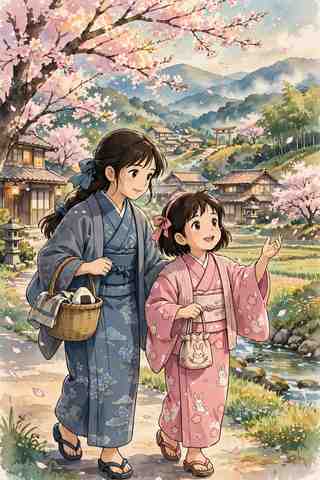
Few images capture the heart of spring like two sisters beneath a shower of cherry blossoms. In Japan, sakura season is a celebration of fleeting beauty and togetherness — families and friends gather under the blooms for hanami picnics, knowing the petals will fall within days. Studio Ghibli has always understood this poetry of impermanence, from the windswept hills of Whisper of the Heart to the flower-strewn fields of The Tale of the Princess Kaguya. The Ghibli style sisters cherry blossom prompt bottles that feeling into a single portrait.
This trend exploded because it speaks to one of the most shareable emotions on social media: sisterhood. Whether it is real sisters, best friends who feel like sisters, or a mother and daughter, the image of two people standing close under falling petals tells a story of love without needing a single word. Paired with Ghibli’s soft watercolor aesthetic, the result looks like a frame pulled from a beloved anime film.
What sets this prompt apart from generic cherry blossom filters is its cinematic tenderness. The drifting petals are not just decoration — they create movement, depth, and that dreamy Ghibli atmosphere where time seems to slow down. The sunlit meadow and rolling hills in the background give the portrait a sense of place, as if the sisters have wandered into their own springtime story.
If you have a photo with your sister, your best friend, or anyone who feels like family, this prompt turns it into a keepsake. Below is the exact copy-paste text plus everything you need: why the prompt works, how to use it step by step, pro tips for flawless results, and answers to common questions.
The Prompt
Copy the complete prompt below and paste it into your AI image tool together with your photo. In seconds you will have a tender Ghibli-style portrait of sisters beneath the sakura blooms.
Transform this photo into a Studio Ghibli anime-style illustration of two sisters standing together beneath blooming cherry blossom trees, keeping the person's face and likeness exactly the same. Surround them with soft pink sakura petals drifting in a gentle spring breeze, a sunlit meadow, and distant rolling hills painted in warm watercolor tones. Portrait orientation (9:16), soft cel shading, delicate hand-painted background details, and a tender nostalgic mood like Whisper of the Heart.
Why This Prompt Works
The prompt works because it layers emotional storytelling on top of precise visual direction. Keeping the person’s face identical ensures the portrait stays personal, while the ‘two sisters’ framing invites the AI to compose a warm, balanced scene — two figures close together naturally creates the symmetry and intimacy that make Ghibli character art so appealing. The drifting sakura petals add motion and texture that flat backgrounds lack.
The color direction is doing quiet heavy lifting here. Soft pink petals against a sunlit meadow and warm watercolor hills produce the pastel harmony Ghibli is famous for — think of the gentle palettes in Whisper of the Heart. By naming the mood ‘tender’ and ‘nostalgic,’ the prompt steers the AI away from harsh contrast and toward the soft, glowing look that defines the trend.
Portrait orientation makes the composition work for modern sharing. A 9:16 frame lets the cherry blossom canopy arch overhead while the sisters stand in the lower two-thirds — a classic Ghibli composition that draws the eye from the faces up through the falling petals. It is tailor-made for phone wallpapers, Instagram Stories, and profile pictures, which is exactly why this version of the trend keeps going viral.
- Face preservation keeps the portrait personal and instantly recognizable.
- Sister composition creates natural symmetry and emotional warmth.
- Drifting sakura petals add movement, depth, and dreamlike atmosphere.
- Pastel watercolor palette mirrors authentic Ghibli background art.
- Tender nostalgic mood avoids harsh contrast for a soft, glowing finish.
- Vertical 9:16 framing is perfect for wallpapers, Stories, and profile photos.
How to Use This Prompt
Creating your sisters cherry blossom portrait is quick and beginner-friendly. All you need is a photo and an AI image generator.
- Pick a clear photo of yourself (or you and your sister) with faces well-lit and unobstructed — outdoor selfies work beautifully.
- Open an AI image tool with photo editing support, such as ChatGPT image generation, Gemini, or a photo-to-anime app, and upload your picture.
- Paste the full prompt from the box above, making sure your photo stays attached as the reference.
- Generate and inspect the result — check that both faces look right and the petals feel natural, then regenerate if anything looks off.
- Save your favorite version and share it with your sister, or post it with spring Ghibli hashtags to join the viral trend.
Pro Tips for Best Results
These small refinements will make your cherry blossom portrait look like a genuine Ghibli film still.
- Photos taken in natural daylight blend most seamlessly into the sunlit meadow background.
- If using a solo photo, the AI will imagine the second sister — for best results, upload an actual photo of both sisters together.
- Add ‘petals caught in her hair’ to the prompt for an extra touch of Ghibli-style detail and realism.
- Ask for a second variation at ‘golden hour’ if you want warmer, more romantic lighting on the blossoms.
- Keep jewelry and accessories simple in the source photo so the anime restyle stays clean and recognizable.
- Print the final portrait on matte photo paper — the pastel tones look stunning as a framed gift for siblings.
Frequently Asked Questions
I only have a solo photo. Can I still use this prompt?
Yes. The AI will generate a sister figure beside you based on the scene description. For the most natural result, choose a solo photo where you are positioned slightly to one side, giving the AI space to compose the second figure. If you have a real photo with your sister, though, always use it — real faces preserve far better than imagined ones.
Will the AI change my clothes into anime outfits?
Usually the AI keeps clothing similar but restyles it with soft cel shading to match the Ghibli aesthetic. If you want a specific look, such as a spring dress or school uniform style, add a short phrase like ‘wearing a light spring dress’ to the prompt before generating.
Which tools give the best Ghibli style results?
ChatGPT’s image model and Gemini both understand the Studio Ghibli style reference very well and handle face preservation reliably. Midjourney produces gorgeous painterly backgrounds but needs a character reference for likeness. Free mobile photo-to-anime apps also work for quick casual versions.
How do I get more petals in the scene?
Add a phrase like ‘a swirling shower of cherry blossom petals filling the air’ to the prompt. The AI responds well to intensified weather and atmosphere words — ‘drifting,’ ‘swirling,’ and ‘shower’ all increase petal density in the output.
Sisters, sakura, and springtime — some combinations are simply timeless. With this Ghibli style prompt, your photo becomes a tender anime keepsake of togetherness, the kind of image you will still treasure when the real petals have long since fallen.
Related Viral Prompts
Ghibli Style Cherry Blossom Path AI Photo Prompt
Ghibli Style Flower Tunnel AI Photo Prompt
Ghibli Style Autumn Maple Road AI Photo Prompt
#GhibliAI #AIPhotoPrompt #StudioGhibliStyle #CherryBlossom #SakuraSeason #AnimePortrait




Leave a Reply