
Introduction
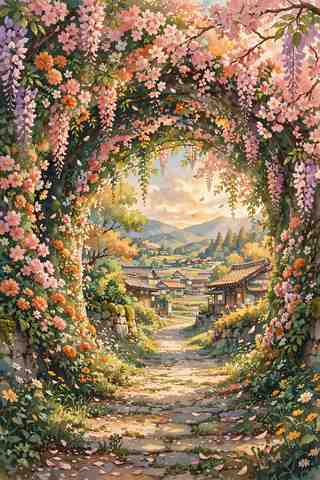
Flower tunnels are among Japan’s most photographed wonders — the wisteria tunnels of Kawachi Fuji Gardens, where blossoms hang like violet rain, or the cherry-blossom avenues that turn entire streets pink each spring. Studio Ghibli has always understood this magic: the flower fields of Howl’s Moving Castle, the blossom storms that sweep through its spring scenes. The Ghibli style flower tunnel AI photo prompt places you inside that wonder, your likeness preserved, petals drifting through golden light all around you.
This trend blooms brightest in spring, but its appeal is year-round, because it delivers pure, uncomplicated beauty. The pastel palette — soft pinks, lavenders, creamy whites — is universally flattering and endlessly shareable. People are using these portraits for spring festival posts, wedding and engagement announcements, birthday greetings, and profile pictures that radiate gentleness. In a feed full of harsh contrasts and loud edits, a flower tunnel portrait feels like a deep breath of perfume.
There is a dreamlike psychology at work too. A tunnel of flowers is a threshold image — you are walking through beauty toward something unknown, and the AI renders you mid-journey, petals swirling. It captures the feeling of being inside a moment rather than posing for one. That is why these portraits get saved to collections and set as wallpapers: they do not just show a face, they hold a feeling — the fleeting, precious loveliness of blossoms at their peak.
The Prompt
Here is your copy-paste prompt. Upload your photo, paste this text into your AI image generator, and walk into a tunnel of wisteria and cherry blossoms — petals drifting, sunlight streaming, your face perfectly preserved.
Transform this photo into a Studio Ghibli anime illustration, keeping the person's exact face, identity and likeness unchanged. Set the scene inside a breathtaking flower tunnel — arches of blooming wisteria and cherry blossoms overhead, petals drifting through shafts of golden sunlight, soft pink and violet hues glowing all around. Portrait orientation (9:16), soft cel shading, warm hand-painted Ghibli backgrounds, pastel floral palette, delicate film-grain texture, romantic and dreamlike mood.
Why This Prompt Works
This prompt works because the pastel floral palette does two jobs at once: it creates the dreamlike Ghibli atmosphere and it flatters the human face. Soft pinks and lavenders reflect gentle, warm tones onto skin, smoothing and beautifying without any retouching. Ghibli’s artists have always used flower scenes to make characters glow — think of Sophie walking through Howl’s flower field — and this prompt borrows that exact lighting logic.
The prompt also works because the tunnel composition is inherently dynamic. Arches of blossoms overhead create a natural frame-within-a-frame, drawing every eye toward the center where your preserved face sits. Drifting petals add motion to a still image, and the shafts of golden sunlight give the AI clear lighting direction. It is a composition that cannot fail: the architecture of the scene does the visual work automatically.
Finally, the specificity of the flowers matters. Naming wisteria and cherry blossoms — rather than just ‘flowers’ — anchors the AI to two of the most visually distinctive blooms in Japanese art. Wisteria hangs in cascading violet clusters; cherry blossoms scatter as delicate pink clouds. Together they give the AI rich, recognizable detail to paint in true hand-painted Ghibli fashion instead of generic pink blobs.
- The pastel pink-and-violet palette flatters every face with soft, glowing, Ghibli-style light.
- The tunnel’s natural arch framing draws all attention to your preserved face at the center.
- Named flowers — wisteria and cherry blossoms — give the AI specific, beautiful detail to paint.
- Drifting petals and sun shafts add motion and light direction that make the still image feel alive.
- The romantic, dreamlike mood is perfect for spring posts, weddings, engagements, and gentle profile pictures.
- Portrait 9:16 framing turns the flower tunnel into an immersive walkway you seem to stroll through.
How to Use This Prompt
- Pick a clear, well-lit photo of yourself — a head-and-shoulders selfie or a half-body shot works best. The prompt preserves your face identity while the AI rebuilds everything around you as a magical blossom flower tunnel, so a sharp, front-facing source photo gives the cleanest and most recognizable result.
- Open your favorite AI image generator — ChatGPT’s image mode, Gemini, Midjourney, Leonardo AI, or any tool that accepts a text prompt together with an uploaded photo — and upload your picture first.
- Copy the exact prompt from the
block above and paste it into the prompt box. Keep the wording untouched: the face-preservation clause, the portrait 9:16 instruction, and the soft cel-shading directions are tuned to work together as one package.
- Generate the image and review the result carefully. If a detail feels slightly off — the lighting, the background density, the mood — regenerate once or twice. AI image tools very often nail the composition on the second attempt.
- Download your new Ghibli-style portrait in full resolution and share it anywhere. It is sized 9:16, which is perfect for Instagram Stories, TikTok, WhatsApp status, Facebook posts, and phone wallpapers.
Pro Tips for Best Results
- Use a well-lit, front-facing photo with a simple background. Busy original backgrounds can confuse the AI, while a clean source photo lets the Ghibli scene take over completely.
- Do not edit the prompt's technical instructions — the face-preservation line, the 9:16 portrait note, and the cel-shading directions are the load-bearing parts of the prompt.
- A soft smile or serene expression matches the dreamlike mood — save the big grin for a different trend.
- Long hair in the source photo looks magical here, as the AI often lets it drift with the petals.
- For a wedding or engagement version, add 'wearing elegant formal attire' after the prompt.
- Generate a few variations — petal density and light shafts change beautifully between generations.
Frequently Asked Questions
Will this prompt really keep my face looking like me?
Yes — that is the entire point of the face-preservation clause in the prompt. It explicitly instructs the AI to keep your exact face, identity, and likeness unchanged while only the scene around you is rebuilt in Studio Ghibli anime style. For the most faithful likeness, start with a front-facing, well-lit photo where your face fills a good portion of the frame, and avoid heavy filters or sunglasses in the source picture.
Which AI image generator works best with this prompt?
This prompt works with any modern generator that accepts image input plus a text prompt — including ChatGPT's image mode, Gemini, Midjourney, and Leonardo AI. Free options like ChatGPT's image mode or Gemini handle a magical blossom flower tunnel scenes very well. If you want the most painterly, hand-drawn-looking backgrounds, Midjourney tends to produce the richest Ghibli-style textures, while ChatGPT is usually the most faithful at preserving your face.
Is this Ghibli AI photo prompt free to use?
Yes, the prompt itself is completely free to copy and use as many times as you like. You only need access to an AI image generator — many of which offer free daily generations. There are no watermarks added by the prompt, and you can regenerate the scene endlessly until you love the result.
Can I swap the flowers — for example, roses or sunflowers instead of wisteria?
Yes. The prompt names wisteria and cherry blossoms because they are the most iconic Japanese tunnel flowers and the most Ghibli-like, but you can replace them with a short phrase like 'arches of blooming red roses' or 'a tunnel of tall sunflowers.' Keep the rest of the prompt exactly as written — especially the face-preservation clause and the cel-shading instructions — so the Ghibli style and your likeness stay intact.
Violet wisteria, pink cherry blossoms, and golden light on drifting petals — step into the tunnel and let spring keep your face. Copy the prompt and take the walk.
Related Viral Prompts
Ghibli Style Cherry Blossom Path AI Photo Prompt
Ghibli Style Sisters Cherry Blossom AI Photo Prompt
Ghibli Style Lavender Field AI Photo Prompt
#GhibliAI #AIPhotoPrompt #StudioGhibliStyle #AnimePhoto #GhibliTrend




Leave a Reply