
Introduction
Every diver remembers the first time light broke through the surface above them. Shafts of sunlight cut the turquoise water into glowing pillars, dust-like particles drift through the beams, and the reef below ignites with color. Photographers call it “God light,” and it lasts minutes. This AI photo prompt lets you summon it whenever you want, and hold it for as long as you like.
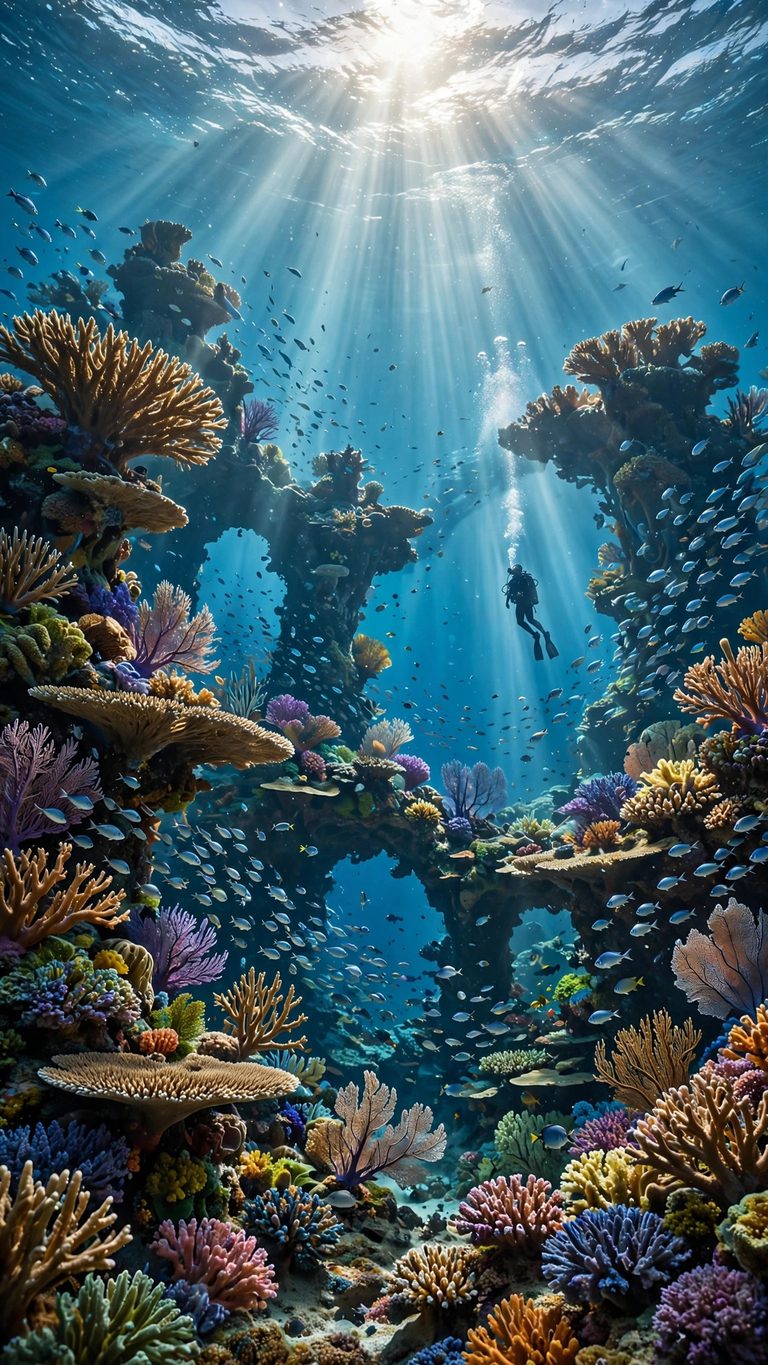
The prompt builds a heavenly scene: sunbeams piercing turquoise water and falling onto a coral reef, light pillars illuminating colorful corals and schooling fish, with a diver silhouette ascending through the beams. The composition reads like a cathedral, with light as the architecture and the ocean as the nave. It is spiritual without a single religious symbol.
Light-beam underwater shots are among the most saved images in ocean photography because they trigger awe, the emotion most linked to sharing. Awe makes people tag friends. If you want content that travels, this sunbeam reef #AIPhoto prompt is engineered to inspire exactly that reaction.
The Prompt
Copy the prompt below exactly as written, then paste it into your AI image generator of choice.
Heavenly photograph of sunbeams piercing turquoise water onto a coral reef, light pillars illuminating colorful corals and schooling fish, diver silhouette ascending through the beams, divine underwater cathedral, ultra detailed, 8k, professional underwater photography, photorealistic
Why This Prompt Works
Light is the hardest thing to fake, and this prompt treats it like the main character. “Sunbeams piercing turquoise water” gives the model a specific optical phenomenon, crepuscular rays underwater, rather than a generic “bright light.” Models have seen thousands of captioned photos of light shafts, so naming the phenomenon precisely pulls up the right visual memory: defined pillars, brighter cores, soft edges, visible particles inside the beam.
The prompt then directs the light like a cinematographer. “Light pillars illuminating colorful corals and schooling fish” tells the model what the beams hit and what they reveal, which creates natural pools of brightness in the frame instead of flat, even lighting. The diver silhouette ascending through the beams is a compositional masterstroke: a dark human shape inside bright light creates the strongest possible contrast, gives the scene scale, and adds a story, someone swimming toward the light.
“Divine underwater cathedral” is the emotional thesis in three words. It tells the model to aim for grandeur, symmetry, and reverence, which influences everything from the verticality of the beams to the richness of the color grade. “Turquoise water” sets a tropical, inviting palette rather than cold deep blue, which keeps the mood heavenly instead of abyssal. The closing quality stack “ultra detailed, 8k, professional underwater photography, photorealistic” ensures the light looks captured rather than painted, with the crisp particulate detail that sells underwater realism.
How to Use This Prompt
Capturing believable light takes deliberate settings. Here is how on each platform.
Midjourney: Paste the full prompt with --ar 9:16 --v 7; portrait orientation suits vertical light pillars perfectly. Midjourney renders light shafts beautifully by default. If beams look weak, add “strong volumetric god rays, visible light pillars” and rerun. Use Vary (Subtle) to refine the diver silhouette, keeping it dark and clean against the brightest beam.
DALL-E 3: DALL-E 3 interprets “sunbeams piercing water” very literally and reliably. Paste the prompt as written and request portrait output. For extra drama, follow up with “make the light beams more defined with visible floating particles inside them.” DALL-E 3’s conversational editing is perfect for dialing beam intensity without changing the reef.
Flux: Flux excels at clean, photographic light. Use the full prompt at 768×1344 or higher. If the scene looks hazy, add “crisp defined light shafts, clear turquoise water.” Generate multiple seeds and pick the composition where the diver sits inside, not beside, the main beam, that placement is what makes the image iconic.
Pro Tips & Creative Variations
Time of day is your biggest creative lever. The base prompt implies midday sun, but try “golden hour sunbeams, warm amber light” for a dreamy late-afternoon reef, or “moonbeams piercing dark water” for a haunting night variant in deep blue and silver. Same composition, completely different emotion.
Change what the light reveals. Replace the coral reef with “a sunken shipwreck,” “a sea turtle gliding through the beams,” or “a school of silver jacks swirling in the light.” The light-pillar structure stays, but each subject tells a new story. The diver can also evolve: “two divers ascending hand in hand” adds human warmth, while removing the diver entirely creates a pure, untouched paradise.
For a series, generate the same reef at three light intensities: faint morning rays, blazing midday pillars, and fading dusk glow. Post as a carousel titled “one reef, three moods.” Creators who build series around one strong prompt look prolific with minimal effort. Add a real ocean fact to your caption, like how light fades to blue because water absorbs red wavelengths first, and your heavenly #AIPhoto post earns both hearts and saves.
Frequently Asked Questions
Q: Why do my light beams look like white stripes instead of natural sun rays?
A: The beams need atmosphere to feel real. Add “visible floating particles in the beams, soft volumetric edges, light diffusing through water” so the rays have texture and falloff instead of hard graphic edges.
Q: Should the diver face the camera or swim away?
A: A silhouette ascending away from the camera, toward the light, reads as aspirational and keeps the face from distracting. If the face is visible, models often render it oddly through a mask, so the away-facing silhouette is both safer and more poetic.
Q: Which platform handles underwater light best?
A: Midjourney v7 produces the most cinematic god rays out of the box. Flux gives the cleanest photorealistic light. DALL-E 3 is the easiest to art-direct with follow-up edits. All three can nail this prompt.
Q: Can I use this as a phone wallpaper?
A: Yes, that is one of its best uses. Generate at 9:16, keep the brightest beam centered in the upper third, and leave the bottom area relatively calm so app icons stay readable over it.
Light is the ocean’s oldest special effect, and now it answers to your keyboard. Generate this sunbeam reef, tune the beams until the scene feels sacred, and share the glow. Somewhere, a viewer is about to feel the same awe divers feel, all because of your prompt.
Related Viral Prompts
- Master of Disguise Octopus AI Photo Prompt: Capture Camouflaged Texture-Shifting Skin in Ultra Detailed Art
- Scuba Diving Coral Reef AI Video Prompt: Thrilling First-Person Dive Through Sunlit Turquoise Water Scenes
- Coral Garden Drift AI Video Prompt: Serene Slow Float Over Swaying Corals and Clownfish Havens Footage
# A I V i d e o # P r o m p t B a z a r # A I P h o t o # S u n b e a m # R e e f


Leave a Reply