
Introduction
Nothing makes a human feel small like a whale shark. At up to 40 feet long, with a mouth wide enough to swallow a person whole (they eat plankton, thankfully), these spotted giants are the largest fish in the sea. Real underwater photographers spend entire expeditions hoping for one clean frame of a whale shark gliding past a diver, the ultimate scale shot. This AI photo prompt hands you that frame on demand.
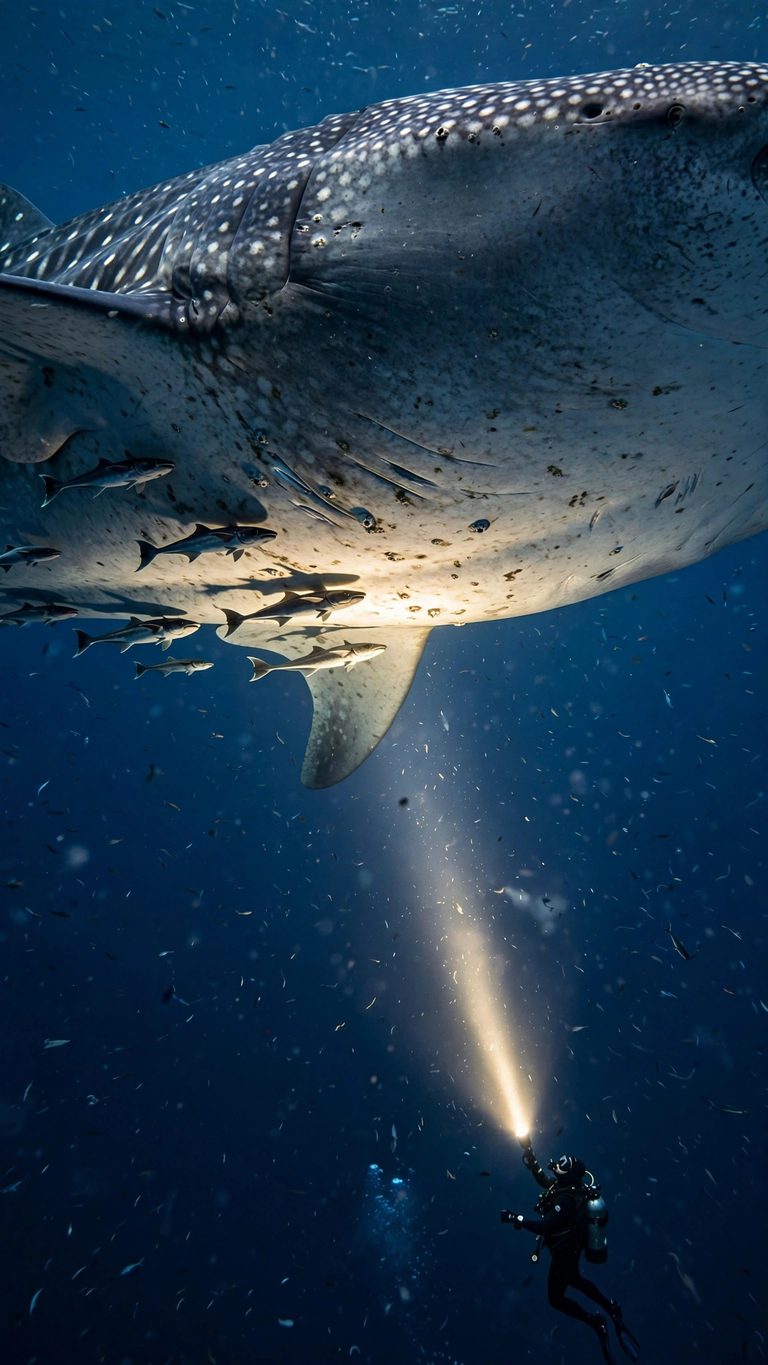
The prompt paints a humbling scene: a colossal whale shark gliding through deep blue vastness while a tiny diver floats beside it, a beam of light from the diver’s torch raking across the shark’s patterned skin. Remoras cling along the belly, adding authentic detail, and the endless blue around them sells the enormity of the open ocean.
Scale-contrast images are engagement magnets. Viewers instinctively compare the human figure to the animal, and that moment of realization, “wait, that shark is HOW big,” drives shares and saves. If your feed needs a jaw-dropper, this whale shark #AIPhoto prompt delivers the ocean’s most humbling size comparison in a single frame.
The Prompt
Copy the prompt below exactly as written, then paste it into your AI image generator of choice.
Mind-blowing scale photograph of a whale shark gliding past a tiny diver, spotted giant dwarfing the human, diver's light beam on patterned skin, remoras along the belly, deep blue vastness, humbling ocean enormity, ultra detailed, 8k, professional underwater photography, photorealistic
Why This Prompt Works
This prompt works because it is engineered around a single psychological trigger: scale. Everything in the description serves the size contrast. “Spotted giant dwarfing the human” is explicit about the relationship between the two subjects, which prevents the model from drawing them at similar sizes, a common failure when two subjects share a frame. The model needs to be told who dominates.
The lighting detail is doing quiet, heavy lifting. “Diver’s light beam on patterned skin” gives the scene a motivated light source, which is something image models struggle with unless guided. It also creates a natural focal point: the eye follows the beam to the intricate spot pattern, which the prompt calls out separately so the model renders those signature markings instead of generic gray skin. “Remoras along the belly” is a brilliant authenticity token. It is a small, specific, real-world detail that signals “genuine underwater photography” to the model and to viewers, separating the image from fantasy sea-monster art.
“Deep blue vastness” and “humbling ocean enormity” handle the environment and the emotion together. The vast empty water around the subjects is what makes the shark feel enormous; without negative space, even a giant looks cramped. Finally, the quality stack “ultra detailed, 8k, professional underwater photography, photorealistic” locks in the documentary look. Remove it, and the same scene can drift into illustration. With it, you get the crisp, National-Geographic feel that makes viewers double-take.
How to Use This Prompt
Here is how to run this prompt on the three major platforms.
Midjourney: Paste the full prompt with --ar 9:16 --v 7 for a portrait scale shot. Midjourney is excellent at the spot patterning but sometimes shrinks the size gap, so if the diver looks too large, add “tiny diver, enormous whale shark, extreme size difference” and rerun. Upscale your favorite, then use Vary (Region) to fix any warped remoras.
DALL-E 3: Paste the prompt verbatim; DALL-E 3 is the most literal interpreter of size relationships described in words. Request portrait orientation. If the light beam looks wrong, add “single flashlight beam from the diver illuminating the shark’s spotted skin” in a follow-up edit. DALL-E 3’s inpainting-style edits are ideal for fixing the beam without regenerating everything.
Flux: Flux handles photorealistic underwater scenes with strong detail. Use the full prompt at 768×1344 or higher. If the composition crowds the shark, append “wide composition, generous negative space of deep blue water.” Run three to four seeds and choose the one with the cleanest silhouette and most natural diver pose.
Pro Tips & Creative Variations
The scale trick in this prompt is reusable across the whole animal kingdom, so think of it as a template. Swap the whale shark for a manta ray, a blue whale, or a giant Pacific octopus, keep the tiny diver, and you have a series. “Manta ray wingspan dwarfing the diver” or “blue whale eye beside a diver” follow the same formula and feel fresh every time.
Play with the light beam, because it is the storytelling heart of the image. Change it to “diver’s light beam cutting through drifting marine snow” for atmosphere, or remove the diver’s light entirely and add “sun rays from the surface catching the spotted back” for a daytime variant. You can also move the camera: “shot from below, diver silhouetted against the shark’s belly” is a dramatic angle that real photographers dream about.
For maximum realism, add environmental storytelling details: “a second diver in the distant blue,” “a school of small fish parting around the shark’s head,” or “faint surface light far above.” Each one adds depth and documentary credibility. Post your best result with a caption about whale shark facts, real ones, like their 40-foot length, and watch the saves roll in. Educational captions paired with #AIPhoto scale shots are a proven combination for reach.
Frequently Asked Questions
Q: The model keeps making the diver too big. How do I fix the scale?
A: Be blunt and repetitive about size: “enormous whale shark, tiny small diver, extreme size difference, shark at least ten times the diver’s length.” Image models respond well to explicit, quantified relationships.
Q: Are whale shark spot patterns really unique like fingerprints?
A: Yes. Researchers identify individual whale sharks by their spot patterns, just like fingerprints. Mentioning the pattern in your caption adds a real educational hook to the post.
Q: Which platform is best for the photorealistic documentary look?
A: Midjourney v7 and Flux both nail the photorealistic underwater aesthetic. DALL-E 3 is slightly softer but follows the described composition most faithfully. Pick based on whether you prioritize texture or layout.
Q: Can I animate this image into a video later?
A: Absolutely. Generate the still first, then use an image-to-video tool with a prompt like “whale shark gliding slowly forward, diver drifting, light beam swaying.” Slow, minimal motion sells underwater footage best.
Few images humble a viewer like a human dwarfed by a whale shark. This prompt gives you that iconic scale shot without a boat, a wetsuit, or a decade of dive experience. Generate it, tweak the light and composition until it takes your breath away, then share it and watch your audience feel deliciously small.
Related Viral Prompts
- Pygmy Seahorse Macro AI Photo Prompt: Capture Hidden Miniature Dragons in Stunning Ultra Detailed Close-Up Art
- Heavenly Sunbeam Reef AI Photo Prompt: Create a Divine Underwater Cathedral with Light Pillars and Coral Beauty
- Master of Disguise Octopus AI Photo Prompt: Capture Camouflaged Texture-Shifting Skin in Ultra Detailed Art
# A I V i d e o # P r o m p t B a z a r # A I P h o t o # W h a l e S h a r k # S c a l e


Leave a Reply