
Introduction
Far below the surface, where sunlight never reaches, the ocean lights itself. Drifting jellyfish pulse with colors no lamp can imitate, and for a photographer the deep sea is the hardest studio on Earth. Crushing pressure, total darkness, and shy subjects make a real glowing jellyfish shot a once-in-a-decade achievement. But with this AI photo prompt, you can create that same otherworldly image from your desk, no submarine required.
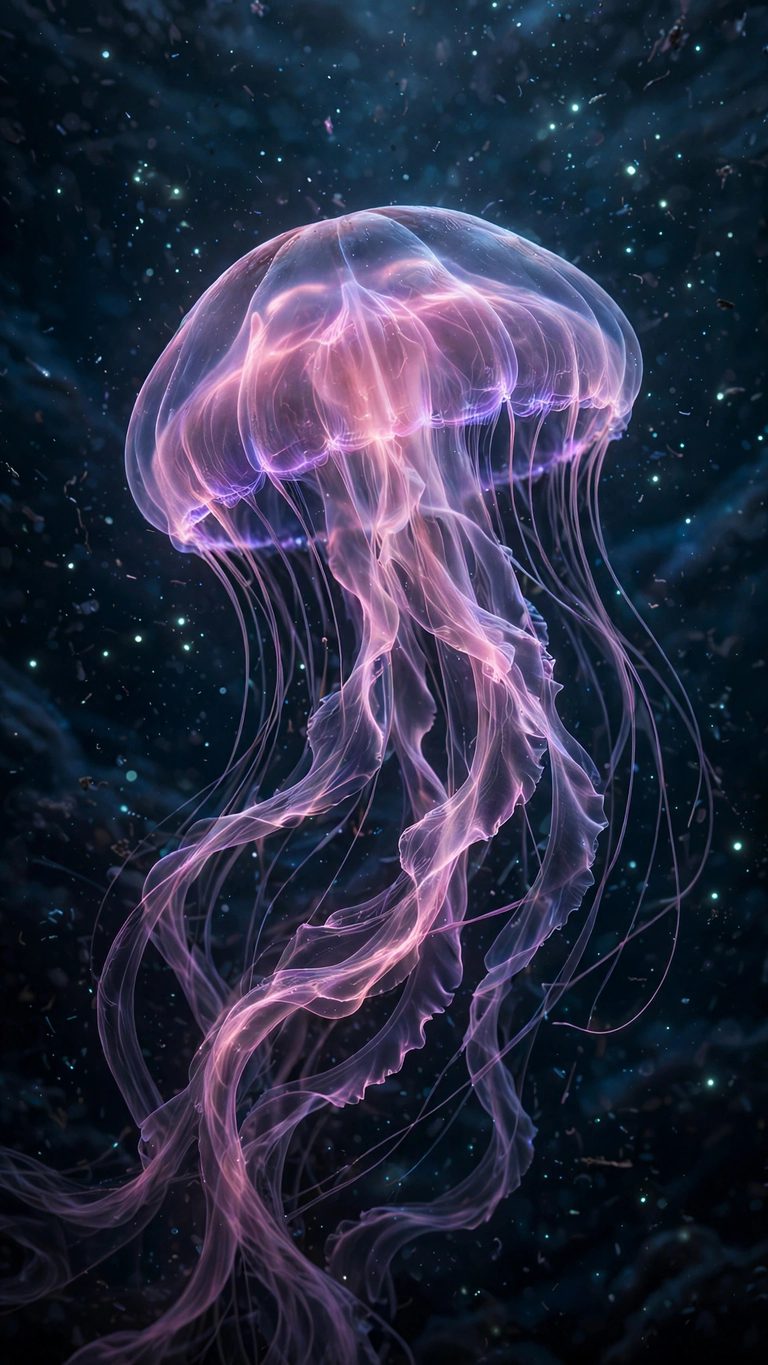
This prompt conjures ethereal jellyfish drifting through dark deep water, their translucent bells glowing pink and violet, trailing tentacles that flow like silk ribbons. Tiny plankton sparkle around them like stars in a liquid night sky. The result feels less like a photograph and more like a visit from an alien world, graceful, haunting, and impossibly detailed.
Bioluminescent-style imagery is one of the most shared niches in AI art communities. Posts tagged #AIPhoto that feature glowing sea creatures routinely pull in comments from viewers who swear they are looking at real deep-sea photography. If you want a portfolio piece that stops thumbs mid-scroll, this jellyfish prompt is your ticket to the abyss.
The Prompt
Copy the prompt below exactly as written, then paste it into your AI image generator of choice.
Ethereal photograph of glowing jellyfish drifting in dark deep water, translucent bells pulsing with pink and violet light, trailing tentacles like silk ribbons, tiny plankton sparkling, alien grace, ultra detailed, 8k, professional underwater photography, photorealistic
Why This Prompt Works
Great prompts are built from layered, sensory language, and this one is a masterclass in how to do it. Every clause does a job. The opening phrase, “Ethereal photograph,” sets both the mood and the medium: it tells the model you want something delicate and dreamlike, rendered with photographic realism rather than painted fantasy. Without that anchor, glow effects can easily slide into cheap digital-art territory.
Then comes the subject description, which is where the magic lives. “Glowing jellyfish drifting in dark deep water” establishes contrast, and contrast is what makes bioluminescent subjects readable. The model knows that light needs darkness to shine against, so the pitch-black background makes every pink and violet highlight pop. “Translucent bells pulsing with pink and violet light” gives the model a specific lighting plan: internal illumination, a limited two-color palette, and a sense of motion in the word “pulsing.”
The sensory metaphor “trailing tentacles like silk ribbons” is the kind of concrete visual simile that image models love. It converts an abstract idea (delicate, flowing movement) into a texture the model has seen thousands of times: silk. “Tiny plankton sparkling” adds depth through secondary detail, filling the background with bokeh-like points of light that keep the frame from feeling empty. “Alien grace” sets the emotional tone in two words, and the closing chain “ultra detailed, 8k, professional underwater photography, photorealistic” stacks quality and style tokens that push the output toward crisp, believable, high-resolution results instead of soft, muddy approximations.
How to Use This Prompt
Follow these steps to get a flawless render on your platform of choice.
Midjourney: Paste the full prompt into the prompt bar and add aspect ratio and version flags for a portrait post, for example --ar 9:16 --v 7. Midjourney v7 excels at translucent materials and glow, so leave stylization at its default first. If the bells look too opaque, add “translucent, backlit” weight with ::2 after the glow clause and rerun. Use the Vary (Subtle) button on your favorite result to refine tentacle flow.
DALL-E 3: DALL-E 3 follows long natural-language prompts very faithfully, so paste the prompt almost exactly as written. Ask for a 1024×1792 portrait output for social formats. If colors wash out, append “rich saturated pink and violet bioluminescence against pure black water.” DALL-E 3 handles the plankton sparkle beautifully at default settings.
Flux: Flux rewards clean, structured prompts. Paste the whole prompt, then in a second pass strengthen lighting with “volumetric glow, subsurface scattering on jellyfish bells.” Generate at 768×1344 or higher and use two or three seeds to pick the most graceful tentacle composition. Keep guidance scale moderate so the glow stays soft rather than harsh.
Pro Tips & Creative Variations
Once you have a strong base image, treat the prompt as a starting point, not a finish line. Swap the color palette first: “electric teal and cobalt blue” gives a colder, more scientific deep-sea mood, while “amber and magenta” feels like a sunset trapped underwater. Small palette changes make an image look completely original, which matters if you post daily.
Change the composition by adding a second layer of depth. Try appending “a second jellyfish out of focus in the foreground” to create cinematic depth of field, or “school of tiny silver fish scattering through the frame” for scale and movement. You can also shift the camera angle: “viewed from below, looking up toward a faint surface glow” produces a dramatic, cathedral-like frame that performs well as wallpaper content.
For storytelling series, generate a sequence with the same seed: first the lone jellyfish, then a bloom of dozens, then an extreme close-up of one bell. Post them as a carousel with a caption about deep-sea creatures, and you have a mini documentary. If you want a more artistic edge, add “long exposure light trails” to stretch the tentacles into flowing ribbons of light, or “macro detail of bell texture” for an abstract art piece. Creators who remix one prompt ten ways build recognizable feeds, and this #AIPhoto jellyfish concept has enough variety to carry a whole week of posts.
Frequently Asked Questions
Q: Which AI generator gives the most realistic glow for this prompt?
A: Midjourney v7 currently renders translucent glow the most convincingly, thanks to its strong handling of light diffusion. Flux is a close second for sharp detail. DALL-E 3 is best if you want the composition to match the prompt description exactly.
Q: My jellyfish look flat and cartoony. How do I fix that?
A: Add “subsurface scattering, translucent tissue, volumetric lighting” to the prompt and make sure “dark deep water” stays in there. Flat results usually come from a background that is too bright, which kills the glow contrast.
Q: Can I use this image commercially, like on a poster or merch?
A: Check your generator’s commercial terms first. Midjourney paid plans, DALL-E 3 through ChatGPT Plus, and Flux commercial licenses generally allow commercial use of images you generate, but always confirm the current terms for your account tier.
Q: How do I make the portrait version fit Instagram Reels covers?
A: Generate at 9:16 (1080×1920) as the settings suggest. Keep the main jellyfish centered with clear space at the top and bottom so profile icons and captions never cover the subject.
The deep sea glows for those patient enough to look, and now you can look anytime. Paste this prompt into your favorite generator, experiment with palettes and compositions, and share your most ethereal result with the community. Your glowing jellyfish masterpiece is one prompt away, so dive in and start creating today.
Related Viral Prompts
- Whale Shark vs Tiny Diver AI Photo Prompt: Capture Mind-Blowing Ocean Scale with Ultra Detailed Photorealism
- Pygmy Seahorse Macro AI Photo Prompt: Capture Hidden Miniature Dragons in Stunning Ultra Detailed Close-Up Art
- Heavenly Sunbeam Reef AI Photo Prompt: Create a Divine Underwater Cathedral with Light Pillars and Coral Beauty
# A I V i d e o # P r o m p t B a z a r # A I P h o t o # J e l l y f i s h # G l o w


Leave a Reply