
Introduction
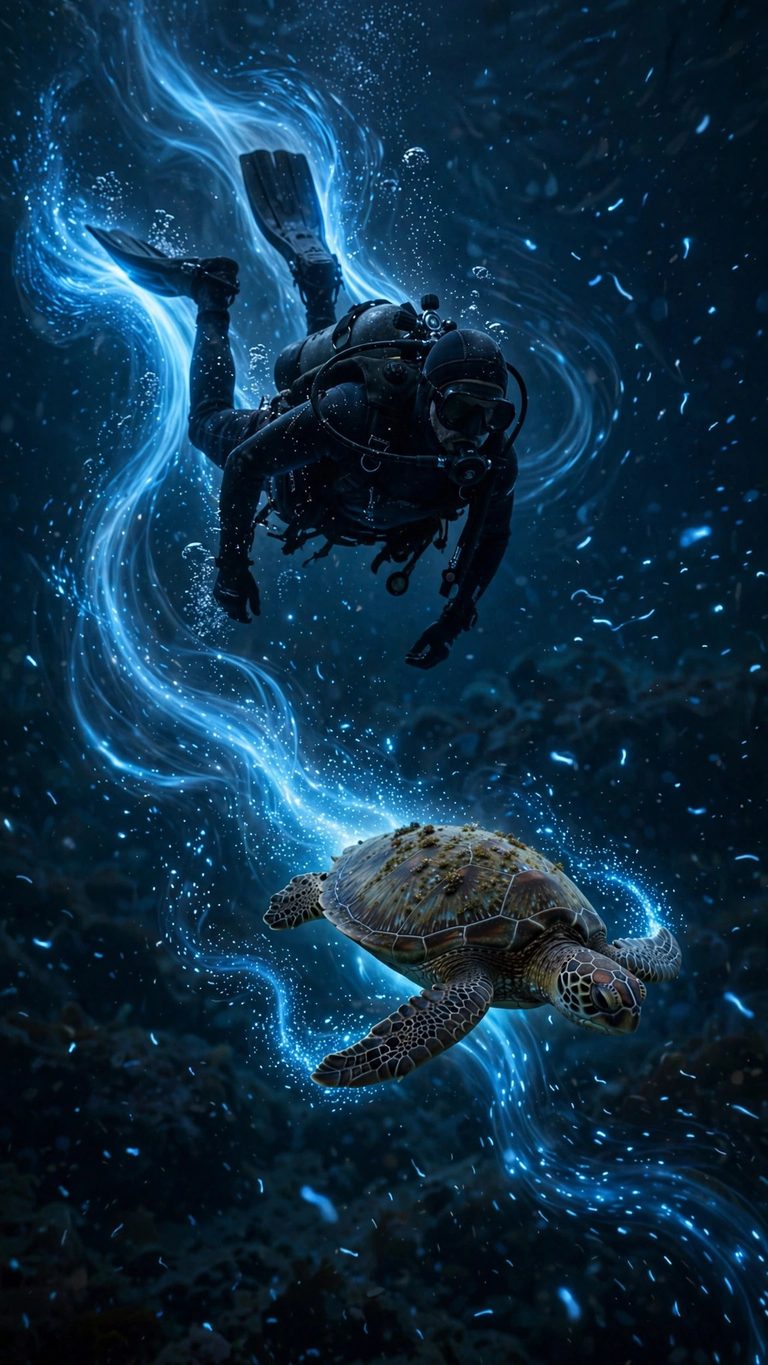
Slip beneath the waves at night and the ocean rewrites its own rules. Every kick of your fins ignites a trail of glowing blue sparks. Your hand leaves ribbons of light in the dark. It feels less like swimming and more like flying through a galaxy.
This AI video prompt captures that surreal magic: a night dive where bioluminescent plankton turns every movement into light, with a turtle trailing sparks through the dark. In this article you will get the exact copy-paste prompt, a breakdown of why the glow-on-dark formula is so powerful, setup steps for Veo 3, Runway, Kling, Pika, and Sora, and pro variations from glowing mantas to shoreline surf. Dim the lights and dive into this #NightDive.
The Prompt
Copy the complete prompt from the box below into your generator. The contrast between dark water and bright glow is the whole trick, so run it word-for-word first.
Surreal night dive scene with every movement igniting trails of glowing blue plankton, diver's fins leaving light ribbons, a turtle trailing sparks, dark water alive with bioluminescence, like swimming through stars, magical otherworldly, ultra realistic, dreamlike
Why This Prompt Works
The core formula here is glow on darkness, and it is one of the most reliable attention magnets in visual media. Dark water makes every blue spark pop with maximum contrast, which means the thumbnail alone stops thumbs. Bright subjects on dark backgrounds simply outperform the reverse, and this prompt is built entirely on that principle.
The motion design is equally smart. “Every movement igniting trails” turns the diver’s body into a paintbrush: fins leave light ribbons, hands draw glowing arcs. Trails read beautifully in short clips because they visualize motion itself, and they give the model a clear cause-and-effect to render rather than abstract “magic.”
The turtle is the storytelling masterstroke. “A turtle trailing sparks” adds a second character and a second trail, which doubles the visual interest and gives viewers an animal to love. It transforms the clip from a cool effect into a tiny story: two travelers swimming through stars.
The analogy does quiet heavy lifting too. “Like swimming through stars” hands every viewer an instant mental image, and familiar analogies make surreal visuals feel real. Wrapped in “magical otherworldly, dreamlike” with an ultra-realistic finish, this #Plankton glow becomes the rare AI clip people describe as beautiful rather than just cool.
How to Use This Prompt
Follow these steps to generate your glowing night dive:
- Copy the prompt exactly as written in the box above.
- Choose your tool: Veo 3, Runway Gen-4, Kling 2.x, Pika 2, or Sora.
- Set 9:16 vertical and 8 seconds. The diver-centered composition suits the tall frame.
- Use a gentle follow camera behind or beside the diver so the light trails stream across the frame.
- Set motion strength to medium. The trails need enough movement to draw ribbons, but too much turns the glow into chaos.
- Generate three takes and pick the one with the cleanest, most ribbon-like trails.
- Keep the grade dark, add deep ambient audio or ethereal music, and post.
Platform notes: Veo 3 and Kling both render bloom and glow effects convincingly. In Runway, image-to-video from a dark underwater still with a diver gives you strong control over the composition. In Pika, medium motion strength is the sweet spot for smooth trails. In Sora, a simple follow-cam path keeps the ribbons coherent. A negative prompt like “daylight, bright water, washed out” protects the night mood.
Pro Tips & Creative Variations
Pro tips first. Protect the darkness: if a take renders grayish or washed-out water, regenerate rather than fixing it in the grade, because the contrast is the entire effect. Insist on blue: “glowing blue plankton” keeps the palette oceanic, while vague “glowing” sometimes drifts into green or purple. Keep the diver’s movements simple in your mind’s eye; the prompt already choreographs the trails, so extra action words only tangle the ribbons.
Creative variations once the base works:
- Manta in the glow: add “a giant manta ray soaring through the glowing plankton, wings trailing light” for pure spectacle.
- Jellyfish drift: add “translucent jellyfish pulsing gently, bells glowing from within” for an ethereal double-glow.
- Freediver purity: replace the diver with “a freediver without tanks, no bubbles, pure silhouette” for a cleaner, more artistic frame.
- Whale shark glow: add “a whale shark gliding past, its spots glowing like constellations” for the ultimate version.
- Shoreline version: adapt with “waves glowing electric blue as they break on a night beach” for the famous surf glow.
- Long-exposure feel: add “long exposure light trails, silky smooth motion” for a photographic, dreamy finish.
For posting, this clip thrives after dark in every sense: publish in the evening, use minimal on-screen text, and let the glow be the caption. Night content gets saved at very high rates.
Frequently Asked Questions
Which tool handles glow and bloom effects best?
Veo 3 and Kling 2.x render luminous effects most convincingly from text, with natural-looking bloom rather than flat neon. Runway works well via image-to-video if your starting frame already has the diver composed in dark water. Pika and Sora both manage it with medium motion strength.
My glow looks washed out and the water looks gray. How do I fix it?
Strengthen the darkness: keep ‘dark water’ prominent and add a negative prompt of ‘daylight, bright, washed out.’ Washed-out glow usually means the model lifted the whole exposure, so regenerating with the night cues emphasized typically restores the contrast.
The light trails look chaotic instead of ribbon-like. What went wrong?
Motion strength is almost certainly too high. Drop it to medium or medium-low so each fin kick draws one clean ribbon instead of a tangle. A slower follow camera also helps the trails read as smooth streams.
Does vertical framing suit a night dive scene?
Yes. The diver is the compositional anchor and the trails stream vertically with the kicks, so 9:16 frames the action naturally. The same prompt works in 16:9 for a wider, more cinematic YouTube cut; only the aspect setting needs to change.
Bioluminescence is nature’s own special effect, and now it is yours on demand. Generate your night dive, choose the take with the cleanest light ribbons, and share it with #NightDive so your audience can swim through stars too. Tag PromptBazar, and surface up to the next Underwater World prompt.
Related Viral Prompts
- Sea Turtle Portrait AI Photo Prompt: Capture a Soulful Underwater Close-Up in Stunning 8K Detail Today
- Coral Garden Wide AI Photo Prompt: Create a Thriving Underwater Reef Panorama in Breathtaking 8K Detail
- Manta Ray Top Down AI Photo Prompt: Capture Minimalist Ocean Elegance From Above in Photorealistic 8K
# A I V i d e o # P r o m p t B a z a r # N i g h t D i v e # P l a n k t o n # G l o w

[…] Night Dive Bioluminescent Plankton AI Video Prompt: Copy This Glowing Ocean Prompt for Veo 3, Runway… […]