
Introduction
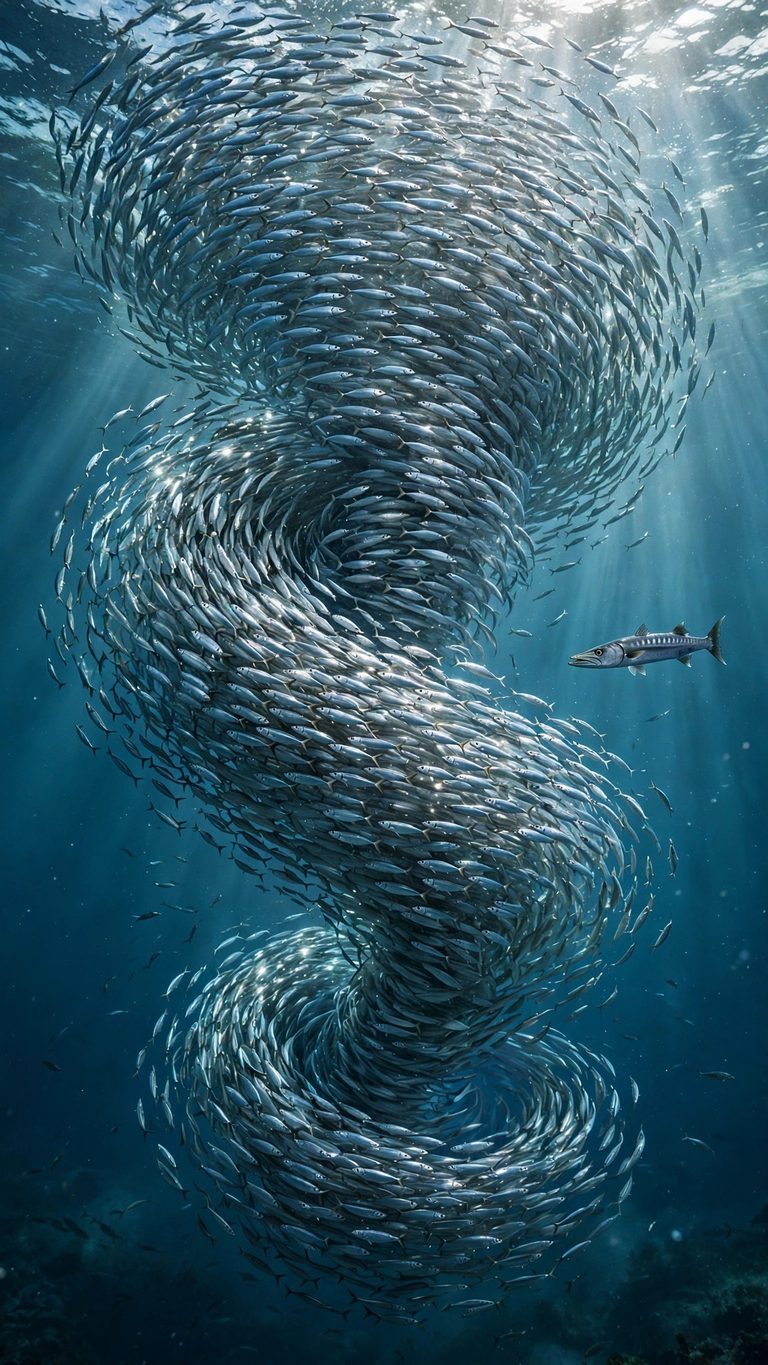
Picture this: you are hovering in open blue water when the light suddenly bends. Thousands of silver fish wheel above you in perfect unison, folding into a spinning column that pulses like a living heartbeat. It looks like a tornado made of mercury, breathing and shape-shifting with every passing second. This is a bait ball, one of the ocean’s great spectacles, and filming one in real life takes a full dive crew, perfect conditions, and a mountain of luck.
That is exactly why this AI video prompt is so powerful. It hands you nature’s greatest choreography on demand: a hypnotic fish tornado you can generate in seconds, tuned for vertical video and built to loop seamlessly. In this article you will get the exact copy-paste prompt, a breakdown of why every phrase earns its place, platform-specific setup steps for Veo 3, Runway, Kling, Pika, and Sora, plus pro variations that push the concept even further. By the end, you will be posting #FishTornado clips that stop thumbs mid-scroll.
The Prompt
Copy everything inside the box below and paste it directly into your video generator. Do not change a single word on your first run. The phrasing is tuned for maximum swirl, shimmer, and synchronized motion.
Hypnotic sight of thousands of silver fish swirling into a living tornado, the shape-shifting bait ball pulsing and breathing, sunlight flashing off a million scales, a barracuda circling patiently outside, synchronized liquid motion, nature's greatest choreography, ultra detailed, cinematic, mesmerizing
Why This Prompt Works
The first reason this prompt works is the phrase “synchronized liquid motion.” Those three words tell the model that thousands of individual fish must move as one fluid mass instead of scattering like startled minnows. Without that instruction, most generators produce a loose, random school. With it, you get the eerie coordination that makes bait balls so mesmerizing in real footage.
The second reason is light. “Sunlight flashing off a million scales” is doing heavy lifting. It instructs the model to render thousands of tiny specular highlights rippling across the swarm, which reads as expensive, high-production cinematography. That shimmer is what separates a flat gray blob from a living, glittering tornado on screen.
The third reason is story. A barracuda circling patiently outside the swarm adds predator-versus-prey tension. Viewers instinctively keep watching because something might happen. That micro-narrative boosts watch time, and watch time is the currency of every short-form feed.
Finally, the quality anchors do their quiet work. “Ultra detailed, cinematic, mesmerizing” set the finish, while “nature’s greatest choreography” gives the model an artistic target rather than a documentary one. And at 8 seconds, the clip sits in the perfect loop zone: swirling motion hides the loop point, so your #School of fish can spin forever on Reels, Shorts, and TikTok.
How to Use This Prompt
Follow these steps to turn the prompt into a finished clip:
- Copy the prompt from the box above, exactly as written.
- Pick your generator: Veo 3 (inside Flow or Gemini), Runway Gen-4, Kling 2.x, Pika 2, or Sora. All five handle swarm motion well.
- Set 9:16 vertical and 8 seconds. This matches the prompt’s native design and every short-form platform.
- Keep the camera slow. Choose a gentle orbit or a static shot. A fast camera plus a dense swarm turns into mush on every model.
- Set motion strength to medium-high in Kling or Pika so the tornado spins energetically without tearing apart.
- Generate three variations and keep the one with the tightest, most coherent swirl.
- Trim to a seamless loop, add soft ocean ambience or a trending audio track, and post with your hashtags.
Platform notes: Veo 3 renders dense swarm motion most reliably from text alone. In Runway, try image-to-video from a still frame of schooling fish for extra control. In Kling, the motion brush lets you paint the swirl direction. In Sora, use the storyboard to lock a slow orbital camera path.
Pro Tips & Creative Variations
Pro tips first. Never shrink the school: the word “thousands” is load-bearing, and replacing it with “a school of fish” gives you a sparse, unimpressive group. Keep the camera slower than you think it should be; the swarm supplies all the energy the frame needs. If fish edges look melted, lower the motion strength one notch rather than rewriting the prompt. A negative prompt like “extra fins, deformed fish, human hands, blurry” cleans up the most common artifacts.
Creative variations to try once the base version works:
- Night bait ball: add “bioluminescent plankton glowing inside the swirl, dark deep water” for a completely different mood.
- Sardine run: add “dolphins darting through the tornado, explosive feeding frenzy” for pure adrenaline.
- Top-down view: add “drone-style view from directly above, spiral pattern on the surface” for a hypnotic mandala effect.
- Manta cameo: add “a giant manta ray gliding through the bait ball, fish parting around it” for scale and drama.
- Slow-motion feel: add “graceful slow swirl, dreamlike drifting motion” for a calmer, more cinematic cut.
- Golden hour: add “warm golden light from the low sun, amber glow on the scales” for a sunset version.
For posting, loop the 8-second clip three times to make a 24-second Reel, and let the loop point land on a beat drop. Swirl content performs best when the motion never appears to stop.
Frequently Asked Questions
Which AI video tool renders fish schools best?
Veo 3 and Kling 2.x currently handle dense swarm motion most reliably from a text prompt alone. Runway shines when you start from a reference image of schooling fish and use image-to-video. Pika and Sora both work, but generate two or three takes and keep the tightest swirl.
My fish look like blurry blobs instead of distinct fish. How do I fix it?
Lower the motion strength one step, keep the camera static or very slow, and make sure the words ‘ultra detailed’ stay in the prompt. Rendering at the highest resolution your plan allows also helps, because the model has more pixels to define individual fish. If one take melts, regenerate rather than editing the prompt.
Can I make the clip longer than 8 seconds?
Yes. Runway, Kling, and Pika all offer extend or expand features that continue the motion. Alternatively, loop the 8-second clip two or three times; the circular swirl motion hides the loop point so well that most viewers never notice the repeat.
Can I use this video commercially?
That depends on your subscription tier, not on the prompt. Most paid plans on Veo 3, Runway, Kling, Pika, and Sora include commercial usage rights, while free tiers often do not. Check your plan’s license terms before using the clip in ads or client work.
A fish tornado is one of those rare visuals that feels impossible until you see it, and now you can create one in under a minute. Paste the prompt, generate your swirl, and share it with the world. Post your best take with #FishTornado, tag PromptBazar so we can feature it, and come back for the next prompt in the Underwater World series.
Related Viral Prompts
- Whale Diver Encounter AI Video Prompt: Copy This Emotional Humpback Whale Video Prompt for Veo 3 and Runway
- Seahorse Macro Drift AI Video Prompt: Copy This Magical Tiny Seahorse Video Prompt for Veo 3, Kling and Pika
- Kelp Forest Sun Rays AI Video Prompt: Copy This Spiritual Underwater Cathedral Prompt for Veo 3, Sora, Runway
# A I V i d e o # P r o m p t B a z a r # F i s h T o r n a d o # S c h o o l # H y p n o t i c

Leave a Reply