
Introduction
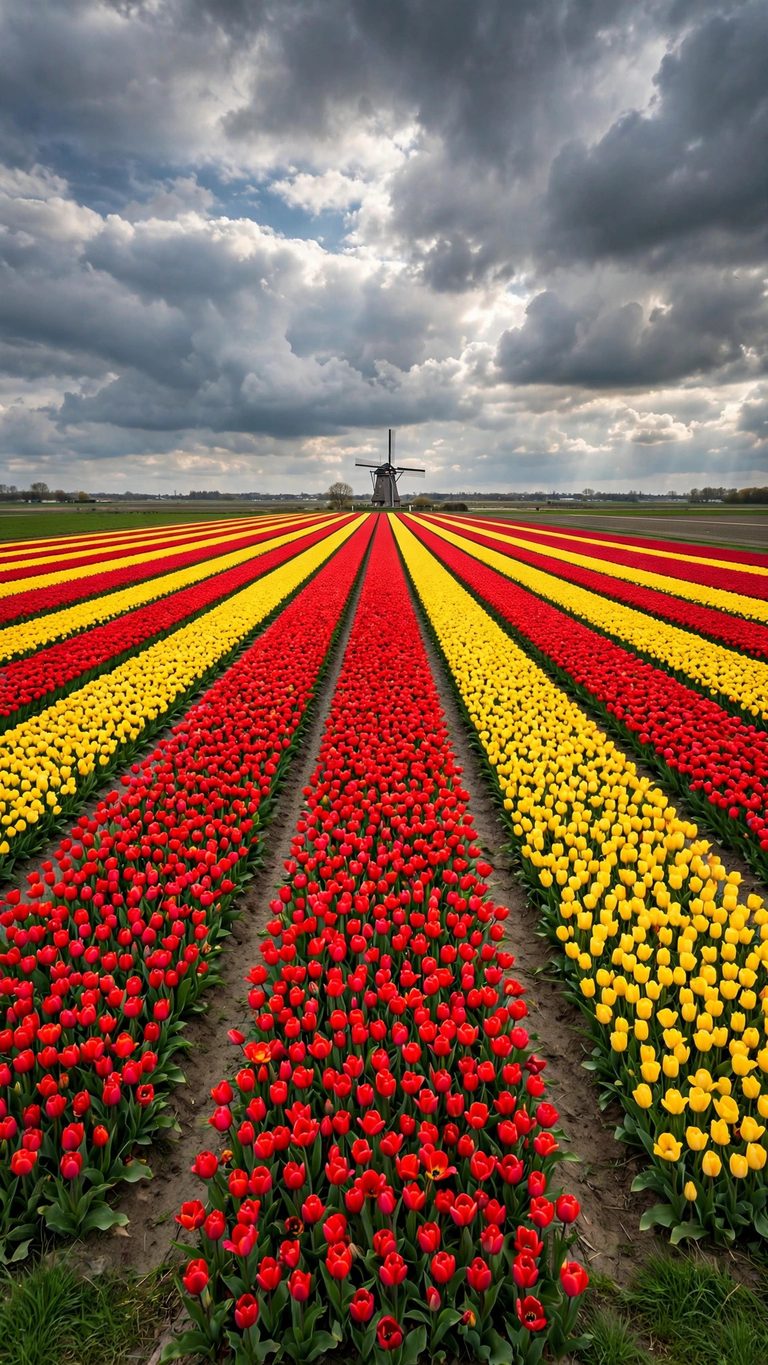
Some images feel less like photographs and more like optical illusions — rows of red and yellow tulips stretching to the horizon in perfect alternating stripes, converging like a road drawn by a compass. This is the power of geometric nature photography: the moment order and abundance collide. Tulip fields are already among the most photographed landscapes on earth, but turning them into a bold graphic pattern elevates the shot from postcard to art print. A lone windmill on the skyline, dramatic spring clouds above, and leading lines that pull your eye straight to the vanishing point complete a composition that looks like it was scouted for weeks.
Here is the secret: you do not need to fly to the Netherlands in April. This AI photo prompt compresses the location scout, the sunrise wake-up call, and the drone shot into a single paragraph of text. The result is a landscape image with the visual punch of professional stock photography — the kind of bold, colorful frame that stops thumbs, decorates calendars, and sells as wall art. Whether you are building a travel blog header, a spring campaign, or simply a gorgeous wallpaper, this prompt delivers geometric flower-field beauty on demand.
The Prompt
Here is the complete, copy-ready prompt. Paste it exactly as written into your AI image generator of choice:
Graphic photograph of endless tulip rows in alternating red and yellow stripes, perfect leading lines converging to the horizon, a lone windmill on the skyline, dramatic spring clouds above, bold geometric beauty, ultra detailed, 8k, professional landscape photography, photorealistic
Why This Prompt Works
This prompt works because it speaks the language of composition — and composition is what separates a snapshot from a professional landscape. The opening phrase, graphic photograph of endless tulip rows in alternating red and yellow stripes, does triple duty: it sets the subject (tulips), the treatment (graphic, meaning bold and high-contrast), and the pattern (alternating stripes, which creates rhythm). Rhythm is the engine of this image; without it, a flower field is just a colorful blur.
Next, perfect leading lines converging to the horizon hands the model the most important compositional technique in landscape photography. Leading lines give the eye a path to travel, creating depth from a flat image. Combined with a lone windmill on the skyline, the prompt adds a focal point and a sense of place — the windmill instantly says Netherlands without needing any text, and “lone” keeps the composition uncluttered.
Dramatic spring clouds above solves the sky problem. AI landscapes often default to boring blue skies; dramatic clouds add texture, contrast, and mood, making the bright field below feel even more vivid. Then bold geometric beauty acts as a style anchor, reminding the model that this is about pattern and structure, not soft romance.
The closing technical stack — “ultra detailed, 8k, professional landscape photography, photorealistic” — locks in realism and maximum detail. Notice the prompt never asks for anything physically impossible, which is why it succeeds so reliably: every element (stripes, lines, windmill, clouds) is something the model has seen thousands of times in training data. When a prompt asks only for real, well-documented things, the output quality skyrockets.
How to Use This Prompt
Generating this landscape is straightforward on every major platform. Here is the step-by-step for each.
Midjourney: Type /imagine and paste the full prompt. Because this is a wide landscape, use --ar 16:9 for a cinematic feel or --ar 3:2 for a classic photo ratio. Review the four variations and look for the one with the cleanest stripe pattern and the best-placed windmill. Upscale with U1–U4. Midjourney is excellent at tulip fields — its training data is rich with Dutch landscape photography, so the rows and sky will look authentic.
DALL-E 3 (via ChatGPT): Paste the prompt with an instruction such as: “Generate this as a wide photorealistic landscape, 16:9 aspect.” DALL-E 3 is particularly good at following the alternating red and yellow stripes instruction literally, keeping the pattern crisp. If the windmill lands in an odd spot, ask: “Regenerate with the windmill centered on the horizon.”
Flux: Paste the prompt as-is and choose a wide output size. Flux’s photorealism engine renders flower texture and cloud detail superbly. If your interface offers a guidance or CFG setting, keep it at the default or slightly raised so the stripe pattern stays disciplined.
One universal tip: the stripe alternation is the fragile part. If a generation shows muddled or random colors, regenerate rather than trying to fix it — the pattern either locks in correctly or it does not, and the next roll usually gets it right.
Pro Tips & Creative Variations
This prompt is a pattern machine — small edits produce dramatically different art. Here are the best ways to play with it.
Recolor the stripes. Swap “red and yellow” for “pink and white,” “purple and orange,” or “rainbow stripes” for pride-season or festival versions. Each color pair creates a totally different mood: pink-and-white feels soft and romantic, purple-and-orange feels electric.
Change the landmark. Replace the windmill with “a lone farmhouse,” “a hot air balloon on the horizon,” or “distant mountains” to relocate the scene anywhere in the world. The leading-line structure works with any horizon landmark.
Change the season and sky. Try “dramatic storm clouds” for a moody cinematic look, “sunset sky with sun rays” for golden warmth, or “morning mist between the rows” for soft mystery. The sky occupies half the frame, so sky edits transform the image more than any other change.
Add a human element. “A cyclist riding down the dirt path between the rows” or “a child running through the tulips” adds scale and story, turning a graphic landscape into an editorial lifestyle shot.
Fix common glitches. Watch for warped windmills (AI struggles with architecture) and melting flower rows near the horizon. If the windmill looks wrong, simplify to “a distant windmill silhouette” — silhouettes are far easier for models to render cleanly. If rows dissolve into mush at the vanishing point, add “sharp focus throughout, infinite depth of field.”
Sell the series. Tulip-field art prints sell well in spring. Generate the same composition in four colorways and list them as a matching set — the consistent structure makes them look like a professional collection.
Frequently Asked Questions
Q: Why do my tulip rows look messy instead of striped?
A: Messy rows usually mean the model lost the alternating instruction mid-generation. Keep the phrase alternating red and yellow stripes exactly as written, near the start of the prompt. If it still fails, simplify: rows of tulips in strict alternating red and yellow stripes. Regenerating two or three times almost always produces a clean pattern.
Q: Can I make a vertical version for phone wallpapers or stories?
A: Yes. In Midjourney add –ar 9:16; in DALL-E 3 ask for a vertical 9:16 image; in Flux choose a portrait output size. The leading lines still work vertically — they converge toward the top of the frame, which actually intensifies the depth effect. The windmill may need repositioning, so check the horizon placement.
Q: How do I avoid the windmill looking distorted?
A: Windmills are a known weak spot for AI architecture. Use the word silhouette to simplify what the model must draw, keep it small and distant (on the skyline), and avoid asking for visible blades in close detail. If one generation warps it, regenerate — architectural glitches are random and the next roll is often clean.
Q: Can this prompt work for other flowers?
A: Definitely. Replace tulips with lavender rows in purple stripes, sunflower fields, or cherry blossom orchards in rows and the entire geometric structure carries over. Lavender rows in particular are a classic of this genre and render beautifully with the same prompt skeleton.
Geometric flower fields are proof that nature, given a little structure, becomes graphic design — and this AI photo prompt hands you that structure for free. Copy it, generate your tulip stripes, and experiment with colors and skies. Your next gallery-worthy landscape is one paste away.
Related Viral Prompts
- Orchid Portrait AI Photo Prompt: Create Luxurious Botanical Studio Flower Photography With AI Generators
- Marigold Garland AI Photo Prompt: Capture Festive Cultural Craft Photography With AI Image Generators
- Wildflower Meadow AI Photo Prompt: Generate Breathtaking Golden Hour Landscape Art With AI Generators
# A I V i d e o # P r o m p t B a z a r # A I P h o t o # T u l i p # P a t t e r n

Leave a Reply