
Introduction
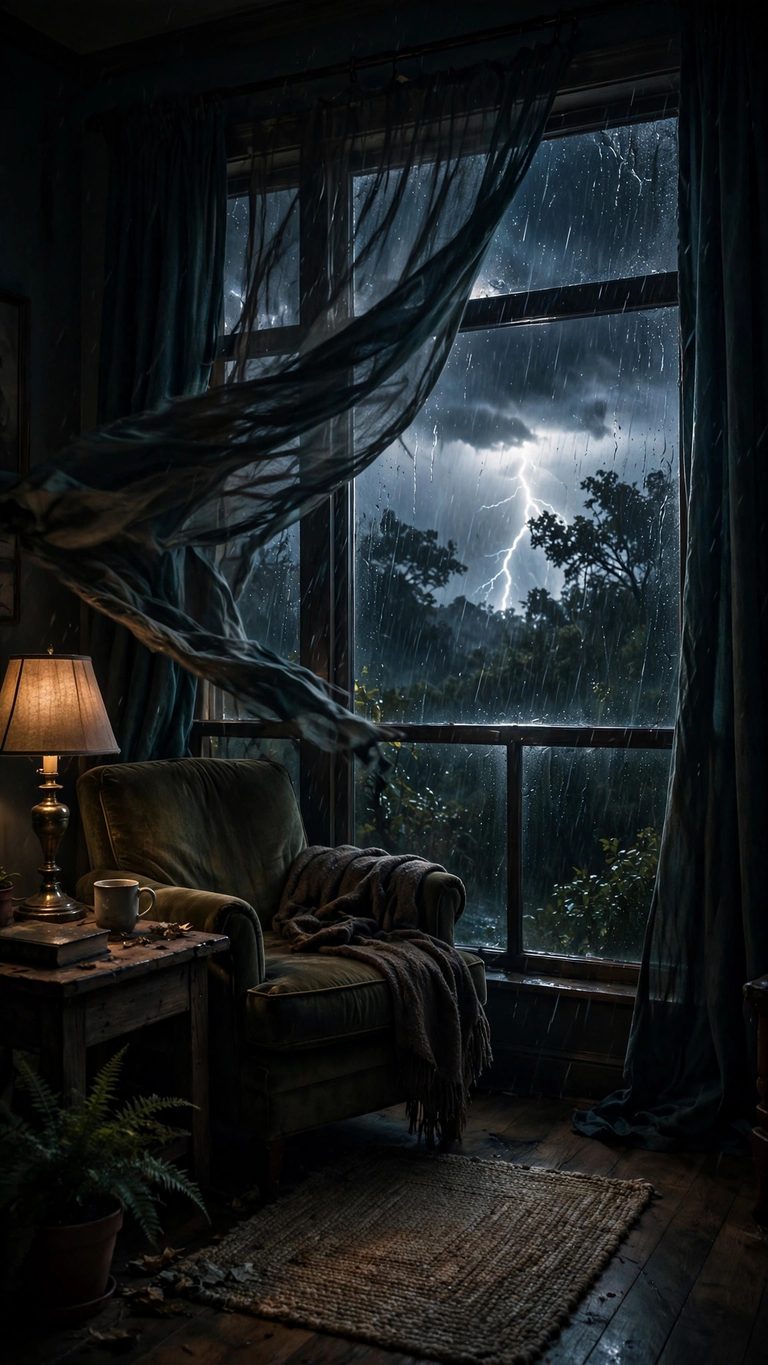
There is a particular kind of fear that only arrives at night, when the rain is hammering the glass and the power is holding on by a thread. You are warm inside, wrapped in a blanket, the television murmuring in the background — and then it comes: knock, knock, knock, on the window. Nobody knocks on a window. Not during a thunderstorm. Not at that hour. This is the exact moment this AI horror prompt freezes in time, and it is the reason it performs so well on Reels, Shorts, and TikTok. The scene opens inside a cozy room — soft lamplight, a curtain half-drawn, rain streaking down the dark windowpane. Then the knocking starts. The curtain stirs as if brushed by something cold. And in one violent flash of lightning, a silhouette is revealed standing outside in the storm, staring in. The video ends before you learn who — or what — it is. That unresolved beat is the entire engine of the clip: eight seconds of domestic safety collapsing into dread, engineered for replays, nervous comments, and tags of friends who should absolutely not watch this alone at midnight.
The Prompt
Copy the prompt below exactly as written and paste it into your AI video generator. It is tuned to deliver maximum suspense inside a single eight-second shot:
Suspenseful scene inside a cozy room during a thunderstorm, sudden knocking on the dark window, curtain moving, lightning flash revealing a silhouette outside, heart-pounding, cinematic horror, ultra realistic
Why This Prompt Works
This prompt is built on one of the oldest and most reliable engines in horror psychology: the violated safe space. A haunted graveyard is scary in the abstract, but your own living room is scary in the specific — because the viewer maps this room onto theirs. The “cozy room” in the prompt is doing heavy psychological lifting. Warm lamplight, a curtain, the sound of rain: the AI renders comfort first, so that the knocking lands as an intrusion rather than an ambience. Horror that follows you home always outperforms horror that stays in a spooky location, and the comment sections prove it — viewers write “this is literally my house during the storm” and tag the friend they watch horror with.
Then there is the knocking itself. A knock is not background noise; it is a demand. The human brain cannot hear an unexplained knock and simply move on — it must resolve who is there. That is an open loop, and open loops are the currency of short-form video. The prompt times the dread in three beats: the knock (attention), the curtain moving on its own (wrongness — curtains do not move without wind, and the window is closed), and the lightning flash revealing the silhouette (the payoff). The flash is doing the work of a jump scare without cheapening the moment, because the silhouette has no face. No face means the viewer’s imagination renders something worse than any model could generate. Every viewer scares themselves, personally, in high definition.
On platforms, this sits at the intersection of two proven niches: domestic POV horror and storm ambience. Thunderstorm sound videos already pull enormous passive traffic on TikTok and YouTube; this prompt hijacks that audience and gives them a story. Eight seconds is the sweet spot for the algorithm: short enough to loop, and every loop counts as additional watch time. The silhouette reveal reliably lands in the final two seconds, which means viewers rewatch to catch the frame they flinched past — and replays are the single strongest signal you can send to a recommendation engine. Shareability comes from the tag mechanic: this is a “send this to someone” video by design, and every share is free distribution.
How to Use This Prompt
Start by opening your AI video tool of choice — Veo 3, Runway Gen-4, Kling, Pika, or Sora all handle this scene well. Set the canvas to 9:16 vertical and the duration to 8 seconds. Paste the prompt exactly as written into the text field. If your tool supports negative prompts, add “cartoon, blurry, watermark, deformed hands” to keep the render clean and cinematic. Generate three to four takes; you are looking for the version where the silhouette reveal lands precisely on a lightning flash, with the curtain visibly stirring before the knock. Small differences in timing change the scare completely, so do not settle for the first render.
Next, handle sound — this is where the clip becomes genuinely frightening. AI video audio is improving, but a dedicated sound pass still wins. In CapCut or any editor, layer three elements: a low rain-and-thunder bed, a deep sub-bass rumble that swells under the knocking, and three sharp wood-on-glass knocks panned slightly to one side. Make the knocks slightly too loud. That subtle wrongness — a sound closer than it should be — is what makes viewers check their own windows. Export at 1080×1920. Post in the late evening, between 9 PM and 11 PM your audience’s local time: horror content performs best when the viewer is already in the dark, already half-scared, already scrolling. Pair it with a caption like “POV: it’s 2 AM and the storm won’t stop” and horror hashtags to seed discovery.
Pro Tips & Creative Variations
The difference between a good horror short and a viral one is almost always sound design, so treat audio as half the video. Try the silence trick: drop every sound to zero for half a second right before the lightning flash. That vacuum makes the thunderclap and the reveal hit twice as hard, because the viewer’s nervous system was bracing for the knock and got nothing instead. Another pro move is ordering the beats so the curtain moves a fraction of a second before the first knock — wrongness before the scare teaches the audience that something is already inside the logic of the room, and that is far more unsettling than a loud noise.
This prompt has genuine series potential, which is how you convert one viral clip into a following. Plan a three-part arc before you post part one. Part 2: “I opened the curtain” — the silhouette is closer. Part 3: “the knocking moved to the front door.” Each installment ends on a new open loop, and viewers who missed part one will binge your profile to catch up — profile visits are a powerful growth signal. You can also vary the silhouette itself for fresh uploads without rebuilding the concept: a tall, unnaturally thin figure; a small child standing perfectly still holding something unidentifiable; or the most disturbing option of all, a figure with an umbrella standing motionless while the storm rages around it. Stillness inside chaos reads as deeply inhuman.
For thumbnails and hooks, freeze the exact lightning-reveal frame and add minimal text: “WAIT FOR THE FLASH.” Do not show the silhouette clearly in the thumbnail — the curiosity gap is the click. Seasonal timing is free leverage: post storm-knock videos during monsoon or hurricane season in your region and mention the weather in your caption; relevance plus dread is a potent combination. Finally, build duet bait into your posting strategy. A caption like “stitch this with your reaction — I dare you” turns your audience into co-creators, and every stitch is a new video carrying your original clip to a new audience. Horror is a communal genre; the viewers who scream together, follow together.
Frequently Asked Questions
Q: Will free tools like Pika handle the lightning reveal, or do I need Veo 3?
A: Free and mid-tier tools can absolutely produce this clip, but expect to generate more takes. The critical frame is the silhouette revealed in the lightning flash, and cheaper models sometimes render the flash and the figure a beat apart, which deflates the scare. Generate four to six variations and pick the one with the tightest timing. If the flash misfires, you can cheat in editing: cut to a white frame for two frames at the thunderclap and overlay a darkened silhouette PNG. The audience will never know.
Q: How do I add realistic knocking and thunder sounds?
A: Record your own knocks on a real window with your phone — nothing beats the actual acoustic of glass — or pull royalty-free knocks and storm beds from Pixabay, Freesound, or the YouTube audio library. In CapCut, place the knocks on a separate track so you can push their volume slightly above the rain bed. Add a low rumble underneath that swells for two seconds before the first knock; the swell is what makes viewers’ chests tighten before anything visible happens.
Q: Why is late evening the best posting time for horror?
A: Horror is a context-dependent genre. The same clip watched at noon on a bright commute gets a shrug; watched at 10:30 PM in a dark bedroom with headphones, it gets a scream, a replay, and a share. Late-evening posting aligns your content with the viewer’s most suggestible state. Analytics across horror creators consistently show higher completion rates, saves, and shares for uploads between 9 PM and midnight local time.
Q: Is this prompt safe for monetization, or will it get flagged?
A: This is one of the safest horror formats for monetization because the fear is entirely suggestive — there is no gore, no weapon, no injury, and the “monster” is an unidentifiable silhouette. Suggestive dread is advertiser-friendly; graphic content is not. Keep your caption free of violent language, avoid fake “real footage” claims that could trip misinformation flags, and you should stay firmly in monetizable territory on all major platforms.
This prompt works because it understands that the scariest place in any horror story is the room you are sitting in right now. Copy it, generate your takes, nail the sound design, and post it late tonight — then watch your comments fill with people who swear they just heard knocking too. Try it once, and you will never look at a rainy window the same way again.
Related Viral Prompts
- Whispers in a Pitch-Dark Forest: Viral AI Horror POV Video Prompt for a Chilling Found-Footage Short (Free)
- Flickering Elevator Lights and a Mirror Extra Person: Viral AI Horror Video Prompt for a Jump-Scare Short (Free)
- Old Family Photo Faces Changing: Viral AI Horror Video Prompt for a Subtle Supernatural Chiller (Free)
# A I V i d e o # P r o m p t B a z a r # S t o r m # S u s p e n s e # H o r r o r


Leave a Reply