
Introduction
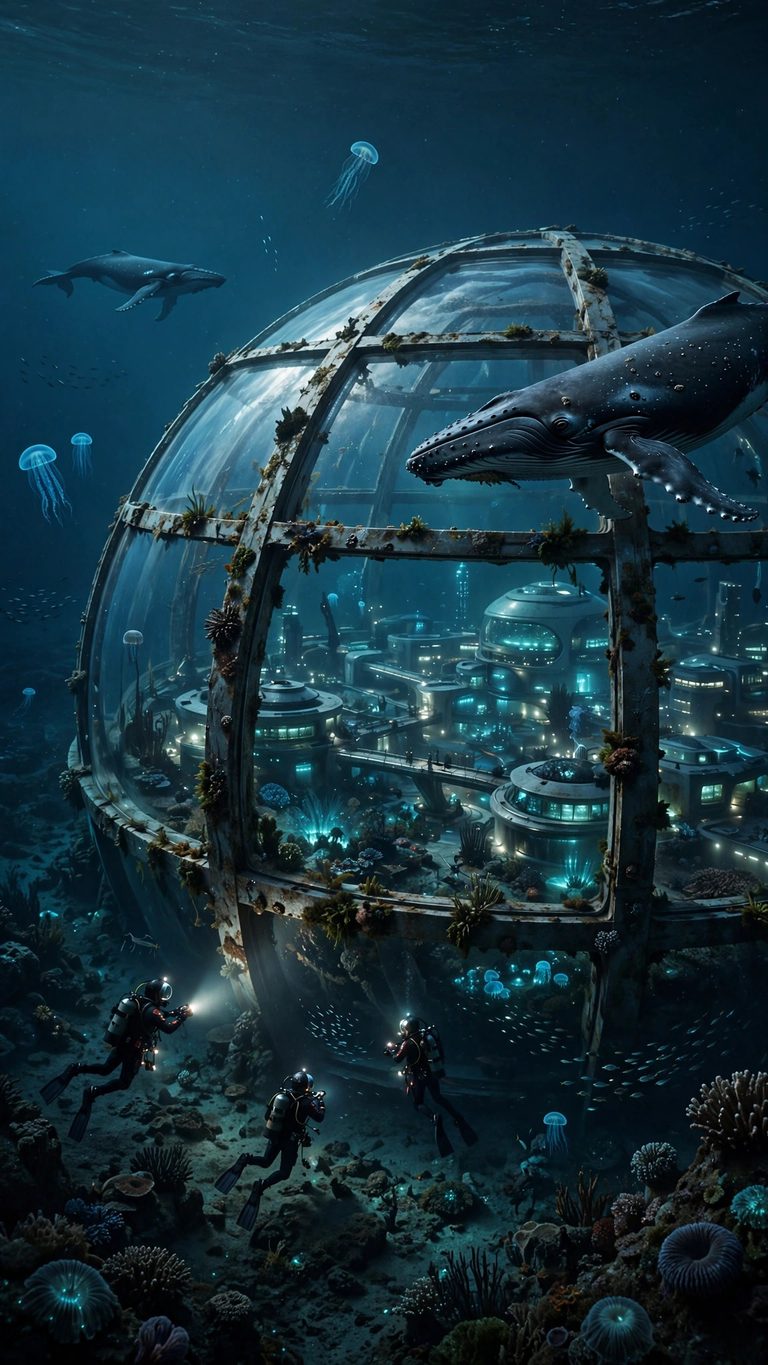
Imagine sinking two thousand meters beneath the ocean surface, where sunlight has never reached, and finding a city glowing like a lantern in the dark. A colossal glass dome rises from the seabed, its streets bathed in cyan and violet bioluminescent light, while humpback whales glide silently past the curved glass like slow-moving clouds. Tiny divers with glowing suits drift between coral spires, exploring a world that should not exist — yet there it is, rendered in breathtaking cinematic detail. That single impossible image is exactly why AI video creators are obsessed with underwater sci-fi scenes right now.
The underwater city concept sits at the perfect intersection of two of the internet’s most powerful visual appetites: the deep ocean, which remains genuinely mysterious to most viewers, and futuristic world-building, which invites endless imagination. Short-form platforms are flooded with fantasy architecture, alien landscapes, and “lost civilization” reveals, and a glowing dome city on the ocean floor delivers all of that in one eight-to-ten-second shot. It feels expensive, like a frame pulled from a two-hundred-million-dollar film, yet it costs nothing to generate. For creators chasing viral reach, this prompt is a shortcut to the kind of spectacle that stops thumbs mid-scroll and triggers the comment every creator dreams of: “Wait, this is AI?”
The Prompt
Copy the prompt below exactly as written — every word, every comma — and paste it into your AI video generator of choice. The exact wording has been tuned for strong composition and consistent results:
Stunning sci-fi scene of a glowing underwater city inside a giant glass dome on the ocean floor, whales swimming past the dome, bioluminescent lights, divers exploring, cinematic, ultra realistic
Why This Prompt Works
This prompt succeeds because it stacks multiple layers of visual psychology into a single frame. First, there is the contrast of scale: a giant glass dome, impossibly large, set against the infinite darkness of the deep ocean. The human brain is wired to pay attention to scale violations — things that are bigger or stranger than they should be — and that instant of “how is that possible?” is what halts a scroll. Second, the color palette does heavy lifting. Bioluminescent cyan, teal, and violet are the exact hues that perform best on phone screens; they glow against dark backgrounds, they read clearly even at small sizes, and they trigger associations with nature documentaries, which viewers already trust as beautiful.
Third, the whales are an emotional masterstroke. Whales are among the most universally loved animals on the planet, and placing them as silent observers outside the dome creates a story in a single image: the city is the intruder, the ocean is the ancient world watching it. Viewers do not just see a pretty scene; they feel something. Divers exploring add the final ingredient — human scale. Without the divers, the dome could be any size; with them, the audience instantly understands the staggering scale and feels the wonder of exploration themselves.
On Reels, TikTok, and YouTube Shorts, this maps directly onto proven trends. “Impossible architecture” and “hidden world” reveals routinely pull millions of views because they exploit the curiosity gap — the viewer must watch to the end to fully absorb the scene, which boosts watch time and completion rate, the two metrics algorithms reward most. The prompt’s keywords, “cinematic” and “ultra realistic,” push generators toward film-grade lighting and texture, which is critical because viewers share content that looks expensive. A video that looks like a movie trailer gets forwarded to group chats; a video that looks like a video game gets scrolled past. Shareability here comes from awe plus disbelief: people send it to friends specifically to ask, “Is this real?” and every one of those shares is free distribution for the creator.
How to Use This Prompt
Follow these steps to turn the prompt into a finished vertical video:
- Copy the prompt exactly. Paste the full text into the prompt box of your chosen generator. Do not rephrase it — the adjective order and keywords were selected for reliable composition.
- Pick your tool. Google Veo 3 (via the Gemini app or Flow) handles cinematic realism and water physics beautifully. Runway’s Gen-4 model is excellent for controlled camera movement. Kling 2.x is a strong free-tier option for realistic motion, Pika 2.x is fast for quick iterations, and Sora produces gorgeous atmospheric detail.
- Set vertical format. Use a 9:16 aspect ratio at 1080×1920 so the video fills the phone screen on Reels, TikTok, and Shorts. Most tools default to 16:9 — change this before generating.
- Set the duration. The source settings call for 10 seconds, which is the sweet spot for this scene: long enough for a slow camera push toward the dome, short enough to loop cleanly. In Veo 3 or Kling, select the 10-second output option; in Runway, generate 10 seconds directly.
- Add camera direction (optional but recommended). Append a short camera instruction such as “slow dolly forward toward the dome” or “gentle aerial orbit around the dome” to give the shot cinematic motion instead of a static frame.
- Generate two to three variations. Run the prompt at least twice with different seeds. Pick the version with the cleanest dome geometry and the most natural whale motion — AI sometimes warps large curved glass, so compare before choosing.
- Finish and post. Add subtle deep-sea ambience or an epic orchestral sting, burn in a short caption, and post with hashtags like #AIVideo #Underwater #SciFi #Fantasy. Post during evening hours in your audience’s timezone for maximum initial reach.
Pro Tips & Creative Variations
Once you have the base scene working, this prompt becomes a launchpad for an entire series — and series are what build followers. Try a time-of-day variation: add “at dawn, faint sunlight filtering through the water above” for a hopeful tone, or “during a deep-sea storm, lightning flashing above the surface” for drama. Swap the whales for a giant manta ray or a pod of dolphins to change the emotional register, or add “a submarine approaching with headlights on” to introduce narrative tension.
For a completely different shot, flip the perspective: prompt “inside the dome, looking up through the glass at whales swimming overhead, futuristic streets below” — interior views perform exceptionally well as follow-up videos because they answer the question the first video raised. You can also experiment with era mashups: “ancient Atlantean ruins fused with the glowing dome city” taps the lost-civilization trend, while “dome city under construction, cranes and welding sparks underwater” gives you a satisfying before-and-after pair to post as a two-part series.
On the technical side, if your generator supports negative prompts, add “blurry, distorted glass, warped geometry, extra limbs” to clean up common artifacts. Boost the “bioluminescent” lighting by adding “volumetric god rays, glowing particles in the water” for extra depth. Color grade toward teal and orange in your editor — that blockbuster palette makes the thumbnail pop. For sound, layer whale song under a slow synth pad; audio is half the immersion in underwater scenes. Finally, consider a looping version: ask for “seamless loop, whales circling the dome continuously” and post it as a calming ambient video — loop-friendly content gets rewatched, and rewatches supercharge the algorithm.
Frequently Asked Questions
Do I need a paid AI video tool to use this prompt?
No. The prompt works on free tiers too — Kling and Pika both offer free generations, and Veo 3 is accessible through trial credits in many regions. Paid plans mainly buy you higher resolution, longer durations, and faster queues, but the composition and concept shine through even on free outputs. Start free, and upgrade only when a video takes off and you want a 4K remaster.
Why does my glass dome look warped or melted?
Large curved transparent surfaces are one of the hardest things for video models to render. Fix it by generating multiple seeds and picking the cleanest, adding “perfect glass geometry” to the prompt, or using an image-to-video workflow: generate a still of the dome first, then animate it. Shorter 5-second generations also warp less than longer ones.
Can I extend this into a longer video?
Yes. Generate the establishing shot (the dome from outside), then generate interior shots and a whale close-up as separate clips, and stitch them in CapCut or Premiere. Three 10-second clips edited with a slow zoom transition give you a 30-second mini-film that feels like a trailer — trailer-style edits are among the highest-performing AI video formats.
Will a video like this actually get views?
Impossible-architecture and deep-sea fantasy are evergreen viral categories, but execution matters: clean geometry, good music, and a hook caption in the first second (“A city at the bottom of the ocean…”) make the difference. Post consistently — creators who publish a themed series (five underwater world videos) almost always outperform one-off posters.
In the end, the underwater city prompt works because it sells a dream everyone secretly shares: that wonders are still hiding in the dark places of the world. Copy the prompt, generate your dome, add whale song and a slow push-in, and post it tonight — your audience is waiting to be amazed. Try it free and watch the comments roll in.
Related Viral Prompts
- AI Robot Waking Up Video Prompt: Free Viral Cinematic AI Video Prompt for Veo 3, Runway & Sora — Complete Guide
- Spaceship Landing AI Video Prompt: Free Viral Epic Sci-Fi Scene Over a Bengal Village (Veo 3 & Sora) — Full Guide
- Hologram Concert AI Video Prompt: Free Viral Futuristic Stage Scene for Veo 3, Runway, Pika & Sora — Guide
# A I V i d e o # P r o m p t B a z a r # U n d e r w a t e r # C i t y # F a n t a s y

Leave a Reply