
Introduction
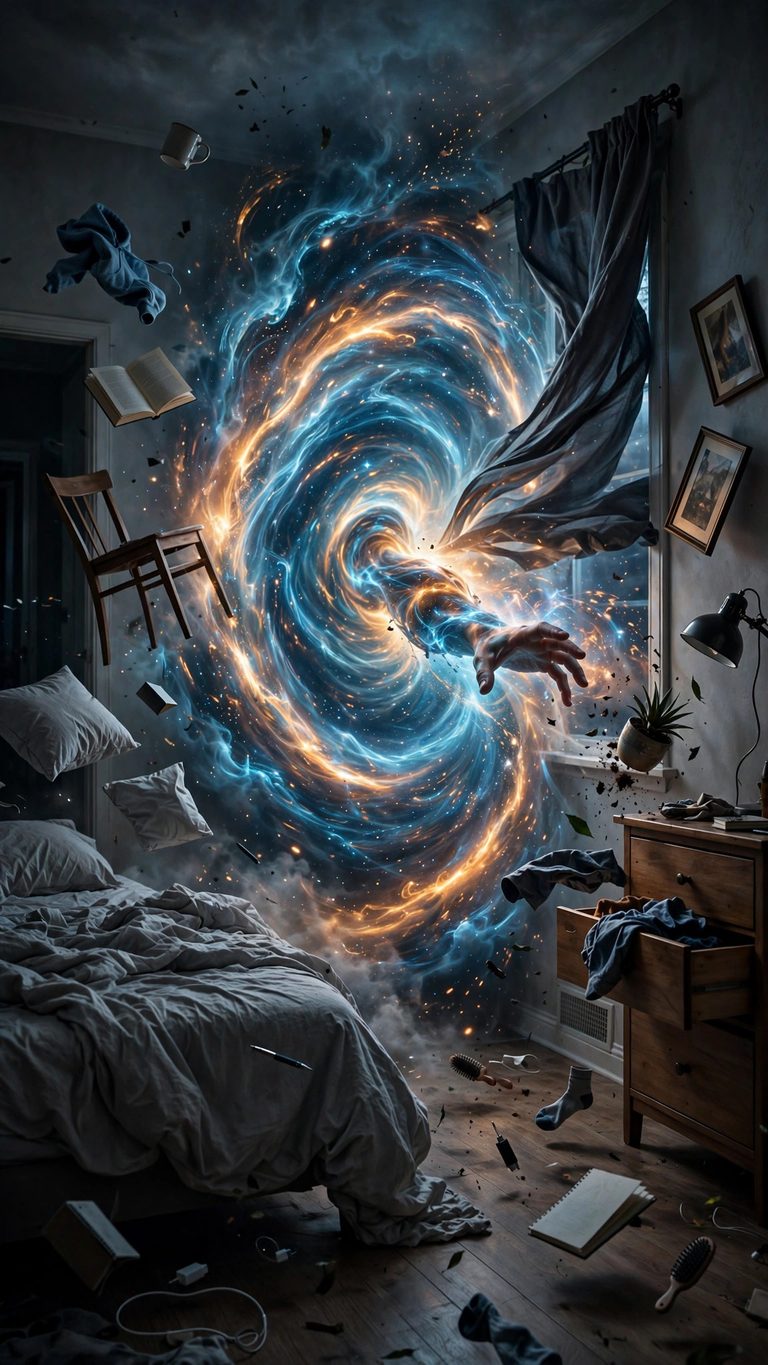
The most viral sci-fi videos share one secret: they drop the impossible into the ordinary. A glowing, swirling time portal opening in the middle of an everyday bedroom takes a space every viewer recognizes — their own room — and tears a hole in reality right through it. Furniture floating toward the vortex, light bending around the edges, a hand reaching through from the other side: this is pure sci-fi thriller fuel, and AI video creators love it because the contrast between mundane and mind-bending is an instant attention magnet.
Portal content has a proven viral track record, from Doctor Strange-style effects to the endless “what would you do” trend videos. The bedroom setting makes it personal in a way that alien planets never can — viewers immediately imagine the portal opening in their own room, and that self-insertion drives comments, stitches, and duets. At 8 seconds, the clip is a perfect loop of escalating weirdness: the longer you watch, the stranger it gets, and the stranger it gets, the harder it is to look away.
The Prompt
Copy the prompt below exactly as written and paste it into your favorite AI video generator. The power is in the specific thriller details — the floating furniture, the bending light, and the mysterious hand:
Mind-bending scene of a glowing swirling time portal opening in the middle of an ordinary bedroom, furniture floating toward it, light bending, a hand reaching through, sci-fi thriller style, ultra realistic
Why This Prompt Works
This prompt works because it weaponizes the familiar. Psychologists call it the “uncanny disruption” effect: when something impossible invades a normal setting, the brain cannot file it away and keeps replaying it to make sense of it. A bedroom is the most familiar room in anyone’s life, so a portal tearing open inside one creates maximum cognitive dissonance — and dissonance means replays. Every replay boosts the completion rate and loop count that TikTok, Reels, and Shorts algorithms reward most.
The scene is also built as a sequence of escalating reveals: first the glowing portal, then furniture lifting off the floor, then light itself bending, and finally the hand reaching through. Escalation is the engine of retention — each new impossible detail arrives just as the viewer thinks they have seen it all. The hand is the masterstroke: it introduces a character and a question (whose hand? what is on the other side?) that viewers cannot resist discussing in the comments. Portal and time-travel content also plugs directly into massive existing fandoms and trend formats — “POV” videos, “choose your portal” challenges, and story-time stitches — giving your clip built-in collaboration potential and discoverability far beyond its own hashtags.
How to Use This Prompt
- Veo 3: Paste the prompt, set aspect ratio to 9:16, and generate an 8-second clip. The thriller pacing works best with the portal already active in frame one — no slow buildup needed.
- Runway: Use text-to-video in 9:16 vertical with an 8-second duration. A subtle camera shake or slow push toward the portal amplifies the tension and urgency.
- Kling: Paste the prompt, select 9:16 portrait mode, and generate at 8 seconds. Kling handles the floating furniture physics well — check that objects drift toward the portal rather than randomly.
- Pika: Enter the prompt in text-to-video, choose vertical 9:16, and aim for 8 seconds. Keep the camera mostly static so the portal’s swirling motion dominates the frame.
- Sora: Paste the prompt as-is with vertical 9:16 framing and an 8-second duration. Sora’s light-bending and glow effects will make the portal feel genuinely three-dimensional.
- Finish and post: Add a rising tension sound — deep rumble with a high shimmer — export at 1080×1920, and post with time travel, portal, and sci-fi thriller hashtags. A caption like “POV: you wake up to this” multiplies engagement.
Pro Tips & Creative Variations
The portal concept is endlessly remixable. Change the location for fresh videos with the same viral DNA: a portal in a school hallway, in a grocery store aisle, in a car backseat, under a bed. Each mundane setting creates the same delicious contrast. Change what comes through the portal: a hand reaching out, a robot stepping through, a dinosaur eye peering in, or your own past self. “What’s on the other side” is a content series with infinite episodes, and you can let commenters vote on the next reveal — audience participation is rocket fuel for the algorithm.
For maximum impact, structure multi-part stories: Part 1 ends with the hand reaching through (cliffhanger), Part 2 shows what emerges, Part 3 reveals where the portal leads. Multi-part series are among the highest-follower-conversion formats on TikTok because viewers follow to avoid missing the next installment. Sound design is critical for thriller content — a deep bass swell, crackling energy, and sudden silence before the hand appears will give viewers genuine chills. You can also flip the perspective: generate the scene from inside the portal looking out at the bedroom for a sequel that recontextualizes the original. Finally, try the “duet bait” format — leave the right side of the frame relatively calm so other creators can duet with their reaction, turning your video into a collaboration magnet.
Frequently Asked Questions
Which AI video generator creates the most convincing portal effects?
Sora and Veo 3 currently produce the most convincing glowing, volumetric portal effects with realistic light interaction. Runway gives you the best camera control for thriller-style movement. If the portal looks flat in one tool, try another — glow and distortion rendering varies significantly between models.
What aspect ratio and length should I use?
Generate in 9:16 vertical for TikTok, Reels, and Shorts. The source settings specify an 8-second sci-fi thriller clip — short enough to loop seamlessly, long enough for the escalating reveals (portal, floating furniture, bending light, the hand) to land in sequence.
How do I turn this into a multi-part series?
End part one on the cliffhanger (the hand reaching through) and tease part two in the caption and comments. Keep the bedroom and portal visually consistent across parts by reusing the same prompt with small additions describing what emerges. Post parts 12 to 24 hours apart to build anticipation.
Will viewers think this is real footage?
Some might at first glance, which is why many creators add “AI” to their captions or hashtags. Transparency builds trust and helps discovery, since audiences actively seek out AI-generated sci-fi content. The goal is to amaze, not to deceive.
A time portal in an ordinary bedroom is the ultimate scroll-stopper: familiar meets impossible in eight heart-pounding seconds. Copy the prompt, generate your clip in 9:16 vertical, and dare your viewers to look away. Then ask them what should come through the portal next — and watch your comments explode.
Related Viral Prompts
- Dhaka 2050 With Flying Cars Over Neon Skyscrapers: Free Viral Cyberpunk AI Video Prompt for Reels & Shorts
- Underwater City AI Video Prompt: Create a Viral Glowing Sci-Fi Dome Scene Free (Veo 3 & Kling) Guide
- AI Robot Waking Up Video Prompt: Free Viral Cinematic AI Video Prompt for Veo 3, Runway & Sora — Complete Guide
# A I V i d e o # P r o m p t B a z a r # T i m e T r a v e l # P o r t a l # S c i F i



Leave a Reply