
Introduction
There is a reason bike entry videos never stop going viral on Instagram Reels and YouTube Shorts. A powerful sports bike, a slow motion hero walk, golden hour light, and a romantic twist at the end is a combination that stops every thumb mid-scroll. The Yamaha R1M is one of the most loved superbikes in India, and when you pair its aggressive racing look with a cinematic romantic entry, you get a clip that feels straight out of a South Indian action film. The best part is that you no longer need a real superbike, a camera crew, or a film set to create it. With one detailed AI video prompt, tools like Google Veo, Flow, Kling, or Runway can generate this entire scene for you in under a minute.
This article gives you a complete, copy-paste Yamaha R1M bike romantic entry video AI prompt that is written for ultra realistic results. It covers the rider, the bike, the road, the camera movement, the lighting, and the romantic ending beat by beat, so the AI has no room to guess. Whether you create bike content, couple content, or cinematic Reels, this prompt will help you produce a clip that looks expensive, emotional, and highly shareable.
The Prompt
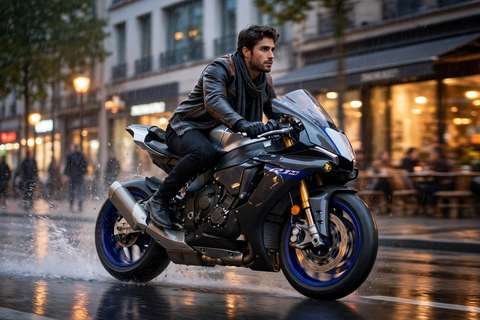
Create an ultra realistic cinematic vertical video, 9:16 aspect ratio, 8 seconds long. Scene: a stylish young Indian man in a black leather jacket, dark jeans, and black riding gloves makes a heroic entry on a blue and black Yamaha R1M superbike on a wide city road at golden hour. The bike's LED headlights are on, the engine sound is deep and powerful, and dust and golden sunlight swirl in the air as the bike approaches in slow motion. Camera: low angle tracking shot following the bike from the side, then a smooth switch to a front three-quarter view as the rider slows down and stops. The rider removes his black helmet in slow motion, revealing a confident smile, and looks toward a beautiful young woman in a red dress standing at the roadside, who smiles back shyly. Background: modern city buildings, palm trees, warm orange sunset sky, light traffic blur, cinematic depth of field. Style: ultra realistic, movie quality, sharp details on the bike's fairing, mirrors, and tyres, natural skin tones, film grain, dramatic golden hour lighting, smooth slow motion at key moments, no text, no watermark, no distorted faces or hands, no extra wheels.
Why This Prompt Works
This prompt works because it gives the AI video model everything it needs in the exact order it processes a scene: subject first, then action, then camera, then environment, then style. Instead of a vague instruction like “make a bike video,” it names the exact bike model, the rider’s outfit, the time of day, and the emotional beat of the ending. AI video tools perform dramatically better when the prompt describes one clear story in one shot, and this prompt does exactly that: a hero arrives, stops, removes his helmet, and locks eyes with the girl. That mini story is what makes viewers watch till the last second, which is the single biggest signal for Reels and Shorts algorithms.
The second reason is the camera direction. Low angle tracking shots make the bike look powerful and expensive, while the switch to a front three-quarter view gives the model a clear moment to render the rider’s face properly. Slow motion is mentioned at two specific moments, the approach and the helmet removal, which are the two moments viewers replay and share. Golden hour lighting is also a deliberate choice: warm sunset light hides small AI imperfections, adds natural contrast, and instantly makes any clip look cinematic without extra editing.
Finally, the negative instructions at the end protect the result. AI video models commonly distort hands, faces, and wheels, especially in fast motion scenes. By explicitly asking for no distorted faces, no extra wheels, no text, and no watermark, you push the model away from its most common failures. The result is a clip that looks like it was shot on a real camera with a real superbike, which is exactly why this style of video earns millions of views.
How to Use This Prompt
Using this prompt is simple, and you can do it entirely on your phone. First, open your AI video tool of choice. Google Veo 3 or Flow gives the most realistic motion, Kling is excellent for smooth slow motion, and Runway Gen-4 handles cinematic lighting very well. Paste the full prompt exactly as written into the text box. Set the aspect ratio to 9:16 vertical, because this clip is designed for Reels and Shorts, and set the duration to 8 seconds if your tool allows it. If your tool supports image-to-video, you can also upload a photo of a Yamaha R1M first and then paste this prompt to lock the bike design.
After the first generation, watch the clip twice before posting. Check the bike’s wheels, the rider’s hands on the handlebar, and the face reveal moment. If anything looks off, regenerate with the same prompt rather than rewriting it, because video models produce a different result every time. Most creators get a post-ready clip within two or three tries. Once you are happy, add a trending romantic or mass background song, keep the original bike engine feel low in the mix if your tool generates audio, and add a short hook caption like “Her reaction at the end” to boost watch time.
Pro Tips for Best Results
- Keep the rider’s outfit simple and dark. Black leather reads clearly in golden hour light and stops the AI from inventing strange patterns or colours.
- Ask for 8 seconds, not longer. Short clips render with fewer errors, and 8 seconds is the sweet spot for Reels retention.
- If the face reveal looks distorted, generate the clip again and keep the helmet removal in slow motion. Slow motion gives the model more frames to render the face correctly.
- Use the same prompt for a series. Change only the bike colour or the city background, and you can build a full “hero entry” series that your audience starts recognising.
- Post between 7 PM and 10 PM, when bike and romance content gets the highest engagement in India, and reply to early comments quickly to push the Reel further.
Frequently Asked Questions
Which AI tool is best for this Yamaha R1M bike video prompt?
Google Veo 3 and Flow give the most realistic bike motion and lighting at the moment, while Kling is a strong free alternative for smooth slow motion. All three handle this prompt well, so use whichever tool you already have access to.
Can I change the bike model in this prompt?
Yes. Replace “Yamaha R1M” with any superbike you like, such as a Kawasaki Ninja ZX-10R or a BMW S1000RR, and keep the rest of the prompt unchanged. The camera and story structure work for any sports bike.
Why does my video sometimes show a distorted bike wheel?
Fast spinning wheels are one of the hardest things for AI video models. Keeping the approach in slow motion and the final stop moment steady reduces this problem a lot. If a wheel still looks wrong, regenerate the clip rather than trying to fix it in editing.
Is this prompt free to use for my Reels and YouTube Shorts?
Yes. You can use this prompt freely for your own videos, including monetised content. Just make sure the video tool you use allows commercial use under its own terms.
One powerful bike, one slow motion entry, and one look that says everything. Copy the prompt above, generate your hero entry today, and watch your audience fall in love with the clip before the bike even stops.
Related Viral Prompts
- Bike Stunt Wheelie Video AI Prompt: Create a Thrilling — a high speed stunt clip for action lovers.
- Couple Bike Ride Monsoon Video AI Prompt: Create a Romantic — a soft romantic bike ride through monsoon rain.
- Secret Love Eye Contact Video AI Prompt: Create a Romantic — a silent romance told entirely through glances.
#YamahaR1M #BikeEntry #ActionRomance #AIVideoPrompt #ViralReels #PromptBazar


Leave a Reply