
Introduction
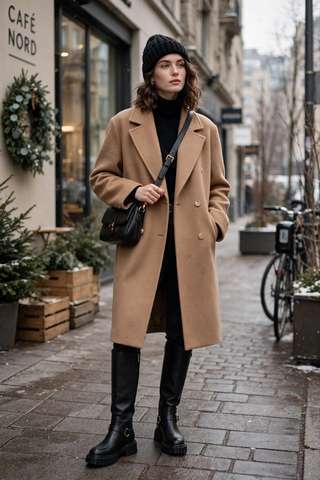
A stylish winter fashion lookbook photo is one of the most searched styles right now, and the right prompt makes all the difference. A vague prompt gives you a random picture, but a detailed prompt gives you exactly the a stylish winter fashion lookbook photo you imagined, with the right mood, light and setting.
In this post you will get a ready-to-copy prompt for a stylish winter fashion lookbook photo, built around a chic city street in winter with soft light and a fashionable outfit. Just copy it, paste it into your favourite AI tool, upload your photo if needed, and generate. Below the prompt you will also find why it works, step-by-step instructions, pro tips and answers to the most common questions, so even your first try looks professional.
The Prompt
Copy the complete prompt below and paste it into your AI tool:
Create a stylish winter fashion lookbook photo of me walking down a chic city street in winter, wearing a long camel wool coat, ankle boots, a knitted scarf and leather gloves, with confident editorial poise. Keep my face, hairstyle and skin tone exactly the same as in my uploaded photo. The background shows elegant shop windows, soft winter light and a few falling snowflakes, with a clean, high-fashion mood. Use natural skin texture, detailed wool and leather fabric and a cinematic editorial colour grade. Make the image vertical 9:16, sharp and polished, perfect for fashion posts, lookbook feeds and style inspiration.
Why This Prompt Works
Winter fashion lookbook photos work because fashion content drives saves, and winter outfits photograph beautifully with coats, boots and scarves. The editorial city-street setting makes the photo look like a professional shoot, and lookbook posts are shared by fashion pages and style communities. Winter fashion searches also peak from November to January.
The secret is specificity. Instead of asking for a generic picture, this prompt describes the subject, the setting, the lighting, the colours and the mood. AI tools follow detailed instructions far better than vague ones, so every extra detail you include moves the result closer to what you imagined. The face-preservation line is equally important: it tells the model to keep your real features instead of inventing a new face, which is the difference between a photo that looks like you and one that does not.
This prompt also works across tools, because it is written in plain, visual language rather than tool-specific jargon. In Gemini or ChatGPT image tools, paste it with your uploaded photo and the model will treat the photo as the identity reference. In video tools like Flow, Veo, Kling or Seedance, the same description becomes the shot: one subject, one setting, one light source and one mood, which is exactly how video models produce their cleanest clips. If your first result is not perfect, change one element at a time, the colour, the background or the pose, and regenerate. Changing everything at once makes it impossible to tell which change helped, while single changes let you steer the result precisely toward your vision.
Common Mistakes to Avoid
- Using a blurry or side-angle photo: the AI has too little facial information and invents features. Always upload a sharp, front-facing photo in good light.
- Deleting the face-preservation line: without it, the model is free to redesign your face, and the result will look like a stranger.
- Overloading the prompt: ten outfits, three locations and five moods in one prompt confuse the model. One clear scene always beats a long wish list.
- Ignoring the aspect ratio: a square image cropped for stories loses the composition. Ask for 9:16 for reels and stories, and 1:1 for profile pictures.
- Posting the first result without checking hands and details: always zoom in on hands, jewellery and text in the image before posting, and regenerate if anything looks off.
Variations to Try
- Change the colour palette: swap the main colour for another, for example maroon to emerald, and you get a fresh version of the same idea.
- Change the setting: keep the subject and outfit, but move the scene, from a beach to a city street, or from day to golden hour.
- Change the mood: the same prompt can feel romantic, playful or dramatic depending on the lighting words you choose.
- Make a series: generate three versions with small changes and post them as a carousel, which consistently earns more saves than a single image.
How to Use This Prompt
- Copy the full prompt from the box below.
- Open your AI tool, such as Gemini, ChatGPT, Flow or Veo.
- Upload a clear photo if the prompt asks for one, with good light and a front-facing angle.
- Paste the prompt exactly as written, without changing the face-preservation line.
- Generate, and if needed, run it once more and pick the best version.
- Download, crop if needed, and post it on Instagram, WhatsApp or YouTube.
Pro Tips
- Pick one statement coat colour, camel, black or burgundy photograph best.
- Add boots, scarf and gloves together for a complete winter look.
- Use a walking pose for a natural editorial feel.
- Keep the background clean, shop windows and soft light, not crowds.
- Generate three outfit colours in the same setting for a mini lookbook series.
Frequently Asked Questions
Can I make a full winter lookbook with AI?
Yes, generate the same setting with three different coats and you have a mini lookbook series.
What coat colours photograph best in winter?
Camel, black, burgundy and forest green look premium against winter light.
Will my face stay the same in a fashion photo?
With a clear photo and the face-preservation line, yes.
Is lookbook content good for fashion pages?
Absolutely, lookbook photos are among the most saved fashion posts.
Try this prompt today and share your result. Small changes, like swapping a colour or a background, can give you a completely fresh version, so experiment and make it your own.
Related Viral Prompts
- AI Portrait Winter Glow AI Photo Prompt
- Winter Wedding Guest Look AI Photo Prompt
- 80s AI Trend Video AI Prompt
#WinterFashion #Lookbook #AIPhotoPrompt #WinterStyle #FashionInspo


[…] Winter Fashion Lookbook AI Photo Prompt […]