
Introduction
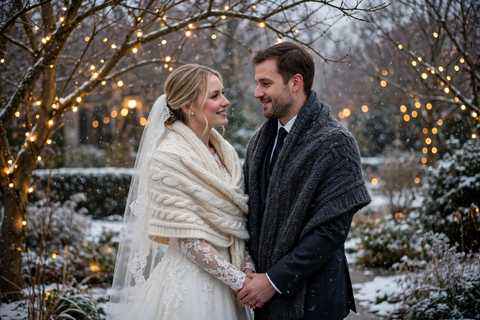
A winter wedding is a different kind of romance. There are no sweating guests and no harsh sun — instead there is snow on the roses, fairy lights in the bare trees, and a bride and groom wrapped in warm shawls, laughing at the cold together. It is intimate, cinematic and unforgettable, and it photographs like a fairytale.
This prompt is made for couples planning a winter wedding, for photographers building a portfolio, and for anyone who wants a wedding photo that looks like it belongs in a film. The snow gives the image its magic, the fairy lights give it warmth, and the shawls give it that practical, real-life tenderness that makes winter weddings so loved.
Upload a photo of the couple, paste the prompt into Gemini or ChatGPT, and you will get a snowy garden wedding portrait with both faces true to life and the whole scene glowing like the last light of a December afternoon.
The Prompt
Copy the prompt below and paste it into your favourite AI tool. It is written to work exactly as it is, with no editing needed.
Create a photorealistic winter wedding portrait, 4K ultra-detailed, using the uploaded photo as the exact face reference for the couple. Keep both faces 100% identical to the original photo — same facial features, same smiles, same hairstyles, same skin tones, do not beautify or alter either face. A beautiful bride and groom stand close together in a snowy garden at dusk on their winter wedding day. The bride wears an elegant long-sleeved white gown with delicate lace, a warm ivory shawl draped over her shoulders, a small bouquet of white roses and pine, snowflakes resting lightly in her hair. The groom wears a classic dark suit with a burgundy tie and a warm charcoal woollen shawl over his shoulders, one arm around the bride, both laughing softly. Behind them, bare trees are wrapped in thousands of warm fairy lights, a stone arch covered in pine garlands and white roses, gentle snow falling, lanterns glowing along a garden path, a historic stone manor house with lit windows in the distance. Soft blue dusk light mixed with warm golden fairy light, snow sparkling on the ground, romantic cinematic colour grading, shallow depth of field, magical fairytale mood, shot on an 85mm portrait lens, vertical 4:5 composition.
Why This Prompt Works
This prompt works because it treats the cold as a feature, not a problem. The shawls, the snow in the hair, the warm lights — every detail says this couple chose winter on purpose, and that confidence is what makes the photo romantic.
- Face-lock wording protects the couple: both faces stay identical to the uploaded photo, so the portrait is unmistakably them on their day.
- Fairy lights replace the sun: thousands of warm lights in bare trees give the portrait a glow that summer weddings can never copy.
- Shawls add tenderness: a shawl over a gown is a small, caring gesture that reads as love in a photograph.
- Dusk light is the most romantic light: the mix of blue twilight and golden lights is the classic cinematic wedding palette.
- Snow adds the fairytale: falling snow and sparkling ground turn an ordinary garden into a scene from a storybook.
Together these details create a wedding photo that guests will ask about for years — not because it is perfect, but because it feels like a winter fairytale that really happened.
How to Use This Prompt
- Open Gemini (Nano Banana) or ChatGPT and upload a clear, well-lit photo of yourself — or the people in the scene — facing the camera.
- Copy the full prompt from the box above and paste it into the chat, keeping every detail exactly as written.
- If the first result changes a face too much, add this line at the end of the prompt: “Keep the exact same face, facial features, hairstyle and skin tone as the uploaded photo, 100% identical, do not beautify or alter the face.”
- Generate two or three versions and pick the one with the most natural faces, hands and lighting.
- Download the best version in the highest quality available and crop it gently to 4:5 for Instagram or 9:16 for Reels and Stories.
- Post it with a warm caption and the hashtags below, and tag the people in the photo so it reaches more feeds.
Pro Tips
- Upload a clear photo of the couple together, faces front and well lit, for the best face match.
- Swap the bouquet flowers to match your real wedding flowers — roses, lilies or even red berries all work.
- If the shawls hide the gown, add “shawl draped loosely off one shoulder, gown fully visible”.
- Generate a second version with the couple kissing under the fairy lights for a classic wedding album shot.
- Use the image for save-the-dates, wedding invitations or a thank-you card — the vertical format fits all three.
- Ask for a wide version too, so the manor house and garden path can frame a wedding website banner.
FAQ
Can I use this prompt before our actual wedding?
Yes, many couples do. Upload an engagement photo and use the result for save-the-dates or invitations — it gives guests a beautiful preview of your winter theme.
Will the AI keep both our faces the same?
The prompt locks both faces to your uploaded photo. With a clear couple photo the match is usually excellent, and one or two regenerations fix any drift.
Can I change the dress or suit style?
Absolutely. Describe your real outfit — “a ballgown with a long veil” or “a navy three-piece suit” — and the prompt will rebuild the scene around it.
Is this prompt good for a winter wedding photographer portfolio?
Yes. It produces the exact fairytale look clients ask for, and it is a great way to show couples what a snowy garden wedding can look like.
Winter weddings are not a compromise — they are a choice, and this photo proves it was the most romantic choice of all.
Related Viral Prompts
Christmas Tree Decorating AI Photo Prompt
Winter Snowfall AI Photo Prompt
Christmas Winter Village AI Photo Prompt
#WinterWedding #Winter2026 #AIPhotoPrompt #WeddingGoals #PromptBazar


Leave a Reply