
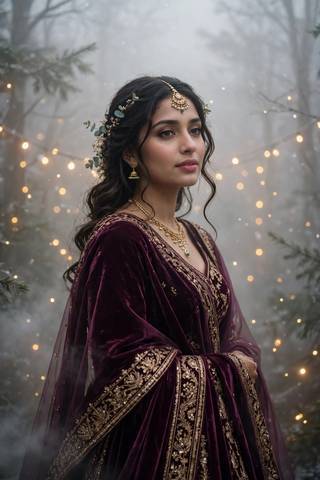
There is something special about wedding-season celebration that makes everyone reach for their camera, and this year AI photo prompts have taken that excitement to a whole new level. Instead of waiting for the perfect moment or hiring a photographer, you can now describe exactly the picture you want and watch an AI tool like Gemini or ChatGPT turn your words into a stunning, lifelike portrait in seconds. That is exactly what this prompt is made for. It captures A dreamy portrait of a winter bride in a deep velvet lehenga standing in light fog with fairy lights behind her, a scene that feels warm, real, and instantly shareable. Whether you want a profile picture that stands out, a festive post for Instagram and Facebook, or simply a beautiful image to remember the season by, this prompt gives you a head start that most people never get. The best part is that you do not need any design skills at all. You only need the right words, and this article hands them to you, ready to copy and paste.
Before we get to the prompt itself, it helps to picture the final image in your mind. Imagine A dreamy portrait of a winter bride in a deep velvet lehenga standing in light fog with fairy lights behind her. Now imagine that image with professional lighting, natural expressions, and colours that pop without looking fake. That is the standard this prompt is written to. Every detail in it, from the setting to the mood to the camera style, has been chosen to guide the AI toward a result that looks like it was taken by a skilled photographer at a real celebration. In the sections below you will find the complete prompt, a breakdown of why each part matters, a step-by-step guide to using it, and answers to the questions people ask most often. By the end, you will be able to create this portrait in under a minute, and you will understand how to adapt the same formula for any other seasonal photo idea you have.
The Prompt
Copy the complete prompt below and paste it into your favourite AI image tool. It is written to work as a single block, so copy everything inside the box.
Create a dreamy, photorealistic portrait of a winter bride in a deep maroon velvet lehenga with delicate gold embroidery, standing gracefully in soft evening fog with strings of warm fairy lights glowing behind her. Her breath mists slightly in the cold air, her jewellery glimmers, and she holds a small bouquet of winter roses. Shot on an 85mm lens with a shallow depth of field, soft diffused winter lighting, realistic velvet texture, natural skin tones, and a moody cinematic colour grade. Ethereal, romantic, and straight out of a winter fairytale, vertical portrait orientation, high resolution.
This prompt describes A dreamy portrait of a winter bride in a deep velvet lehenga standing in light fog with fairy lights behind her, and it is ready to use exactly as it is. If you want to personalise it, change one small detail at a time and regenerate until the result feels like yours.
Why This Prompt Works
A good AI prompt is not just a long sentence; it is a clear set of instructions, and this one works because it covers the four things AI image tools need most: subject, setting, mood, and style. The subject is described in vivid detail, so the AI knows exactly who or what to focus on. The setting places that subject in a believable world, full of small details like lights, decorations, and atmosphere that make the image feel real. The mood tells the AI how the people in the picture should feel, which is why the expressions in the result look genuine instead of stiff or blank. Finally, the style instructions, including the lens, lighting, and colour grading, push the output away from a flat cartoon look and toward a professional photograph. Together, these four layers remove the guesswork that usually causes disappointing AI images. Instead of a random result, you get a portrait that matches the picture in your head, and that consistency is why this prompt keeps going viral every time the season comes around.
Another reason this prompt performs so well is its balance. It is detailed enough to control the result, but not so long or complicated that the AI gets confused. Short, vague prompts often produce generic images, while overly long prompts can pull the AI in too many directions at once. This prompt sits in the sweet spot: every sentence adds something useful, and nothing fights against anything else. It also uses concrete, visual words rather than abstract ones, which matters because AI tools understand objects, colours, light, and actions far better than vague ideas. When you copy it exactly, you are giving the tool a clear, consistent brief, and that is the fastest path to a photo you will actually want to post.
- Clear subject: the AI knows exactly who the portrait is about and what they are doing.
- Rich setting: decorations, lights, and atmosphere make the scene believable and immersive.
- Real emotion: mood words guide natural, joyful expressions instead of stiff poses.
- Photographic style: lens, lighting, and colour instructions push the result toward a professional photo.
How to Use
Using this prompt takes less than a minute. Follow these simple steps and you will have a finished portrait ready to share.
- Open your favourite AI image tool, such as Google Gemini, ChatGPT image generation, or any tool that accepts text-to-image prompts.
- Copy the full prompt from the box above, exactly as written, including the style and lighting details at the end.
- Paste it into the prompt box of your chosen tool and press generate. Wait a few seconds while the image is created.
- Look closely at the result. If you want a small change, such as a different outfit colour or background detail, edit just that one part of the prompt and generate again.
- Once you love the result, download the highest quality version available and save it to your phone or computer.
- Share it on Instagram, Facebook, or WhatsApp, or use it as your profile picture, and enjoy the compliments that follow.
Pro Tips
These small tricks can turn a good result into a great one, especially if you plan to post the image publicly.
- Keep the camera and lighting instructions intact. They are what make the result look like a real photograph instead of a digital painting.
- Change only one detail at a time when experimenting. Changing everything at once makes it hard to tell what improved the image.
- If the first result is not perfect, generate two or three versions and pick the best one. Small variations happen every time, and one is usually outstanding.
- Add a personal touch, like a name, a favourite colour, or a specific location, to make the portrait feel uniquely yours.
- For the sharpest social media post, upload the original file rather than a screenshot, and avoid heavy filters that wash out the colours.
FAQ
Is this prompt free to use?
Yes, completely free. You can copy it, use it as many times as you like, and share it with friends. There are no charges and no sign-up needed to use the prompt itself; you only need access to an AI image tool.
Which AI tool works best with this prompt?
This prompt is written to work well with Gemini, ChatGPT image generation, and most modern text-to-image tools. Results can vary slightly between tools, so if one tool gives you a weaker result, try the same prompt in another tool before changing the wording.
Can I change the details in the prompt?
Absolutely. The prompt is a starting point, not a rule. You can change colours, outfits, backgrounds, or even the time of day. Just keep the structure the same: subject, setting, mood, and style, and your customised version will still work beautifully.
Why does my AI photo sometimes look unrealistic?
Unrealistic results usually come from missing style instructions, such as lens type, lighting, and texture details. This prompt includes all of those, which is why it produces lifelike images. If a result still looks off, regenerate once or twice, since every generation varies slightly.
This prompt is your shortcut to a beautiful, shareable portrait that captures the very best of wedding-season celebration. Copy it, generate your image, and make it your own with a few personal tweaks. The season only comes once a year, so do not wait for the perfect moment. Create it yourself, post it proudly, and let your photo be the one everyone asks about.
Related Viral Prompts
- Wedding Season 2026 Couple First Dance Newlyweds Sparklers Romantic Portrait
- Halloween 2026 Pumpkin Carving Fail Family Laughing Wonky Pumpkin Face Portrait
- Halloween 2026 Couple Matching Skeleton Costumes Party Playful Portrait
#AIPhotoPrompt #ViralAIPrompt #GeminiPrompt #ChatGPTPrompt #PromptBazar


Leave a Reply