
Introduction
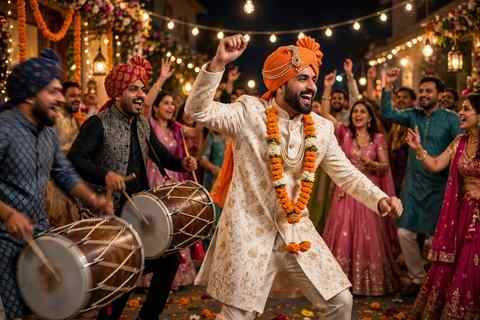
If your feed is full of dreamy Wedding Baraat Dance photos lately, you are not alone. This style has become one of the most requested wedding and celebration looks of the season, because it feels personal, emotional and timeless all at once. The secret is not a costly photographer or a rented venue. It is a well-written prompt that tells the AI exactly what to keep, what to change and what mood to create.
Below you will get the complete prompt, ready to copy, plus a simple breakdown of how it works and how to use it step by step. Follow it as written, or adjust small details like colours and background to match your own taste, and you will have a beautiful photo ready to post in minutes.
The Prompt
Copy the full prompt below and paste it into your AI photo tool along with your photo:
Use my uploaded couple photo as the exact reference and keep both faces, facial features, skin tones and natural expressions exactly the same, with no beautification or reshaping. Place the groom dancing joyfully in the middle of an energetic baraat at night, dressed in a festive sherwani, surrounded by friends and family dancing, dhol players, colourful lights, confetti in the air and decorated cars glowing behind him. Capture the pure energy of the baraat: mid-dance movement, laughing faces, motion in the crowd and warm night lights streaking softly in the background. Use realistic skin texture, detailed fabric, natural motion blur on the background only, and a vibrant, festive colour grade. Use an 85mm portrait lens look, shallow depth of field and vertical 4:5 framing. The mood must feel electric, joyful and unforgettable, perfect for baraat reels, wedding posts and celebration memories. No text, no watermark, no logos, no distorted hands, no frozen or stiff poses.
Why This Prompt Works
This prompt is written the way professional photographers brief a shoot: subject first, then outfit, then light, then setting, then technical style. Each part has a job, and together they remove the guesswork that usually makes AI photos look fake or generic. Here is what makes it so effective:
- Face first, always. The prompt opens by locking your real face, skin tone and expression, so the result looks like you, not like a stranger in a costume. This single instruction is what separates a good AI photo from a disappointing one.
- Detail creates realism. Instead of vague words like beautiful or nice, the prompt names the outfit, the jewellery, the lighting and the background. The AI has clear material to work with, so textures, shadows and colours come out rich and believable.
- Light sets the mood. Warm golden light, soft bokeh and gentle shadows are written into the prompt on purpose. Good lighting is what makes a photo feel professional, and this prompt builds it in from the start.
- Composition is built in. The 85mm portrait look, shallow depth of field and vertical framing match how real photographers shoot portraits. Your photo therefore looks natural on Instagram, WhatsApp status and Reels covers.
- Clean output, no clutter. The prompt clearly forbids text, watermarks, logos and distorted hands. These small negative instructions prevent the most common AI photo mistakes before they happen.
Beyond the technical details, the prompt also protects the emotional core of the photo. A Wedding Baraat Dance photo is about a real person and a real celebration, so the prompt keeps your identity front and centre while letting the AI handle the styling, the atmosphere and the polish around you.
How to Use This Prompt
- Choose a clear, front-facing photo of yourself or your couple, with good light and a visible face. Avoid sunglasses, heavy filters or group photos where faces are small.
- Open your favourite AI photo tool, such as Gemini, ChatGPT image generation or any photo-to-photo AI app that accepts a reference image.
- Upload your photo first, then copy the entire prompt from the box below and paste it exactly as written. Do not shorten it, because every detail adds realism.
- Generate the image and wait for the result. If the face looks slightly different, regenerate once with the same photo and prompt rather than rewriting everything.
- Download the best version, check it at full size, and share it. A small brightness or contrast tweak in your phone gallery is usually all the editing you need.
- Want a variation? Change only one thing at a time, such as the outfit colour or the background, and keep the face instruction untouched. This keeps your results consistent.
Pro Tips
- Use the highest quality photo you have. A sharp, well-lit original gives the AI more real detail to preserve, and the result will look far more like you.
- Keep the face instruction in every version. If you edit the prompt, never remove the part that says to keep your face exactly the same.
- Try two or three generations and pick the best. AI results vary slightly each time, and the second or third try is often the most natural.
- Match the outfit to the occasion. The colours and setting in this prompt are chosen for this celebration, so changing them randomly can break the mood.
- Post at the right time. Evening posts and festival days get more views, so save your best result and share it when your audience is most active.
Frequently Asked Questions
Will this Wedding Baraat Dance prompt keep my real face?
Yes. The prompt starts with a strict instruction to keep your face, skin tone and expression exactly the same. For the best match, use a clear, front-facing photo with natural light and no sunglasses or heavy filters.
Which AI tool works best for this Wedding Baraat Dance prompt?
Any modern photo-to-photo AI tool works well, including Gemini and ChatGPT image tools. The prompt is written in plain, detailed language, so it performs consistently across tools. If one tool gives a weaker result, try the same prompt in another.
Can I change the colours or background in this Wedding Baraat Dance prompt?
Yes, small changes are fine. You can swap a colour, a flower or a background detail, but keep the face instruction and the overall mood unchanged. Change one element at a time so you can see what improves the result.
Why does my Wedding Baraat Dance photo sometimes look different from my face?
This usually happens when the original photo is blurry, dark or taken from an angle. Use a sharper, front-facing photo and regenerate. Two or three tries with the same good photo almost always fix the problem.
Your memories deserve photos that look as beautiful as they felt. Copy the prompt, use your favourite photo, and create a Wedding Baraat Dance image that you will be proud to share with everyone you love.
Related Viral Prompts
- Veil Twirl Wedding AI Photo Prompt
- Night Light Walk Wedding AI Photo Prompt
- Karwa Chauth Sieve Moon AI Photo Prompt
#wedding #baraat #dance #aiphotoprompt #viralprompt


Leave a Reply