
Introduction
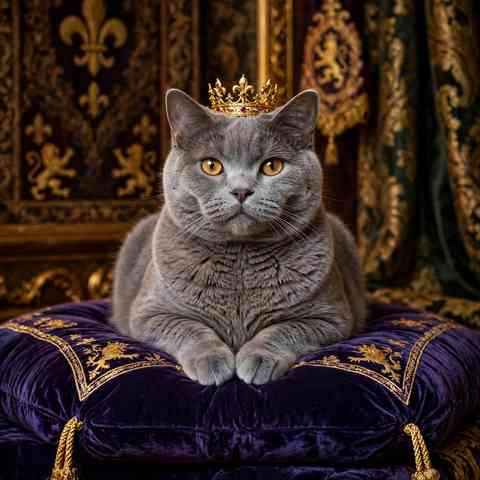
Every cat already believes it is royalty — this prompt just makes it official. A tiny golden crown, a velvet cushion and palace lighting turn any cat into a king, and royal pet portraits are viral because they are funny, majestic and impossible not to share.
In this post, you will get the complete copy-paste prompt for this viral pet portrait, plus a breakdown of why it works, a step-by-step guide to using it, pro tips for a flawless result, and answers to the most common questions. Whether you are creating a new profile photo, a post for Instagram, or just experimenting with AI photography, this prompt is designed to deliver a premium, shareable portrait in minutes. It has been written with the exact details AI image tools respond to best — clear subjects, specific lighting, defined backgrounds and realistic textures — so you spend less time fixing outputs and more time enjoying the result.
The best part is that you do not need any photography skills, expensive equipment or editing apps. All you need is the prompt below, an AI image tool like Gemini or ChatGPT, and optionally your own photo as a face reference. Copy it, paste it, generate, and watch a simple idea turn into a portrait that looks like it came from a professional shoot.
The Prompt
Here is the full prompt. Copy everything inside the box and paste it directly into your AI image generator:
Create a royal portrait of a cat wearing a tiny golden crown, sitting proudly on a deep red velvet cushion like a king. Rich dark background with warm palace lighting, elegant draped curtains behind, the cat's posture regal and calm, eyes looking slightly upward with royal dignity. Ornate golden details on the crown, soft luxurious textures, photorealistic, classical oil-painting-inspired royal portrait quality, vertical portrait.
Feel free to customise small details — colours, outfits or backgrounds — but keep the core structure intact, because that structure is what makes the result look polished rather than random.
Why This Prompt Works
Great prompts work because every detail earns its place. Here is why this particular combination of setting, light and styling produces such consistently viral results:
- The joke lands instantly: a serious royal portrait of a cat is funny and majestic at the same time.
- Velvet and gold textures scream luxury, making a simple pet photo look like classical art.
- A regal pose with eyes slightly upward mimics real royal paintings, which sells the whole concept.
- Pet content is the most shared content on the internet, and a crowned cat is peak shareability.
- The dark rich background keeps all attention on the cat, so the portrait feels truly royal.
When all of these elements work together — the right setting, the right light, the right styling and a clear subject — the AI has everything it needs to produce a portrait that looks intentional, professional and genuinely viral-worthy. That is also why this prompt is so forgiving for beginners: even a first attempt usually looks good, and a second attempt with one small tweak is often enough to get a result worth posting.
How to Use This Prompt
Using this prompt takes less than two minutes. Follow these steps exactly and you will get a clean, shareable portrait on your first or second try:
- Copy the full prompt from the prompt box above — it is written to paste directly into Gemini or ChatGPT.
- Open your AI image tool and upload your own photo first if you want the portrait to look like you.
- Paste the prompt, adding ‘use the uploaded photo as the face reference’ at the start when using your own photo.
- Generate the image and check the details: face, outfit, background and lighting should all match the description.
- If anything looks off, adjust just that one detail in the prompt and regenerate instead of starting over.
- Try two or three variations with small changes — different colours, poses or lighting — and keep your favourite.
- Download the best version in high quality and post it with the hashtags below for maximum reach.
Pro Tips
Small tweaks make a big difference with AI portraits. These pro tips will help you avoid the most common mistakes and get a premium result every time:
- Say ‘tiny golden crown’ — the word tiny keeps the crown cute and proportional instead of oversized.
- A deep red or royal blue velvet cushion gives the richest contrast against most cat fur colours.
- Describe the pose as regal and calm; a playful pose breaks the royal illusion.
- Warm palace lighting with draped curtains completes the classical painting feel.
- If you have a real cat, upload its photo as a reference so the portrait looks like your actual pet.
Remember, AI image generation is a creative process, not a one-click miracle. The creators getting the most viral results are the ones who tweak, regenerate and refine until the portrait feels exactly right — so do not settle for your very first output if a small edit could make it perfect.
FAQ
Before you generate your portrait, here are the answers to the questions creators ask most about this style:
Can I use my own cat’s photo?
Yes — upload a clear photo of your cat and add ‘keep the same cat, same fur colour and face markings’. The crown and cushion will be added around them.
Does this work for dogs too?
Absolutely — just replace ‘cat’ with your dog’s breed. A crowned dog on velvet is equally royal and equally viral.
Why does the crown look too big?
Add ‘tiny, small, proportional golden crown sitting on top of the head’ to keep the size realistic and cute.
Can I print this as wall art?
Yes — generate it at high resolution and it makes a hilarious, beautiful framed print for any pet lover’s home.
Try this prompt today and create your own viral pet portrait — one great portrait is all it takes to transform your feed. Copy the prompt, make it yours, and share the result with the world.
Related Viral Prompts
- Viral Sunset Beach Portrait Girl White Dress Waves Feet Golden Portrait
- Viral Winter Fashion Portrait Woman Long Wool Coat Snowy Street Chic
- Viral Cinematic Street Portrait Young Man Streetwear Blurred City Editorial
#AIPhotoPrompt #ViralPhotoPrompt #GeminiPrompt #ChatGPTPrompt #PromptBazar


Leave a Reply