
Introduction
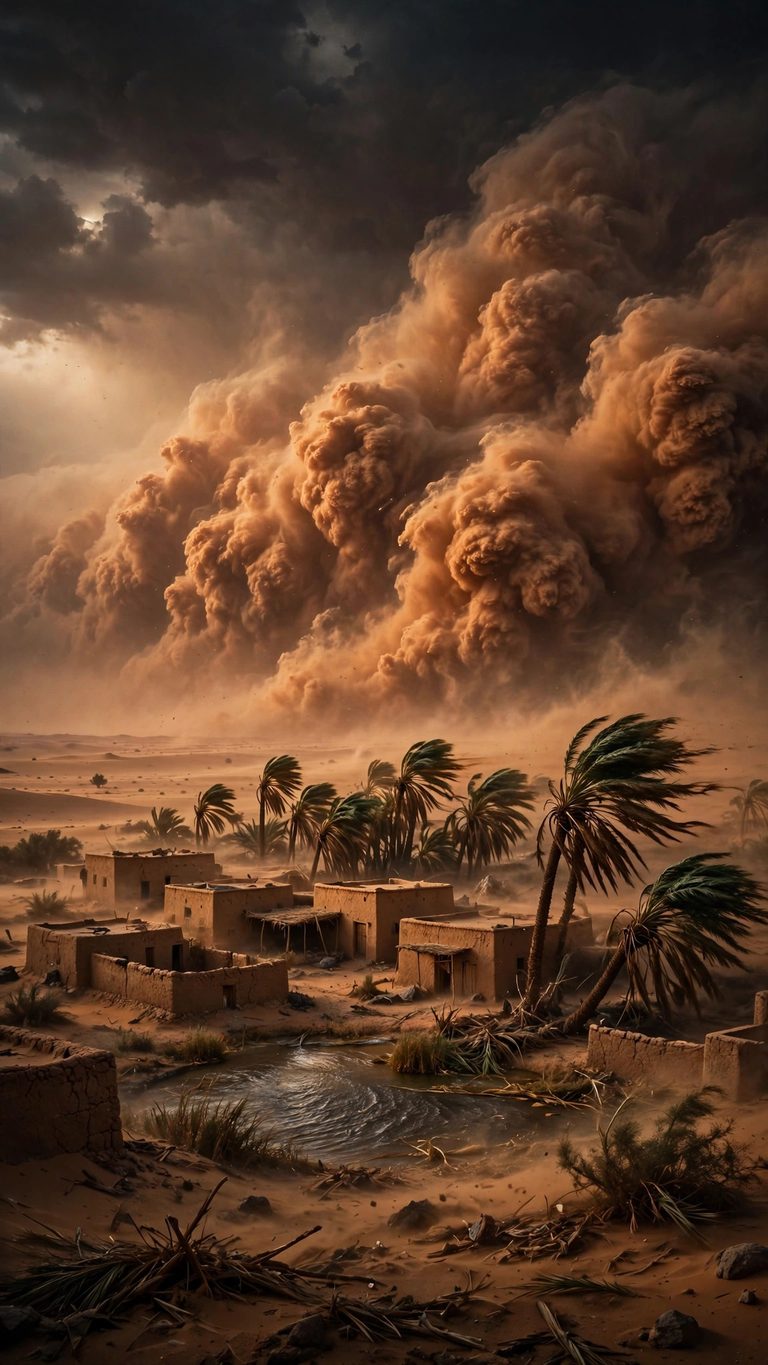
On the horizon, the sky begins to change. A wall of orange dust rises higher than any building, wider than the eye can follow, and it is moving toward you. Palm trees bend sideways as the wind arrives first, a hot breath that smells of electricity and sand. The light turns amber, then copper, then a strange bruised darkness as the storm swallows the sun. For a few terrifying minutes, the world is nothing but roaring wind and stinging grit. And then, as suddenly as it came, the wall passes, the sky clears, and an impossible calm settles over the desert like nothing ever happened.
A giant sandstorm is nature at its most dramatic, and drama is the currency of viral video. The timelapse format compresses this entire terrifying arc, calm, chaos, calm, into ten seconds of pure visual storytelling. Nobody can scroll past a sky being devoured by a dust wall; the brain is wired to monitor threats, and it will not look away until the threat resolves. That involuntary attention is exactly what this AI video prompt captures, no storm-chasing required.
The Prompt
Copy the exact prompt below and paste it into your favorite AI video generator. It choreographs the full storm arc from approach to aftermath:
Dramatic timelapse of a colossal sandstorm wall rolling across the desert toward a small oasis village, towering orange dust cloud swallowing the horizon, palm trees bending, sky darkening, then calm returning, terrifying natural power, cinematic, ultra realistic, dramatic lighting
Why This Prompt Works
This prompt weaponizes two of the strongest viral triggers known to content science: fear and transformation. Fear, even the safe, screen-mediated kind, commands absolute attention; the sight of a colossal dust wall bearing down on a tiny village activates the same threat-monitoring circuitry that kept our ancestors alive. Viewers literally cannot look away, which produces the near-perfect completion rates that short-form algorithms prize above all else. When the storm passes and calm returns, the relief is satisfying, and satisfying endings get rewatched.
Transformation is the second trigger. Timelapse content shows a dramatic before-and-after inside a single clip, and before-and-after is one of the most rewatchable formats on the internet. Viewers replay the video to catch the exact moment the sky darkens, or to show a friend “wait for the part where the horizon disappears.” Each replay is another loop counted toward your watch time, and loops are the hidden multiplier behind most viral Reels. The tiny oasis village in the frame is a deliberate scale cue: its smallness against the towering dust wall makes the storm feel even more immense, and immense things get shared.
There is also a curiosity advantage. Most viewers have never seen a real sandstorm and never will, which makes this footage feel rare and precious rather than routine. Rare phenomena earn comments full of questions, and comments are weighted heavily by ranking systems. Posting with tags like #Sandstorm and #Dramatic connects your video to weather, nature, and adventure audiences simultaneously, tripling your discovery surface while the competition in this specific niche remains remarkably low.
How to Use This Prompt
Storm timelapses need careful handling to look real rather than cartoonish. Here is the exact workflow:
Step 1: Use a generator with strong physics and lighting. Veo 3, Runway, Kling, Pika, and Sora can all run this prompt, but the darkening-sky transition is the hard part. Veo 3 and Kling currently handle large-scale atmospheric changes most convincingly, with dust that billows and churns instead of sliding like a flat texture.
Step 2: Set 9:16 vertical aspect ratio. Vertical framing emphasizes the towering height of the dust wall, which is the money shot. A wide landscape frame would shrink the storm; a tall frame makes it loom over the viewer, which is exactly the threatening scale you want.
Step 3: Paste the prompt verbatim. The sequence matters: calm approach, towering wall, bending palms, darkening sky, calm returning. This is a tiny three-act story, and rewording can scramble the order of events. Run it exactly as written first.
Step 4: Generate a 10-second timelapse clip. Match the original settings. If your tool has a motion-intensity control, set it high; timelapse needs aggressive motion to compress the storm’s full arc into ten seconds.
Step 5: Generate several takes and check the transitions. The critical quality test is the sky-darkening moment and the calm-aftermath moment. The best take is the one where the transition feels gradual and physical, not like a filter snapping on and off. Discard anything that looks like a jump cut.
Step 6: Add thunderous sound design. Deep wind rumble, rising in intensity as the wall approaches and falling away as calm returns, will multiply the clip’s impact. Add an on-screen caption like “WAIT FOR IT” to hold viewers through the calm opening seconds, then publish.
Pro Tips & Creative Variations
The storm concept is endlessly remixable. Here is how to turn one prompt into a whole dramatic-weather catalog.
Maximize the calm-before contrast. The terror of a storm is measured against the peace that precedes it. Try opening with “a serene blue morning over the oasis village, birds singing” before the wall appears. The sharper the contrast between the peaceful opening and the chaos, the harder the emotional punch, and emotional punches drive shares.
Change the point of view. The original watches from the village, but try “POV from a car fleeing down a desert highway as the dust wall chases it” for a disaster-movie thrill, or “aerial drone view watching the storm front devour the landscape” for godlike scale. Each perspective tells a different story with the same weather.
Swap the storm type. Once you master the dust wall, adapt the structure: “a massive thunderstorm with lightning over the dunes,” “a rare desert flash flood surging through a canyon,” or “a haboob rolling over a city skyline at dusk.” The three-act calm-chaos-calm structure works for any extreme weather, giving you a repeatable viral formula.
Add human stakes. A tiny detail like “a lone figure running toward shelter” or “lanterns flickering out one by one in the village” gives viewers someone to worry about, and worry holds attention even tighter than spectacle. Micro-narratives like this are what separate a pretty weather clip from a story people remember.
Build a “nature’s fury” series. Post the sandstorm as episode one, then release the thunderstorm, the flash flood, and the dust devil as follow-ups under a consistent series title. Weather series have enormous binge potential because each episode promises the same satisfying arc with a new disaster. Tag each one with #Sandstorm or its weather equivalent so storm-chasers and nature fans can find your full collection.
Frequently Asked Questions
Q: Why does my sandstorm look like a blurry orange filter instead of a real storm?
A: That happens when motion intensity is set too low or the prompt’s structural words get diluted. Make sure “towering,” “wall,” and “swallowing the horizon” survive in your prompt, set motion to high, and generate at maximum quality. Real storms have visible billowing texture and a defined leading edge; if yours lacks both, regenerate rather than settling.
Q: How do I keep the village looking consistent through the storm?
A: AI video can morph small background details during heavy motion. Keep the village description simple and anchored: “small oasis village with palm trees” gives the model a stable concept to hold onto. Review takes for morphing rooftops or vanishing palms, and choose the take where the village survives the storm most intact; ironically, that stability makes the chaos around it feel more real.
Q: What is the best posting time for dramatic weather content?
A: Weather and nature content performs well in the early evening when people are relaxing and browsing, and it also spikes during real-world weather news cycles. If a major dust storm or extreme weather event is in the headlines, posting your AI storm clip with a clear AI label can ride the curiosity wave, since search interest for storm footage surges.
Q: Should I label AI storm footage as AI-generated?
A: Yes, always. Realistic disaster footage carries a real risk of being mistaken for actual news, which can cause panic or misinformation. A simple “AI-generated concept” note in your caption protects your credibility and keeps you on the right side of platform policies, and audiences still love the content just as much when it is honestly presented as art.
Nature’s fury, compressed into ten unforgettable seconds. Copy the prompt, render your sandstorm timelapse in 9:16, and let the dust wall do what it does best: stop every scroll. Post it today and ride the storm.
Related Viral Prompts
- Hidden Oasis Discovery: Free Viral AI Video Prompt for Paradise Reveal Reels and Breathtaking Turquoise Water Shots
- Adorable Fennec Fox AI Video Prompt: Cinematic Golden Sunrise Desert Hunt for Viral Wildlife Reels Content
- Bedouin Mint Tea Ceremony AI Video Prompt: Warm Golden Evening Culture for Aesthetic Travel Reels Shorts
# A I V i d e o # P r o m p t B a z a r # S a n d s t o r m # D e s e r t # D r a m a t i c



Leave a Reply