
Introduction
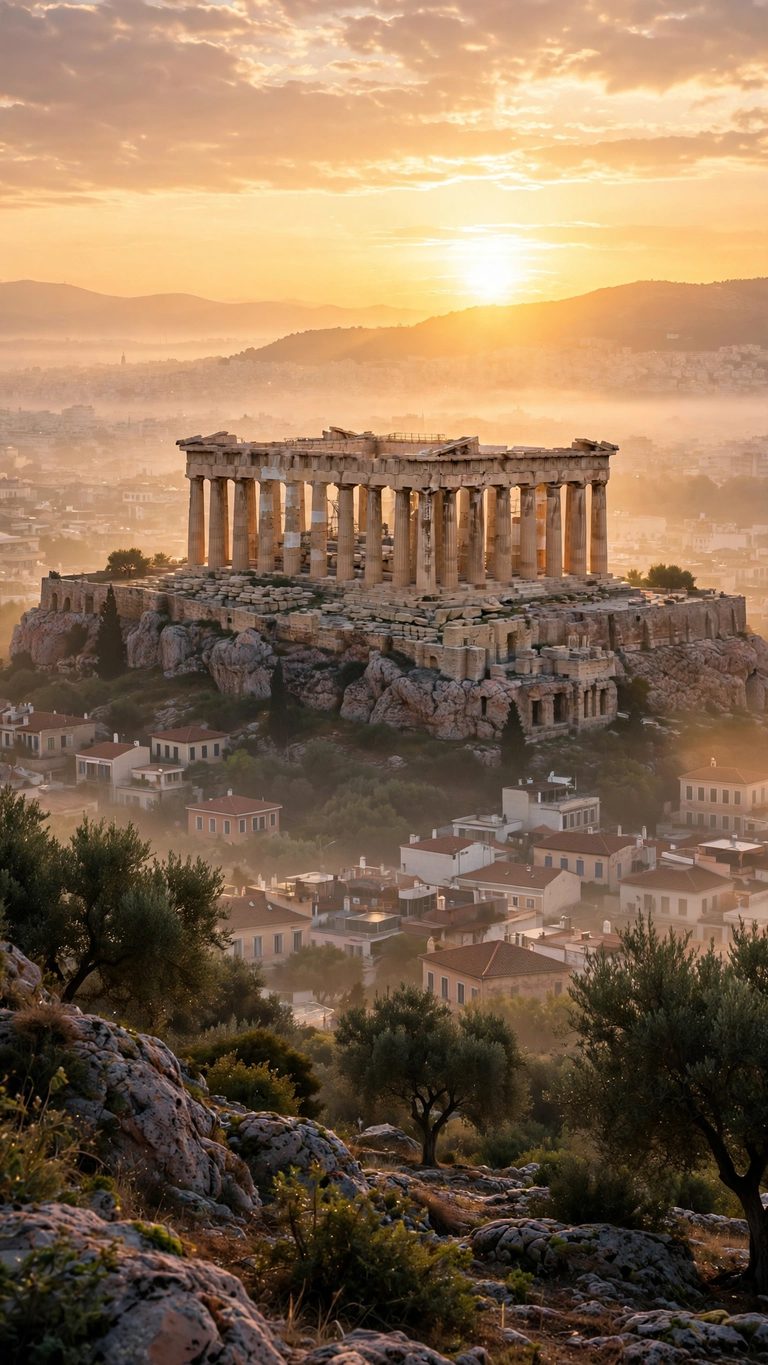
There is a moment, just before dawn breaks over Athens, when the Parthenon seems to hold its breath. The marble columns that have stood for nearly 2,500 years catch the first threads of sunlight, and for a few minutes the entire Acropolis glows as if it were carved from living gold. This is the shot every travel filmmaker dreams of, and now, with a single AI video prompt, you can generate it in seconds. The Parthenon sunrise prompt captures that fleeting golden-hour magic: warm light washing across ancient stone, a soft haze hanging in the morning air, and a slow, stately orbit that lets viewers drink in every column and pediment while the modern city stirs awake below. Whether you run a history channel, a travel page, or simply want a scroll-stopping clip for Reels, TikTok, and Shorts, this prompt delivers the kind of timeless beauty that algorithms love and audiences never tire of. In this guide, you will get the exact copy-paste prompt, a breakdown of why it performs so well, step-by-step instructions for Veo 3, Runway, Kling, Pika, and Sora, plus pro variations to keep the concept fresh across an entire content series.
The Prompt
Copy the prompt below exactly as written, paste it into your AI video generator, and render at 9:16 vertical for a 10-second cinematic clip.
Majestic sunrise over the ancient Parthenon in Athens, golden light washing over marble columns, light haze in the air, camera slowly orbiting the temple, city waking below, timeless classical beauty, ultra realistic, 8k, cinematic, timeless marble glory shines bright today
Why This Prompt Works
Golden-hour lighting is one of the most reliable emotional triggers in visual storytelling. Warm dawn light on ancient marble creates an instant sense of awe, reverence, and wonder, which is exactly the cocktail of feelings that makes viewers stop scrolling and watch to the end. The Parthenon is also one of the most recognizable landmarks on Earth, so the clip passes the critical one-second recognition test: the audience knows what they are looking at before a single word is spoken, and curiosity about this fresh angle does the rest.
The slow orbiting camera move is the real retention engine here. A static shot of a temple would get two seconds of attention; a smooth, continuous orbit keeps the eye traveling around the columns, pediments, and the glowing horizon, holding attention through the full ten seconds. Because the motion never resolves into a final frame, viewers are more likely to rewatch, which is the single strongest signal TikTok, Reels, and Shorts algorithms use to push content wider. The “city waking below” layer adds depth and scale, contrasting the eternal monument with the pulse of modern life, which gives the clip a quiet emotional story without a single line of dialogue.
Finally, the quality tokens matter. Phrases like “ultra realistic, 8k, cinematic” steer the model toward filmic depth of field, rich color grading, and fine architectural detail rather than a flat game-engine look. The vertical 9:16 framing is purpose-built for the feed: it fills the phone screen completely, eliminating the black bars and cropping that kill watch time on mobile-first platforms.
How to Use This Prompt
Follow these steps to generate your Parthenon sunrise clip on any major AI video platform:
- Veo 3 (Google): Open the Veo 3 prompt box, paste the prompt exactly as written, set the aspect ratio to 9:16, choose a 10-second duration, and select the highest quality mode available. Veo 3 handles the slow orbit motion especially gracefully, so keep the “slow orbit” phrasing intact.
- Runway (Gen-4 or later): Paste the prompt in Text-to-Video mode, set vertical 9:16 output, and enable any camera-control options set to a slow circular path. If Runway offers a reference image, upload a daytime photo of the Parthenon first to anchor the architecture and reduce structural errors in the columns.
- Kling: Use the standard text-to-video workflow with 9:16 framing. Kling excels at smooth, realistic camera motion, which makes it a strong pick for this orbiting shot. Keep creativity or mode settings balanced rather than maxed out so the temple geometry stays plausible.
- Pika: Paste the prompt, choose vertical framing, and set motion strength to medium. Pika is fast for iterating: if the haze looks too heavy or the orbit too fast, regenerate with “very light haze” or “extremely slow orbit” added to fine-tune.
- Sora: Paste the full prompt, select vertical 9:16, and render. Sora’s lighting realism is excellent for golden-hour marble; if you want extra warmth, append “honey-gold color grade” to the end.
After rendering, watch the first two seconds closely: the light should bloom gradually over the columns rather than snapping on. If it does, trim the first frame and add a subtle fade-in in your editor. Pair the clip with soft ambient music or a slow cinematic score, and add a simple text hook like “2,500 years of sunrises” in the first second to lift retention even further.
Pro Tips & Creative Variations
To get the most out of this prompt, treat it as the seed of a series rather than a one-off clip. The most successful history and travel accounts on TikTok post themed sequences, and the Parthenon at dawn is a perfect episode one. Try a blue-hour variation by swapping “sunrise” for “blue hour just before sunrise” to get cooler tones and city lights twinkling below. A storm-cleared morning version with “dramatic clouds parting at dawn” adds spectacle, while a night version with “moonlight on marble, stars above” gives you a completely different mood from the same architectural anchor.
You can also change the camera language. Replace “slowly orbiting” with “low drone rising from the city streets toward the temple” for a reveal-style opener, or “close tracking along the marble columns at eye level” for an intimate architectural study. Each camera change produces a genuinely different video, so a five-clip “Parthenon from dawn to dusk” sequence is trivially achievable. Add seasonal texture too: “a rare dusting of snow on the steps” or “swallows circling in spring light” keeps the series visually fresh without changing the core composition.
- Negative prompts: If your platform supports them, add “blurry, warped columns, extra pillars, distorted pediment, modern construction equipment” to protect the temple’s geometry.
- Music pairing: Slow strings, soft Greek bouzouki, or ambient piano all fit. Keep narration sparse and let the light carry the emotion.
- Text hooks: Openers like “Built 2,500 years ago. Still glowing.” or “The sunrise the ancients watched too.” perform well because they fuse the visual with a human connection.
- Extend the idea: Apply the same formula to the Colosseum, Petra, or Angkor Wat and you have a “Wonders at Dawn” series with a built-in audience.
Frequently Asked Questions
Q: Which AI video tool gives the best result for this Parthenon prompt?
A: Veo 3 and Kling generally produce the smoothest orbital camera motion and the most realistic golden-hour light, which are the two pillars of this shot. Runway is the best choice if you want camera-path control or want to anchor the render with a reference photo of the real Parthenon. Pika is fastest for quick iterations, and Sora renders beautiful atmospheric haze. Try the same prompt on two platforms and keep whichever render has the cleanest columns.
Q: Why does the prompt specify a slow orbit instead of a static shot?
A: Motion holds attention. A static frame of a famous building gets recognized and dismissed in two seconds; a continuous, unresolved orbit gives the eye somewhere to travel and gives the viewer no clean exit point, which raises average watch time and rewatch rate. Both are core ranking signals on Reels, TikTok, and Shorts.
Q: Can I monetize videos made with this prompt?
A: AI-generated clips are widely used in monetized travel and history channels, but always check your platform’s current generative-content policy and your generator’s terms of use. Adding original narration, music, or editorial context makes the video clearly transformative and safer for monetization.
Q: The columns look warped in my render. How do I fix that?
A: Classical architecture is one of the harder subjects for AI models. Use a reference image in Runway or image-to-video tools, lower the motion or creativity strength slightly, and add negative terms like “warped columns, distorted architecture.” Regenerating with the same seed after a small tweak often converges on a clean version.
In the end, this Parthenon sunrise prompt works because it fuses the most dependable ingredients in short-form video: a world-famous subject, golden-hour emotion, and motion that never lets the eye rest. Generate it, pair it with a human hook, and let 2,500 years of beauty do the heavy lifting for your channel.
Related Viral Prompts
- Aztec Marketplace AI Video Prompt: Bring a Bustling Ancient Bazaar to Life in Cinematic 8K Detail for Viral Shorts
- Viking Storm Voyage AI Video Prompt: Epic Longship Battle in a Tempest for Viral Shorts & Reels | Copy-Paste
- Library of Alexandria AI Video Prompt: Serene Cinematic Glide Through the Ancient Temple of Knowledge
# A I V i d e o # P r o m p t B a z a r # P a r t h e n o n # G r e e c e # S u n r i s e

Leave a Reply