
Introduction
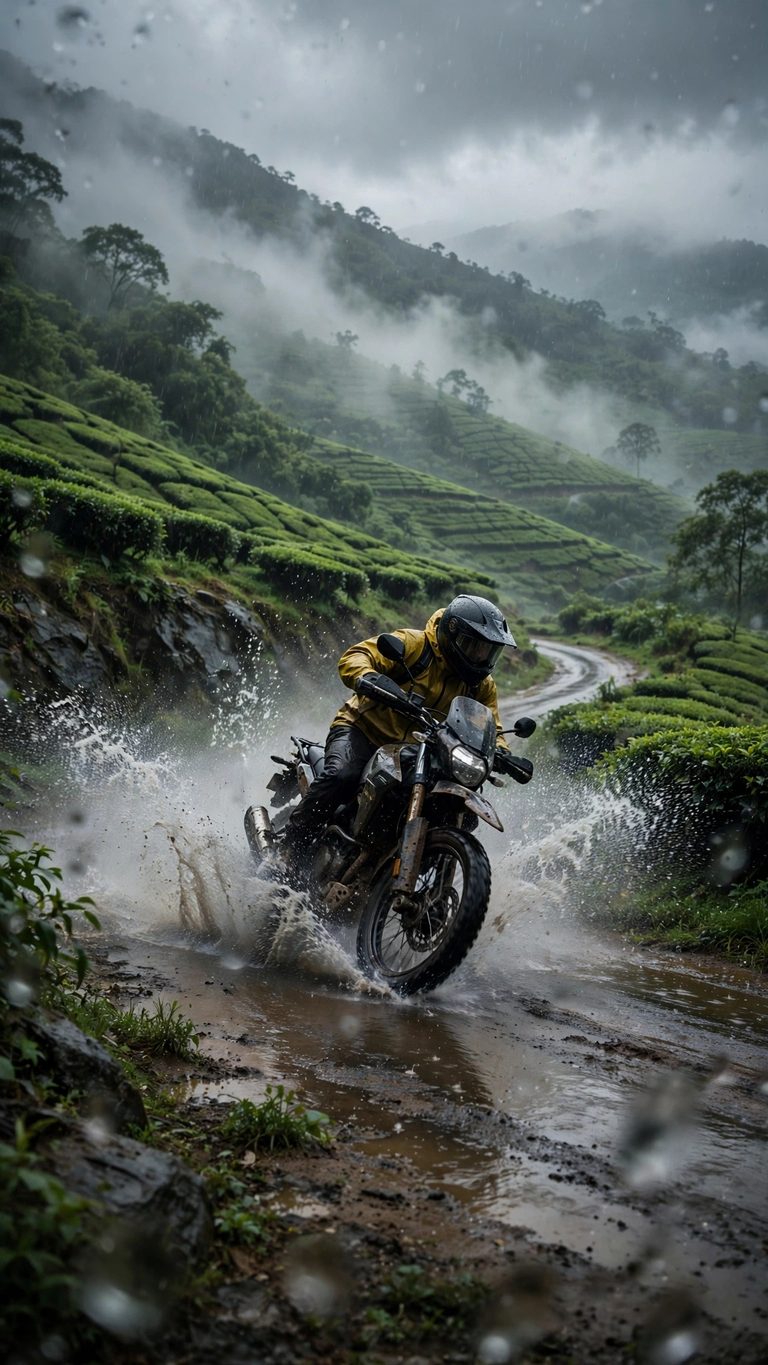
Rain changes everything about a road. The same highway you commute on becomes a mirror, a splash zone, a test of nerve – and on camera, rain is pure gold. A motorbike carving through a monsoon downpour, water exploding off the tires, mist hanging over green hills, droplets beading on the lens: this is the kind of footage adventure channels build entire identities around. It looks dangerous, it feels alive, and it triggers a primal response in anyone who has ever ridden through a storm. The problem is that filming it for real means risking your bike, your camera gear, and your safety. This AI Video Prompt removes all three risks. It generates a cinematic monsoon bike ride through lush hills with rain, spray, and moody light baked in, ready for Reels, TikTok, and Shorts. Share it with #BikeRide communities and watch riders tag their friends. In this guide we dissect the prompt, explain the psychology of rain content, and walk you through rendering it on Veo 3, Runway, Kling, Pika, and Sora.
The Prompt
Paste this prompt exactly as written into your AI video generator. The sensory details are doing heavy lifting, so keep every phrase intact on your first render.
Cinematic monsoon ride through lush green hills, a motorbike splashing through rain puddles, water spraying dramatically, rider in a rain jacket leaning into curves, mist rolling over tea gardens, moody overcast light, droplets on the camera lens, adventurous spirit, ultra realistic, 8k
Why This Prompt Works
Rain is one of the most reliable engagement triggers in outdoor content, and the reasons are rooted in how human vision works. Water in motion – spray, splashes, sheeting rain – creates high-contrast, fast-changing texture that the eye cannot ignore; it is visual caffeine. Our brains are also wired to find wet surfaces beautiful: rain darkens colors, deepens greens, and turns roads into mirrors that double every light source in the frame. This prompt exploits both effects at once. The motorbike splashing through puddles gives you explosive foreground action, while the mist rolling over tea gardens delivers the soft, layered background that makes footage feel cinematic rather than chaotic. That foreground-background contrast is the difference between a clip and a film.
There is also an emotional layer. Rain riding signals courage and freedom, two of the strongest aspirational triggers in the adventure niche. The rider leaning into curves in a rain jacket is not just transportation; it is a character the viewer can project onto. Moody overcast light flatters AI generation because it hides harsh shadows and reduces the risk of uncanny highlights on the rider’s gear. And the detail of droplets on the camera lens is a stroke of genius for authenticity: lens artifacts are exactly what separate “real footage” from “rendered footage” in a viewer’s mind, so including them paradoxically makes the AI output feel more real. Monsoon content has a built-in seasonal audience across South Asia and Southeast Asia, giving this prompt a massive, underserved viewership that actively searches for rain-ride videos every year.
How to Use This Prompt
Copy the prompt into Veo 3, Runway, Kling, Pika, or Sora exactly as written. Set the aspect ratio to 9:16 vertical and the duration to 8 seconds per the post settings; the action-ride pacing is tuned for that length. Choose the top quality tier and 24 fps for a filmic motion blur that makes the rain streaks look natural rather than strobing. The prompt already specifies “ultra realistic, 8k,” so avoid adding competing style words. On tools with camera controls, confirm the camera rides with the bike – a side-tracking or low three-quarter chase angle – because a static camera would flatten the sense of speed.
If the rain looks sparse on the first render, regenerate with the same seed rather than rewriting the prompt; water density is one of the most seed-sensitive elements in AI video. Export at 1080 by 1920, then in your editor add the rumble of an engine and rain patter as a sound bed – AI clips are silent, and wet-road audio sells the scene more than any visual tweak. Post with monsoon and adventure hashtags, and time it for actual rainy days in your audience’s region when #Monsoon searches spike. Keep the original caption short and let the first comment carry the prompt credit.
Pro Tips & Creative Variations
The monsoon is a season, so treat this prompt as the start of a series. Swap the motorbike for a vintage scooter to capture nostalgic city-rain vibes, or a heavy adventure tourer with panniers for expedition energy. Change the landscape: coastal highways with waves crashing beside the road, or dense forest trails with waterfalls in the background. For night riders, append “wet asphalt reflecting neon signs, headlight beam cutting through rain” to create a cyberpunk-noir variant that performs brilliantly as a follow-up. Slow the whole thing down by adding “extreme slow motion” to turn a single splash into a three-second money shot of water physics.
Detail stacking is your realism lever: “mud splatter on the exhaust,” “rider’s glove wiping the visor,” and “rainbow forming as the rain eases” each add a micro-story the audience replays to catch. If the tea gardens do not render clearly, simplify to “misty green hills” and let the model fill in; over-specific geography can confuse some models. For a narrative arc, generate a three-part sequence – storm approaching, ride through the worst of it, sun breaking through – and stitch them into a 24-second short with a music crescendo. And never skip sound design: layered thunder, tire spray, and a heartbeat-like engine idle turn a silent render into an immersive ride that viewers feel in their chest.
Frequently Asked Questions
How do I make the rain look heavier? Keep the same prompt and seed, and add “torrential downpour, sheets of rain” before the final quality tags. If your tool has a motion intensity slider, raise it slightly – rain reads better with stronger motion.
My rider looks distorted. What went wrong? Human figures at speed are the hardest element for AI video. Reduce complexity by keeping the rider small in frame or partially silhouetted against the mist, and avoid close-ups of hands or faces in the first render.
Can I use this for a travel vlog intro? Yes, it is ideal. Use the eight-second ride as a cold open, then transition to your real footage or narration. Many creators now open episodes with AI establishing shots before cutting to authentic content.
Does vertical 9:16 really matter for bike content? Enormously. Over 80 percent of short-form viewing is on phones held vertically. A 9:16 render fills the screen, while a cropped landscape clip shrinks your bike to a thumbnail inside a thumbnail.
A monsoon ride is adventure in its purest form, and this prompt lets you bottle it without getting soaked. Run it tonight, add engine and rain audio, and post it while the clouds are still gathering over your audience. Then explore the night-rain and slow-motion variants to build a monsoon series riders will binge. Your next viral ride is eight seconds and one prompt away.
Related Viral Prompts
- Hypercar Launch Control AI Video Prompt: Slow Motion 8K Rocket Launch Start With Smoking Tires and Flames
- Mountain Hairpin Chase AI Video Prompt: Thrilling FPV Drone Pursuit of Sports Cars Over Epic Switchbacks
- Vintage Village Bus AI Video Prompt: Nostalgic 8K Bengal Countryside Ride in Warm Golden Afternoon Light
# A I V i d e o # P r o m p t B a z a r # B i k e R i d e # M o n s o o n # A d v e n t u r e

Leave a Reply