
Introduction
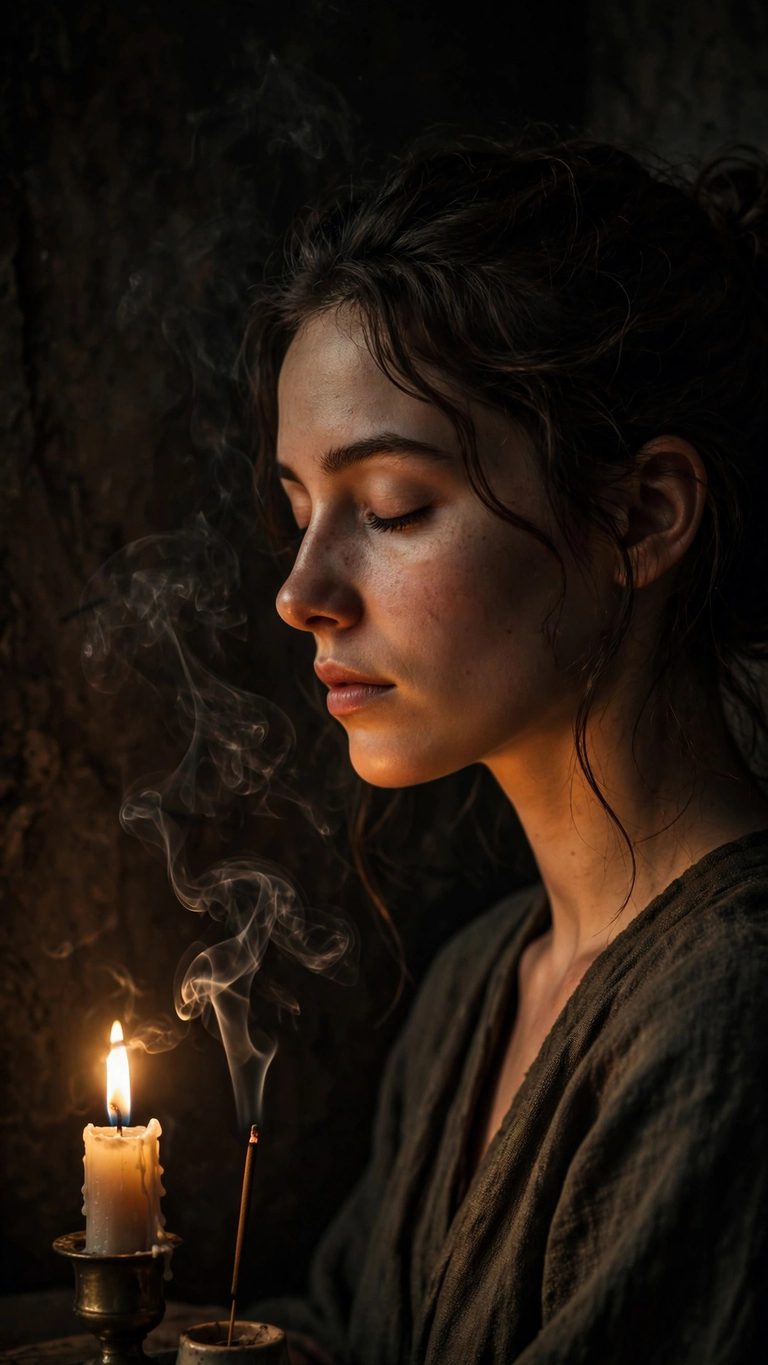
There is something primal about firelight. Long before screens and cities, human beings gathered around flames to breathe, to rest, and to be still. This AI video prompt brings that ancient feeling into the modern scroll. Picture it: a single candle trembling in a darkened room, its golden light brushing across the calm face of someone deep in meditation, while ribbons of incense smoke curl through the shadows. The camera barely moves, creeping forward with impossible patience, as if it too is afraid to disturb the silence. In a feed full of noise, this is a whisper that stops thumbs cold. Meditation content is exploding across TikTok, Instagram Reels, and YouTube Shorts right now, and the moody, cinematic aesthetic is exactly what the algorithm and audiences are craving. Whether you run a wellness brand, a mindfulness page, or simply love creating beautiful AI art, this prompt gives you a professional-grade scene in seconds. Below: the exact prompt, why it works, platform guides, and creative variations. This is #AIVideo creation at its most atmospheric, and the calm it radiates is genuinely contagious.
The Prompt
Copy the prompt below exactly as written and paste it into your favorite AI video generator:
Intimate moody shot of a person meditating beside a flickering candle in a dark room, warm flame light dancing on calm face, deep shadows, incense smoke curling, camera very slowly pushing in, profound stillness, cinematic chiaroscuro, ultra realistic, 8k, deep meditative stillness, shadows dancing softly on walls, profoundly peaceful night mood
Why This Prompt Works
Great AI video prompts succeed because they speak the language of both machines and human emotion, and this one is a masterclass in both. Let us break down the visual psychology. The prompt opens with “intimate moody shot,” which immediately sets the camera distance and emotional register: we are close, we are inside someone’s private moment. The flickering candle is not just a light source; it is the beating heart of the scene. Warm flame light dancing on a calm face creates natural chiaroscuro, the dramatic play of light and shadow that Renaissance painters used to make images feel alive. AI generators respond beautifully to the word “chiaroscuro” because it is a well-documented visual style with millions of reference images in their training data.
Then there is the smoke. “Incense smoke curling” gives the model a dynamic, organic element to animate — and motion is what separates a living video from a still image. The slow push-in camera move is pure cinematic grammar; our brains associate gradual forward movement with growing intimacy and importance. The repeated emphasis on stillness — “profound stillness,” “deep meditative stillness,” “profoundly peaceful night mood” — acts as a negative prompt in disguise, telling the model to suppress chaotic motion and keep everything soft, slow, and serene. From a wellness-trend perspective, this hits multiple currents at once: the cottagecore love of candles and coziness, the mainstreaming of meditation, the “dark academia” aesthetic that dominates #Meditation content, and the ASMR-adjacent appeal of flickering light. Shareability comes from emotional resonance — people do not just watch calm videos, they send them to friends who need calm. A reel like this gets saved, shared in DMs, and reposted on stories with captions like “needed this today.” That save-and-share behavior is rocket fuel for the algorithm. The #ViralReels tag on this one is earned, not hoped for.
How to Use This Prompt
Using this prompt is simple, but a few platform-specific tweaks will elevate your result from good to breathtaking. Start by pasting the full prompt into your generator of choice. In Veo 3, keep the native 9:16 vertical setting and set the duration to 8 seconds; Veo’s cinematic model excels at low-light scenes, and its physics engine renders flame flicker convincingly. In Runway (Gen-3 or Gen-4), paste the prompt into Text to Video, select 9:16, and consider raising the camera motion slightly if the push-in feels too subtle — though for meditation content, subtle is usually better. In Kling, this prompt shines because Kling handles smoke and particle motion with unusual realism; use Standard or Master mode at 9:16 and 8 seconds for the cleanest flame. In Pika, add a negative prompt like “fast motion, jitter, extra faces, distorted hands” to protect the meditative calm, since Pika can occasionally over-animate. In Sora, the prompt works nearly verbatim — Sora’s strength in lighting means the chiaroscuro will look genuinely filmic. Across all platforms, keep the aspect ratio at 9:16 vertical so the video fills a phone screen edge to edge, which is how meditation reels get watched — late at night, in bed, one hand on the phone. Maintain calm pacing by avoiding any prompt additions about quick cuts or dramatic action. Render once, watch it on your phone in a dark room, and only regenerate if the face or flame looks off. One strong take beats five mediocre ones.
Pro Tips & Creative Variations
Once you have the base scene, the real fun begins: customization. First, play with the light source. Swap the single candle for a circle of tea lights around the meditator to create a halo effect, or replace the candle with a Himalayan salt lamp for a rose-gold glow that reads beautifully on #Candlelight themed feeds. Second, change the setting while keeping the mood: the same prompt structure works in a candlelit temple, a cozy cabin during rainfall (add “rain streaking a window, distant thunder” for extra atmosphere), or even a minimalist Japanese tea room. Third, experiment with the subject: a monk in saffron robes, an elderly practitioner with weathered hands in mudra, or a young woman with closed eyes and a single tear catching the light — each tells a different story. Fourth, layer audio thoughtfully, because these generators produce silent video. Add a track of soft rain, a low singing bowl tone, or whispered guided meditation to transform the clip into a full sensory experience. Fifth, try seasonal variations: autumn leaves drifting past a window, or snow falling outside while the candle burns warm inside. Sixth, for a series, generate three matching clips — candlelit meditation, dawn meditation by a window, and starlit meditation — and stitch them into a “meditation through the night” carousel or a 30-second compilation. Seventh, adjust the camera: a slow orbit instead of a push-in gives a more dreamlike feel, while an extreme close-up on the flame itself makes an incredible looping background for quote reels. Finally, brand it: add your page’s watermark subtly in a corner and pair the video with a caption in your voice. The #PromptBazar community loves seeing the same prompt interpreted in wildly different ways, so share your variation and tag it — your twist might inspire the next creator’s viral hit.
Frequently Asked Questions
Q1: Which AI video generator gives the best results for this candlelit meditation prompt?
All five major tools handle it well, but they have different strengths. Veo 3 and Sora produce the most filmic lighting and realistic flame. Kling renders smoke and subtle motion most naturally. Runway gives you the most control over camera movement. Pika is fastest for quick experiments. If you only try one, start with Veo 3 or Kling at 9:16 vertical and 8 seconds.
Q2: The face in my generated video looks distorted. How do I fix it?
Faces in low light are the hardest thing for AI video models. Regenerate with the face slightly more in shadow (add “face half in shadow” to the prompt), which hides imperfections and actually deepens the mood. Alternatively, frame the shot from behind the meditator looking toward the candle — silhouettes never have distorted faces and look incredibly cinematic.
Q3: Can I use this video commercially, for example on my wellness brand’s page or in an ad?
That depends on the generator’s terms of service. Most platforms grant commercial rights to paid subscribers for content they generate, but always check the current terms of the tool you use. Also, if you add music, make sure the track is licensed for commercial use — a copyright strike will kill a beautiful reel faster than anything.
Q4: How do I make this loop seamlessly for a calming background video?
Choose the slowest, most uniform segment of your clip and use a video editor to crossfade the end into the beginning over about one second. Because the scene is dark and the motion is minimal, the loop point is nearly invisible. Looping meditation videos get extraordinarily long watch times, which the algorithm rewards heavily.
In a world that never stops shouting, the quietest video in the feed wins. Copy this AI video prompt, generate your candlelit meditation scene tonight, and share it with someone who needs a moment of peace. Then explore the full #PromptBazar collection for more prompts that turn stillness into scroll-stopping art — your next viral reel is one prompt away.
Related Viral Prompts
- Desert Warrior Yoga AI Video Prompt: Generate an Epic Golden Hour Scene of Strength and Serenity on the Dunes
- Floating Meditation AI Video Prompt: Conjure a Magical Levitating Scene of Glow, Serenity, and Spiritual Wonder
- Forest Sunbeam Yoga AI Video Prompt: Capture a Sacred Tree Pose in Dramatic God Rays for Breathtaking Nature Reels
# A I V i d e o # P r o m p t B a z a r # C a n d l e l i g h t # M e d i t a t i o n # M o o d y # V i r a l R e e l s

Leave a Reply