
Introduction
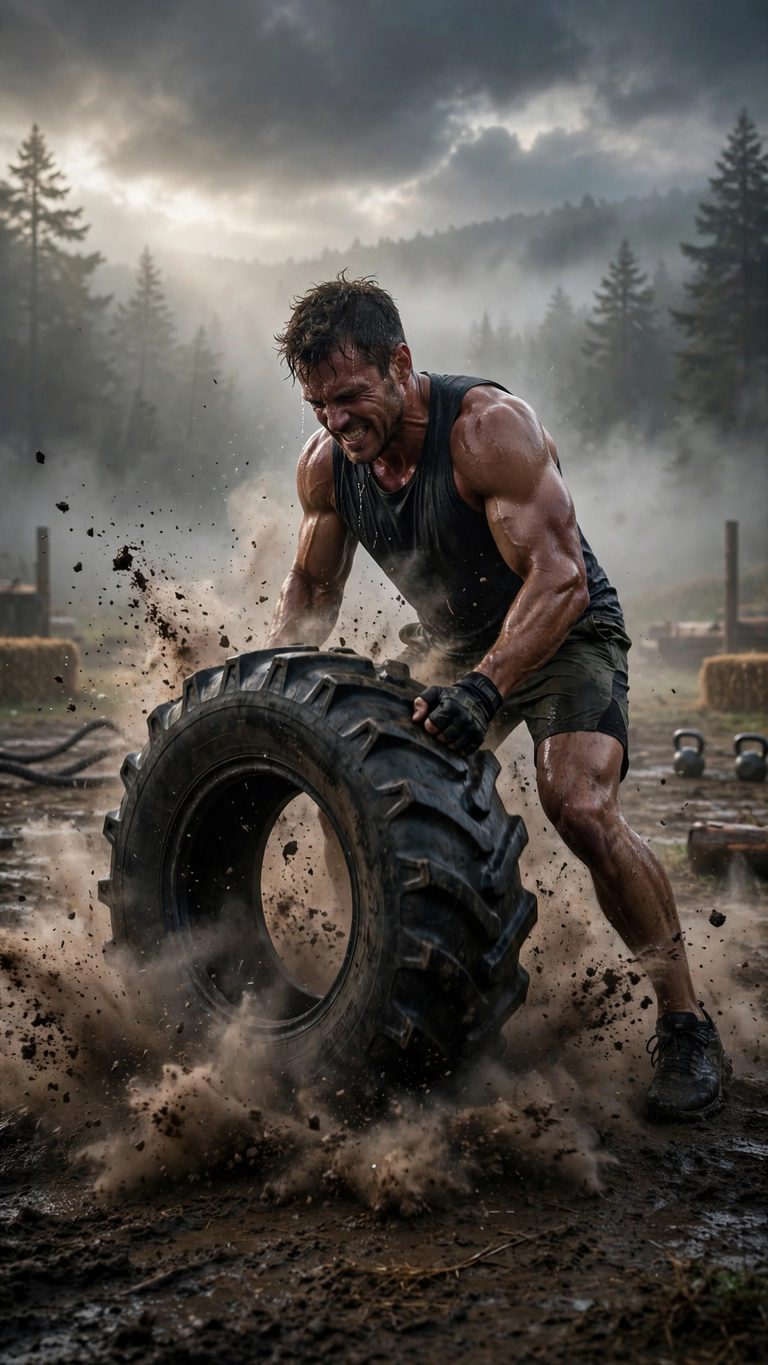
There is no gym exercise that looks more primal than flipping a giant tractor tire. It is pure functional power: grip, drive, explode, slam. Bootcamp tire-flip clips consistently outperform polished gym content because they feel real, raw, and attainable in a way chrome machines never do. Dust kicks up, muscles strain, a group cheers in the background, and the viewer feels the impact through the screen. This prompt distills that entire bootcamp atmosphere into eight vertical seconds of cinematic slow motion, no tire, field, or film crew required.
This article gives you the complete copy-paste prompt, explains why each phrase makes the scene hit harder, walks you through generating it in Veo 3, Runway, Kling, Pika, or Sora with the intended 9:16, 8-second slow-motion flip settings, offers pro variations for a full content series, and answers the questions creators ask most. Time to flip.
The Prompt
Here is the complete prompt. Copy everything inside the box and paste it into your AI video generator:
Powerful outdoor bootcamp scene of an athlete flipping a giant tractor tire, muscles straining, tire slamming down kicking up dust, morning fog in background, group cheering blurred behind, low dramatic camera angle, raw gritty energy, cinematic slow motion on the flip, dramatic sky, ultra realistic, 8k sports film
Why This Prompt Works
This prompt works because it choreographs a complete micro-story with a beginning, climax, and aftermath, all inside eight seconds. The narrative beats are embedded in the description: “muscles straining” sets up the effort, “tire slamming down kicking up dust” delivers the payoff impact, and “group cheering blurred behind” provides the social reward. Viewers process this arc instinctively, which is why the clip feels satisfying rather than merely decorative. AI models render this well because each beat is a distinct, familiar visual: strain, impact, celebration.
The camera and atmosphere choices amplify the drama. “Low dramatic camera angle” makes both athlete and tire loom larger, a classic power-framing trick borrowed from sports films. “Cinematic slow motion on the flip” stretches the money moment, the exact frame where the tire leaves the ground, into the kind of suspended spectacle viewers rewind. Environmental texture does heavy lifting: “morning fog in background” adds atmospheric depth that separates foreground action from the scene, while “dramatic sky” pushes the grade toward moody contrast. “Raw gritty energy” is a tone instruction that steers the model away from clean commercial fitness aesthetics toward something authentic and hard-edged, which is precisely what bootcamp audiences respond to.
Finally, the blurred cheering group is a clever inclusion: background figures rendered slightly out of focus hide the anatomical imperfections that sharp background faces would reveal, while still delivering the energy of a tribe. The closing “ultra realistic, 8k sports film” tags lock in the cinematic quality bar.
How to Use This Prompt
Follow these steps to generate a tire flip that lands with impact:
Step 1: Pick your generator. Veo 3 and Kling render heavy-object physics and dust impacts most convincingly; Runway excels at the gritty cinematic grade; Sora handles dramatic skies beautifully; Pika works for quick drafts.
Step 2: Apply the post settings. This prompt is tuned for 9:16 vertical, 8 seconds, with slow motion on the flip. Set portrait aspect ratio first, then 8-second duration, and enable slow-motion or high-frame-rate mode if your tool offers it so the flip stretches dramatically.
Step 3: Paste the entire prompt. Keep the atmosphere phrases intact. The fog, dust, and cheering group are load-bearing: remove them and the scene loses its bootcamp soul.
Step 4: Generate multiple takes. Review each for the critical moment: the tire mid-flip. Keep the take where the tire’s arc and the dust burst look most physical. Reject takes where the tire warps or the athlete’s grip looks detached.
Step 5: Add impact audio. Layer a deep thud on the slam, crowd cheers, and an intense beat drop. Caption it with a challenge: tag-a-friend energy drives shares for this genre.
Pro Tips & Creative Variations
One tire flip is a clip; a series is a brand. Vary the athlete: “firefighter in training,” “female CrossFit athlete,” or “veteran strongman” each open different audience segments. Change conditions for mood: “rain-soaked muddy field” for a brutal variant, “golden desert at dusk” for a cinematic one, or “snowy morning” for a hardcore winter edition. Keep the low camera angle and slow-motion flip language constant so the series feels cohesive. For a longer video, generate three flips with different seeds and cut them to a beat drop: strain, strain, SLAM.
Storytelling upgrades multiply engagement. Add a countdown text overlay before the flip, or a “POV: leg day is over, now it is war” caption that invites comments. Pair the clip with a voiceover about mental toughness to reach the motivational audience beyond pure fitness. If your tool supports image-to-video, start from a still of a real tractor tire in a field to anchor the object’s texture, then let the prompt drive the flip motion. For maximum shareability, end the clip on the dust cloud freeze-frame with bold text like “NO EXCUSES,” the kind of frame people screenshot and repost. And remember the loop: trim to the flip cycle and loop it for a hypnotic repeating slam.
Frequently Asked Questions
Why does my tire look warped or melting mid-flip?
Large deforming objects are tough for generators. The slow-motion instruction helps by smoothing the motion. Generate several seeds and keep the take with the cleanest tire arc. Veo 3 and Kling currently handle heavy-object physics best.
Can I show the athlete’s face clearly?
The prompt keeps focus on the action with a low angle. If you want a face-forward version, add “determined face visible straining with effort” near the athlete description, but expect to generate extra takes to get clean facial detail.
Is AI-generated fitness content okay for my coaching business?
Many coaches use AI b-roll successfully. Check your generator’s commercial license terms, be transparent if your audience asks, and mix AI clips with your real coaching footage for authenticity and trust.
How do I make the dust impact more dramatic?
Emphasize it by adding “massive dust explosion on impact” to the prompt, and in editing, place a bass-heavy thud exactly on the slam frame. The combination of visual and audio impact is what makes viewers feel it.
Raw power, flying dust, and a slow-motion slam: the tire flip is bootcamp cinema at its finest, and this prompt puts it one copy-paste away. Generate it today, pick the most explosive take, add a thunderous beat drop, and challenge your audience to keep up. No excuses.
Related Viral Prompts
- Dramatic Gym Portrait AI Photo Prompt: Sculpt a Cinematic Athlete Portrait with Powerful Rim Lighting
- Moody Dumbbell Still Life AI Photo Prompt: Create Dark Cinematic Gym Aesthetic Shots for Social Media
- Sunrise Runner Silhouette AI Photo Prompt: Capture Stunning Inspirational Dawn Running Photos for Feeds
# A I V i d e o # P r o m p t B a z a r # T i r e F l i p # B o o t c a m p # S t r e n g t h # V i r a l R e e l s



Leave a Reply